pi-starline
A Starship-inspired statusline and Opencode-style TUI for Pi.
Package details
Install pi-starline from npm and Pi will load the resources declared by the package manifest.
$ pi install npm:pi-starline- Package
pi-starline- Version
0.10.4- Published
- Nov 2, 2026
- Downloads
- 1,989/mo · 1,854/wk
- Author
- andy8647
- License
- MIT
- Types
- extension
- Size
- 635.2 KB
- Dependencies
- 0 dependencies · 3 peers
Pi manifest JSON
{
  "image": "https://raw.githubusercontent.com/Andy8647/pi-starline/main/assets/cover.png",
  "extensions": [
    "./extensions"
  ]
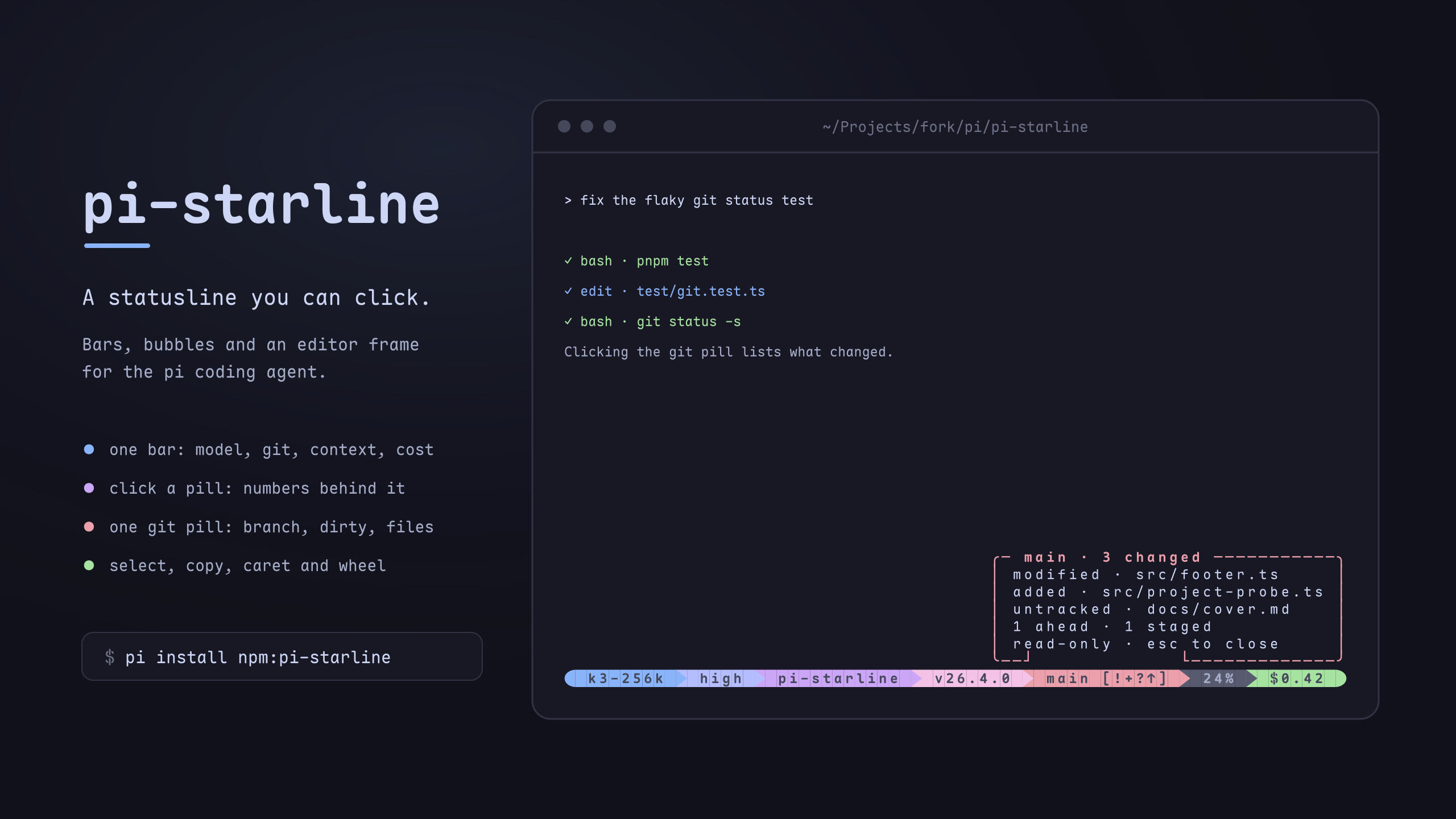
}
Security note
Pi packages can execute code and influence agent behavior. Review the source before installing third-party packages.
README
Starline
A Starship-inspired statusline, Opencode-style editor chrome, and fullscreen mouse control for Pi.
Starline makes Pi's fullscreen mode feel like a finished terminal app:
- See the state: a pill footer with directory, git, runtime, model, context and cost; click one for the numbers behind it.
- Act on it: click a pill to switch model or thinking level, see what is queued, or list running subagents.
- Type comfortably: a bordered input box with the model inside the frame, paste collapse, and a
ctrl+ghint for your$EDITOR. - Drive with the mouse: select and copy anywhere, click to move the caret, wheel to scroll the draft.
Features
Footer
- Starship-style segments: directory, git, runtime (57 runtimes), model, context, cost, plus optional session name,
user@host, time, OS, session duration and project version. - A colour palette with
$namereferences; the bar is built frompill.segments, in your order. - One
gitpill: branch, dirty markers and any operation in progress together. Click it for the changed files, ahead/behind and stashes. The list is read-only, because an agent may be running in the same tree. - One
contextpill: the percentage, and nothing else. Click it for the window size, tokens used, session in/out totals and the cache rate. - Other extensions' statuses from
ctx.ui.setStatus()as pills, on either side or in the middle. - The model pill's icon spins while the agent works, and the pill counts the run's elapsed time; when the run ends the number stays as the total it reached.
- No git pill on the bar means no
git status: the refresh only reads the repository when something on the bar shows it.
Clickable pills
- Model: pick from your scoped models (the ones ctrl+p cycles).
- Thinking: pick a level from the ones the model supports.
- Queue: an inbox icon and a count while messages wait; click to read them.
- Subagents: with pi-subagents, a count of running subagents; click for agent, model, time and tokens, live.
- Context: click for the window split into what fills it — system prompt, tool schemas, MCP tools, memory, skills and the conversation — as a grid with a legend, plus the session's token totals.
- Throughput: the last reply's tokens per second; click for a scatter of every reply's rate against how full the context was, coloured by how fast it ran.
- Your extension's pill: a small published API lets any extension open the same bubble with its own content. See Clickable pills for other extensions.
- Clicking anywhere else on screen closes the bubble, and the click still does what it would have done: the caret moves, the line gets selected.
- Every action also runs from the keyboard as
/starline <name>, and the pointer turns into a hand over anything clickable.
Editor
- Bordered input box with an accent rail, as tall as its text; paste, selection and
ctrl+ghints ride its top rule.editorMinRowskeeps it a fixed minimum height, and the blank row Pi keeps above the box is dropped. - A
gitPrsegment for the current branch's pull or merge request, with the checks mark and the repository's open count when the branch has none. Clicking it lists your pulls, the ones waiting on your review, and the rest you are involved in — each pull once — plus a last row that opens the repository page; a row opens in the browser. - User messages in the transcript are styled by pi-tidy, which draws them to match.
- Copy-friendly mode drops the rail glyphs so terminal selection copies less chrome.
Mouse (Pi's tuiMode: "fullscreen")
- Drag to select in the transcript or the draft; double-click keeps paths and kebab-case whole; triple-click takes a line.
- Clean copies: Starline's rails and rule rows and pi-toolbox frames are dropped before the clipboard.
- A selection hint says how many characters the copy key will copy.
- Click to move the caret; backspace/delete remove a selected range; the wheel scrolls the draft.
Screenshots
A session as a whole: the transcript above, the editor frame in the middle, the bar along the bottom.
Install
Needs Pi 0.84.4 or newer (0.85.0 or newer for clickable pills) and a Nerd Font (or set icons.mode to "ascii").
pi install npm:pi-starline
# or from git
pi install git:github.com/Andy8647/pi-starline
What changed in each version: Changelog.
Configure
/starline opens a menu for the everyday settings: colour sources, feature toggles, the order of the bar (Pills), and where other extensions' statuses go. The Pills tab is the bar itself: one row per segment, its value is the position it holds, and every status an extension published this session gets a row of its own, so one of them can be placed without editing JSON.
Everything else lives in ~/.pi/agent/starline.json. The file is optional; missing keys fall back to defaults.
{
	"pill": { "segments": ["model", "cwd", "git", "context", "cost"] },
	"colors": { "gitBranch": "bold purple" },
	"mouse": { "transcriptCleanCopy": false }
}
Docs
- Configuration: every option and its default.
- What the footer shows: git status indicators and the detected runtimes.
- Clickable pills for other extensions: put your extension's content in a pill.
- Clickable pills: design: how the pills, bubbles and bridges work.
Development
npm install
npm run verify       # lint, typecheck, tests
npm run pi:dev       # run Pi with this checkout and no other extensions
pi:dev uses the globally installed Pi; set PI_BIN=/path/to/pi to use another.
Credits
Started as a fork of pi-zentui by Luka. Inspired by Starship and Opencode.
License
MIT