pi-starline
A Starship-inspired statusline and Opencode-style TUI for Pi.
Package details
Install pi-starline from npm and Pi will load the resources declared by the package manifest.
$ pi install npm:pi-starline- Package
pi-starline- Version
0.3.7- Published
- Sep 22, 2026
- Downloads
- 931/mo · 99/wk
- Author
- andy8647
- License
- MIT
- Types
- extension
- Size
- 427.2 KB
- Dependencies
- 0 dependencies · 3 peers
Pi manifest JSON
{
  "image": "https://raw.githubusercontent.com/Andy8647/pi-starline/main/assets/starline.png",
  "extensions": [
    "./extensions"
  ]
}Security note
Pi packages can execute code and influence agent behavior. Review the source before installing third-party packages.
README
Starline
A Starship-inspired statusline, Opencode-style editor chrome, and fullscreen mouse control for Pi.
Starline is a fork of pi-zentui by Luka, renamed and released on its own. It has diverged well past upstream and adds a pill footer style, a colour palette with
$refexpansion,model/thinkingfooter segments, a git host icon, per-segment display options, configurable editor cursor styles, and mouse selection and copying.
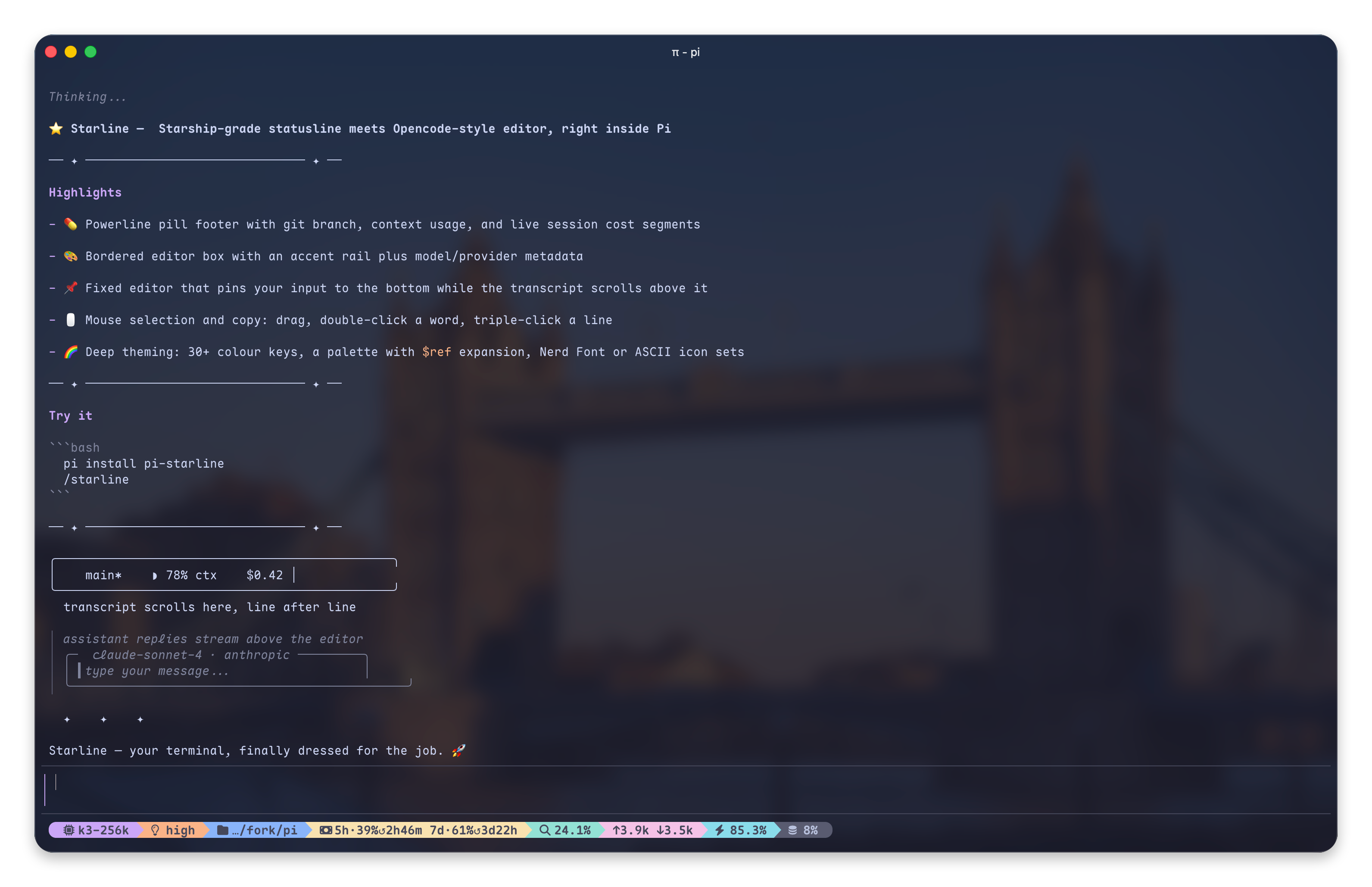
Screenshots
What is this?
Starline makes Pi's fullscreen mode feel like a finished terminal app — three pieces of one product, not a theme:
- See the state — a Starship-inspired statusline and pill footer: current directory, git branch and status, runtime/version detection, context usage and token counts in a compact, icon-rich format
- Type comfortably — Opencode-style editor chrome: a clean bordered input box with accent rail and copy-friendly mode, model and provider inside the frame, paste collapse, and a
ctrl+ghint pointing at your$EDITORwhen a draft outgrows the box - Drive with the mouse — fullscreen mouse control: select and copy anywhere, click to move the caret, wheel to scroll the draft — see Mouse
Features
Footer (Starship-inspired)
dirname— current directory (basenameby default; optionalfullpath with directory depth viapathDisplay)on branch— git branch with icon[!?↑]— git status indicators (modified, untracked, ahead/behind, stashed, etc.)via v5.5.0— runtime detection with version and Starship-style Nerd Font runtime/language modules- Optional segments (off by default): session name,
user@host, current time, OS icon, session duration, and the project package version (e.g.package.json→0.6.0) — distinct from the runtime segment, which shows the installed toolchain - Right side shows context usage, token counts, and cost
- Built-in footer segments can be shown or hidden individually from
/starline - Fully custom Starship-style layout via a
footerFormattemplate string — see Footer Format Template - Third-party Pi extension statuses from
ctx.ui.setStatus()can be shown on the left, middle, or right side of the footer, on the editor's metadata row, or hidden per status key from/starline
Editor (Opencode-inspired)
- Bordered input box with configurable accent rail and border colors
- Model name and provider displayed inside the editor frame
- Configurable model, provider, and thinking-level indicator colors
- Prompt-box-style user messages matching the Starline input chrome
- Copy-friendly mode hides editor and previous-message rail glyphs so terminal selection copies less chrome
Mouse (fullscreen control)
The second half of the product: the statusline tells you where you are, the
mouse lets you act on what you see. Starline drives Pi 0.84's own renderer
(tuiMode: "fullscreen") by patching its methods directly — the extension API
stops at high-level hooks, and the selection hint, click-to-caret and clean-copy all
need to reach into the renderer itself. That is also why they live in Starline:
they sit on the same prototype patches the footer and editor already use, and
Pi keeps its core deliberately minimal — behaviours belong in extensions.
- Select and copy anywhere. Drag to select in the transcript or the input box; double-click a word (paths and kebab-case stay whole), triple-click a line. Releasing copies — or set Pi's
fullscreenCopyOnSelect: falseand the selection stays highlighted, waiting for the copy key (Pi #7720, shipped in Pi 0.84.4). - Clean copies. Transcript selections drop Starline's rails, rule rows and pi-toolbox frame borders before they reach the clipboard; editor selections copy the draft's text, not the painted rows.
- Selection hint. A selection that is not auto-copying shows exactly how many characters the copy key (
ctrl+xby default, whateverapp.message.copyis bound to) will copy, and a selection inside the editor names your editor —ctrl+g to edit in nvim. - Click to move the caret in the input box; backspace/delete remove a selected range; the wheel scrolls the draft over the input box, and a draft taller than the box keeps the
ctrl+gexternal-editor hint on screen.
0.2.x's fixedEditor config block was renamed to mouse (migrated
automatically, see the changelog); the fixed editor itself is
gone, superseded by Pi's fullscreen mode.
Git Status Icons
| Icon | Meaning |
|---|---|
! |
Modified |
? |
Untracked |
+ |
Staged |
✘ |
Deleted |
» |
Renamed |
= |
Conflicted |
$ |
Stashed |
↑ |
Ahead |
↓ |
Behind |
⇕ |
Diverged |
Runtime Detection
Detects Starship Nerd Font runtime/language modules, uses the Starship Nerd Font symbols, and keeps Starship-style defaults such as bold green for Node.js. By default Starline maps those styles through your active Pi theme; switch the Starship/footer color source to terminal in /starline if you want your terminal colorscheme to supply the exact ANSI colors.
| Runtime/language | Detection examples |
|---|---|
| Buf | buf.yaml, buf.gen.yaml, buf.work.yaml |
| Bun | bun.lock, bun.lockb |
| C | .c, .h files |
| C++ | .cpp, .cc, .cxx, .hpp files |
| CMake | CMakeLists.txt, CMakeCache.txt |
| COBOL | .cbl, .cob files |
| Conda | CONDA_DEFAULT_ENV environment |
| Crystal | .cr files, shard.yml |
| Dart | .dart files, pubspec.yaml, .dart_tool/ |
| Deno | deno.json, deno.jsonc, deno.lock |
| .NET | .csproj, .fsproj, global.json, Directory.Build.* |
| Elixir | mix.exs |
| Elm | .elm files, elm.json, elm-stuff/ |
| Erlang | rebar.config, erlang.mk |
| Fennel | .fnl files |
| Fortran | .f, .f90, .f95, .f03, .f08, .f18, fpm.toml |
| Gleam | .gleam files, gleam.toml |
| Go | go.mod |
| Gradle | build.gradle, build.gradle.kts, gradle/ |
| Guix shell | GUIX_ENVIRONMENT environment |
| Haskell | .hs, .cabal, stack.yaml, cabal.project |
| Haxe | .hx, .hxml, haxelib.json, .haxerc |
| Helm | helmfile.yaml, Chart.yaml |
| Java | .java-version |
| Julia | .jl files, Project.toml, Manifest.toml |
| Kotlin | .kt, .kts files |
| Lua | .lua files, stylua.toml, .luarc.json, lua/ dir |
| Maven | pom.xml |
| Meson | MESON_DEVENV=1 and MESON_PROJECT_NAME environment |
| Mojo | .mojo files |
| Nim | .nim, .nims, .nimble, nim.cfg |
| Nix shell | IN_NIX_SHELL=pure or IN_NIX_SHELL=impure environment |
| Node.js | package.json, .nvmrc, .node-version |
| OCaml | .opam, .ml, .mli, dune, _opam/, esy.lock/ |
| Odin | .odin files |
| OPA/Rego | .rego files |
| Perl | .pl, .pm, Makefile.PL, cpanfile, META.* |
| PHP | composer.json |
| Pixi | pixi.toml, pixi.lock, PIXI_ENVIRONMENT_NAME environment |
| Pulumi | Pulumi.yaml, Pulumi.yml |
| PureScript | .purs files, spago.dhall, spago.yaml, spago.lock |
| Python | pyproject.toml, requirements.txt, setup.py, Pipfile |
| R | .R, .Rmd, .Rproj, DESCRIPTION, .Rproj.user/ |
| Raku | .raku, .rakumod, .p6, .pm6, META6.json |
| Red | .red, .reds files |
| Ruby | Gemfile, .ruby-version |
| Rust | Cargo.toml |
| Scala | .scala, .sbt, build.sbt, .metals/ |
| Solidity | .sol files |
| Spack | SPACK_ENV environment |
| Swift | .swift files, Package.swift |
| Terraform | .tf, .tfplan, .tfstate, .terraform/ |
| Typst | .typ files, template.typ |
| Vagrant | Vagrantfile |
| V | .v files, v.mod, vpkg.json |
| Xmake | xmake.lua |
| Zig | .zig files, build.zig |
Install
Starline drives Pi 0.84's alternate-screen renderer, so it needs Pi ≥ 0.84.4. If you are on a distribution that bundles an older Pi, upgrade it or wait for it to catch up.
# From npm
pi install npm:pi-starline

# From git
pi install git:github.com/Andy8647/pi-starline
Coming from pi-zentui? Run mv ~/.pi/agent/zentui.json ~/.pi/agent/starline.json to carry your config over — Starline does not read the old file automatically. Inside it, rename any colorMode: "zentui" value to colorMode: "themed".
What changed in each version, and what you need to do about it: Changelog.
Config
Settings live in ~/.pi/agent/starline.json. The file is optional — anything missing falls back to a default, and unknown keys are ignored at runtime.
{
	"footerStyle": "pill",
	"colors": { "gitBranch": "bold purple" },
	"mouse": { "transcriptCleanCopy": false }
}
/starline opens an interactive menu for the settings worth changing day to day: colour sources, feature toggles, which built-in segments show, and where third-party extension statuses go. Tab and Shift+Tab move between its five sections.
Full configuration reference → — every option with its default: the pill footer, the colour palette and its $name references, footer format templates, per-segment display options, icon overrides, and editor styling.
Requirements
Development
npm install
npm run verify
npm run fmt
npm run pack:check
Test in Pi
The project keeps Pi core packages as peer dependencies for runtime and dev dependencies for
typechecking. To avoid accidentally running the local node_modules/.bin/pi shim, the dev scripts use
the globally installed Pi binary by default:
npm run pi:dev
npm run pi:install-local
Override the binary if your Pi install is somewhere else:
PI_BIN=/path/to/pi npm run pi:devCredits
Forked from pi-zentui by Luka, whose work is the foundation of this project.
Inspired by:
- Starship — the minimal, blazing-fast, and infinitely customizable prompt
- Opencode — terminal-based AI coding assistant
License
MIT