pi-starship
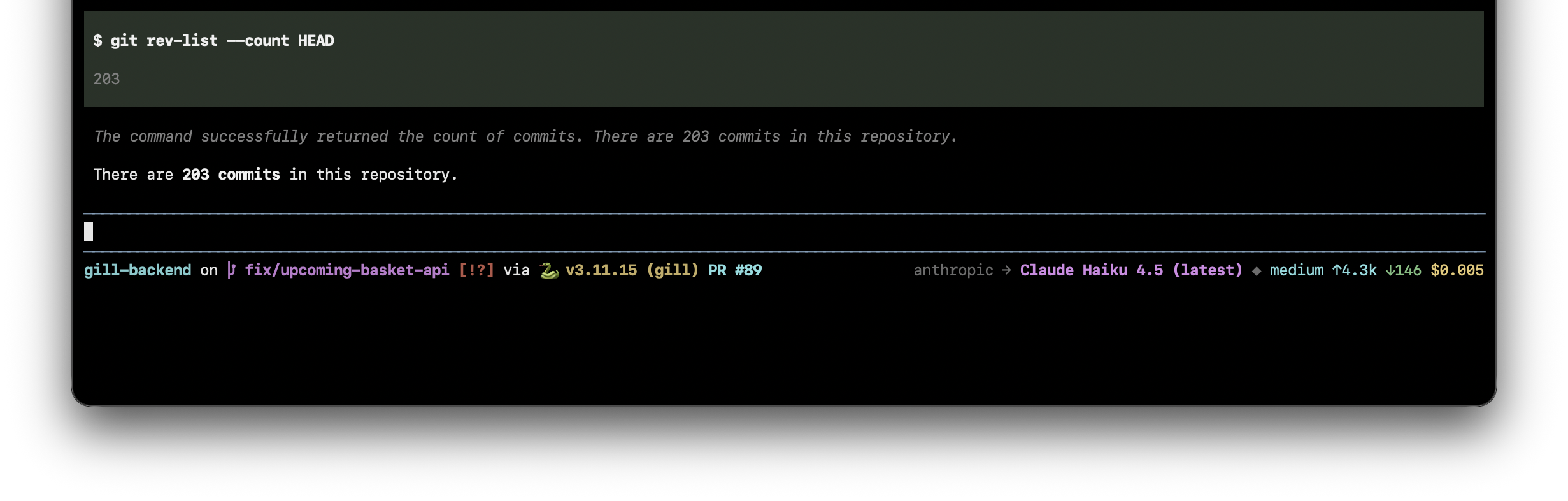
Starship-powered footer for pi — with PR number, model info, token counts, and thinking level
Package details
Install pi-starship from npm and Pi will load the resources declared by the package manifest.
$ pi install npm:pi-starship- Package
pi-starship- Version
0.1.2- Published
- May 7, 2026
- Downloads
- 92/mo · 24/wk
- Author
- rajivm1991
- License
- MIT
- Types
- extension
- Size
- 13 KB
- Dependencies
- 0 dependencies · 0 peers
Pi manifest JSON
{
  "extensions": [
    "./src/index.ts"
  ],
  "image": "https://raw.githubusercontent.com/rajivm1991/pi-starship/main/screenshots/screenshot.png"
}
Security note
Pi packages can execute code and influence agent behavior. Review the source before installing third-party packages.
README
pi-starship
A pi extension that replaces the default footer with your Starship prompt — so colours, icons, and segments match your terminal exactly — and adds pi-specific context on the right: model, token counts, cost, and thinking level.

Features
- Left side — delegates to
starship prompt, so every segment, colour, and icon comes directly from your~/.config/starship.toml.- Automatically shows git branch, status (
!modified,?untracked,⇣behind,⇡ahead), language versions, virtualenvs, cloud contexts — whatever starship shows in your shell - Appends a clickable PR #N link (OSC-8 hyperlink) when there is an open GitHub PR for the current branch
- Automatically shows git branch, status (
- Right side — pi-specific info starship can't know about:
provider → Model Name(e.g.anthropic → Claude Haiku 4.5)◆ thinking-levelwhen extended thinking is active↑input tokens ·↓output tokens ·$cost for the session
Prerequisites
| Tool | Purpose |
|---|---|
| Starship | Left side rendering |
| Nerd Font | Branch icon () and other glyphs |
| gh CLI | PR number + URL lookup |
gh and starship must be in your PATH. The extension degrades gracefully when either is missing — the PR segment simply won't appear, or the left side falls back to empty.
Installation
pi install npm:pi-starship
Or from source:
pi install git:github.com/rajivm1991/pi-starship
How it works
On startup the extension calls starship prompt --terminal-width=<width> as a subprocess (with STARSHIP_SHELL=bash so it emits plain ANSI codes). It takes only the first line of the output, which is the info bar for two-line prompts and strips the ❯ line naturally.
Data is fetched asynchronously and cached. The footer renders immediately with whatever is cached and updates as fetches complete. Refresh triggers:
| Event | What refreshes |
|---|---|
| Session start | Starship prompt + PR |
| Branch change | Starship prompt + PR |
| Agent turn end | Starship prompt + PR |
| Terminal resize | Starship prompt (width changed) |
| Model/thinking change | Right side re-renders immediately |
Contributing
See CONTRIBUTING.md.