pi-studio
Two-pane browser workspace for pi with prompt/response editing, annotations, critiques, active quiz, prompt/response history, live previews, and tmux-backed REPL/literate REPL workflows
Package details
Install pi-studio from npm and Pi will load the resources declared by the package manifest.
$ pi install npm:pi-studio- Package
pi-studio- Version
0.10.4- Published
- Oct 19, 2026
- Downloads
- 2,437/mo · 226/wk
- Author
- omacl
- License
- MIT
- Types
- extension, theme
- Size
- 4.5 MB
- Dependencies
- 1 dependency · 3 peers
Pi manifest JSON
{
  "themes": [
    "./themes"
  ],
  "extensions": [
    "./index.ts"
  ]
}
Security note
Pi packages can execute code and influence agent behavior. Review the source before installing third-party packages.
README
pi-studio
A browser workspace for Pi. Write and run prompts, read responses with rendered math and diagrams, edit and annotate documents, and follow what Pi is doing, side by side.
Screenshots
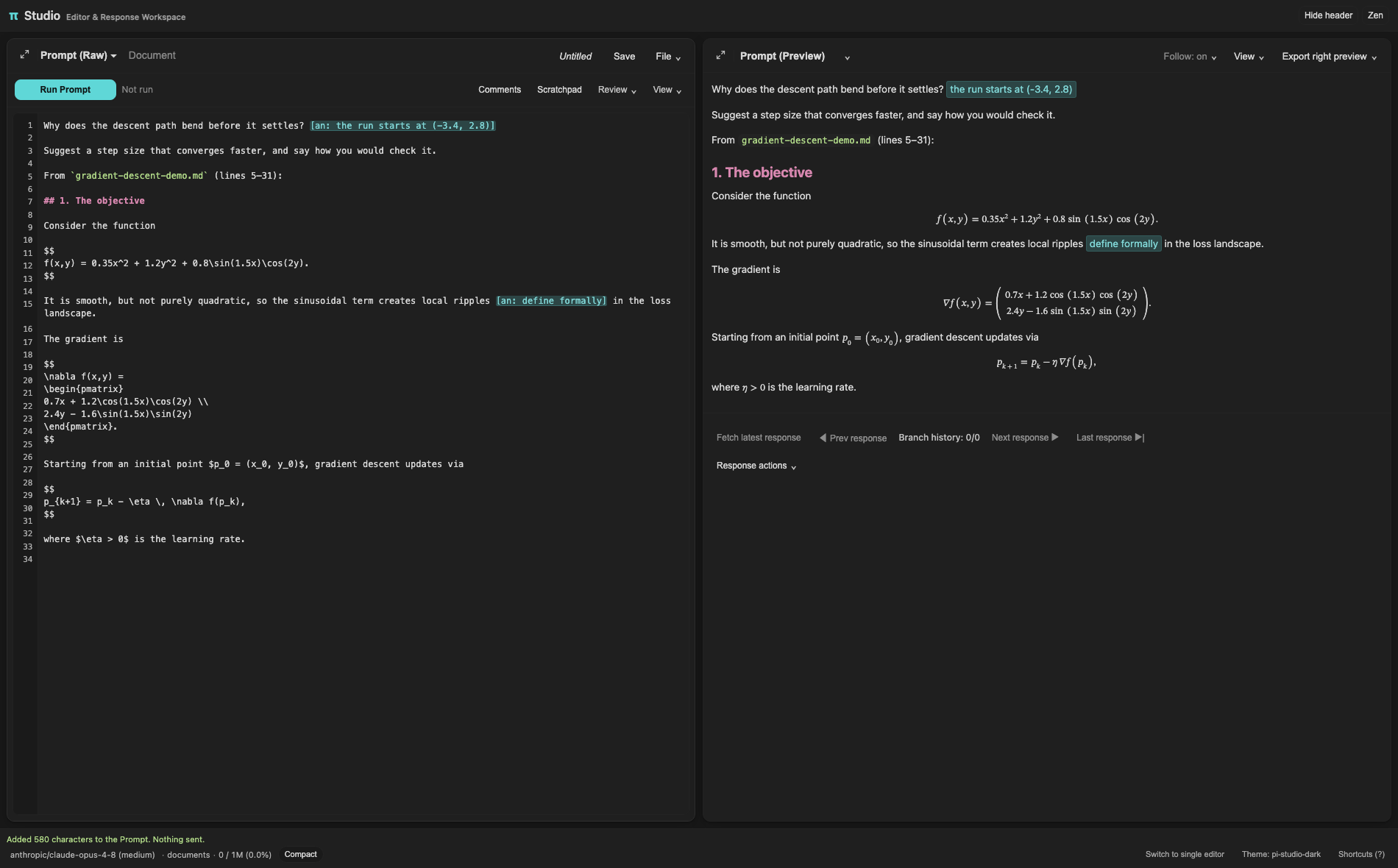
The Prompt, with a section added from the Document:
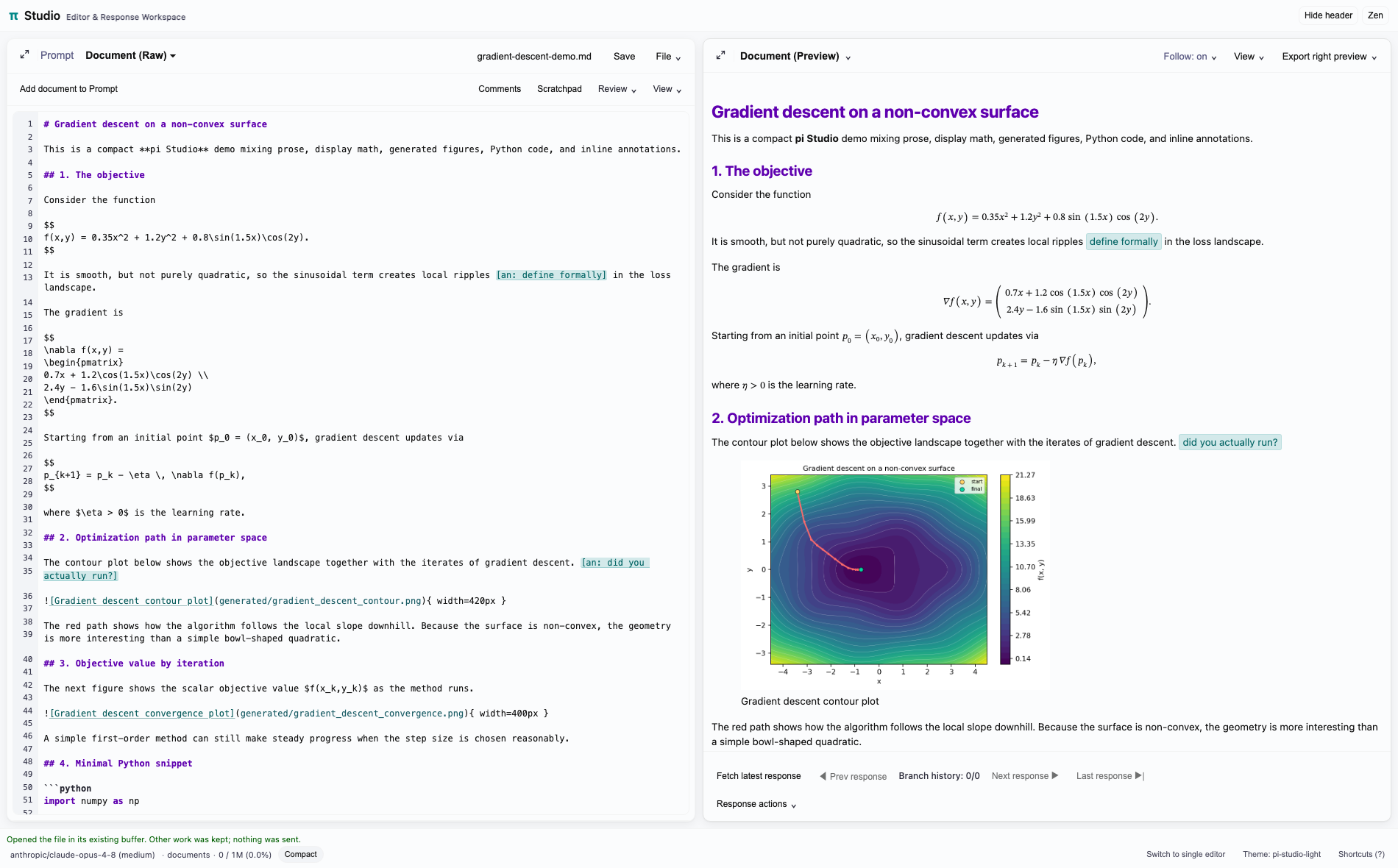
The Document:
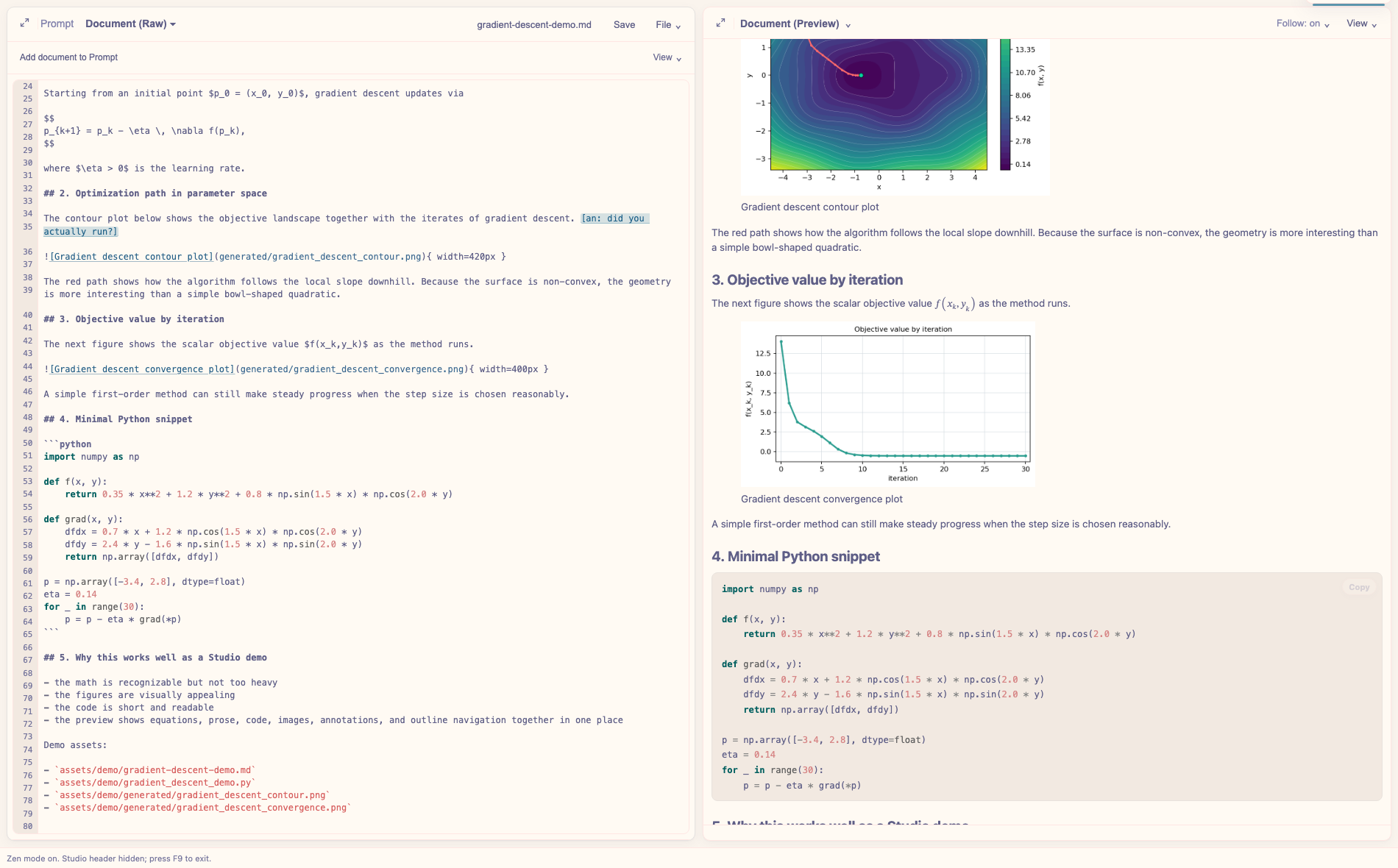
Zen mode, in rose-pine-dawn:
Watch the demo (1m36s, 2× speed, no audio). It shows browsing linked documents and bringing a Document selection into the Prompt.
Features
- Prompt and Document — the default, dual editor mode. The Prompt holds what you send to Pi; the Document holds the file you're working on. Each keeps its own edits, preview and place. See Single and dual editor mode.
- Run, critique, annotate — run the Prompt, ask for a critique, or annotate a response with
[an: ...]markers and send it back. - Response history and Working — step back through earlier responses and the prompts behind them, and follow Pi's thinking and tool use as it happens.
- Rendering — Markdown and LaTeX with math, syntax highlighting, Mermaid diagrams, CSV tables, interactive HTML and embedded PDFs, themed to match Pi.
- Files and Changes — browse folders you've allowed, open or preview files, and see the current git diff.
- Comments and scratchpad — comments anchored to lines or selections, and a scratchpad per document.
- Side questions and quizzes — ask about the text, a folder or the repository in a separate thread that stays out of the main conversation, or quiz yourself on it.
- REPL — send code to tmux-backed Shell, Python, IPython, Julia, R, GHCi or Clojure sessions, shared with pi-repl.
- Export — PDF (Pandoc and LaTeX) or standalone HTML, from the preview, a file or the last response.
Requirements
- Pi
- Pandoc for full previews and exports (
brew install pandocon macOS), and LaTeX (TeX Live or MacTeX) for PDF export - Optional:
tmuxfor the REPL;quartofor Quarto previews;- Mermaid CLI 11.12+ for diagrams in exported PDFs;
pdftotextso side questions can read PDFs;BRAVE_API_KEYfor side-question web search.
Studio is developed on macOS. It should work on Linux, which has had less testing.
Install
pi install npm:pi-studioOr from GitHub, pi install https://github.com/omaclaren/pi-studio, or once without installing, pi -e https://github.com/omaclaren/pi-studio.
Usage
| Command | Description |
|---|---|
/studio |
Open Studio with the last response. In dual editor mode, reopen your last workspace if its tab is gone |
/studio <file> |
Open a text file, or a PDF in a read-only preview |
/studio --watch <file> |
Open a read-only preview that follows changes on disk |
/studio --blank, --last |
Start with a blank editor, or the last response |
/studio --single, --dual |
Switch editor mode, and remember it |
/studio --no-browser |
Print the URL without opening a browser |
/studio --port <port> |
Use a fixed port |
/studio --listen-all |
Listen on all interfaces, for containers (see below) |
/studio --status, --stop |
Show the server's status, or stop it |
/studio-replace |
Replace the open Studio view. In dual editor mode, move it to a new tab here |
/studio-editor-only [file] |
Open an extra editor tab (single editor mode) |
/studio-current <file> |
Load a file into the open Studio tab (single editor mode) |
/studio-pdf [file] |
Export a file, or the last response, to PDF |
/studio-html [file] |
Export a file, or the last response, to HTML |
Studio opens in Muxy's or cmux's built-in browser when Pi runs there, and otherwise in the system browser. Press ? in Studio for keyboard shortcuts.
Pi's agent can also use these tools:
| Tool | Description |
|---|---|
studio_export_pdf, studio_export_html |
Export Markdown/LaTeX, a file or the last response |
studio_repl_status |
List REPL sessions |
studio_repl_send |
Send code to a REPL and record its output |
Single and dual editor mode
Dual editor mode is the default. The left pane has a Prompt, which is what Run sends to Pi, and a Document, the file you're working on. Switch with the tabs or Cmd/Ctrl+Shift+1 and 2. Selecting the Document never changes what Run sends.
- Add to Prompt copies the Document's selection, or all of it, into the Prompt as a labelled snapshot, with Undo.
- File opens a file in the Document, or in a new Document window. Each file has one editor; opening a file that's already open finds that editor.
- Unsaved Prompt and Document text survives reloads and dropped connections. If you close the tab,
/studioreopens the same workspace, asking first if the tab didn't close cleanly. This isn't a backup: save work you want to keep. - If Studio opened somewhere you can't find, such as another browser,
/studio-replacemoves it here, or open its URL and choose Move it here. /studio-current, editable/studio-editor-onlyand Office-to-Markdown conversion aren't available in dual editor mode.
Single editor mode is the one-editor Studio of earlier versions, where Run sends the editor's text.
To switch, use the footer button or /studio --single and --dual. Studio restarts and reopens the tab with the Prompt's text, and remembers the choice. If switching would lose anything, it says so first.
Details
Local files
Studio reads files in the opened document's folder and in folders you allow from Files. A link or image elsewhere asks first, offering that file or its folder, for the rest of the session.
Embed a PDF in a Markdown preview with a studio-pdf block. path is relative to the document; the other fields are optional:
```studio-pdf
path: attachments/paper.pdf
title: A title
page: 3
height: 760
watch: true
```
To view a PDF, run /studio report.pdf; it opens read-only, and #page=N picks the page. /studio --watch report.pdf also reloads it when the file changes; it waits until the file stops changing, so it doesn't reload half-written LaTeX output. (/studio-pdf is different: it exports to a new PDF.)
Mermaid icons
Diagrams can use lucide:* and logos:* icons; the icon packs load only when a diagram uses them.
```mermaid
flowchart LR
  source@{ icon: "lucide:file-code-2", form: "rounded", label: "Source", pos: "b", h: 56 }
  github@{ icon: "logos:github-icon", form: "rounded", label: "GitHub", pos: "b", h: 56 }
  source -->|publish| github
```
Icons in exported PDFs need Mermaid CLI 11.12+ (npm install -g @mermaid-js/mermaid-cli, or set MERMAID_CLI_PATH).
Pi's input editor
Load from pi editor (Cmd/Ctrl+Shift+L) copies the draft in Pi's terminal input into Studio, which suits tools like pi-nvim-context that build that draft up. When Studio runs that text, it clears the terminal draft only if the draft hasn't changed since.
REPL
The REPL pane runs code in tmux sessions. It can start its own, and it shares a record of submissions and output with pi-repl when both use the same session. Pane echo (Off, Summary, Full) controls how much submitted code appears in the raw tmux history; Full writes your code into that history. The record format is in shared/REPL_SESSION_RECORD_PROTOCOL.md.
Side questions
Review → Side question, or Cmd/Ctrl+Option/Alt+Q, opens a separate thread. It starts from the selection, the section at the cursor or the whole text, and can read the document's folder, the repository or another folder you allow, including PDF, DOCX, ODT and EPUB text. Its tools are read-only. With BRAVE_API_KEY set, it can also search the web; queries go to Brave Search. Nothing enters the main conversation unless you choose Bring to main conversation.
Network and SSH
Studio listens on 127.0.0.1 only, and every URL carries a token. Over SSH, forward the port and open the printed URL with its token; /studio --no-browser --port <port> gives a stable port to forward.
For a container, /studio --no-browser --listen-all --port 4321 listens on all interfaces. Anyone with the full URL can control Studio, including running prompts and reading or writing files, and there's no TLS. Treat the URL like a password, never expose the port to the internet, and bind the host side to loopback (-p 127.0.0.1:4321:4321). Quarto previews use a second port, which must be forwarded too.
Environment variables
| Variable | Effect |
|---|---|
PANDOC_PATH, PANDOC_PDF_ENGINE |
Pandoc binary, and the LaTeX engine for PDFs (default xelatex) |
MERMAID_CLI_PATH |
Mermaid CLI for diagrams in PDFs |
BRAVE_API_KEY |
Enables web search in side questions |
PI_STUDIO_FONT_MONO, PI_STUDIO_FONT_UI, PI_STUDIO_FONT_PROSE |
CSS font stacks for code, interface and previews |
PI_STUDIO_REPL_ECHO_MODE |
Default pane echo for studio_repl_send: off, summary or full |
PI_STUDIO_PANDOC_TIMEOUT_MS, PI_STUDIO_LATEX_TIMEOUT_MS, PI_STUDIO_MERMAID_TIMEOUT_MS |
Export time limits |
Installing pi-studio also adds pi-studio-dark and pi-studio-light to Pi's themes, without changing your current theme.
Acknowledgements
Thanks to Hal Gumbert / CampSoftware for Pi Studio Activity, which inspired Follow activity and the stacked layouts.
License
MIT