pi-subagent-in-memory
In-process subagent tool for pi with live TUI card widgets, JSONL session logging, and zero system-prompt overhead.
Package details
Install pi-subagent-in-memory from npm and Pi will load the resources declared by the package manifest.
$ pi install npm:pi-subagent-in-memory- Package
pi-subagent-in-memory- Version
0.2.3- Published
- Jul 23, 2026
- Downloads
- 263/mo · 197/wk
- Author
- rossz
- License
- MIT
- Types
- extension
- Size
- 830.4 KB
- Dependencies
- 0 dependencies · 4 peers
Pi manifest JSON
{
  "extensions": [
    "extensions/index.ts"
  ],
  "image": "https://raw.githubusercontent.com/ross-jill-ws/pi-subagent-in-memory/main/media/parallel-subagents.png?raw=true"
}
Security note
Pi packages can execute code and influence agent behavior. Review the source before installing third-party packages.
README
pi-subagent-in-memory
In-process subagent tool for pi with live TUI card widgets, JSONL session logging, and zero system-prompt overhead.
Key Design Principle
This extension adds nothing to your LLM context beyond tool parameter definitions. No system prompt injection, no hidden instructions, no pre-determined behavior — the LLM only sees the subagent_create tool schema and decides how to use it naturally.
Features
🤖 subagent_create Tool
Spawns an in-process subagent session using pi's createAgentSession SDK. The subagent runs in the same process (not a subprocess), with its own session, tools, and model. Multiple subagents can run in parallel.
Tool parameters:
| Parameter | Type | Required | Description |
|---|---|---|---|
task |
string | ✅ | The task for the subagent to perform |
title |
string | Display title for the card widget | |
provider |
string | LLM provider (e.g. anthropic, google, openai) |
|
model |
string | Model ID. Supports provider/model format (e.g. openai/gpt-4o-mini) |
|
thinkingLevel |
string | Reasoning effort: off, minimal, low, medium, high, xhigh, or max. Defaults to off |
|
cwd |
string | Working directory for the subagent | |
timeout |
number | Timeout in seconds. Aborts the subagent if exceeded. Defaults to the configured default timeout (300s, see /saim-timeout) |
|
columnWidthPercent |
number | Card width as % of terminal (33–100). Controls card grid layout |
If provider and model are omitted, the subagent inherits the main agent's model.
⏱️ Timeouts That Don't Destroy Child Work
Every subagent has a timeout (default 300s, configurable via --saim-timeout / /saim-timeout, 0 = unlimited). When a parent agent is aborted or times out while a child subagent is still running, the child is not killed. Instead it detaches:
- The parent's tool call returns immediately with a note that the child continues in the background
- The child keeps running, still bounded by its own timeout
- When it finishes, its output is written to
result.md(orerror.mdon failure) as usual, so the work can be harvested later
On any failure (timeout, error), whatever text the subagent had already produced is salvaged to partial-result.md alongside error.md — nothing is silently discarded.
🛑 Nesting Depth Limit
Subagents may spawn their own subagents, but only up to a configured max depth (default 2: main agent → subagent → sub-subagent). Subagents at the max depth don't receive the subagent_create tool at all, so a runaway fork cascade is structurally impossible. Configure via --saim-max-depth / /saim-max-depth (1–10).
📊 Live TUI Card Widgets
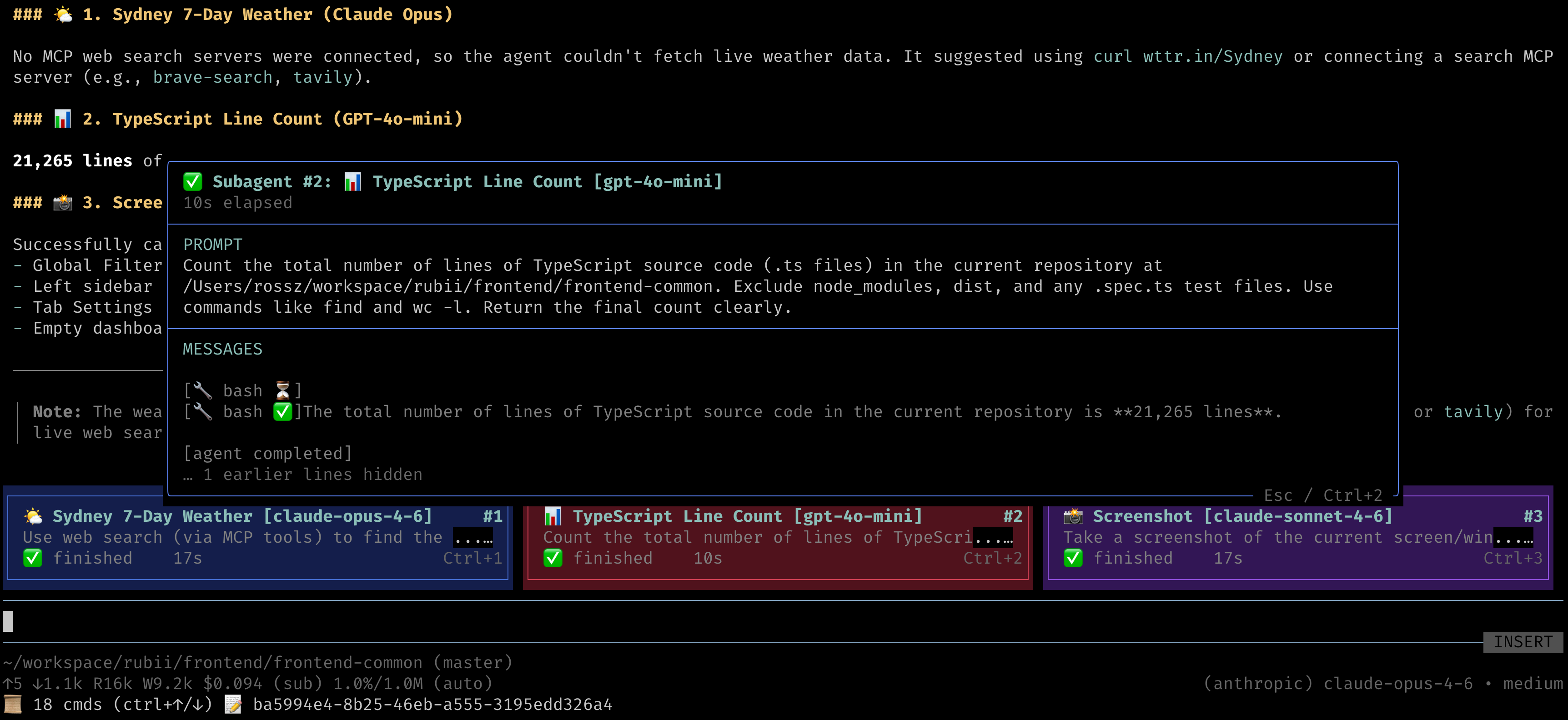
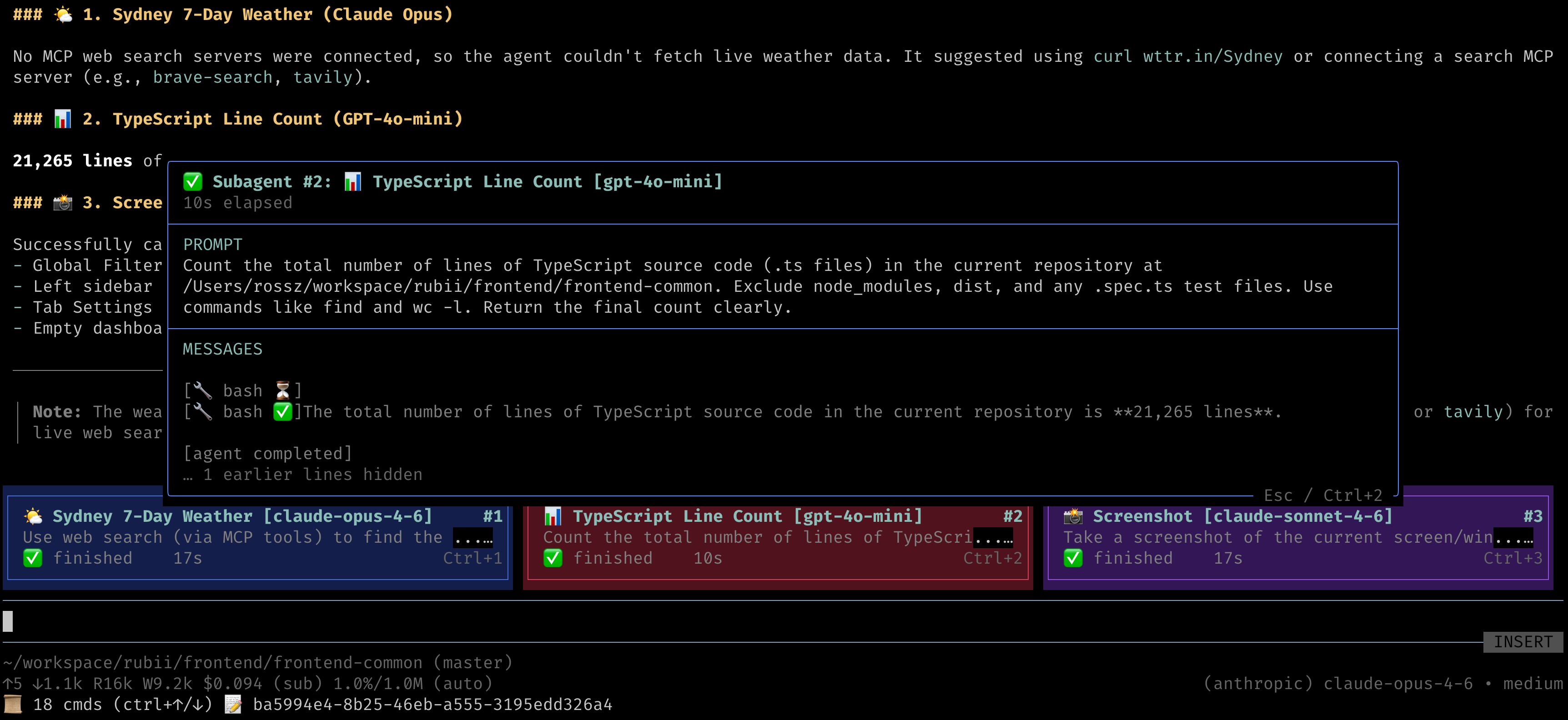
Each running subagent is displayed as a colored card widget above the editor:
- Cards show title, model, prompt preview, elapsed time, and status indicator (⏳ started, ⚡ working…, ✅ finished, ❌ error)
- The prompt passed to the subagent is displayed as card content, so you can see at a glance what each subagent is doing
- Cards auto-layout into a responsive grid (1–3 columns based on
columnWidthPercent) - Subagent number badge (
#1,#2, …) shown on the top-right corner of each card - Six rotating color themes for visual distinction between cards
🔍 Subagent Detail Overlay (Ctrl+N)
Press Ctrl+1 through Ctrl+9 to open a detail popup for the N-th visible subagent card (1 = leftmost/topmost in the current window):
- Prompt — Full prompt text with word wrapping (up to 5 lines)
- Messages — Live-updating stream of the subagent's activity (text output, tool calls, status changes), always showing the latest 5 lines
- Press the same Ctrl+N shortcut or Escape to close the overlay
📑 Paging Through Cards (Ctrl+Alt+←/→)
When more subagents have been spawned than fit in the visible window (see /saim-set-max-tui-overlays below):
- Ctrl+Alt+← scrolls back to older subagent cards
- Ctrl+Alt+→ scrolls forward to newer subagent cards
- A
subagents X–Y of N (Ctrl+Alt+←/→ to page)hint is displayed above the cards whenever paging is active
📝 JSONL Session Logging
Every subagent session is logged to disk for debugging and auditing:
.pi/subagent-in-memory/<mainSessionId>/
├── subagent_1/
│   ├── events.jsonl        # Full event stream (text, tool calls, results)
│   └── result.md           # Final subagent output
├── subagent_2/
│   ├── events.jsonl
│   ├── error.md            # On failure: what went wrong
│   └── partial-result.md   # On failure: any text produced before the failure
└── ...
The JSONL log includes:
- Session metadata (model, provider, task, cwd)
- Aggregated text output (deltas combined into single entries)
- Tool call arguments and results
- Timestamps and parent event IDs for tracing
🔄 Nested Subagent Support
Subagents can spawn their own subagents, up to the configured max depth (see above). All nested cards render in the main agent's widget — they share the same module-level state regardless of nesting depth. This is achieved by passing the subagent_create tool directly as an AgentTool to child sessions.
🎛️ Slash Commands
| Command | Description |
|---|---|
/saim-max-depth [n] |
Show or set the max subagent nesting depth (1–10, default 2). Applies to newly created subagents. |
/saim-timeout [seconds] |
Show or set the default subagent timeout in seconds (default 300, 0 = unlimited). A per-call timeout parameter overrides it. |
/saim-toggle-overlay [on|off|toggle] |
Enable, disable, or toggle the subagent TUI overlay. When disabled, no card widget is mounted even while subagents are actively running — they continue executing silently in the background. |
/saim-set-max-tui-overlays <N> |
Set the maximum number of cards displayed at once (1–9, default 3). Older cards remain accessible via Ctrl+Alt+←/→. |
/saim-clear-tui-overlay |
Clear all subagent cards from the TUI and close any open detail overlay. |
🚩 CLI Flags
| Flag | Description |
|---|---|
--saim-max-depth <n> |
Max subagent nesting depth (1–10, default 2). Same as /saim-max-depth. |
--saim-timeout <seconds> |
Default subagent timeout in seconds (default 300, 0 = unlimited). Same as /saim-timeout. |
--saim-no-tui |
Start with the subagent overlay disabled (equivalent to running /saim-toggle-overlay off immediately on startup). Subagents still run normally — only the TUI cards are hidden. |
Install
pi install npm:pi-subagent-in-memory
Remove
pi remove npm:pi-subagent-in-memory
Verify Installation
After installing, start pi and check:
- The
subagent_createtool should appear in the tool list - The
/saim-max-depth,/saim-timeout,/saim-toggle-overlay,/saim-set-max-tui-overlays, and/saim-clear-tui-overlaycommands should be available (type/to see commands) - Ask the agent to "run a subagent to list files" — you should see a card widget appear
Usage Examples
Once installed, the LLM will discover the subagent_create tool from its schema and use it when appropriate. Some natural prompts:
# Single subagent
"Spawn a subagent to analyze the test coverage in this repo"

# Parallel subagents
"Run 2 subagents in parallel: one to summarize src/ and another to summarize tests/"

# Different models and reasoning effort
"Use a subagent with openai/gpt-4o-mini and medium thinking to review the README"

# With timeout
"Spawn a subagent with a 60-second timeout to count lines of code"

# Custom working directory
"Run a subagent in /tmp to check disk space"
How It Works
- Tool registration — On load, registers
subagent_createas a tool plus the/saim-*commands and--saim-no-tuiflag. No system prompt modifications. - Session creation — When the LLM calls
subagent_create, a newcreateAgentSessionis created in-process with its own model, auth, and coding tools (read, write, edit, bash, grep, find, ls). - Event streaming — All subagent events (text deltas, tool calls, completions) are forwarded as
tool_execution_updateevents to the parent agent and logged to JSONL. - Widget rendering — A TUI widget renders card(s) above the editor, updated on every event.
- Result handoff — The final text output is written to
result.md. The parent agent receives a short pointer path, not the full content, keeping context lean.
Requirements
- pi (peer dependency)
- API keys configured for any providers you want subagents to use (via
pi loginor environment variables)
License
MIT