pi-subagent-in-memory
In-process subagent tool for pi with live TUI card widgets, JSONL session logging, and zero system-prompt overhead.
Package details
Install pi-subagent-in-memory from npm and Pi will load the resources declared by the package manifest.
$ pi install npm:pi-subagent-in-memory- Package
pi-subagent-in-memory- Version
0.2.1- Published
- Apr 24, 2026
- Downloads
- 805/mo · 187/wk
- Author
- rossz
- License
- MIT
- Types
- extension
- Size
- 820.1 KB
- Dependencies
- 0 dependencies · 4 peers
Pi manifest JSON
{
  "extensions": [
    "extensions/index.ts"
  ],
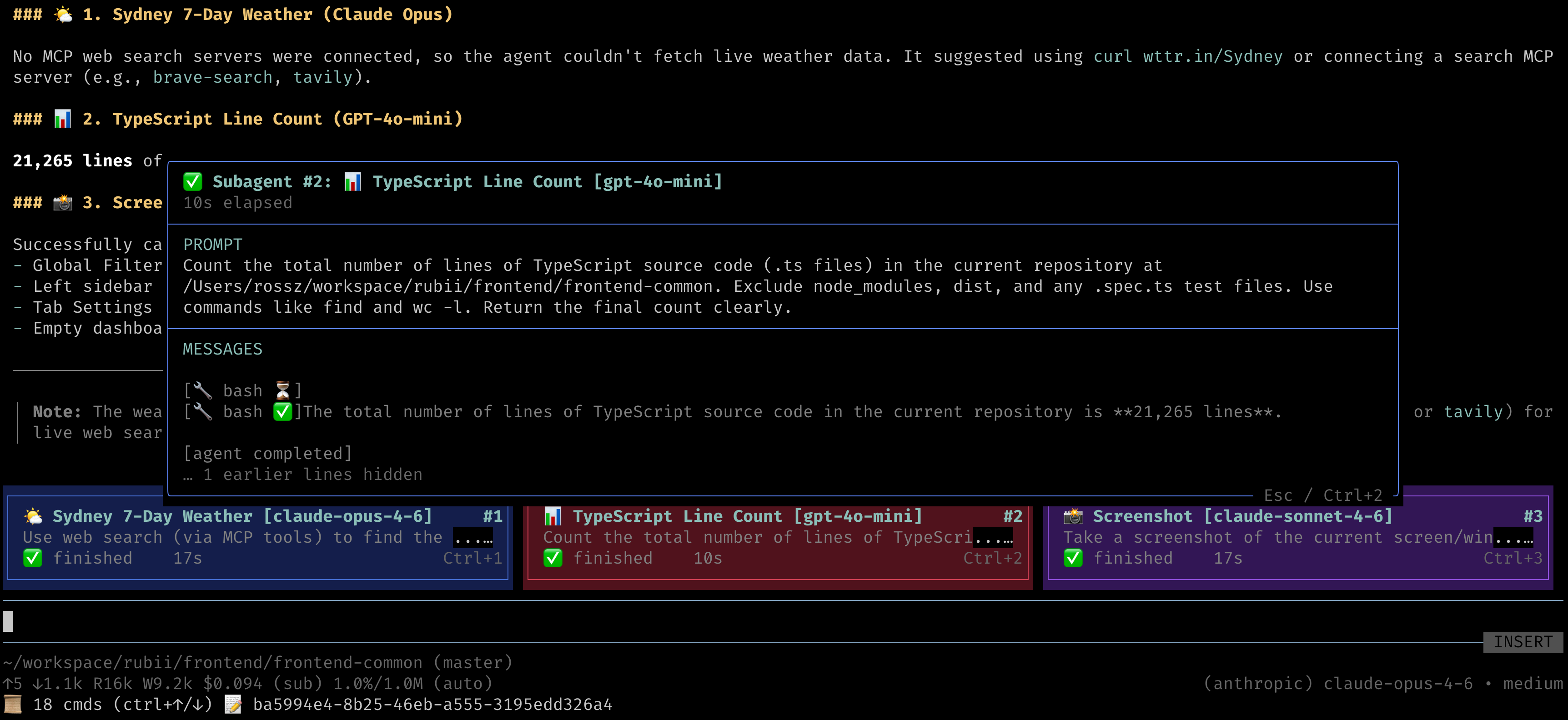
  "image": "https://raw.githubusercontent.com/ross-jill-ws/pi-subagent-in-memory/main/media/parallel-subagents.png?raw=true"
}
Security note
Pi packages can execute code and influence agent behavior. Review the source before installing third-party packages.
README
pi-subagent-in-memory
In-process subagent tool for pi with live TUI card widgets, JSONL session logging, and zero system-prompt overhead.
Key Design Principle
This extension adds nothing to your LLM context beyond tool parameter definitions. No system prompt injection, no hidden instructions, no pre-determined behavior — the LLM only sees the subagent_create tool schema and decides how to use it naturally.
Features
🤖 subagent_create Tool
Spawns an in-process subagent session using pi's createAgentSession SDK. The subagent runs in the same process (not a subprocess), with its own session, tools, and model. Multiple subagents can run in parallel.
Tool parameters:
| Parameter | Type | Required | Description |
|---|---|---|---|
task |
string | ✅ | The task for the subagent to perform |
title |
string | Display title for the card widget | |
provider |
string | LLM provider (e.g. anthropic, google, openai) |
|
model |
string | Model ID. Supports provider/model format (e.g. openai/gpt-4o-mini) |
|
cwd |
string | Working directory for the subagent | |
timeout |
number | Timeout in seconds. Aborts the subagent if exceeded | |
columnWidthPercent |
number | Card width as % of terminal (33–100). Controls card grid layout |
If provider and model are omitted, the subagent inherits the main agent's model.
📊 Live TUI Card Widgets
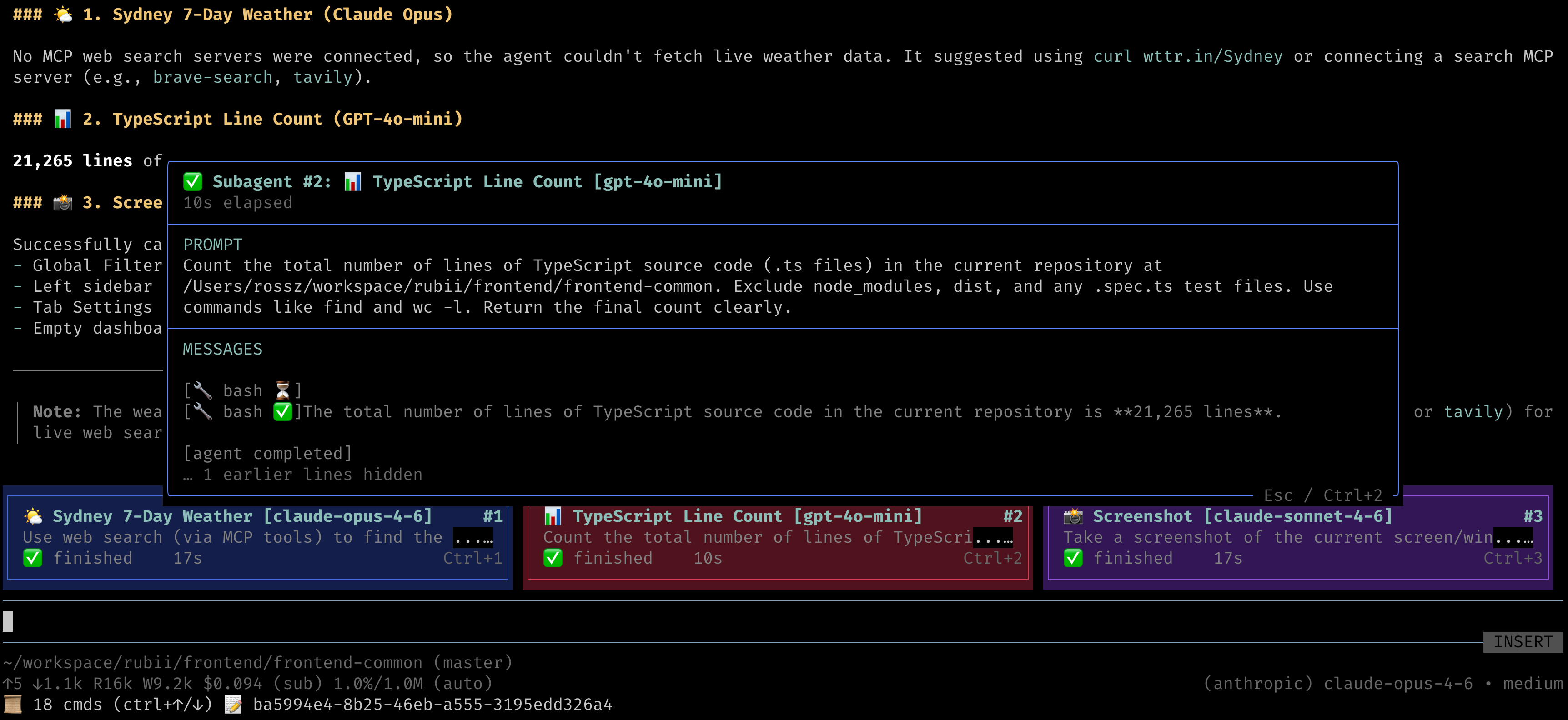
Each running subagent is displayed as a colored card widget above the editor:
- Cards show title, model, prompt preview, elapsed time, and status indicator (⏳ started, ⚡ working…, ✅ finished, ❌ error)
- The prompt passed to the subagent is displayed as card content, so you can see at a glance what each subagent is doing
- Cards auto-layout into a responsive grid (1–3 columns based on
columnWidthPercent) - Subagent number badge (
#1,#2, …) shown on the top-right corner of each card - Six rotating color themes for visual distinction between cards
🔍 Subagent Detail Overlay (Ctrl+N)
Press Ctrl+1 through Ctrl+9 to open a detail popup for the N-th visible subagent card (1 = leftmost/topmost in the current window):
- Prompt — Full prompt text with word wrapping (up to 5 lines)
- Messages — Live-updating stream of the subagent's activity (text output, tool calls, status changes), always showing the latest 5 lines
- Press the same Ctrl+N shortcut or Escape to close the overlay
📑 Paging Through Cards (Ctrl+Alt+←/→)
When more subagents have been spawned than fit in the visible window (see /saim-set-max-tui-overlays below):
- Ctrl+Alt+← scrolls back to older subagent cards
- Ctrl+Alt+→ scrolls forward to newer subagent cards
- A
subagents X–Y of N (Ctrl+Alt+←/→ to page)hint is displayed above the cards whenever paging is active
📝 JSONL Session Logging
Every subagent session is logged to disk for debugging and auditing:
.pi/subagent-in-memory/<mainSessionId>/
├── subagent_1/
│   ├── events.jsonl    # Full event stream (text, tool calls, results)
│   └── result.md       # Final subagent output (or error.md on failure)
├── subagent_2/
│   ├── events.jsonl
│   └── result.md
└── ...
The JSONL log includes:
- Session metadata (model, provider, task, cwd)
- Aggregated text output (deltas combined into single entries)
- Tool call arguments and results
- Timestamps and parent event IDs for tracing
🔄 Nested Subagent Support
Subagents can spawn their own subagents. All nested cards render in the main agent's widget — they share the same module-level state regardless of nesting depth. This is achieved by passing the subagent_create tool directly as an AgentTool to child sessions.
🎛️ TUI Overlay Slash Commands
| Command | Description |
|---|---|
/saim-toggle-overlay [on|off|toggle] |
Enable, disable, or toggle the subagent TUI overlay. When disabled, no card widget is mounted even while subagents are actively running — they continue executing silently in the background. |
/saim-set-max-tui-overlays <N> |
Set the maximum number of cards displayed at once (1–9, default 3). Older cards remain accessible via Ctrl+Alt+←/→. |
/saim-clear-tui-overlay |
Clear all subagent cards from the TUI and close any open detail overlay. |
🚩 --saim-no-tui CLI Flag
Start pi with --saim-no-tui to launch with the subagent overlay disabled (equivalent to running /saim-toggle-overlay off immediately on startup). Subagents still run normally — only the TUI cards are hidden.
Install
pi install npm:pi-subagent-in-memory
Remove
pi remove npm:pi-subagent-in-memory
Verify Installation
After installing, start pi and check:
- The
subagent_createtool should appear in the tool list - The
/saim-toggle-overlay,/saim-set-max-tui-overlays, and/saim-clear-tui-overlaycommands should be available (type/to see commands) - Ask the agent to "run a subagent to list files" — you should see a card widget appear
Usage Examples
Once installed, the LLM will discover the subagent_create tool from its schema and use it when appropriate. Some natural prompts:
# Single subagent
"Spawn a subagent to analyze the test coverage in this repo"

# Parallel subagents
"Run 2 subagents in parallel: one to summarize src/ and another to summarize tests/"

# Different models
"Use a subagent with openai/gpt-4o-mini to review the README"

# With timeout
"Spawn a subagent with a 60-second timeout to count lines of code"

# Custom working directory
"Run a subagent in /tmp to check disk space"
How It Works
- Tool registration — On load, registers
subagent_createas a tool plus the/saim-*commands and--saim-no-tuiflag. No system prompt modifications. - Session creation — When the LLM calls
subagent_create, a newcreateAgentSessionis created in-process with its own model, auth, and coding tools (read, write, edit, bash, grep, find, ls). - Event streaming — All subagent events (text deltas, tool calls, completions) are forwarded as
tool_execution_updateevents to the parent agent and logged to JSONL. - Widget rendering — A TUI widget renders card(s) above the editor, updated on every event.
- Result handoff — The final text output is written to
result.md. The parent agent receives a short pointer path, not the full content, keeping context lean.
Requirements
- pi (peer dependency)
- API keys configured for any providers you want subagents to use (via
pi loginor environment variables)
License
MIT