pi-surface
Interactive, reactive web surfaces connected to your running Pi session
Package details
Install pi-surface from npm and Pi will load the resources declared by the package manifest.
$ pi install npm:pi-surface- Package
pi-surface- Version
0.1.0- Published
- Sep 20, 2026
- Downloads
- 179/mo · 8/wk
- Author
- perapp
- License
- MIT
- Types
- extension, skill, prompt
- Size
- 191.8 KB
- Dependencies
- 3 dependencies · 3 peers
Pi manifest JSON
{
  "extensions": [
    "./src/index.ts"
  ],
  "skills": [
    "./skills"
  ],
  "prompts": [
    "./prompts"
  ],
  "image": "https://raw.githubusercontent.com/perapp/pi-surface/main/docs/pi-surface.png"
}Security note
Pi packages can execute code and influence agent behavior. Review the source before installing third-party packages.
README
pi-surface
A web surface for your running Pi session. Keep using the terminal, continue from your phone, and let Pi create interactive reports, dashboards, forms, and small applications in the browser.
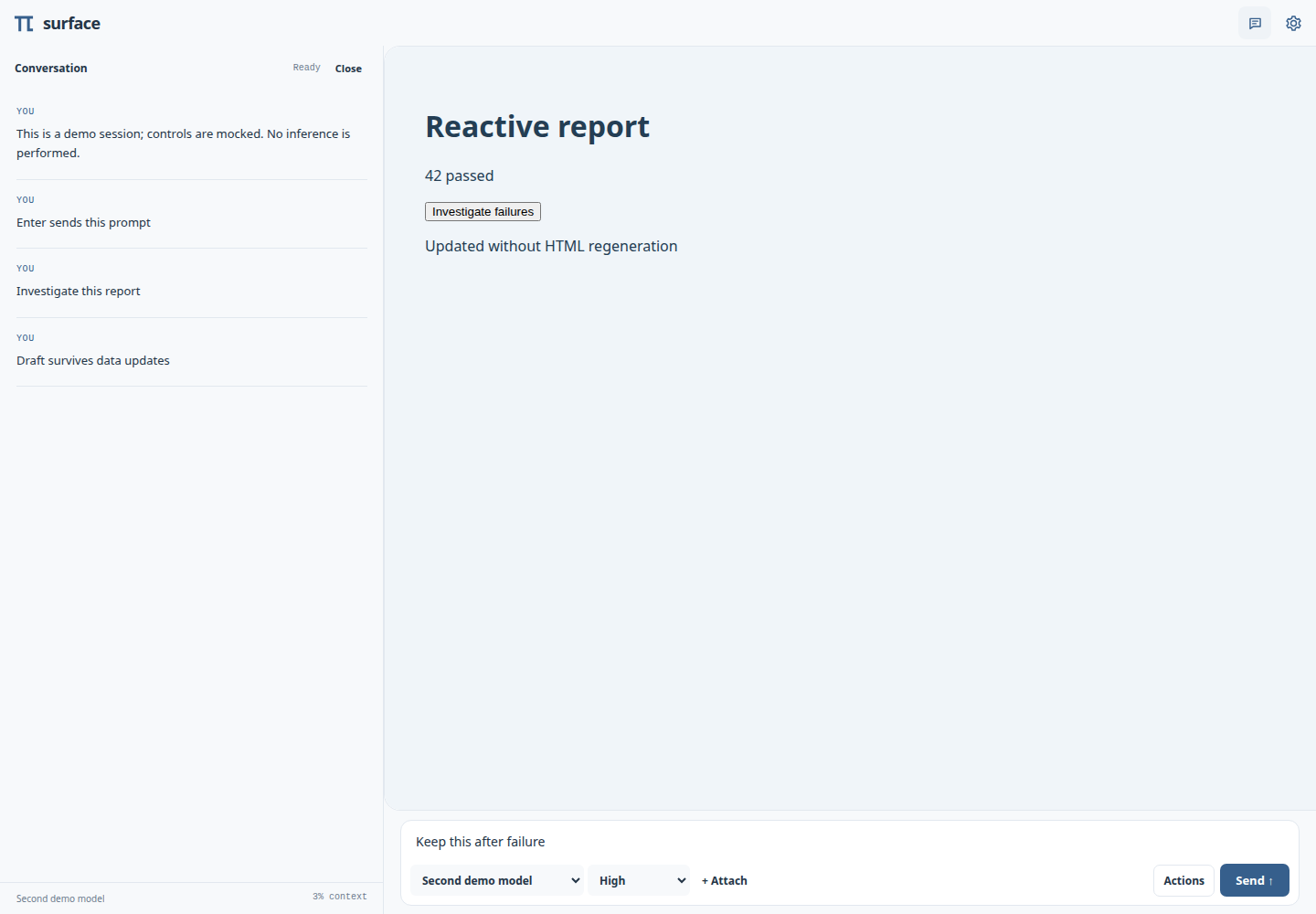
This is a Pi extension, not a second agent, RPC subprocess, or shared daemon. Each extension runtime owns its server, credentials, files, and watchers.
Install
Requires Node 22+ and Pi 0.85.1+.
pi install npm:pi-surfaceRestart Pi, or run /reload in an existing session, then use /surface to open the authenticated browser interface. To try the package for one run without installing it, use pi -e npm:pi-surface. Update an installed copy with pi update npm:pi-surface.
Develop from this checkout
Development uses @earendil-works/pi-coding-agent 0.85.1+.
npm ci
npm run check
npm test
pi install /absolute/path/to/pi-surface
The last command registers the checkout globally, without copying it. All your Pi projects then use this working tree. Run /reload in existing Pi sessions after extension/server changes. To try without changing global settings, run pi -e ./src/index.ts.
This repository's .pi/settings.json also loads the checkout as a local package when you run Pi here. Pi resolves local package identity by absolute path, so the same globally registered checkout is deduplicated. A different local checkout is a different identity; don't load two copies in one session.
Installing/registering globally is intentionally not performed by the test suite or development setup. No credentials, commits, or global configuration are bundled here.
Connect
In normal TUI mode, the extension starts automatically on 0.0.0.0 with an OS-assigned port and prints one preferred LAN authenticated URL (loopback if no LAN address is available). No QR code appears automatically. /surface or /surface qr shows that URL and its QR once in the transcript—not as a pinned widget. In print/JSON/RPC modes it starts only when explicitly requested through its tool or command.
/surface          Show preferred URL and QR once
/surface qr       Show preferred URL and QR once
/surface open     Open preferred URL in browser (Linux/macOS)
/surface status   Show all connection URLs (no QR)
/surface hide     Clear any legacy QR widget
/surface stop     Stop server and delete temporary files
/surface start    Start again
Configuration: ~/.pi/agent/surface.json, overridden by trusted-project .pi/surface.json:
{ "host": "0.0.0.0", "port": 0 }CLI overrides: --surface-host 127.0.0.1 --surface-port 9001. Use --surface-disabled to suppress automatic startup. Hosts must be literal IP addresses; LAN discovery currently advertises IPv4 interfaces (a specifically bound IPv6 address also works). There is deliberately no unauthenticated mode.
Pi 0.85 session lifecycle: /new, resume, fork, clone, and /reload tear down and recreate extensions. Pi Surface hands authentication and its listening address to the fresh extension instance, so connected browsers briefly reconnect automatically. /reload, fork, and clone also carry the current temporary surfaces and attachments forward. /new and resume/switch keep the browser draft but start with fresh temporary surfaces and uploads; project/global surfaces remain available. Fork and clone inherit the current workspace, not a historical snapshot from the selected conversation entry. /surface stop or process exit closes connections and rotates credentials.
Browser controls
The browser is surface-first: the active surface fills the viewport below a compact control row. The Pi mark and tab favicon blink orange while Pi works, turn green when work finishes unseen, turn blue once the idle session is viewed, and turn red when disconnected. The browser tab title is directory · Pi. The Pi mark opens a conversation sidebar whose desktop width can be dragged or adjusted with the resize handle’s arrow keys. Conversation follows new activity like tail -f until you deliberately scroll upward. Top-right Prompt and Settings icons toggle the composer and open Session controls. The prompt grows automatically from one through ten rows, then scrolls internally; the sidebar width persists locally. Settings includes session identity, surface selection, every /surface operation, authenticated URLs, and a shareable QR code. Ctrl/Cmd+B toggles conversation, Ctrl/Cmd+/ toggles and focuses the prompt, and Escape closes an open panel (dialogs first). In the composer, Enter sends while Shift+Enter or Ctrl+J inserts a new line. The single-row toolbar uses compact icons for Attach, Abort, Commands, and Send alongside model and reasoning controls. Sending automatically starts a turn when idle or steers Pi while working. File picker, drag/drop, and image paste share the attachment pipeline. The Commands icon opens a searchable picker for browser-supported built-ins plus advertised extension, skill, and prompt commands, with optional arguments and a shortcut to Session controls.
The bridge uses documented Pi extension APIs. Session mutations dispatch through an internal command so they receive a real command context. Recognized slash commands typed into the composer use the same validated dispatcher as the Commands picker; /new, /compact, and /reload map to their browser-safe built-in operations. Unknown slash text remains ordinary prompt text. Extension, skill, and prompt-template commands come from pi.getCommands().
Not full TUI parity: extension confirmation/input/custom dialogs remain in the terminal. The browser shows waiting activity but cannot answer those dialogs. Provider login, TUI settings, and arbitrary internal tool execution aren't exposed as raw internals. The authenticated client can prompt the real agent, switch models, configure tools, invoke registered commands, and use the supported session controls. It is a full-trust capability, not a restricted guest role.
Surfaces are ordinary web projects
.pi/agent/surfaces/test-report/
  surface.json
  index.html
  app.js
  style.css
{
"name": "Test report",
"entry": "index.html",
"default": true,
"watch": ["examples/test-results.json"]
}watch paths are relative to the session working directory, not the manifest directory. They may be files, directories, or globs inside that directory. Declaring a dependency also authorizes the browser to read matching files. Avoid broad globs that include secrets. The surface directory itself is served as an asset root: don't put secrets there either. Traversal, outside symlinks, and directory listing are rejected.
| Scope | Storage | Lifetime |
|---|---|---|
| Temporary | Private OS temporary directory | Current Pi process/session; survives /reload |
| Project | .pi/agent/surfaces/ |
Version-controlled project files |
| Global | ~/.pi/agent/surfaces/ |
Reusable user applications |
Project surfaces are only loaded in trusted projects. Scope-qualified IDs (e.g. project:test-report) prevent collisions. The first default surface in deterministic priority order opens initially. Invalid manifests report errors without stopping other surfaces.
- HTML/CSS/JS changes reload the surface, not the persistent composer.
- Declared file changes send
data_changed; a watch callback can refresh data without inference. With no callback, the page reloads. - Manifest changes and newly created surfaces are discovered automatically.
surface.emitpushes an application event without regenerating HTML.surface.promotecopies a temporary surface to project/global storage without overwriting an existing directory.
Ask Pi: “Show these test results as a reactive surface.” The bundled pi-surface skill teaches the tools and browser API.
Adaptive Report Surfaces
An Adaptive Report Surface is a polished, long-form explainer that the reader can reshape through the same Pi session. Its opening controls can regenerate the complete report at a different reading level or target reading time, while each section can request newly generated detail through Tell me more.
Ask naturally:
Give me a report surface on black holes.
Create an adaptive report on the Linux kernel for a technical audience.
Or use the bundled prompt template:
/report-surface black holes
/report-surface "the Linux kernel" "focus on scheduling and memory management"
The report-surface skill defines the reusable adaptive-report/v1 action/event contract. A report sends adaptive-report-regenerate or adaptive-report-expand with its current state and a request ID; Pi returns the generated result with surface emit. Standard top controls use a Technical depth dropdown (Plain language, General audience, Technical, Expert), a Reading time dropdown (2, 5, 10, or 15 minutes), and one Regenerate report button that submits both choices in a single inference. Whole-report regeneration may change the section count instead of merely padding or truncating prose.
Action submission only acknowledges that generation was queued. The report keeps an accessible loading state until the matching event arrives, rejects stale request IDs, and recovers on timeout. Custom events are transient and are not replayed after reconnect; durable reports should keep canonical state in their surface files or a declared watched file.
Browser API (protocol 1)
The server injects /bridge.js before your app scripts. Both window.pi and window.surface.pi refer to the same bridge.
<button id="investigate">Investigate failures</button>
<pre id="results"></pre>
<script>
  async function refresh() {
    const data = await surface.read('examples/test-results.json');
    document.querySelector('#results').textContent = JSON.stringify(data, null, 2);
  }
  surface.watch(refresh);
  refresh();
  document.querySelector('#investigate').onclick = () =>
    pi.followUp('Investigate the failures in examples/test-results.json');
</script>
await pi.prompt('Explain this'); // idle only
await pi.steer('Focus on the errors'); // steer while busy
await pi.followUp('Then summarize'); // enqueue while busy
await pi.abort();
const session = await pi.getSession();
const unsubscribe = pi.on('message_update', event => { /* streamed message */ });
const files = await surface.attach(fileInput.files);
await pi.followUp('Ingest these documents', { attachments: files });
await surface.action('simplify', 'architecture', { audience: 'beginner' });
surface.on('updated-section', data => { /* agent's surface emit result */ });Prompt promises acknowledge submission, not a completed model response. Responses belong to the shared session and arrive as events; use surface.emit for application-specific results. State/event subscriptions are live, not a durable event log. Reconnect obtains a fresh snapshot; transient app events are not replayed.
pi.invoke(method, params) supports getState, prompt, steer, followUp, abort, setModel, setThinkingLevel, renameSession, setActiveTools, compact, command, listSessions, newSession, switchSession, fork, navigateTree, reload, surfaceAction, and surfaceCommand. Unknown methods are errors, not eval or arbitrary Pi object traversal. See src/index.ts for parameter validation and web/bridge.js for helpers.
Security and attachments
Possession of the access URL grants control of Pi, including its tools and credentials. Generated surfaces are trusted applications on that same authenticated origin, not an untrusted-code sandbox. Only open surface code you trust.
- Fresh cryptographic 256-bit bootstrap token per session runtime; retained only in process memory across
/reloadand never stored in project/session output by the extension. - Authentication required even on loopback; the bootstrap URL exchanges its token for an HttpOnly, SameSite=Strict cookie, serves the landing page directly, and removes the token from browser history before application startup. This avoids external QR-scanner redirect chains withholding the new Strict cookie.
- Random per-instance cookie names prevent cookie collisions between Pi ports. Credentials do not work in another instance.
- Strict Host allowlist, Origin checks, mutation-only custom header, no CORS, no-cache/no-referrer headers, and same-origin resource CSP.
- Plain HTTP is not encrypted. Use only a trusted LAN or bind loopback and use a secure tunnel. Do not forward the port onto the Internet. Proxy/HTTPS termination and DNS hostnames are not configured automatically. Browser history, Settings QR screenshots, process lists from
/surface open, and copied links may expose the authenticated bootstrap URL; anyone holding it can control the session. - Files upload as opaque IDs to a private
0700directory with0600files. The browser never supplies a destination path. Recognized image bytes become native Pi image blocks; other files become quoted local path references for Pi's file/document tools. - Limit: 10 MiB/file, 100 MiB and 100 files/runtime, 10 attachments/message, 32 browser logins, 64 event connections. Uploaded files are retained across
/reloadand until session shutdown so queued prompts can read them; unsent files can be removed in the composer. - Uploads are not durable storage. Copy/ingest them into the project before switching sessions or exiting Pi; old session transcripts may reference files that have since been deleted. No automatic PDF/Office extraction is claimed.
Verification
npm run check       # TypeScript against real Pi 0.85.1 types
npm test            # server/auth/security/watchers + extension adapter tests
npm run test:browser # browser integration tests (requires Chrome or CHROME_PATH)
The example project surface under .pi/agent/surfaces/dev/ is a small reactive test-report application. Its source data is examples/test-results.json.