pi-tagteam
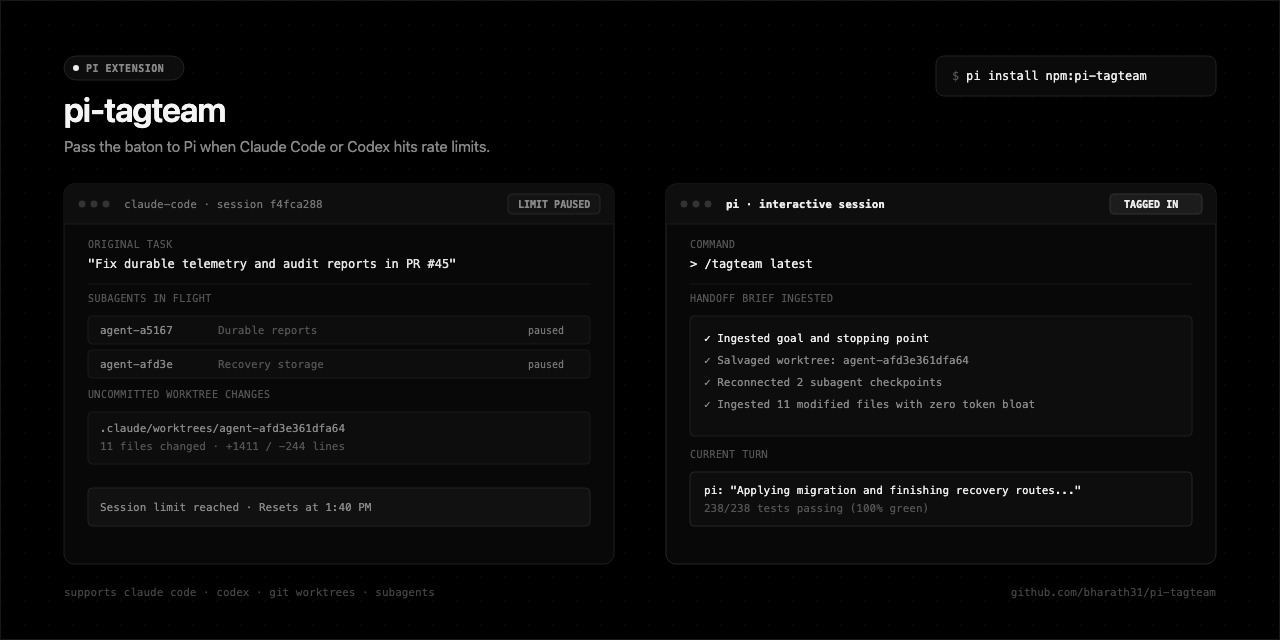
Tag Pi in when Claude Code or Codex hits rate limits, context windows, or crashes. Seamlessly transfer context, uncommitted git work, and subagent tasks.
Package details
Install pi-tagteam from npm and Pi will load the resources declared by the package manifest.
$ pi install npm:pi-tagteam- Package
pi-tagteam- Version
0.1.5- Published
- Aug 17, 2026
- Downloads
- 954/mo · 23/wk
- Author
- brth31
- License
- MIT
- Types
- extension, skill, prompt
- Size
- 202.1 KB
- Dependencies
- 0 dependencies · 4 peers
Pi manifest JSON
{
  "extensions": [
    "./src/index.ts"
  ],
  "skills": [
    "./skills"
  ],
  "prompts": [
    "./prompts"
  ],
  "image": "https://raw.githubusercontent.com/bharath31/pi-tagteam/main/assets/preview.png"
}
Security note
Pi packages can execute code and influence agent behavior. Review the source before installing third-party packages.
README
pi-tagteam 🤝
State-aware session handoff from Claude Code and OpenAI Codex to Pi. Recovers uncommitted git worktrees, in-flight subagents, and checklist state without context bloat.
pi install npm:pi-tagteam
⚡ Why this exists: State Salvage vs Chat Replay
When a coding agent halts due to rate limits or context overflow, replaying old chat messages is only half the picture. The real working state lives in your filesystem:
- Isolated Subagent Worktrees: Claude Code writes subagent changes to separate paths under
.claude/worktrees/agent-<id>. If a rate limit hits before merging, new files and unstaged diffs stay trapped on disk. - Context Bloat: Dumping a raw 100k-token transcript into a new session burns your remaining context budget before you write a single line of code.
pi-tagteam performs actual state salvage. It scans on-disk session stores, maps uncommitted changes across your main branch and subagent worktrees, and passes a high-density, structured execution brief to Pi (pi.dev).
[Claude] f4fca288 · 12m ago · "Fix durable audit reports & recovery storage" (main)
✓ Ingested original goal and stopping point
✓ Salvaged worktree: .claude/worktrees/agent-afd3e361dfa64 (11 files, +1411/-244)
✓ Reconnected 2 subagent checkpoints
✓ Loaded 11 modified files into context

pi: "Applying migration and finishing recovery routes..."
Running tests: 238/238 passing (100% green)
💾 What gets collected
| Item | What pi-tagteam extracts | Why it matters |
|---|---|---|
| Git worktrees | Untracked files and diffs across root and .claude/worktrees/*. |
Captures code created in isolated subagent worktrees before they were merged. |
| Subagent state | Status, descriptions, and worktrees from subagents/*.meta.json. |
Lets Pi continue parallel tasks without repeating work that already finished. |
| Checklists | Pending and completed items from ~/.claude/tasks/. |
Preserves todo lists and checkpoints maintained by the previous agent. |
| Stopping point | The original prompt, last assistant thought, and failed tool call. | Pi knows exactly where the prior run stopped and what was left in progress. |
| Execution brief | A concise, structured brief containing only the active state delta. | Avoids dumping 100k-token raw JSON logs that consume your new context window. |
📦 Installation
# Global install (recommended)
pi install npm:pi-tagteam

# Try once without installing
pi -e npm:pi-tagteam
🎮 Usage
Run /tagteam in any project where an agent stopped:
/tagteam
An interactive menu lists recent sessions for that project. Picking a session lets you continue in your current Pi session, launch a fresh session, or edit the handoff prompt before running.
To pick the most recent session without prompts:
/tagteam latest
🛠️ Command Reference
| Command | Action |
|---|---|
/tagteam |
Open interactive session picker for the current workspace |
/tagteam latest |
Resume the most recent session without prompts |
/tagteam claude |
Filter to Claude Code sessions |
/tagteam codex |
Filter to OpenAI Codex sessions |
/tagteam --all |
Search across all projects on disk |
/tagteam 12 |
Search sessions updated within the last 12 hours |
/tagteam <sessionId> |
Target a specific session ID or filename |
/handoff / /relay |
Aliases for /tagteam |
/claude |
Shortcut for /tagteam claude |
/codex |
Shortcut for /tagteam codex |
🤖 LLM Tool: Autonomous Handoff
Pi also exposes tagteam_handoff as a tool for the model.
If you tell Pi in plain English:
"I was working on this in Claude Code earlier and hit my rate limit. Pick up where it stopped."
Pi automatically queries the discovery engine, inspects uncommitted worktrees, and resumes the task without requiring slash commands.
💡 Proactive Startup Notice
When you start Pi in a project where Claude Code or Codex stopped within the last two hours, pi-tagteam shows a one-line notice:
💡 Recent Claude Code session detected (15m ago: "Fix durable reports in PR #45"). Run /tagteam to take over.
🔍 Supported Data Sources
Claude Code (~/.claude/)
- Transcripts:
~/.claude/projects/<encoded-cwd>/<session-id>.jsonl - Subagents:
~/.claude/projects/<encoded-cwd>/<session-id>/subagents/*.meta.jsonand.jsonl - Tasks:
~/.claude/tasks/<session-id>/*.json - Worktrees:
<project>/.claude/worktrees/* - History:
~/.claude/history.jsonl
OpenAI Codex (~/.codex/)
- Rollouts:
~/.codex/sessions/YYYY/MM/DD/rollout-*.jsonl - Archives:
~/.codex/archived_sessions/rollout-*.jsonl - Thread Index:
~/.codex/session_index.jsonl - Rate limits: Captures quota percentages, reset timestamps, and token usage.
❓ Frequently Asked Questions
Does pi-tagteam modify files during discovery?
No. Discovery and brief generation are strictly read-only. Any edits to your project occur during normal Pi tool execution.
What happens to isolated subagent worktrees?
Claude Code stores subagent changes under .claude/worktrees/agent-<id>. pi-tagteam finds those directories, lists modified files in the handoff brief, and gives Pi the exact paths so you can review and merge them.
Can I edit the prompt before Pi runs?
Yes. Select "Edit Handoff Prompt" in /tagteam to open Pi's editor and modify the text before execution.
💻 Development & Testing
# Clone repository
git clone https://github.com/bharath31/pi-tagteam.git
cd pi-tagteam

# Install dependencies and build
npm install
npm run build

# Run test suite (19 test cases)
npm test

# Run extension directly in Pi
pi -e ./dist/index.js
📄 License
MIT © Bharath