pi-task-manager
Hierarchical task/todo management extension for Pi. Tasks live in a TODO.md file as an indented tree.
Package details
Install pi-task-manager from npm and Pi will load the resources declared by the package manifest.
$ pi install npm:pi-task-manager- Package
pi-task-manager- Version
0.2.0- Published
- Oct 8, 2026
- Downloads
- 175/mo · 17/wk
- Author
- gilgilgil
- License
- MIT
- Types
- extension, skill
- Size
- 187.4 KB
- Dependencies
- 0 dependencies · 3 peers
Pi manifest JSON
{
  "skills": [
    "./skills"
  ],
  "extensions": [
    "./index.ts"
  ]
}
Security note
Pi packages can execute code and influence agent behavior. Review the source before installing third-party packages.
README
pi-task-manager
A task tree your pi agent grows, in a TODO.md file you can still read.
Your pi agent plans and tracks work as a hierarchical tree of tasks, persisted
in plain TODO.md in your project directory. The file auto-opens at session
start, so the agent picks up where it left off — and since it's markdown, you
can grep it, read it, or hand-edit it yourself. No server, no database, no
subprocess: 7 task_* tools over pure TypeScript.
In action
you:  "keep track of Sophie's birthday party — the venue is booked,
      order the cake by the 12th, invites go out next week"
pi:   created the party task and three subtasks
what lands on disk (auto-saved, examples/party/TODO.md):
- [ ] Plan Sophie's birthday party ⏫ ➕ 2026-08-25 (ID: `Kp7dQ2`)
  - [x] Book venue ✅ 2026-08-30 ➕ 2026-08-25 🖊️ 2026-08-30 (ID: `Tm3wZ8`)
  - [>] Order cake 📅 2026-09-12 ➕ 2026-08-25 🖊️ 2026-09-02 (ID: `H4nRv6`)
  - [ ] Send invites ⏳ 2026-09-08 📎 [spec](task-Bq9xLc.md) ➕ 2026-08-26 (ID: `Bq9xLc`)
- [ ] Water the plants 🔁 weekly ➕ 2026-08-25 (ID: `Wp5jTn`)
…same file in your terminal:
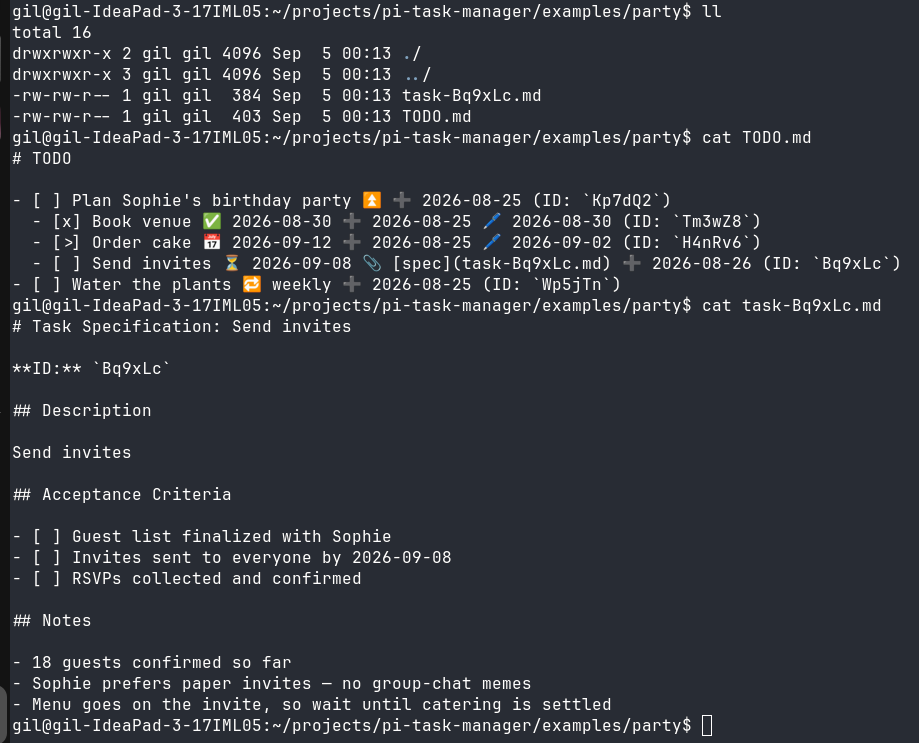
The 📎 task has a real note file beside it — examples/party/task-Bq9xLc.md,
also in the repo.
Install
pi install npm:pi-task-managerAny git source works too: pi install git:github.com/gilgil/pi-task-manager,
pi install https://github.com/gilgil/pi-task-manager, or
pi install /local/path. Pin a tag for stability:
pi install git:github.com/gilgil/pi-task-manager@v0.2.0;
pi update --extensions reconciles the clone to the pinned ref.
The extension registers the tools and the task-manager skill automatically.
If a TODO.md exists in the working directory, it is opened automatically at
session start (with a notification).
Task file format
# TODO

- [ ] Buy milk ➕ 2026-08-15 🖊️ 2026-08-15 (ID: `5Tvc0d`)
  - [ ] Organic 📅 2026-08-20 (ID: `VpLDzY`)
  - [x] Oat milk ✅ 2026-08-14 (ID: `Ab3x9Z`)
- [>] Write report ⏳ 2026-08-16 (ID: `Qw7m2K`)- Indentation (2 spaces) defines the tree — each task's children are the indented lines beneath it.
- Status — exactly one character in the checkbox:
[ ]open ·[x]done ·[>]in-progress ·[!]failed ·[-]cancelled - Emoji annotations between description and ID:
⏳scheduled ·🛫start ·📅due ·✅done ·❌cancelled ·➕created ·🖊️modified (omitted when it equals the created date) · priorities⏬🔽🔼⏫🔺·🔁recurrence ·⛔dependencies ·📎 [spec](task-<id>.md)note file - ID: 6-char base62, stable, referenced by
parent_id,depends_on, etc. depth,position, andparent_idare always derived from the tree — never stored.- Anything that is not a task line is left alone. Prose, headers, plain bullets, and notes are kept verbatim through every save, so you can hand-edit the file freely. (Lines that look like tasks but cannot be parsed — no ID, indented deeper than 8 levels — are preserved as plain text too.)
Tools
| Tool | Purpose |
|---|---|
task_open(path) |
Open <path>/TODO.md (created if missing). Call once first. |
task_add(description, ...) |
Add a task. Returns the new ID. |
task_edit(task_id, ...) |
Change fields; only provided fields change. |
task_move(task_id, ...) |
Move a task with its subtree. No destination = delete task + subtree. |
task_get(task_id) |
Full details of one task. |
task_list(...) |
List tasks: parent_id gives its direct children (include_subtasks for the whole subtree); no parent_id lists everything. status / priority filter the result. |
task_close() |
Save and close. Mutations already auto-save. |
Hierarchy parameters
parent_id— add/move as last child of this taskbefore_id/after_id— insert at the same level, before/after that sibling (must share the target's parent)task_movewith nounder_id/before_id/after_iddeletes the task and its subtree
Other fields
priority:lowestlownormalmediumhighhighest- dates (
scheduled,start,due):YYYY-MM-DD recurrence:dailyweeklymonthlyyearly, orevery N days/weeks/months/years— optionally suffixedon <Weekday>(e.g.weekly on Monday). One line, no annotation emojis (it is written into the task line as free text). Completing a recurring task (x) inserts the next instance as the following sibling, carrying over its description, priority, recurrence and dependencies, withdueadvanced to the next occurrence (scheduledinstead when the original had only a scheduled date).on_completion:keep(default — the completed task stays) ·delete(remove it once done; skipped with a warning if it has sub-tasks)depends_on: list of task IDs (circular dependencies rejected)spec: true— also create atask-<id>.mdspec file- setting status to
x/-stampsdate_done/date_cancelled
Development
npm install
npm test
Layout: index.ts (tool registration) · lib/
(task.ts tree node, parser.ts line ⇄ tree, task-manager.ts mutations,
recurrence.ts next-instance rules, render.ts compact tool results,
tools.ts TypeBox schemas) · skills/task-manager/SKILL.md (LLM usage guide).