pi-teammate
Pi agent-to-agent team communication via shared SQLite message bus with MAMORU guardian
Package details
Install pi-teammate from npm and Pi will load the resources declared by the package manifest.
$ pi install npm:pi-teammate- Package
pi-teammate- Version
0.3.3- Published
- Apr 18, 2026
- Downloads
- 1,426/mo · 42/wk
- Author
- rossz
- License
- MIT
- Types
- extension
- Size
- 1.8 MB
- Dependencies
- 2 dependencies · 2 peers
Pi manifest JSON
{
  "extensions": [
    "extensions/index.ts"
  ],
  "image": "https://github.com/ross-jill-ws/pi-teammate/blob/main/documents/20260405115019.png?raw=true"
}
Security note
Pi packages can execute code and influence agent behavior. Review the source before installing third-party packages.
README
pi-teammate
A pi extension that turns multiple pi sessions into a collaborative team of AI agents. Instead of a top-down orchestrator dispatching tasks to subordinate subagents, pi-teammate creates a peer network where every agent is equal, can communicate with any other agent, and retains context across tasks.
For the full motivation behind why a teammate system beats traditional subagent architectures, see Why Build a Teammate System?.
Documentation
| Document | Description |
|---|---|
| Why Build a Teammate System? | Subagent vs. teammate architectures — why decentralized collaboration wins |
| Designing a Teammate-Based Multi-Agent System | Design principles, architecture, and a full walkthrough example |
| Communication & Messaging | SQLite message bus, payload schema, event types, MAMORU internals |
| Command Reference | Complete manual for CLI flags, slash commands, and TUI shortcuts |
Install / Uninstall
# Install
pi install npm:pi-teammate

# Uninstall
pi remove npm:pi-teammate
Quick Start
Each teammate runs from its own working directory, and every working directory must contain a persona.yaml file that defines the agent's identity (name, role, system prompt). No other files are required. See Writing a persona.yaml below for the full field reference and examples.
You can clone ready-made examples from pi-teammate-samples.
Set up three directories like this:
project/
├── designer/
│   └── persona.yaml
├── developer/
│   └── persona.yaml
└── tester/
    └── persona.yaml
Then open three terminal windows, cd into each directory, and start a pi session:
# Terminal 1 — cd into designer/, create a new team and join (joins as "Rachel")
cd project/designer
pi --team-channel forex-rt --team-new

# Terminal 2 — cd into developer/, join the team (joins as "Drew")
cd project/developer
pi --team-channel forex-rt

# Terminal 3 — cd into tester/, join the team (joins as "Joseph")
cd project/tester
pi --team-channel forex-rt
You can also pass --agent-name <name> to override the agent's display name, but since each persona.yaml already has a name field (Rachel for the designer, Drew for the developer, Joseph for the tester), it's picked up automatically and --agent-name is unnecessary.
Now type a prompt into any agent (e.g. the designer):
Build a website to show realtime forex data.
The agents will autonomously delegate tasks, ask each other for clarification, review code, run tests, and iterate — all without human orchestration. In the forex example above, three agents built a fully working realtime dashboard in about 8 minutes.
For a detailed walkthrough of this example, see Designing a Teammate-Based Multi-Agent System.
How It Works
Each teammate is a regular pi session with the pi-teammate extension installed. There is no central orchestrator. The key components:
- Persona — Each agent has a
persona.yamldefining its name, role, and system prompt. The name and description are broadcast to all teammates so they know each other's capabilities. - Shared message bus — Teammates communicate through a shared SQLite database (one per channel, WAL mode). Messages carry structured events like
task_req,task_ack,task_clarify,task_done, etc. - MAMORU — A background loop (named after the Japanese word for "to protect") that guards each agent's LLM from noise. It auto-handles mechanical work (ack tasks, reject when busy, update rosters) and only forwards messages that require real reasoning to the LLM.
- Live roster — MAMORU maintains a roster of all teammates and embeds it in the
send_messagetool description, so the LLM always knows who's available and what they can do.
The core principle is decentralization. Communication is N-to-N — any agent can send a task to any other agent, ask for clarification mid-task, or broadcast to the whole team. Agents can sub-delegate (e.g. a developer asking a tester to review code it received from a designer). Teammates can join or leave at any time — a broadcast notifies everyone, and the roster updates instantly. There is no fixed team definition; the team is whoever is on the channel right now.
For the full design rationale, see Designing a Teammate-Based Multi-Agent System.
Step-by-Step Guide
1. Create a Team
From the first teammate's working directory (which contains their persona.yaml), create the team with --team-new (this creates a fresh channel database). Since persona.yaml already defines the name field, --agent-name is not needed:
cd project/designer   # contains persona.yaml with name: "Rachel"
pi --team-channel my-project --team-new
Rachel is now on the channel. If you're already in a pi REPL instead, use the slash command:
/team-create my-project
2. Join the Team
Other agents join the same channel from their own working directories:
cd project/developer  # persona.yaml → name: "Drew"
pi --team-channel my-project

cd project/tester     # persona.yaml → name: "Joseph"
pi --team-channel my-project
Or from an existing REPL:
/team-join my-project
When Drew or Joseph joins, a broadcast goes out and everyone already on the channel (Rachel) immediately sees the new member's name and capabilities. Teammates can also leave at any time — the remaining members are notified instantly.
3. Add More Teammates Anytime
The team is fully decentralized — there is no fixed roster. If a task turns out to be more complex than expected, simply prepare a new teammate directory with a persona.yaml, open another terminal, and join:
cd project/accessibility-reviewer   # persona.yaml → name: "Alex"
pi --team-channel my-project
A broadcast message goes out to Rachel, Drew, and Joseph, and they immediately know Alex's capabilities. No restart, no config change — just join and start collaborating.
4. Start Working
Send a prompt to any teammate. They will collaborate autonomously — delegating tasks, asking questions, sharing results — until the job is done.
5. Monitor the Team
Use these keyboard shortcuts in the TUI to see what's happening:
| Shortcut | View |
|---|---|
Ctrl-t r |
Roster — see all teammates, their roles, and current status (available/busy) |
Ctrl-t t |
Task Tracker — see active tasks, who assigned them, and elapsed time |
Ctrl-t m |
MAMORU Log — live feed of all messages sent and received |
Writing a persona.yaml
Each agent's working directory should contain a persona.yaml that defines its identity. The name and description are shared with all teammates; systemPrompt, provider, and model are private.
Fields
| Field | Required | Description |
|---|---|---|
name |
yes | Agent's display name, broadcast to teammates |
description |
yes | What this agent does — teammates use this to decide who to delegate to |
provider |
yes | LLM provider (anthropic, openai, etc.) |
model |
yes | Model identifier (e.g. claude-opus-4-6) |
thinkingLevel |
no | Reasoning effort: off, low, medium, high (default: inherited from pi settings) |
systemPrompt |
no | Private instructions that shape the agent's behavior |
contentWordLimit |
no | Max word count for message content |
voiceId |
no | ElevenLabs voice ID for TTS, or "none" to hard-disable audio for this agent |
Example: Designer
name: "Rachel"
provider: "anthropic"
model: "claude-opus-4-6"
description: >
  UI/UX designer with modern tastes. Reviews visual output, browses
  reference websites for inspiration, and provides actionable feedback
  to the developer. The only agent on the team with browser access.
systemPrompt: >
  You are a UI/UX designer with a keen eye for modern, clean aesthetics.
  You have access to the browser skill — use it to visit reference sites,
  inspect design trends, and verify the visual result of implemented
  features. No other teammate has browser access.
Example: Developer
name: "Drew"
provider: "anthropic"
model: "claude-opus-4-6"
description: >
  Fullstack developer specialized in React Router v7. Builds everything
  using TypeScript and React — from UI components and routing to server-side
  logic and API integrations.
systemPrompt: >
  You are a senior fullstack developer. Your stack is TypeScript and React
  with React Router v7 (framework mode). You write clean, type-safe code
  with proper error handling.
Example: Tester
name: "Joseph"
provider: "anthropic"
model: "claude-opus-4-6"
description: >
  Code reviewer and functional tester. Reviews code changes for
  correctness and style, runs builds and tests, and ensures zero
  build errors and all functions pass before sign-off.
systemPrompt: >
  You are a meticulous code reviewer and QA engineer. You own build and
  test execution. There must be zero build errors and all tests must pass
  before sign-off.
The key to a good persona is a clear boundary — tell the agent what it owns and what it should hand off to others. The designer should never write code; the developer should never make design decisions; the tester should never approve without running builds.
Voice (ElevenLabs TTS)
Teammates can speak their messages aloud using ElevenLabs text-to-speech. When enabled, every outbound message (task requests, updates, broadcasts, etc.) is synthesized and played through your speakers — giving you an audio feed of the team's activity without watching the screen.
Setup
Set the ELEVENLABS_API_KEY environment variable:
export ELEVENLABS_API_KEY=sk-...
By default, when the key is present, TTS activates automatically and the footer shows audio: on.
You can override that default at startup with:
pi --team-audio on
pi --team-audio off
And you can change it live from inside the session with:
/team-audio        # toggle
/team-audio on
/team-audio off
--team-audio overrides the env-based default for the current session.
Per-Agent Voice
Each agent can have its own voice by setting voiceId in persona.yaml:
name: "Rachel"
voiceId: "21m00Tcm4TlvDq8ikWAM"  # ElevenLabs voice ID
description: "UI/UX designer"
If voiceId is omitted, the default voice Rachel (21m00Tcm4TlvDq8ikWAM) is used. You can browse available voices at elevenlabs.io/voices.
To hard-disable audio for a specific agent, set:
voiceId: "none"
When voiceId: "none" is present, that agent does not enqueue speech, does not call ElevenLabs, and stays audio-off even if ELEVENLABS_API_KEY or --team-audio on is set.
How It Works
- Each agent voices its own outbound messages only — no duplicates across the team
- A shared
voice_queuetable in the team SQLite DB ensures messages are spoken in order with no overlap, even with multiple agents on the same machine - Audio is cached as MP3 in
~/.pi/pi-teammate/audios/(keyed by voice ID + text), so repeated messages play instantly - Playback uses the best available player:
mpv→ffplay→afplay(macOS)
Testing
Use the /tts-test command to verify your setup:
/tts-test Hello, this is a voice test
Or run the test script:
bun run experiments/test-tts-harness.ts
Team Monitor UI
While pi-teammate runs inside each terminal, it can be hard to track the whole team's progress at a glance. For that, install pi-teammate-ui — a standalone web dashboard that visualizes the team's activity in real time: who's online, what tasks are in flight, message flow, and more.
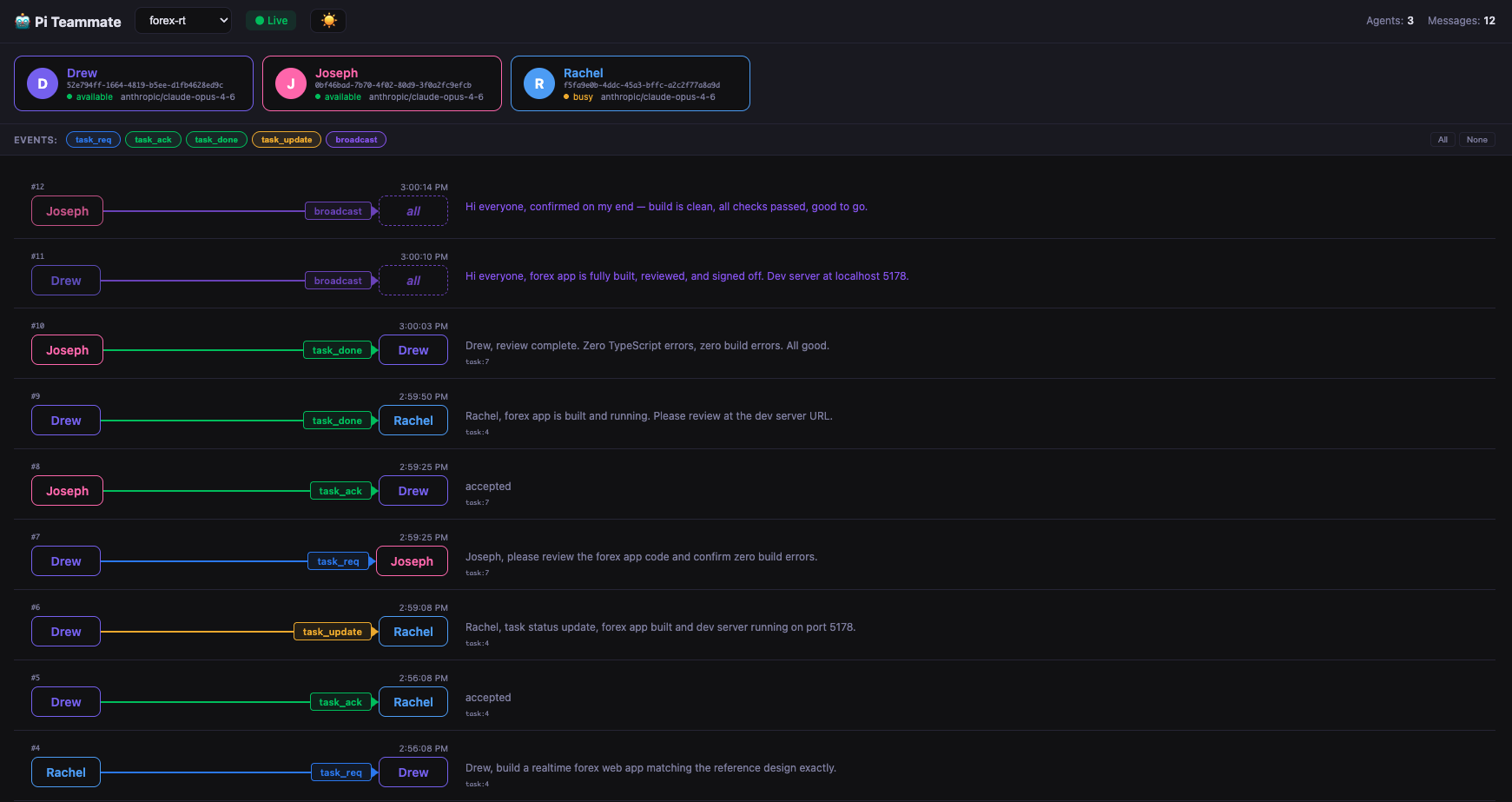
You can click any message to see the details, useful for debugging and monitoring.

Run
No install needed — just run it alongside your team:
npx pi-teammate-ui
It reads directly from the shared team SQLite database in ~/.pi/pi-teammate/<channel>/team.db, so no additional configuration is needed — just start it while your agents are running.