pi-theme-builder
Browser-based theme editor for Pi
Package details
Install pi-theme-builder from npm and Pi will load the resources declared by the package manifest.
$ pi install npm:pi-theme-builder- Package
pi-theme-builder- Version
1.0.0- Published
- Sep 20, 2026
- Downloads
- 185/mo · 6/wk
- Author
- belewer
- License
- MIT
- Types
- extension
- Size
- 112.9 KB
- Dependencies
- 0 dependencies · 1 peer
Pi manifest JSON
{
  "extensions": [
    "./extensions"
  ],
  "image": "https://raw.githubusercontent.com/belewer/theme-builder-pi/1.0.0/assets/pi-themes.png",
  "video": "https://raw.githubusercontent.com/belewer/theme-builder-pi/1.0.0/assets/demo.mp4"
}
Security note
Pi packages can execute code and influence agent behavior. Review the source before installing third-party packages.
README
Pi Theme Builder is a self-contained, vanilla HTML/CSS/JavaScript visual editor for Pi coding-agent themes. It runs entirely in the browser with no runtime dependencies, no external network calls, no command execution, and no remote image loading.
Why Pi Theme Builder
- Edit the full palette. 56 tokens across 7 groups — Core, Backgrounds & content, Markdown, Tool diffs, Syntax, Thinking borders, and Bash mode — each with a native color picker and a text field.
- Preview in context. Five modes — Full Session, State gallery, Syntax / Markdown, Thinking / Bash, and HTML export — show every token where it actually appears in Pi.
- Click to focus. Clicking a token switches to the mode that demonstrates it, scrolls to the target, and highlights it.
- Use variables safely. Import variables, see resolved values and reference counts, and add, edit, rename, or delete them. Cycles are detected and rejected.
- Stay faithful to Pi. xterm numbers (0–255) and empty terminal-default values are previewed with browser RGB approximations; the exported value stays unchanged.
- Undo and reset. Step back through up to 30 changes, or reset the draft to a preset.
- Import and export. Bring in existing Pi theme JSON, export the finished result, or save it straight to Pi.
Real Pi theme workflow
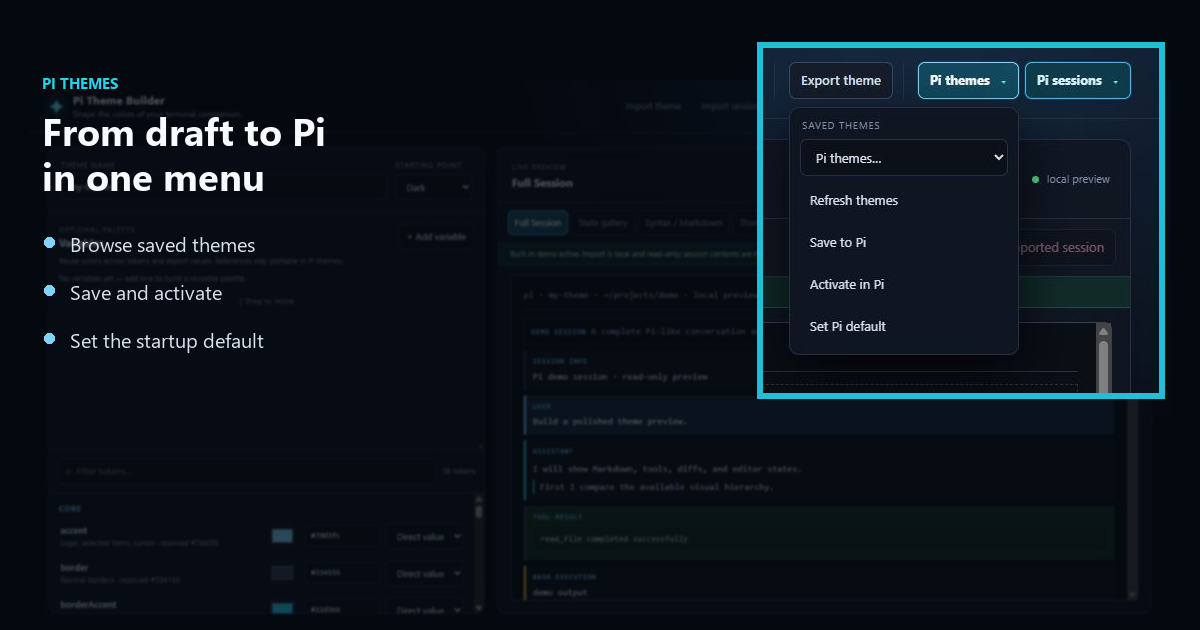
When you open the editor with /theme-builder inside an interactive Pi session, the Pi themes menu talks to your real Pi theme directory — no file juggling required.
- List themes saved in Pi's theme directory.
- Load one into the editor to keep working on it.
- Save to Pi writes the current draft to Pi's real theme directory.
- Activate in Pi applies the newly saved theme to the running session immediately.
- Set Pi default persists the theme as Pi's startup default for future sessions.
Real Pi session workflow
The Pi sessions menu lists the real sessions found through Pi's active session directory, so you can inspect your work without leaving the editor.
- List the real sessions Pi knows about.
- View a selected session in the built-in JSONL viewer.
- Import session validates a JSONL file and places it in the current project's Pi session folder.
The viewer is local and read-only: it never invokes Pi, executes commands, fetches URLs, or renders imported HTML. It reconstructs a conservative default active branch/path and supports user and assistant messages (including text, thinking, and tool calls), tool results, bash executions, custom messages, compaction, branch summaries, model changes, thinking-level changes, labels, session info, and inert cards for unknown records. Malformed lines, duplicate/orphan/cyclic parent chains, record counts, file size, and field/output limits are validated before anything changes.
Importing a session only writes a validated file into the project's session folder. Resuming remains Pi's job — use Pi's normal /resume flow to continue it.
See it in action
The built-in demo transcript exercises the whole editor: pick a Dark or Light preset, edit tokens and watch the preview re-render in real time, jump between the five preview modes, manage variables, and push the finished theme to Pi. The animation is a convenience — every capability it shows is also described in prose above, and the editor runs entirely in the browser with no server round-trip behind the preview.
Install
From npm
pi install npm:pi-theme-builderThen start an interactive Pi session and run:
/theme-builderPi opens the editor in your default browser on a random 127.0.0.1 port.
Until the package is first published to npm, install it from Git or a local checkout instead.
From Git
pi install git:github.com/belewer/theme-builder-piFrom a local checkout
pi install /path/to/theme-builder-piRelative paths work too (pi install ./theme-builder-pi). Local-path installs load the package without copying, so edits to extensions/ take effect the next time Pi starts.
Requirements
- Node.js ≥ 22.19.0 (declared in the package
enginesfield). - Pi (
@earendil-works/pi-coding-agent), which hosts the extension. Pi bundles this dependency, so a working Pi installation is sufficient; the package lists it as apeerDependency. - A graphical browser for the editor.
The package has no runtime npm dependencies; it ships only the extension and static browser assets.
Security model
- The editor runs entirely in the browser after the page loads. It makes no external network calls, executes no commands, and loads no remote images.
- The
/theme-builderintegration serves only on the loopback interface (127.0.0.1) on a random port. Every/api/request must carry a per-run secret token in thex-theme-builder-tokenheader, so other local processes cannot call the API. - Static editor responses set a restrictive
Content-Security-Policy; both static and API responses setX-Content-Type-Options: nosniffandCache-Control: no-store. The CSP allows only same-origin scripts, styles, and connections, plusdata:images. - The API accepts only safe theme filenames, keeps theme paths inside Pi's themes directory, and enforces size limits (1 MB per theme, 5 MB per session).
- Theme and settings writes are atomic (temporary file plus rename) and created with
0600permissions. - The extension respects
PI_CODING_AGENT_DIR; otherwise it uses Pi's default~/.pi/agent/themesdirectory. - It exposes no arbitrary filesystem access and no command execution. The only subprocess it launches is the default browser, to open the editor URL.
Like any Pi package, this extension runs with the privileges of your Pi session. Review the source before installing.
Standalone use
Run the repository's static server:
cd /path/to/theme-builder-pi
npm run serve
Open http://localhost:4173. The server binds to 127.0.0.1 and serves only files inside the repository. Without Node, python3 -m http.server 8000 in the same directory works too (then open http://localhost:8000).
Pi session commands
Pi's interactive commands export and import JSONL sessions:
/export output.jsonl
/import input.jsonl
(The filenames are examples; Pi writes and reads the JSONL files you specify.)
For a static HTML export from a session JSONL file:
pi --export session.jsonl output.htmlPi session selection and continuation options include:
pi --session /path/to/session.jsonl  # open a specific session
pi -c                               # continue the most recent session
pi -r                               # browse and select a session
pi --fork /path/to/session.jsonl    # fork a specific session
The builder can inspect a JSONL file locally, but it cannot resume it. Use Pi itself for /import, /export, --session, -c, -r, and --fork behavior.
Development and testing
Install the locked dependencies:
npm ciRun the browser syntax check, the strict extension type check, and the packed-package smoke test:
npm run check
npm run typecheck
npm run test:package
npm run checkrunsnode --check app.js, a syntax check for the browser bundle.npm run typecheckrunstsc --noEmit, strict TypeScript validation of the extension against the installed@earendil-works/pi-coding-agenttypes.npm run test:packagepacks the package withnpm pack, verifies the tarball contains every runtime asset and excludes development artifacts, installs it into a fresh temporary project alongside the pinned Pi runtime, and loads the extension through Pi's real extension loader to confirm thetheme-buildercommand registers.
Playwright's headless Chromium requires system libraries. On a Linux host, install the browser and its system dependencies together:
npx playwright install --with-deps chromiumRun the end-to-end suite:
npm run test:e2enpm run test:e2e starts the editor on 127.0.0.1 and exercises startup, presets, token editing, search, variables, import/export, undo/reset, and preview tabs. GitHub Actions runs these checks on pushes to main and on pull requests.
Theme export
Use Export theme to choose a filename and destination with the browser's save dialog (File System Access API), or download the JSON in browsers that do not support that API. Install the resulting file globally with:
mkdir -p ~/.pi/agent/themes
cp ./my-theme.json ~/.pi/agent/themes/
Then select it in Pi settings or use pi --theme ~/.pi/agent/themes/my-theme.json as appropriate for your installed Pi version. Theme drafts are retained in localStorage in the browser; imported session contents are never stored there.
When opened by /theme-builder, prefer Save to Pi and Activate in Pi over the download flow. Set Pi default writes the selected saved theme to Pi's global settings for future sessions.
Discovery
The pi.dev package gallery lists packages tagged pi-package; appearing there is discovery only and does not imply official endorsement by the Pi project.