pi-timing
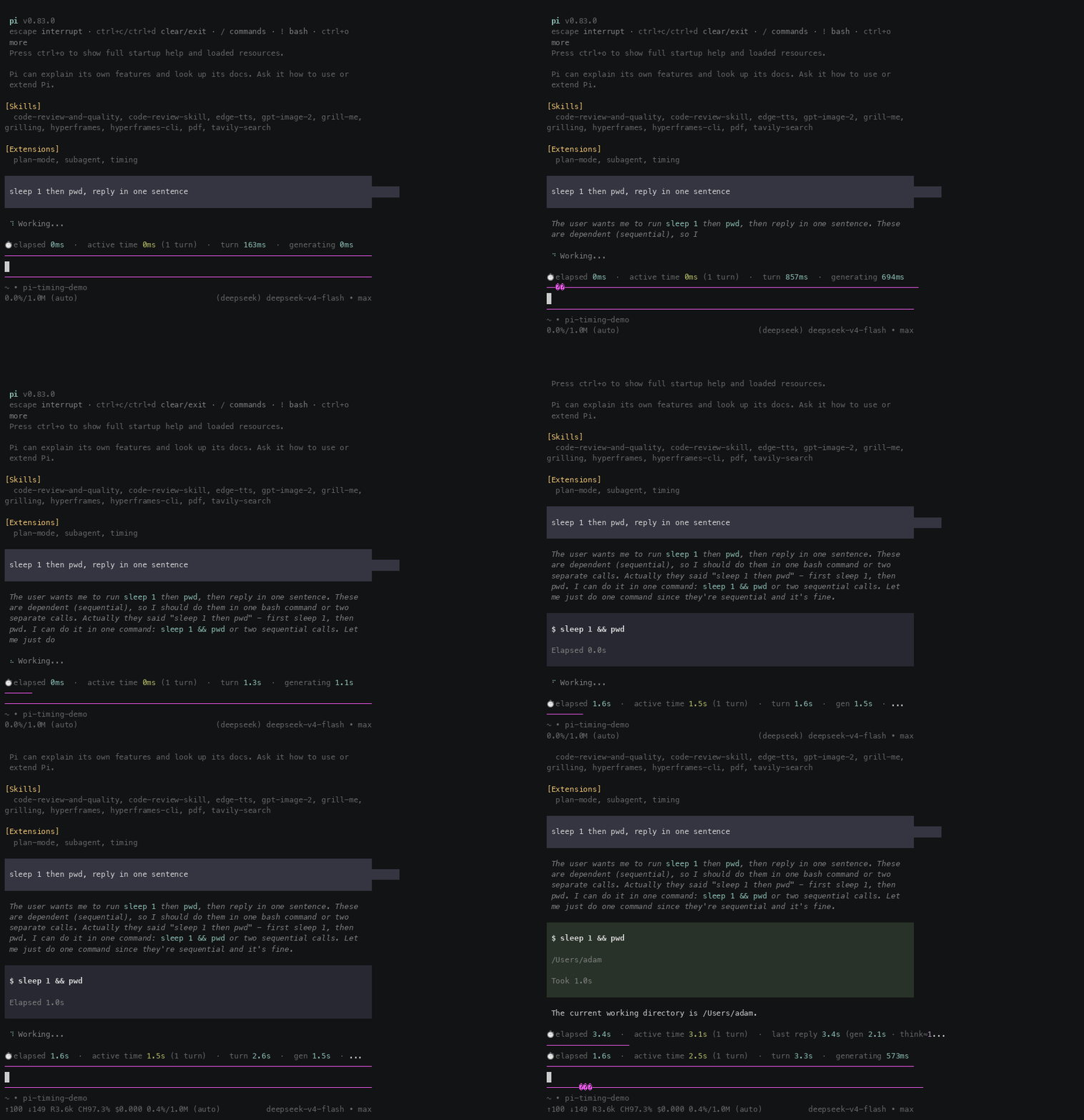
Timing widget for pi: per-turn generation time (with thinking estimate), tool time, cumulative active time (excluding idle), and session span. Commands: /timing, /timing list
Package details
Install pi-timing from npm and Pi will load the resources declared by the package manifest.
$ pi install npm:pi-timing- Package
pi-timing- Version
1.1.5- Published
- Aug 13, 2026
- Downloads
- 252/mo · 252/wk
- Author
- adamcjm
- License
- MIT
- Types
- extension
- Size
- 1,006.6 KB
- Dependencies
- 0 dependencies · 2 peers
Pi manifest JSON
{
  "extensions": [
    "./extensions"
  ],
  "image": "https://raw.githubusercontent.com/adamcjm/pi-timing/main/docs/demo-en.gif"
}
Security note
Pi packages can execute code and influence agent behavior. Review the source before installing third-party packages.
README
pi-timing
Timing widget for pi — shows how long each turn actually took, and how much of your session was real work vs idle waiting.
Features
- Per-turn generation time — wall-clock of each LLM stream (thinking + reply), with an estimated thinking split (
think≈) - Tool time — wall-clock execution; parallel tools counted once
- Cumulative active time — Σ(generation) + Σ(tools), excluding idle; survives restarts via per-turn
timing-snapshotentries - Session span — wall-clock from first to last message (includes idle), shown first
- History recompute — restores totals from the session file on restart;
/treebranches include pre-jump history (ancestor chain) - i18n — widget language follows your message language automatically (zh/en), starts from your system locale; force with
/timing lang
Install
pi install npm:pi-timing
Or copy extensions/timing into ~/.pi/agent/extensions/ (or .pi/extensions/ for a project).
After installing, run /reload (or restart pi) to activate.
Usage
Once active, the widget appears above the input editor. Type any message and press Enter — the widget starts updating immediately (live counter while generating, then the final breakdown when the reply finishes).
Widget examples:
⏱ 会话跨度 10h31m  ·  累计活跃 36m26s (14轮)  ·  上次回复 30.4s (生成 25.2s · 思考≈25.2s · 工具 3.0s)
⏱ elapsed 10h31m  ·  active time 36m26s (14 turns)  ·  last reply 30.4s (gen 25.2s · think≈25.2s · tool 3.0s)
While working (live-updating, Chinese / English):
⏱ 会话跨度 1h02m · 累计活跃 12.4s (3轮) · 本轮已耗时 5m37s · 生成 1.7s · 工具运行中 5m35s
⏱ elapsed 1h02m · active time 12.4s (3 turns) · turn 5m37s · gen 1.7s · tool running 5m35s
Slash commands
All commands are typed in the pi input editor and submitted with Enter.
/timing — toggle the widget
/timing
- Run once to hide the widget, run again to show it.
- Timers keep running while hidden — nothing is lost.
- No confirmation is shown; the widget simply disappears/appears.
/timing list — per-turn detail list
/timing list
Shows the last 20 turns, newest first, inside the widget (English / Chinese):
#1 gen 575ms think≈9ms tool 9ms
#2 gen 776ms think≈700ms tool 0ms
#1 生成 575ms  思考≈9ms  工具 9ms
#2 生成 776ms  思考≈700ms  工具 0ms
Run /timing list again to hide the list.
/timing lang zh|en|auto — widget language
/timing lang zh     # force Chinese
/timing lang en     # force English
/timing lang auto   # back to automatic (default)
auto(default): starts from your system locale, then follows the language of your messages (CJK ratio detection).- In
automode, slash commands and very short messages are ignored to avoid accidental switching. - A confirmation notification is shown at the bottom of the screen (e.g.
timing language: en). - The setting is in-memory: it resets to
autoon pi restart.
Terminology
| 中文 | English |
|---|---|
| 会话跨度 | elapsed (wall-clock, includes idle) |
| 累计活跃 | active time (Σ gen + Σ tool, no idle) |
| 本轮已耗时 | turn |
| 生成 / 生成中 | gen / generating |
| 思考≈ | think≈ (estimated thinking time) |
| 工具 / 工具运行中 | tool / tool running |
| 上次回复 / 上次生成 | last reply / last gen |
Time formats
<1s→500ms<60s→1.5s<60m→1m05s<24h→1h05m>=24h→1d03h
How it works
message_start/message_endevents for generation time (thinking end anchored at the stream'sthinking_endevent)tool_execution_start/tool_execution_endfor tool wall-clock (parallel groups counted once)- A
timing-snapshotcustom entry is appended after each final reply so restarts restore exact values instead of timestamp-delta estimates session_start/session_treerecompute history from the session JSONL (ancestor chain for/treebranches)inputevent detects the language of your messages (CJK ratio) and switches the widget language;Intlsystem locale is the initial value
Development
Repository layout:
pi-timing/
├── package.json              # pi-package manifest (pi install)
├── extensions/timing/index.ts  # the extension
└── README.md / README.zh-CN.md
Local development with a symlink (edit → /reload → immediate effect):
ln -s ~/.pi/dev/pi-timing/extensions/timing ~/.pi/agent/extensions/timing
If you installed the package via pi install, remove it first to avoid double-loading:
pi remove npm:pi-timing
License
MIT