pi-tldraw
Pi extension that opens and persists a local tldraw MCP canvas.
Package details
Install pi-tldraw from npm and Pi will load the resources declared by the package manifest.
$ pi install npm:pi-tldraw- Package
pi-tldraw- Version
0.1.1- Published
- Jul 3, 2026
- Downloads
- 246/mo · 28/wk
- Author
- zeebee
- License
- MIT
- Types
- extension
- Size
- 3.8 MB
- Dependencies
- 5 dependencies · 2 peers
Pi manifest JSON
{
  "extensions": [
    "./src/index.ts"
  ]
}
Security note
Pi packages can execute code and influence agent behavior. Review the source before installing third-party packages.
README
pi-tldraw






Draw with agents without the canvas cold start.
pi-tldraw packages the tldraw MCP app as a Pi extension so agents can open, inspect, edit, persist, resume, and export local tldraw canvases with minimal setup. It focuses on ergonomics for both sides of the loop: end users get a one-command canvas workspace, while agents get lean tools that compress complex drawings into semantic lenses instead of spending tokens on raw shape dumps.
Use it for fast concept sketching, diagram generation, and iterative fine-tuning. The extension keeps the feature set intentionally small: multiple canvases per project folder, durable project snapshots, session resume, semantic canvas summaries, precise exec/edit tools, and PNG/SVG export.
Install
pi install npm:pi-tldraw
Pinned install:
pi install npm:pi-tldraw@0.1.0
Local checkout:
pi -e .
Runtime: the extension talks to a local tldraw MCP endpoint at http://127.0.0.1:8787/mcp; the npm package ships a prebuilt mcp-app/ and auto-starts it when needed, while advanced users can override with TLDRAW_MCP_APP_DIR, TLDRAW_MCP_URL, or TLDRAW_MCP_AUTO_START=false.
How it works
pi-tldraw builds on the tldraw MCP app and adds the Pi extension shape around it: a local browser host, typed agent tools, project-scoped snapshot persistence, semantic scene rendering, and export helpers. The key agent affordance is tldraw_canvas_scene, which turns canvas state into a compact graph/scene view so the model can quickly understand large diagrams before editing them.
Canvas workspace
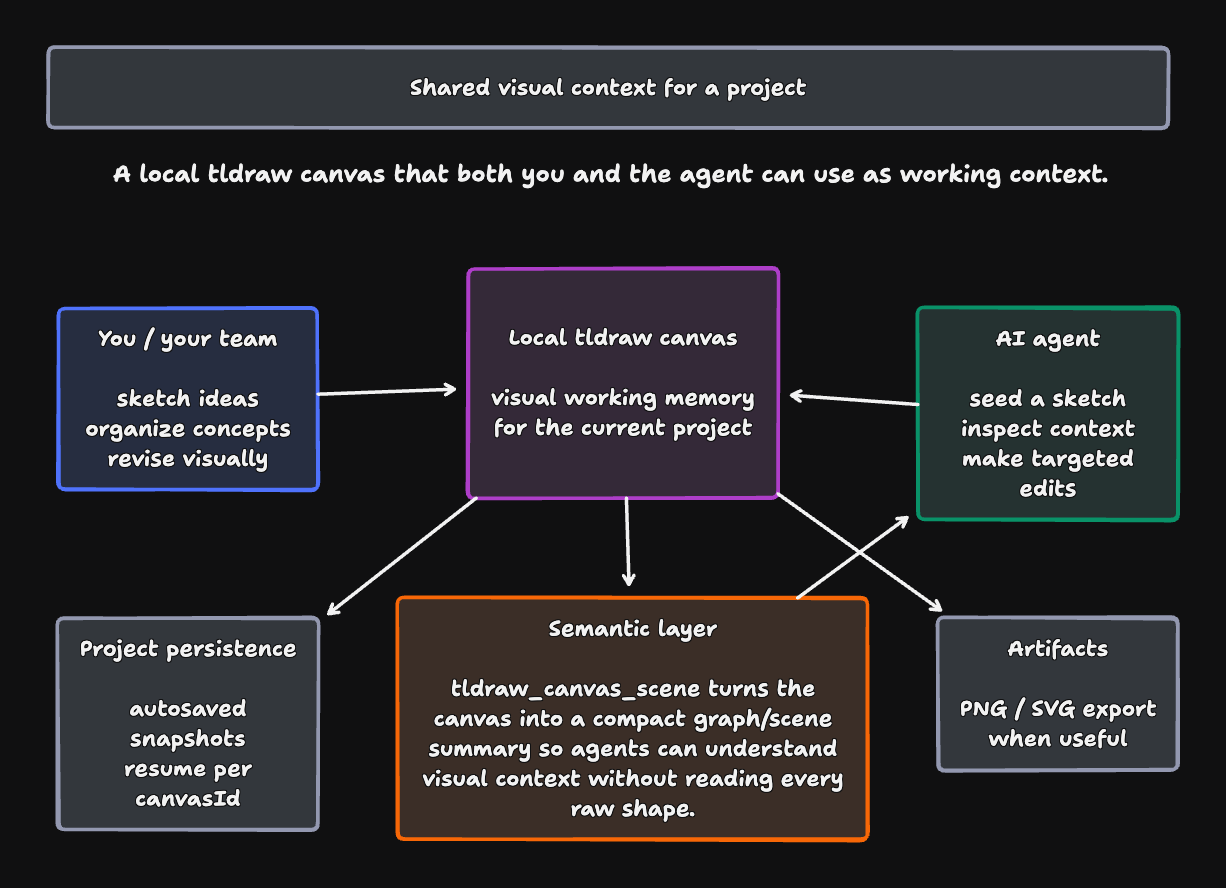
pi-tldraw gives each project a local tldraw canvas that can act as shared visual context. You can sketch directly in the browser; the agent can use the same canvas to seed ideas, inspect what is there, make targeted edits, or export an artifact.
Minimal use:
/tldraw open [canvasId]
The important bridge is the semantic layer: tldraw_canvas_scene turns the drawing into a compact graph/scene summary, so the agent can reason about visual context without loading every raw shape. Project snapshots are persisted automatically, and PNG/SVG export is available when you want to share the result.
One-prompt CLI drawing
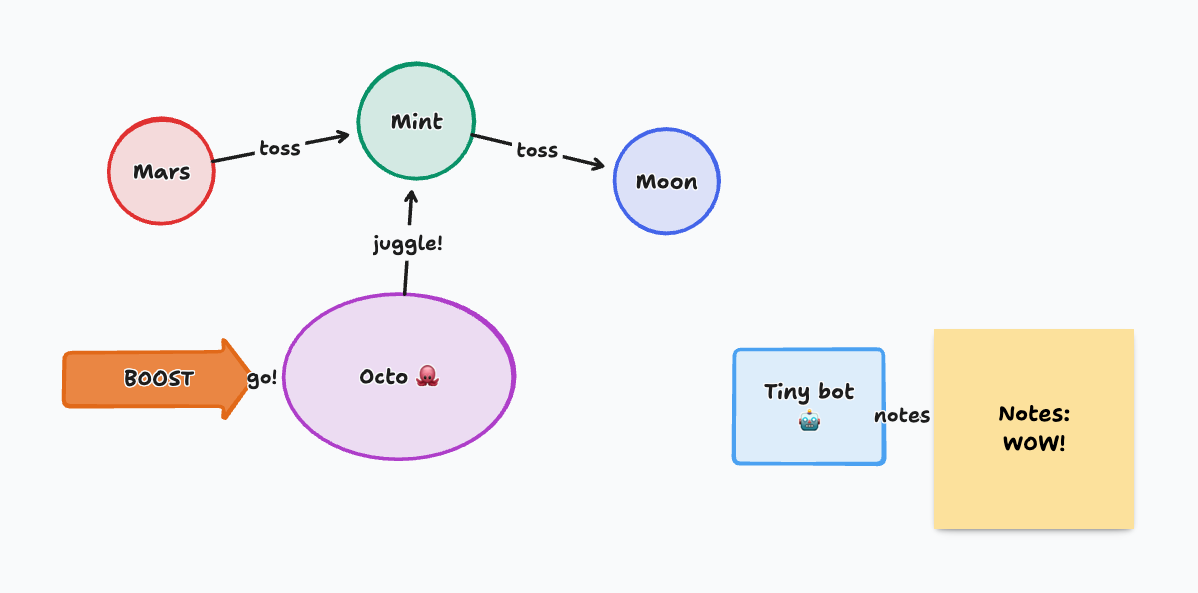
You can also ask Pi to draw from a single CLI prompt. JSON mode streams tool calls and results to stdout, so another process or orchestration agent can watch the drawing loop as telemetry.
pi -e . --approve --mode json -p \
  --session-id crazy-simple-drawer-test \
  --no-builtin-tools \
  --tools tldraw_canvas_open,tldraw_diagram_tips,tldraw_canvas_exec,tldraw_canvas_scene,tldraw_canvas_export \
  'Draw a crazy but simple diagram: a rocket-powered octopus juggling three planets while a tiny robot takes notes. Iterate once, export PNG, and report the path.'
Example output from that exact workflow:
Normal UX
Start or restore the current project canvas:
/tldraw open
Then work in the browser canvas. Edits are autosaved into the current project folder:
.pi/tldraw-canvases/index.json
.pi/tldraw-canvases/<canvasId>.json
You should not need a manual save during normal use.
Useful commands
/tldraw open [canvasId]      # Open/restore canvas; creates one if needed
/tldraw new <canvasId>       # Alias for open; memorable when starting a canvas
/tldraw use <canvasId>       # Alias for open; memorable when switching canvases
/tldraw ls                   # Alias for canvases; list saved project canvases
/tldraw list                 # Alias for canvases
/tldraw host                 # Show host/server/autosave diagnostics
/tldraw canvases             # List saved project canvases
/tldraw current              # Show current project canvas id
/tldraw restart              # Restart local MCP app server
/tldraw save                 # Manual checkpoint; refuses unsafe blank overwrite
/tldraw save!                # Force manual empty overwrite
/tldraw reset                # Reset MCP HTTP session
Short normal workflow:
/tldraw save
/tldraw new design-v2
/tldraw ls
Agent tools
tldraw_canvas_open— open/restore the local browser canvas host.tldraw_diagram_tips— get minimalist drawing guidance before creating or revising a diagram.tldraw_canvas_export— export the current selection or whole canvas as a PNG/SVG image for visual feedback.tldraw_canvas_scene— compact semantic canvas view; falls back to saved snapshots.tldraw_canvas_state— inspect live canvas state and optionally save it.tldraw_canvas_exec— execute JavaScript against the live tldraw editor.tldraw_search— inspect the tldraw Editor API via the MCP search tool.tldraw_status— check MCP server tools/resources.
Persistence model
The durable source of truth is project-local JSON:
<project>/.pi/tldraw-canvases/<canvasId>.json
The MCP server checkpoint store is treated as transient runtime state. If the browser port, MCP session, or Wrangler state changes, /tldraw open restores from the project snapshot.
Safety rules:
- Autosave and manual save refuse to overwrite a non-empty saved snapshot with an empty live canvas.
- Forced empty overwrite is available with
/tldraw save!. - Previous snapshots are copied to
.pi/tldraw-canvases/history/<canvasId>/before overwrite.
Development and release
npm install
npm run build
npm run check
npm run pack:dry
Development stays source-owned but release-friendly: the browser bridge is rebuilt from bridge/app-bridge-entry.js, while the packaged mcp-app/ ships prebuilt dist/ assets so users do not rebuild tldraw during install or startup. Provenance for the packaged MCP app lives in mcp-app-source.json, patches/tldraw-mcp-app/, and mcp-app/PI_TLDRAW_PROVENANCE.json.
Useful maintainer checks:
npm run verify:mcp-app-source
npm run verify:package
npm run e2e:packaged-mcp-app
GitHub Actions verifies build drift, package contents, tests, and provenance before publishing with npm provenance.