pi-todo-rail
Persistent, branch-aware Todo list for Pi — one plan shared by you and the agent, pinned above the editor.
Package details
Install pi-todo-rail from npm and Pi will load the resources declared by the package manifest.
$ pi install npm:pi-todo-rail- Package
pi-todo-rail- Version
0.2.2- Published
- Jul 17, 2026
- Downloads
- 272/mo · 272/wk
- Author
- zlxjune
- License
- MIT
- Types
- extension
- Size
- 46.7 KB
- Dependencies
- 0 dependencies · 4 peers
Pi manifest JSON
{
  "extensions": [
    "./index.ts"
  ],
  "video": "https://raw.githubusercontent.com/j-joker/pi-todo-rail/main/assets/decompose.mp4",
  "image": "https://raw.githubusercontent.com/j-joker/pi-todo-rail/main/assets/decompose.png"
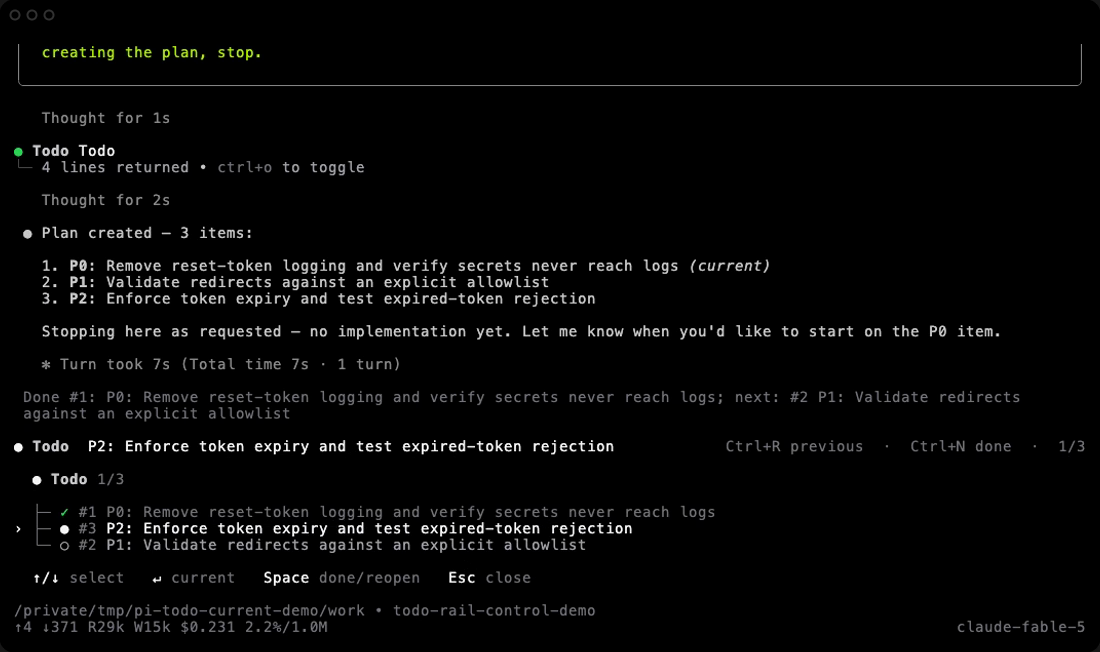
}
Security note
Pi packages can execute code and influence agent behavior. Review the source before installing third-party packages.
README
pi-todo-rail


A Pi extension that turns model output into a persistent, branch-aware Todo list — pinned above the editor, shared between you and the agent.
The output scrolls away. The plan stays.
A model gives you a code review. Three findings. Clear priorities.
Then the conversation moves on.
One command. One patch. One more answer. The findings are still there—but now you have to go looking for them.
pi-todo-rail keeps the plan where the work happens: above the editor, visible to you and Pi.
No scrollback archaeology. No hidden agent checklist. No second source of truth.
Install
pi install npm:pi-todo-rail
Or pin the GitHub release:
pi install git:github.com/j-joker/pi-todo-rail@v0.2.2
Try it without installing:
pi -e npm:pi-todo-rail
Requires Pi 0.80+ (Node.js 22.19+ for development).
Say it once
Break these findings down into Todo tasks.
That is enough.
Pi turns the output into a shared plan. The first unfinished task appears above the editor. Progress stays beside it. When the conversation grows, the plan does not move.
MODEL OUTPUT
P0  Reset tokens are logged
P1  Redirect URLs are unvalidated
P2  Reset tokens never expire

                         ↓

TODO RAIL
● Todo  Remove reset-token logging                    0/3
The answer remains evidence. The rail becomes execution.
When granularity matters, add the steps yourself. When the output is already clear, ask Pi to materialize it. Either way, you keep final control.
One plan. Shared.
MODEL  proposes · reviews · explains
YOU    choose · split · prioritize · redirect
PI     record · execute · verify · advance

SHARED current task · progress · context · branch history
Pi sees the same current task you see.
It is instructed to complete work only after implementation and verification. You can complete, reopen, reorder, remove, or replace any task at any time.
The first unfinished task is always current. There is no separate active flag to drift out of sync.
Quiet by default
Most of the time, Todo Rail is one line:
● Todo Remove reset-token logging 0/3
Just the next thing that matters. When you want control, run /todo:
The symbols do the work:
›    selected
●    current
○    pending
✓    done

› ├─ ●  selected + current
  └─ ○  pending
The selection belongs to you. The current task belongs to the plan.
Fast path
Ctrl+N      Complete the current task
Ctrl+R      Return to the previous task
The shortcuts wrap Pi’s active editor component. If your terminal already owns either key, use /todo instead.
Commands
/todo                         Open the panel
/todo add <text>              Add a task
/todo list                    Print the list
/todo done <ID>               Complete or reopen
/todo rm <ID>                 Remove
/todo clear-done              Clear completed tasks
/todo reset                   Reset after confirmation
Pi gets the same plan through a branch-aware todo tool:
list · add · update · start · done · block
remove · reorder · clear_done · replace
You steer. Pi advances verified work. Both operate on one list.
The plan follows the conversation
Todo state lives in the Pi session—not in a project file or external database.
Fork a conversation and each branch keeps its own plan. Navigate the tree or resume later and the right Todo list returns with it.
The rail remembers the decision without pretending the conversation never branched.
A handoff you can see
When the current task becomes done, the rail shows exactly what changed:
● done task → ✓ done task → ● next task
The animation lasts about 200ms. It never blocks input. It only plays when completed work causes a real handoff.
Disable it when needed:
TODO_MOTION=0 pi
Also respected: REDUCE_MOTION=1, PI_REDUCED_MOTION=1, CI, and TERM=dumb. Session restore and tree navigation never animate.
State is stored in structured tool-result details and manual todo-state session entries. On restore, the extension reads the latest valid snapshot on the active branch.
No database is created. No project file is written. Todo Rail follows Pi’s session model instead of creating a parallel one.
Requires Node.js 22.19+ and Pi 0.80+.
git clone https://github.com/j-joker/pi-todo-rail.git
cd pi-todo-rail
npm install
npm test
pi -e .
Validate the release tarball:
npm run pack:check
Ctrl+N / Ctrl+R don’t work.
Your terminal or another extension probably owns the key. Everything the shortcuts do is also available through /todo.
Where is my Todo list stored? In the Pi session itself. No project file, no database. Delete the session and the plan goes with it.
I resumed a session and see an older plan. Each conversation branch keeps its own list. Check which branch you are on — the rail restores the latest snapshot of the active branch.
How do I turn off the handoff animation?
Start Pi with TODO_MOTION=0, or set REDUCE_MOTION=1 / PI_REDUCED_MOTION=1.
Security
Pi extensions run with the user’s full system permissions. Review extension source before installation.
pi-todo-rail does not start network services, spawn subprocesses, or write external state.
License
MIT — j-joker/pi-todo-rail