pi-tokamak
Token statistics, cost tracking, and usage analytics for pi coding agent. Beautiful heatmaps, dashboards, and cyberpunk visuals included.
Package details
Install pi-tokamak from npm and Pi will load the resources declared by the package manifest.
$ pi install npm:pi-tokamak- Package
pi-tokamak- Version
0.1.1- Published
- Jun 18, 2026
- Downloads
- not available
- Author
- kedongkn
- License
- MIT
- Types
- extension
- Size
- 71.7 KB
- Dependencies
- 1 dependency · 0 peers
Pi manifest JSON
{
  "extensions": [
    "./extensions/tokamak/index.ts"
  ],
  "image": "https://raw.githubusercontent.com/DoubleDD/pi-tokamak/main/docs/screenshot-cyberpunk.png"
}
Security note
Pi packages can execute code and influence agent behavior. Review the source before installing third-party packages.
README
pi-tokamak 🔥
Fusion-grade token heatmaps for your pi coding agent — with cyberpunk aesthetics.

What it does
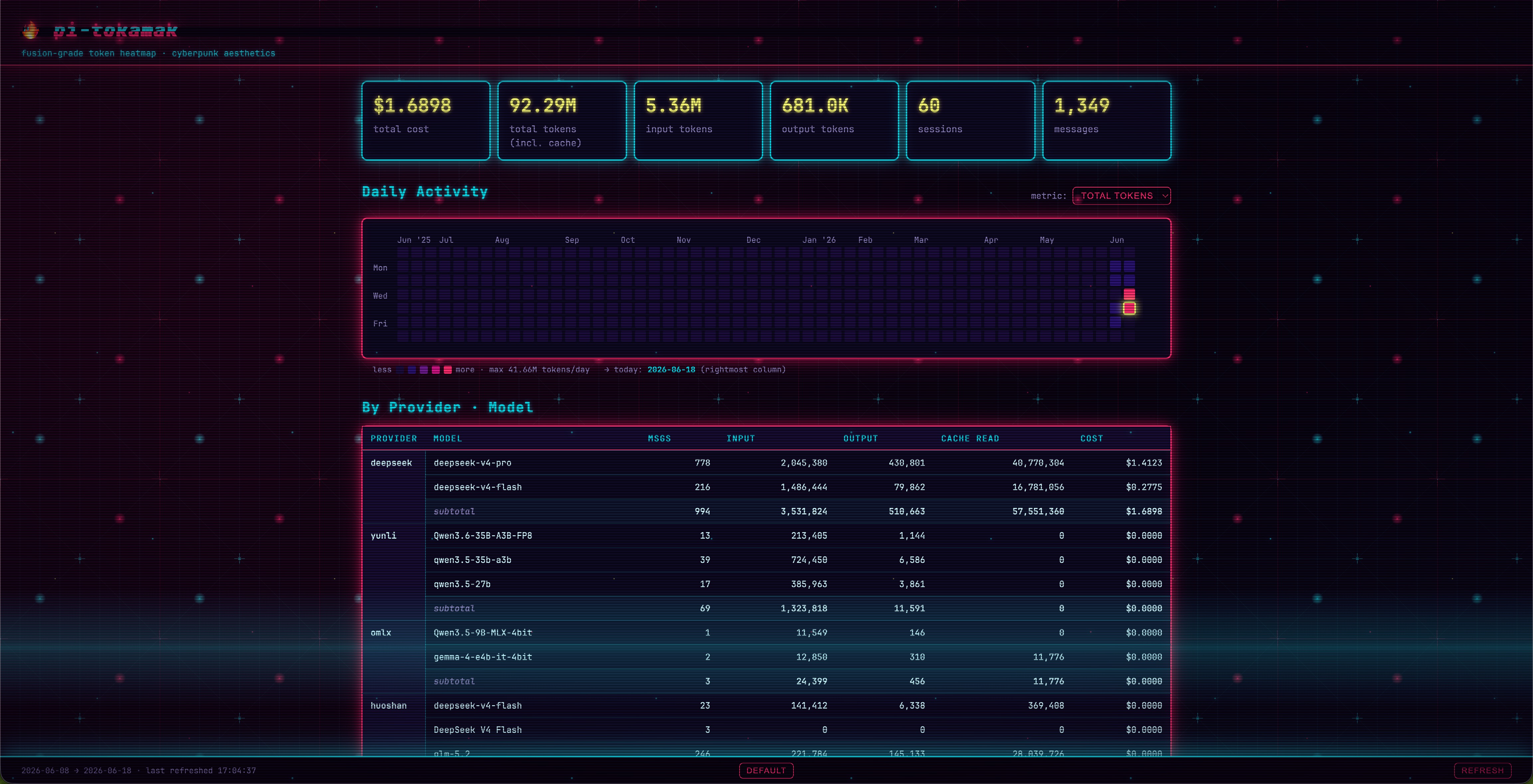
pi-tokamak reads your local pi session logs (~/.pi/agent/sessions/**/*.jsonl) and renders a beautiful dashboard right in your browser:
- 📊 Summary cards — total cost, tokens (input / output / cache), sessions, messages
- 🟩 GitHub-style heatmap — daily token activity over the last 12 months, switchable by metric (cost, tokens, messages, etc.)
- 🤖 Provider & model breakdown — see which providers and models eat your budget
- 📅 Monthly & daily tables — drill into every day's consumption
- 📁 Project breakdown — which project is the token hog?
- 🌐 Cyberpunk theme — toggle in the footer for neon grid, scanline, CRT glitch effects
All data stays on your machine. No telemetry, no cloud.
Quick Start
CLI — standalone dashboard
npm install -g pi-tokamak
tokamak
Opens http://127.0.0.1:<random-port> in your browser.
In pi agent — AI-native tools
Install as a pi extension, and your agent can call tokamak / tokamak_stats / tokamak_stop directly:
pi install npm:pi-tokamak
Restart pi after install. The extension registers three tools and two slash commands:
| Name | Type | What it does |
|---|---|---|
tokamak |
Tool | Start/reuse dashboard, returns URL + token summary |
tokamak_stats |
Tool | Return token stats only — no browser, perfect for quick inline queries |
tokamak_stop |
Tool | Kill the tokamak server and free the port |
/tokamak |
Command | Slash command to open the dashboard |
/tokamak-stop |
Command | Slash command to stop the server |
/tokamak-stats |
Command | Slash command to query stats inline |
Once installed, just say things like:
"查看我的 token 用量"
"我花了多少钱"
"token 统计"
"打开 tokamak"
"关掉 tokamak"
The agent will pick the right tool automatically — no bash scripts, no manual CLI invocation.
CLI Options
tokamak [options]

  -p, --port <n>         server port (default: random)
  --no-open              don't open browser
  --session-dir <path>   pi sessions dir (default: ~/.pi/agent/sessions)
  -h, --help             show help
  -v, --version          show version
Cyberpunk Theme

Click the cyberpunk button in the footer to toggle. Features:
- CRT scanline grid background (SVG pattern)
- Neon pink / cyan / yellow color palette
- Multilayer box-shadow glow on cards and tables
- Glitch text effect on the header (
::before/::afterwith clip-path keyframes) - Row hover "power-on" sweep in tables
- Monospace font (
JetBrains Mono/SF Mono)
Theme preference persists via localStorage.
How it works
Pi records each assistant message's usage block in JSONL session logs. pi-tokamak parses and aggregates them with zero dependencies on pi internals.
{
  "type": "message",
  "message": {
    "provider": "deepseek",
    "model": "deepseek-v4-pro",
    "usage": {
      "input": 808,
      "output": 1834,
      "cacheRead": 75648,
      "cacheWrite": 0,
      "cost": { "total": 0.002221 }
    }
  }
}
Architecture
pi-tokamak/
├── bin/tokamak.mjs          # CLI entry — parse args, start server
├── src/
│   ├── server.mjs           # HTTP server (Node built-in http, static + /api/stats)
│   └── aggregator.mjs       # Parse JSONL → aggregate stats
├── public/                  # Dashboard frontend (zero framework)
│   ├── index.html
│   ├── style.css            # CSS vars — cyberpunk overrides via [data-theme]
│   ├── app.js               # Fetch /api/stats → render heatmap + tables
│   └── bg-cyberpunk.svg     # Cyberpunk scanline grid background
├── extensions/tokamak/
│   └── index.ts             # Pi agent extension — 3 tools + 2 slash commands
├── test/
│   └── aggregator.test.mjs
└── docs/
    ├── screenshot-default.png
    └── screenshot-cyberpunk.png
License
MIT © kedong