pi-trace-viewer
Live local session and LLM context viewer for pi
Package details
Install pi-trace-viewer from npm and Pi will load the resources declared by the package manifest.
$ pi install npm:pi-trace-viewer- Package
pi-trace-viewer- Version
0.2.0- Published
- Sep 30, 2026
- Downloads
- 309/mo · 18/wk
- Author
- liming1142
- License
- MIT
- Types
- extension
- Size
- 933.7 KB
- Dependencies
- 2 dependencies · 3 peers
Pi manifest JSON
{
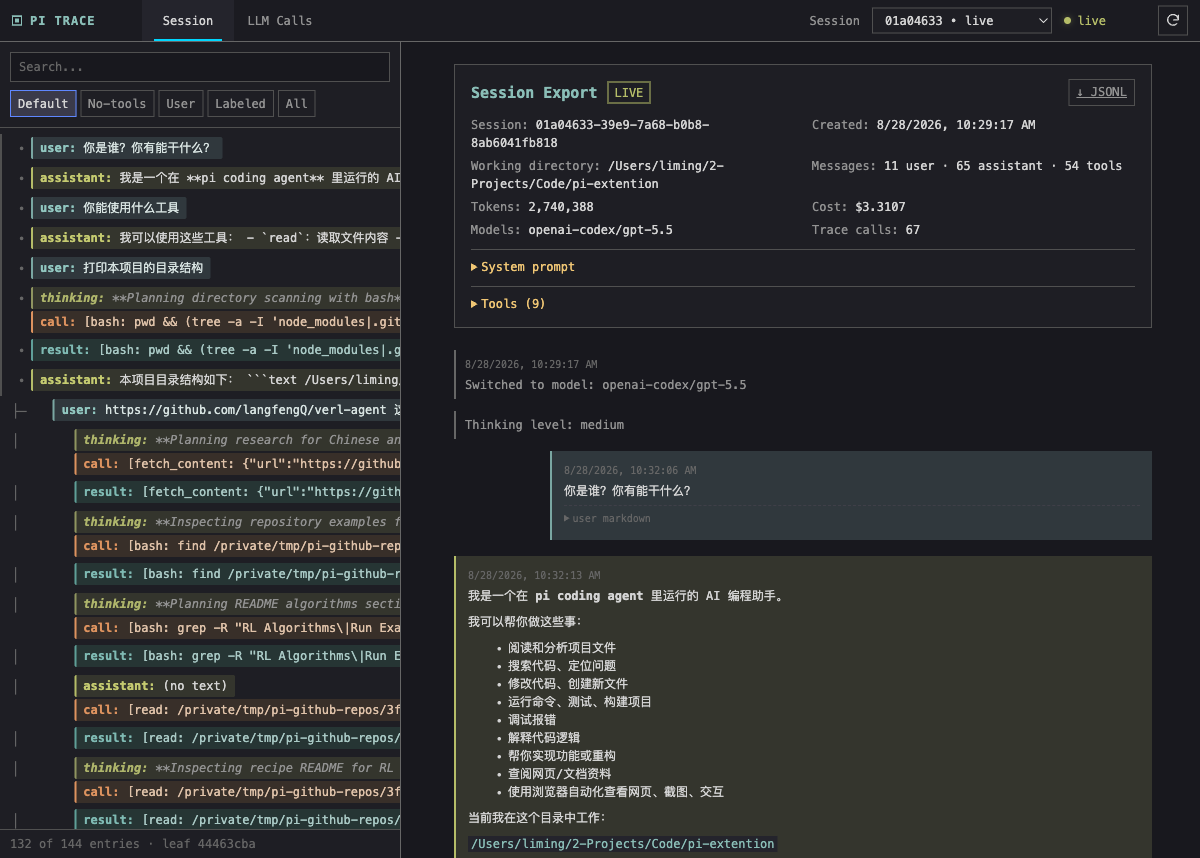
  "image": "https://raw.githubusercontent.com/ZKiteLM/pi-trace-viewer/main/assets/images/realtime-session-viewport.png",
  "video": "https://github.com/ZKiteLM/pi-trace-viewer/releases/download/v0.1.0/pi-trace-viewer-demo.mp4",
  "extensions": [
    "./src/index.ts"
  ]
}
Security note
Pi packages can execute code and influence agent behavior. Review the source before installing third-party packages.
README
Pi Trace Viewer
Live local observability for Pi sessions, branches, compaction, and LLM context.
Pi Trace Viewer answers a practical debugging question: what did the model actually see?
It runs as a Pi extension and opens a local browser UI where you can inspect the live session tree, model calls, tool activity, compaction inputs, and provider payloads without modifying Pi's native session files.
Install
pi install npm:pi-trace-viewerStart a new Pi session and open the viewer:
/trace-viewThe viewer starts at http://127.0.0.1:7890 by default. If that port is busy, it automatically uses the next available port, such as 7891 or 7892.
To try the extension for one Pi run without changing your settings:
pi -e npm:pi-trace-viewerTo choose a custom starting port:
pi --pi-trace-port 8890To disable the trace viewer entirely for a session:
pi --no-pi-traceControlling Capture
You can dynamically toggle trace capture or stop the local server inside an active session without restarting Pi:
/trace-view— show current capture status and the viewer URL (prompts to start if not running)/trace-view on— start the viewer server if stopped, or resume LLM trace capture/trace-view off— pause LLM trace capture (server remains running, existing traces viewable)/trace-view stop— stop the viewer HTTP server and release the port
What You Can Inspect
- The live Pi session tree, including branches and active turns
- The normalized Pi context passed into
pi-ai - The provider-specific payload sent to the backend
- Streaming model output, tool calls, and tool results
- Compaction source messages, cut points, summaries, token metadata, and provider requests
- Custom messages and custom state created by other extensions
Screenshots
Realtime Session Viewer

Session Viewer vs Pi Export
| Pi Trace Viewer | Pi /export |
|---|---|
|
 |
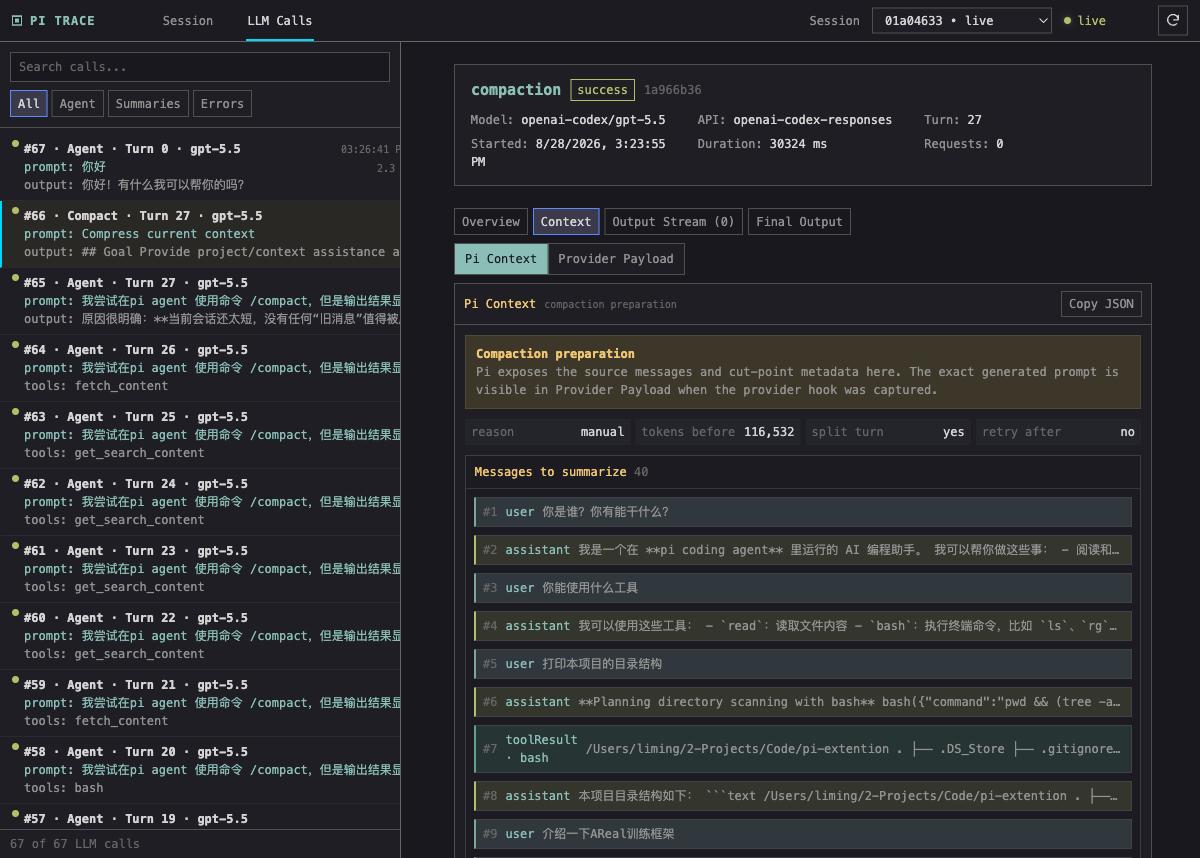
Compaction Context
Why Use It?
Live Observation
Pi /export is useful after a conversation. Pi Trace Viewer updates while the session is running, so you can watch branches, tool calls, model output, and context changes as they happen.
Pi Context vs Provider Payload
Every captured LLM call separates two views:
| View | What it shows |
|---|---|
| Pi Context | Normalized system prompt, messages, and tools handed to pi-ai |
| Provider Payload | Backend-specific request after provider mapping and templates |
Each message can be expanded independently, with rendered Markdown, raw Markdown, and full JSON available when you need them.
Inspectable Compaction
Compaction events show the messages selected for summarization, split-turn prefixes, cut points, token counts, recent-message policy, previous summaries, extracted file operations, and the provider request used to generate the summary.
That makes context loss after compaction easier to trace.
Long Sessions Stay Navigable
The session sidebar keeps single-child chains flat and only indents real branches. LLM calls are numbered chronologically and include call kind, turn, model, API, prompt excerpt, tool names, status, request count, and duration.
How It Works
flowchart LR
    A[Pi session] --> B[Pi extension hooks]
    B --> C[In-memory viewer state]
    C --> D[localhost browser UI]
    B --> E[.pi-traces/session-id.jsonl]
    D --> F[Session and LLM Calls]
The extension reads Pi's live snapshot and listens to public lifecycle events, including:
contextbefore_provider_requestafter_provider_responsemessage_updatemessage_endsession_before_compactsession_compactsession_tree
Data and Privacy
Pi Trace Viewer binds only to 127.0.0.1.
It does not write to Pi's native session JSONL and does not call appendCustomEntry or appendCustomMessageEntry. Pi's native session remains in:
~/.pi/agent/sessions/<encoded-cwd>/<session-id>.jsonlThe extension writes sidecar traces to:
<session-cwd>/.pi-traces/<session-id>.jsonlTrace directories use 0700 permissions and trace files use 0600 permissions. Credential-shaped fields and sensitive response headers are redacted, but prompts, system instructions, tool results, and model output can still contain sensitive data. Treat .pi-traces as private local debugging data.
To remove old traces:
rm -rf "/path/to/session-cwd/.pi-traces"Local Development
npm install
npm run check
pi -e /path/to/pi-trace-viewer
Publishing Checklist
Before publishing a new release:
npm run check
npm pack --dry-run
npm publish --access public