pi-trajectory
Trajectory For All — a browser-based inspection surface for pi coding agent sessions.
Package details
Install pi-trajectory from npm and Pi will load the resources declared by the package manifest.
$ pi install npm:pi-trajectory- Package
pi-trajectory- Version
0.1.4- Published
- Aug 23, 2026
- Downloads
- 447/mo · 447/wk
- Author
- kentaylorappdev
- License
- MIT
- Types
- extension
- Size
- 13 KB
- Dependencies
- 0 dependencies · 1 peer
Pi manifest JSON
{
  "extensions": [
    "./extensions/trajectory-prompt-log.ts"
  ],
  "image": "https://raw.githubusercontent.com/ktappdev/pi-Trajectory/main/artifacts/trajectory-overview.jpg"
}Security note
Pi packages can execute code and influence agent behavior. Review the source before installing third-party packages.
README
Pi Trajectory
A browser-based inspection surface for pi coding agent sessions, inspired by the Trajectory feature in DeepSeek Harness. Browse every session you've ever run, then drill into turns, tool calls, outputs, usage, model changes, compactions, and prompt snapshots — all in a timing-aware visual ledger.
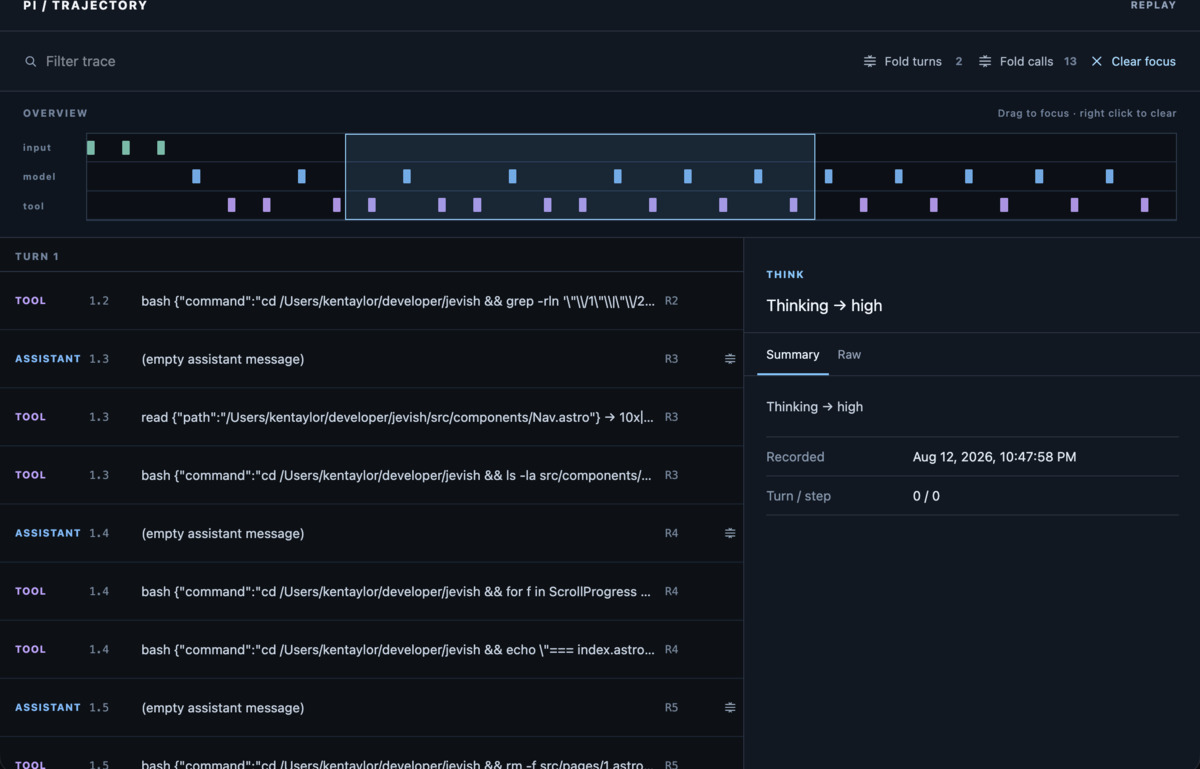
Trajectory is local-first, read-only, and replay-only. It never sends data anywhere, never modifies session files, and never controls a running agent. It reads the JSONL files pi already writes to ~/.pi/agent/sessions/ and projects them into an interactive timeline.
Install the extension
The extension gives you a /trajectory slash command inside pi and logs prompt snapshots for the inspector:
pi install npm:pi-trajectory
# or from git:
pi install git:github.com/ktappdev/pi-Trajectory
Reload pi. Then inside any session:
/trajectory           # open the current session in Trajectory
/trajectory <id>      # open a specific session by id or uuid prefix
The command opens your browser to the session's trajectory page.
The inspector needs a server. The extension is just the slash command + prompt logger. The visual inspector (server + web UI) runs separately — clone this repo and start it:
git clone git@github.com:ktappdev/pi-Trajectory.git
cd pi-Trajectory
pnpm install
pnpm dev    # development (Vite + API on 127.0.0.1)
# or: pnpm start  (production, built UI + API on 127.0.0.1:8787)
If the server isn't running, the
/trajectorycommand tells you how to start it. SetPI_TRAJECTORY_PORTto override the default port (8787).
What you get
- Session picker — searchable list of every pi session, all projects, with message counts and first-message previews
- Three-lane timeline — input, model, and tool activity projected onto a single sequence overview. Drag to focus a region, right-click to clear. Click any block to jump straight to it in the ledger.
- Virtualized ledger — every turn, tool call, and assistant message as a row. Filter by search, fold turns and tool groups, see usage and timing at a glance.
- Inspector — click any record to see full detail: tool input, output, parameter schemas, usage breakdown, raw JSONL, and prompt anatomy.
- Prompt anatomy — when the extension is installed, each system-prompt change is hash-gated and logged with its sections (custom prompt, guidelines, skills, context files) and active tool catalog.
- Loopback only — server binds to
127.0.0.1. No network exposure, ever.
Production build
pnpm build
pnpm start
Serves built UI and API at http://127.0.0.1:8787.
Verify
pnpm typecheck
pnpm test
pnpm build
API
| Endpoint | Description |
|---|---|
GET /api/health |
Server health check |
GET /api/sessions |
All sessions, newest first |
GET /api/sessions/:id |
Projected trajectory snapshot |
GET /api/sessions/:id/raw |
Parsed raw JSONL entries |
Session IDs, session-relative paths, and absolute paths under pi's sessions directory all resolve safely. Anything outside it is rejected.
How it works
Trajectory reads pi session JSONL files, parses them with pi's own parseSessionEntries + buildContextEntries, and projects the active branch into a TrajectorySnapshot — a pi-free data model shared between server and web client. The web client never imports pi types; it only consumes @pi-trajectory/shared.
Replay intentionally leaves per-operation durations empty: pi session JSONL does not persist per-token timing. Live inspection is future work.
Contributing
Found a bug, have a fix, or want to improve the inspector? Contributions are welcome.
- Fork the repository and create a focused branch.
- Make your change and add a small test when behavior changes.
- Run
pnpm typecheck,pnpm test, andpnpm build. - Open a pull request with what changed and how you verified it.
Small fixes, UI improvements, documentation updates, and ideas are all useful. For larger changes, open an issue first so direction stays aligned.
Privacy
Trajectory is read-only and local. It does not:
- Send session data anywhere
- Modify session files
- Expose a network host
- Control a running agent
The extension logs full system prompts (including project context) to session JSONL. Treat session files as sensitive local data. Only install the extension where local session logging is appropriate.
Requirements
- Node 22.19+
- pnpm
- pi with session files under
~/.pi/agent/sessions/
License
MIT