pi-ui-hephaestus
Muted thinking blocks, framed editor, animated header, response time, and rich footer for pi
Package details
Install pi-ui-hephaestus from npm and Pi will load the resources declared by the package manifest.
$ pi install npm:pi-ui-hephaestus- Package
pi-ui-hephaestus- Version
0.3.1- Published
- May 3, 2026
- Downloads
- 320/mo · 320/wk
- Author
- danmademe
- License
- unknown
- Types
- extension
- Size
- 151.8 KB
- Dependencies
- 0 dependencies · 4 peers
Pi manifest JSON
{
  "extensions": [
    "./src/index.ts"
  ],
  "image": "https://raw.githubusercontent.com/danielcherubini/pi-ui-hephaestus/main/docs/splash-screen.png"
}
Security note
Pi packages can execute code and influence agent behavior. Review the source before installing third-party packages.
README
Hephaestus
Visual polish and useful context for the Pi coding agent TUI



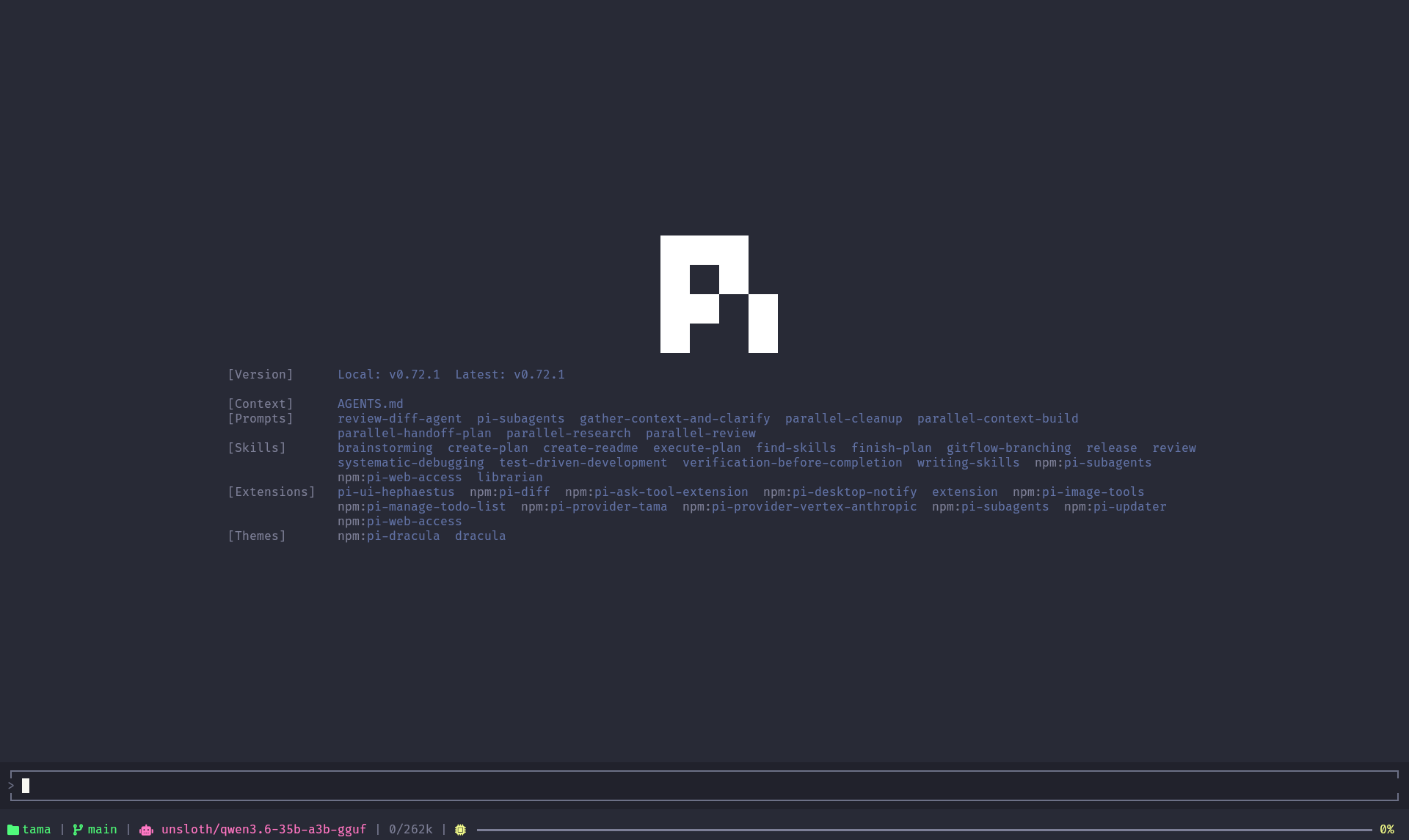
Hephaestus transforms the Pi coding agent terminal into a polished, information-rich workspace. It adds an animated splash screen, a framed editor with a double-press quit guard, muted thinking blocks, per-message response times, and a compact footer that surfaces your git status, model, and context window usage at a glance.
What's inside
Animated splash screen
A smooth reveal animation greets you on startup — the Pi logo fades in diagonally, followed by version info, loaded context, prompts, skills, extensions, and themes. It gives the TUI a proper launch feel instead of an abrupt prompt.
Framed editor pane
The input area gets a clean bordered frame with a ▁ top edge and ▔ bottom edge, visually separating it from the chat history. There's also a double-press quit guard: pressing the clear key once shows a brief "press again to quit" hint, preventing accidental exits while you're mid-conversation.
Muted thinking blocks
Thinking (reasoning) content is rendered in muted colors so it doesn't compete with the actual response. Code blocks inside thinking sections are automatically unindented for readability. The label text and color are fully customizable through settings.
Response time per message
Each user message gets a right-aligned timer showing how long the AI took to respond — displayed as 12.3s or 2m 14s depending on duration. This makes it easy to spot which prompts trigger long reasoning cycles.
Rich single-line footer
A compact status bar at the bottom packs useful information without stealing vertical space:
- Directory and git branch with clean/dirty indicator
- Active model name
- Thinking level indicator (when the agent is reasoning)
- Worktree branch (if you're using one)
- Token usage — input/output/cache counts and cost estimate
- Context window bar — a progress bar showing how much of the context window is used, with color-coded warnings at 80% and 95%
Installation
npm install -g pi-ui-hephaestus
The extension loads automatically when Pi detects it in your global npm packages. No configuration needed to get started.
Settings
Run the /hephaestus slash command to open the interactive settings panel:
| Setting | Description | Default |
|---|---|---|
| Muted Theme | Use subdued colors for thinking blocks | Off |
| Code Unindent | Remove 2-space indent from code blocks inside thinking sections | On |
| Label Text | Custom prefix shown before thinking blocks | Thinking... |
| Label Color | RGB color for the thinking label | 255,215,0 |
Navigate with arrow keys, press Enter to toggle or open submenus, and use the Save button at the bottom to persist changes. Press ESC to cancel without saving.
Configuration
Settings are stored in ~/.pi/agent/settings.json under the "hephaestus" key:
{
  "hephaestus": {
    "mutedTheme": false,
    "codeUnindent": true,
    "labelText": "Thinking...",
    "labelColor": "255,215,0"
  }
}
You can also edit this file directly to fine-tune values.
Requirements
- Pi TUI with extension support (
@mariozechner/pi-coding-agent>= 0.1.0) - Node.js >= 24