pi-ui-workflow
UI design workflow extension for pi coding agent — one command to go from idea to UI design spec.
Package details
Install pi-ui-workflow from npm and Pi will load the resources declared by the package manifest.
$ pi install npm:pi-ui-workflow- Package
pi-ui-workflow- Version
0.2.11- Published
- Jun 10, 2026
- Downloads
- 157/mo · 29/wk
- Author
- rex_young
- License
- MIT
- Types
- extension, skill, prompt
- Size
- 301.9 KB
- Dependencies
- 0 dependencies · 4 peers
Pi manifest JSON
{
  "prompts": [
    ".pi/prompts/*.md"
  ],
  "extensions": [
    "extensions/ui-workflow"
  ],
  "skills": [
    "skills/design-dna",
    "skills/ui-workflow"
  ],
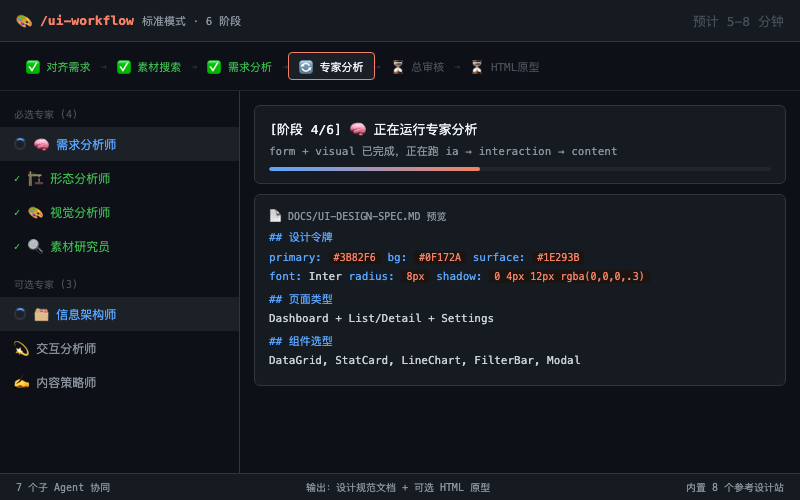
  "image": "https://raw.githubusercontent.com/RexYoung000/pi-ui-workflow/main/preview.png"
}
Security note
Pi packages can execute code and influence agent behavior. Review the source before installing third-party packages.
README
pi-ui-workflow
A UI design workflow for pi coding agent. A lead reviewer (main AI) orchestrates 7 specialized sub-agents (4 required + 3 optional) covering requirements, form, visuals, information architecture, interaction, and content — producing an executable UI design spec, with optional high-fidelity HTML prototypes.
📖 中文文档
30 Second Quickstart
For users who already have Pi installed and want to use
/ui-workflowin any project.
1. Install the plugin
pi install npm:pi-ui-workflow
If Pi is already running, type
/reloadafter installation.
2. Navigate to your project and launch Pi
cd /path/to/your-product
pi
3. Run the workflow command
/ui-workflow I want to build a minimalist time tracker for indie developers
What you'll see:
- Choose execution mode: Fast / Standard / Deep;
- Confirm product requirements;
- Choose search method and extra analysis scope;
- Finally generate
docs/ui-design-spec.md, with intermediate reports archived todocs/ui-workflow/.
Partial Rerun
If you've already run the full workflow and docs/ui-workflow/ contains intermediate reports:
/ui-rerun redo visuals only
/ui-rerun redo interactions
/ui-rerun rebuild final spec
It reuses existing reports, only rerunning the specified part to save time and tokens.
This plugin bundles design-dna, all agents, and the sub-agent engine. Install once and use immediately. The only optional enhancement is TinyFish (for design reference search — you can skip it).
What This Is
Turn vague "I want to build an XXX product" descriptions into:
- Reference material analysis (8 built-in high-quality design sites + optional TinyFish web search)
- Structured requirements report (target users, core features, key scenarios)
- UI form decisions (page types, layout paradigms, component selection, responsive strategy)
- Information architecture (navigation structure, page hierarchy, routing logic)
- Quantified visual spec (complete design tokens + design-dna invocation)
- Interaction experience plan (micro-interactions, state transitions, gestures, accessibility)
- Content & copywriting spec (UI copy, CTAs, error messages, brand tone)
- Integrated design spec document (markdown) + (optional) high-fidelity HTML prototype
Workflow Overview
The workflow starts by letting users choose an execution mode, putting the trade-off of "wait time, token cost, output quality" in their hands:
| Mode | Est. Time | Agent Orchestration | Quality | Use Case |
|---|---|---|---|---|
| Fast | ~2-4 min | Agents in parallel where possible | Medium | Rapid direction exploration, early idea validation |
| Standard (recommended) | ~5-8 min | Two-stage analysis | High | Most UI design tasks |
| Deep | ~8-15 min | Strict sequential / semi-sequential | Highest | Important products, critical pages, dev-ready specs |
Stage 0: Choose execution mode (main AI)
  ├─ Fast mode: quicker, good for initial direction
  ├─ Standard mode: balanced quality and speed, default recommended
  └─ Deep mode: most complete, for important products
       ↓
Stage 1: Align requirements (main AI)
  ├─ Scan project, ask key questions
  └─ Save docs/ui-need-summary.md
       ↓
Stage 1.5: Search materials + choose extra analysis (main AI + researcher)
  ├─ Pop-up: choose search method (TinyFish / custom API / skip)
  ├─ Pop-up: choose extra analysis (IA / interaction / content, all checked by default)
  ├─ Browse 8 built-in reference sites
  └─ Call ui-research-analyst → reference material analysis report
       ↓
Stage 2a: Requirements analysis
  └─ Call ui-need-analyst → requirements analysis report
       ↓
Stage 2b: Expert analysis (orchestrated by execution mode)
  ├─ Fast mode: form / visual / optional experts in parallel
  ├─ Standard mode: form + visual first, then optional experts
  └─ Deep mode: form → visual → ia → interaction → content strict handoff
       ↓
Stage 3: Final review (main AI)
  ├─ Detect conflicts
  ├─ Integrate docs/ui-design-spec.md
  └─ Archive docs/ui-workflow/99-ui-design-spec.md
       ↓
Stage 4: HTML prototype (optional, confirmed first)
  ├─ ask_user_question prompt
  └─ Call design-dna Generate → docs/prototype/*.html
Progress feedback follows a "stage number + current action + why + next step" format:
[1/6] ✅ Mode confirmed: Standard (~5-8 min)
[2/6] 🔎 Aligning requirements: confirming product goals, target users, and key pages...
[3/6] 🔍 Searching reference materials: to ground design decisions...
[4/6] 🧠 Running expert analysis: form + visual first, then downstream experts...
[5/6] 🧩 Integrating reports: checking for conflicts across form, visuals, interaction, content...
[6/6] ✅ Done: final spec saved, optionally generate HTML prototype next.
The workflow preserves two kinds of artifacts:
- Final artifacts:
docs/ui-design-spec.md,docs/prototype/*.html(if generated) - Intermediate report archive:
docs/ui-workflow/, containing the requirements summary, reference material report, each expert report, and the final spec archive
Recommended archive structure:
docs/ui-workflow/
├── 00-need-summary.md
├── 01-research-report.md
├── 02-need-report.md
├── 03-form-report.md
├── 04-visual-report.md
├── 05-ia-report.md
├── 06-interaction-report.md
├── 07-content-report.md
└── 99-ui-design-spec.md
These files are generated artifacts each run and excluded from version control by default via .gitignore.
7 Sub-Agents
| # | Agent | Required | Responsibility | Key Upstream Input |
|---|---|---|---|---|
| 1 | ui-research-analyst | Yes | Analyze reference materials, identify design trends | Requirements summary + search results |
| 2 | ui-need-analyst | Yes | Product positioning, users, core features, key pages | Requirements summary + project context |
| 3 | ui-form-analyst | Yes | Page types, layout paradigms, component selection, responsive strategy | need + research |
| 4 | ui-visual-analyst | Yes | Color/font/spacing/animation + design-dna | need + research; form in standard/deep modes |
| 5 | ui-ia-analyst | Optional | Navigation structure, info hierarchy, routing, search UX | need + research + form + visual |
| 6 | ui-interaction-analyst | Optional | Micro-interactions, state transitions, gestures, accessibility | need + research + form + visual + ia (if available) |
| 7 | ui-content-analyst | Optional | UI copy, empty states, error messages, brand tone | need + research + form + visual + interaction (if available) |
Four Workflow Commands
| Command | Purpose |
|---|---|
/ui-workflow <description> |
Full pipeline: choose mode → align → search → analyze → review → optional prototype |
/ui-align |
Stage 1 only (align requirements), outputs requirements summary |
/ui-review |
Stages 0+1.5+2+3+4 (skip alignment, go straight to analysis) |
/ui-rerun [scope] |
Partial rerun based on docs/ui-workflow/: visuals, interactions, content, or final spec |
Manual Install (Fallback)
If not using npm, you can copy manually:
mkdir -p ~/.pi/agent/agents ~/.pi/agent/prompts
cp .pi/agents/*.md ~/.pi/agent/agents/
cp .pi/prompts/*.md ~/.pi/agent/prompts/
Manual install does not load the built-in extension; the official
subagentextension is needed separately.
Security Defaults
To be safe for distribution, this workflow defaults to only calling user-globally-installed agents:
{
  "agentScope": "user"
}
This avoids auto-executing project-local .pi/agents in untrusted repos. If you explicitly trust a project's local agents, you can temporarily switch to:
{
  "agentScope": "both"
}
But do not disable the project agent safety confirmation — avoid defaulting confirmProjectAgents: false.
Package Manifest
The project uses Pi package manifest to declare prompts, extensions, and skills:
{
  "pi": {
    "prompts": [".pi/prompts/*.md"],
    "extensions": ["extensions/ui-workflow"],
    "skills": ["skills/design-dna", "skills/ui-workflow"]
  }
}
The built-in extension auto-loads the 7 UI sub-agents from the package's bundled .pi/agents/, requiring no manual copying.
The package also exposes a universal ui-workflow skill. This lets other Agent Skills-compatible agents use the same UI/UX workflow even when Pi slash commands are unavailable.
See also:
skills/ui-workflow/SKILL.md: Universal skill entry pointskills/ui-workflow/references/workflow-protocol.md: Shared source of truth for Pi and universal executionskills/ui-workflow/references/external-skill-sources.md: Related UI/UX skill source directory and routing mapdocs/package-plan.md: Packaging roadmapdocs/progress-plan.md: Dynamic progress / TUI panel future plans
Use as a Skill
After installation, Pi users can still use the automated command:
/ui-workflow I want to build a minimalist time tracker for indie developers
They can also explicitly load the universal skill:
/skill:ui-workflow
Other Agent Skills-compatible agents can read:
skills/ui-workflow/SKILL.md
The universal skill follows the same workflow as the Pi command. The shared protocol lives in:
skills/ui-workflow/references/workflow-protocol.md
External UI/UX Skill Routing
The ui-workflow skill includes a source directory for related professional UI/UX skills:
skills/ui-workflow/references/external-skill-sources.md
Agents should consult it before each stage and use relevant skills when available. Examples include:
anthropics/frontend-designfor distinctive frontend UI and anti-generic visual directionvercel-labs/web-design-guidelinesfor UI review, accessibility, and web interface standardsui-ux-pro-max/ui-designfor design-system recommendationstypography-auditfor typography decisionsui-animation/greensock/gsap-*for motion and interactioncopywritingfor product copy and microcopydesign-mdfor long-livedDESIGN.mdproject context
These external skills are optional enhancements, not hard dependencies. If they are unavailable, the workflow continues with built-in guidance.
Built-in Reference Sites
During material search, regardless of method, these 8 high-quality design reference sites are prioritized:
- godly.website — Curated high-quality web design
- awwwards.com — Web design awards & trends
- mobbin.com — Real mobile product screenshots
- reactbits.dev/components/magic-bento — React component examples
- supahero.io — Design inspiration collection
- 60fps.design — High-quality UI animation reference
- ui-pocket.com/mobile — Mobile UI collection
- pinterest.com — Mood boards & style inspiration
Dependencies
This plugin bundles 7 UI analysis agents, the design-dna skill, and the sub-agent invocation engine — no additional dependencies required.
Optional enhancement:
TinyFish Search (optional)
If you want the workflow to automatically search for design reference materials:
pi install npm:pi-tinyfish-tools
Without it you can still use the workflow — just choose "Skip search" during the search phase.
Verify Installation
A check script is included to verify the plugin is correctly installed:
scripts/check-install.sh
Search Method Options
During stage 1.5, a pop-up lets users choose:
| Option | Description |
|---|---|
| TinyFish Search (recommended) | Free, searches web + browses built-in sites |
| Custom Search API | Provide endpoint and key, uses curl |
| Skip Search | No search; researcher analyzes based on available descriptions |
HTML Prototype Confirmation
Stage 4 does not auto-generate HTML prototypes. The workflow prompts:
| Option | Meaning |
|---|---|
| Generate full HTML prototype | Higher token cost, high fidelity previewable |
| Generate 1 key page only (recommended) | Check the look first, expand later |
| Keep spec document only | No HTML generation |
| Skip | Do nothing extra |
Project Structure
pi-ui-workflow/
├── .pi/
│   ├── agents/
│   │   ├── ui-research-analyst.md       Researcher
│   │   ├── ui-need-analyst.md           Requirements analyst
│   │   ├── ui-form-analyst.md           Form analyst
│   │   ├── ui-visual-analyst.md         Visual analyst
│   │   ├── ui-ia-analyst.md             Information architect (optional)
│   │   ├── ui-interaction-analyst.md    Interaction analyst (optional)
│   │   └── ui-content-analyst.md        Content strategist (optional)
│   └── prompts/
│       ├── ui-workflow.md               Full workflow command
│       ├── ui-align.md                  Align only
│       ├── ui-review.md                 Review mode
│       └── ui-rerun.md                  Partial rerun
├── extensions/
│   └── ui-workflow/
│       ├── agents.ts                    Agent discovery (incl. package agents)
│       └── index.ts                     ui_workflow_subagent tool
├── skills/
│   ├── design-dna/                      Bundled design-dna skill
│   └── ui-workflow/                     Universal UI workflow skill + external skill routing
│       ├── SKILL.md
│       └── references/
│           ├── workflow-protocol.md
│           ├── external-skill-sources.md
│           ├── agent-roles.md
│           ├── artifact-templates.md
│           └── quality-checklist.md
├── scripts/
│   └── check-install.sh                 Installation health check
├── docs/
│   ├── usage.md                         Detailed usage guide
│   ├── iteration-plan.md                Iteration roadmap
│   ├── package-plan.md                  Packaging plan
│   └── progress-plan.md                 Dynamic progress plan
├── README.md
├── README.zh-CN.md
├── CHANGELOG.md
├── package.json
└── LICENSE
License
MIT