pi-umbra-subagents
Parallel pi branches with a live agent tree under the input box, read-only or in their own git worktree, the delegate skill that starts them, and /umb-loop, which resubmits a prompt on a count or a timer.
Package details
Install pi-umbra-subagents from npm and Pi will load the resources declared by the package manifest.
$ pi install npm:pi-umbra-subagents- Package
pi-umbra-subagents- Version
0.2.0- Published
- Oct 4, 2026
- Downloads
- 282/mo · 282/wk
- Author
- grknbyk
- License
- MIT
- Types
- extension, skill
- Size
- 220.5 KB
- Dependencies
- 0 dependencies · 3 peers
Pi manifest JSON
{
  "skills": [
    "./extensions/umbra-subagents/skills"
  ],
  "extensions": [
    "./extensions/umbra-subagents.ts",
    "./extensions/umbra-loop.ts"
  ]
}
Security note
Pi packages can execute code and influence agent behavior. Review the source before installing third-party packages.
README
pi-umbra-subagents
Parallel pi branches you can watch while they work. A branch is a separate pi -p process with
an empty context; a live tree under the input box shows what each one is doing, and their answers
come back to the session when the last one ends. Branches are read-only, unless one is marked
[write]: that one works in its own git worktree, and its changes wait on a git branch until you
say whether to merge them. Also /umb-loop, which
sends a prompt again after every reply, on a count or a timer.
pi install npm:pi-umbra-subagents
node ~/.pi/agent/npm/node_modules/pi-umbra-subagents/patch.mjs
Restart pi after the patch. Only /umb-loop needs it; the branches work without it.
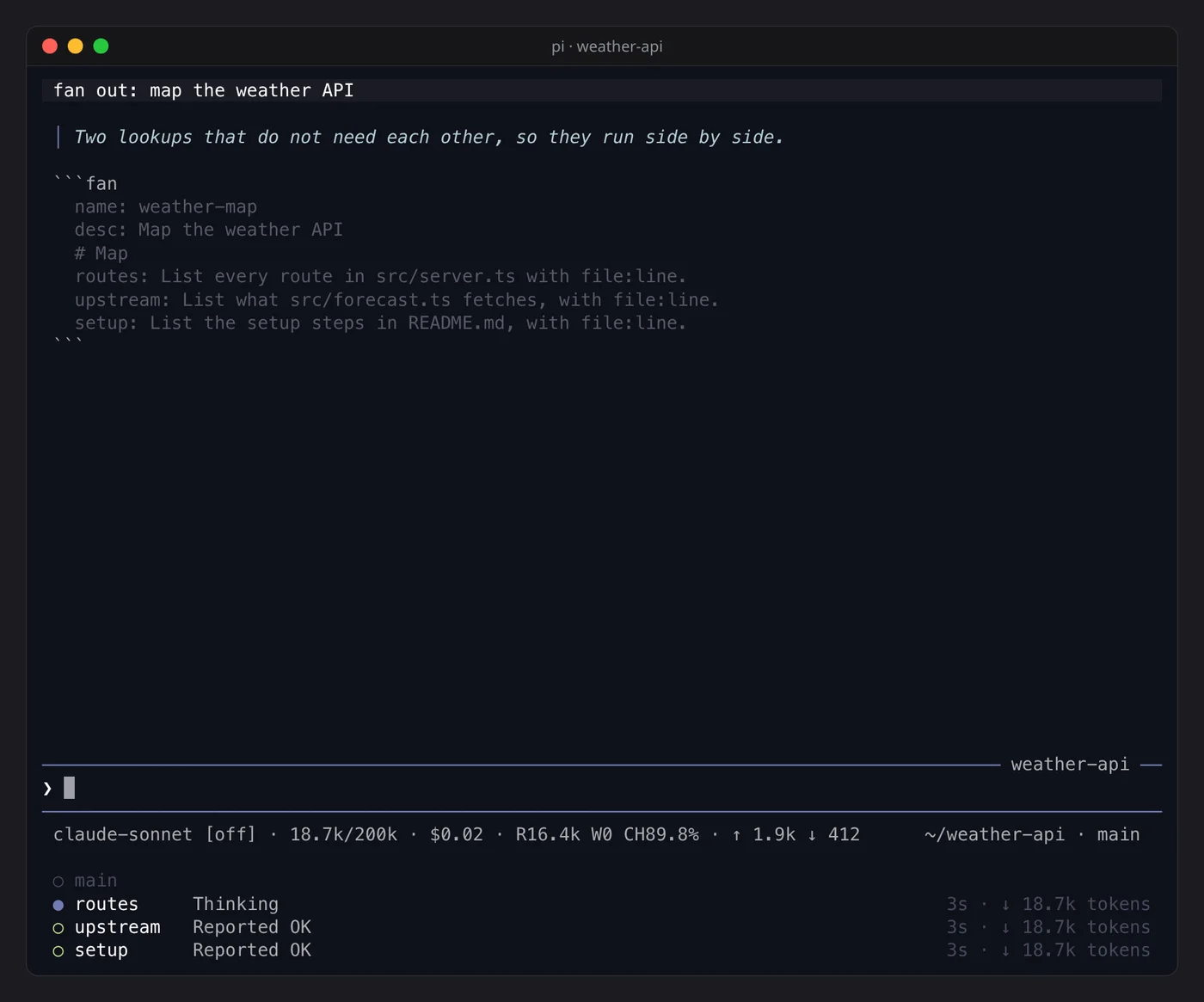
Nothing is added to the model's prompt and no tool is registered. The model starts a run by
ending its answer with a fenced fan block, which the bundled fan skill teaches it:
```fan
name: weather-map
desc: Map the weather API
# Map
routes: List every route in src/server.ts with file:line.
upstream: List what src/forecast.ts fetches, with file:line.
# Plan
design: Given the Map results, propose the change.
```
# Title starts a phase. Phases run in order; the branches inside one run at the same time.
label@provider/model: task picks a model for one branch, otherwise it runs on the session's
model. The results arrive as a follow-up message at the start of the next turn.
label [write]: task gives one branch edit, write and bash, in its own git worktree on a
new fan/<run>/<branch> branch that starts from your working tree, uncommitted work included.
Its changes are committed to that branch when it ends and its row reads Changed +12 −3 · 2 files on fan/...; nothing is merged until the session asks you and you say yes. It needs a git
repository, and pi has no sandbox: bash can still reach outside the worktree, and only the
branch's instructions forbid it.
The worktree lives under .git/fan-worktrees/, where test runners, linters and git clean do not
look. A write branch cannot stop on a question, because its worktree closes when it ends, so its
task has to carry every decision. Every write branch starts from the tree as it was when the run started, so a later
phase does not see an earlier phase's changes. A run you start with /umb-fan tells you when a write branch
left changes; ask the session to merge or discard them.
Commands and keys
| Command or key | Effect |
|---|---|
/umb-fan [spec] |
start a run yourself; with no argument an editor opens with a template |
/umb-agents, alt+a |
open the agent panel |
↓ from the last input line |
move the ❯ into the agent tree under the input box |
↑ ↓ in the tree |
move between rows; ↑ past main or esc goes back to the input box |
enter in the tree |
open the row's agents, closing every other row; on main it folds the tree back to the top |
x in the tree |
stop the row and every agent under it |
alt+a in the tree |
open the agent panel on that row |
↑ ↓ in the panel |
move between phases, or between the agents of one phase |
→ ← in the panel |
go into a phase's agents, and back out to the phases |
x in the panel |
stop the selected phase, or the selected agent |
esc in the panel |
back to the input box, unsent text kept |
/umb-loop [count|duration] [prompt] |
send the prompt again after each reply; run it again to stop |
/umb-loop 5 fix the next failing test runs five times, /umb-loop 10m continue for ten
minutes, /umb-loop 0 … until stopped. Without a prompt it sends Continue.. Escape cancels
one round and keeps the loop.
Skills
| Skill | Use |
|---|---|
fan |
the fenced block above; the extension owns the branches |
delegate |
the same branches started from a bash call (dstart, branch, dwait), for runs the model wants to read back itself, or continue with dresume after a branch asks a question |
Both write every branch's answer to .pi-out/<run>/<phase>-<name>.md and its errors to the
matching .err. Add .pi-out/ to .gitignore. Quitting pi stops the branches; what they
wrote stays on disk.
Settings
| Variable | Default | Effect |
|---|---|---|
FAN_MODEL |
the session's model | model for fan branches that do not name one |
FAN_TOOLS |
read,grep,find,ls |
tools a read-only branch may use ([write] branches get edit,write,bash too) |
FAN_LOAD |
$LOAD from delegate.env |
extra -e <path> flags; branches start with --no-extensions, so a provider that comes from an extension has to be listed here |
FAN_TIMEOUT_MS |
$DELEGATE_TIMEOUT × 1000, else 300000 |
a branch still running after this long is cut off |
Both ways in share one settings file: the packaged delegate.env, then
~/.pi/agent/delegate.env, which wins.
A branch starts without extensions, so a model that only an extension provides is not there
for it. When no branch can start on its model, you get a warning and the model is told to ask
you which one to use. The suggestions are your scoped models (enabledModels) that a branch
can reach; if none can, free models; if there are none, the first few a branch can reach.
Name the choice per branch with label@provider/model, set FAN_MODEL, or load the extension
through LOAD.
A model id may carry a colon, as in label@openrouter/some-model:free: task; the key ends at
the first colon followed by a space.
The patch
/umb-loop sends its prompt the way the input box does, and the extension API has no way to
do that. patch.mjs makes one small additive edit to pi's installed bundle that exposes it. A
pi update removes the patch without any error, so run the script again after every update.
| Command | Effect |
|---|---|
node .../patch.mjs |
apply the patch; a part already applied is skipped |
node .../patch.mjs --check |
change nothing, exit 1 if the patch is missing |
The script patches the pi on your PATH. Set PI_UMBRA_PI to the pi-coding-agent
directory to patch another one.
MIT.