pi-umbra-theme
pi's look in one package: seven umbra themes and the terminal background they set, a status footer, a gutter beside model text, every tool call drawn as a card with rich diffs, and a working line that names the running tool.
Package details
Install pi-umbra-theme from npm and Pi will load the resources declared by the package manifest.
$ pi install npm:pi-umbra-theme- Package
pi-umbra-theme- Version
0.3.0- Published
- Oct 4, 2026
- Downloads
- 577/mo · 179/wk
- Author
- grknbyk
- License
- MIT
- Types
- extension, theme
- Size
- 605.7 KB
- Dependencies
- 1 dependency · 3 peers
Pi manifest JSON
{
  "image": "https://raw.githubusercontent.com/grknbyk/pi-umbra/main/assets/cards.webp",
  "themes": [
    "./themes"
  ],
  "extensions": [
    "./extensions"
  ]
}Security note
Pi packages can execute code and influence agent behavior. Review the source before installing third-party packages.
README
pi-umbra-theme
Seven dark themes for pi, and six extensions for what a theme cannot colour: the terminal background, a gutter beside model text, the footer, the working line, the tool calls and a viewer for the images they return.
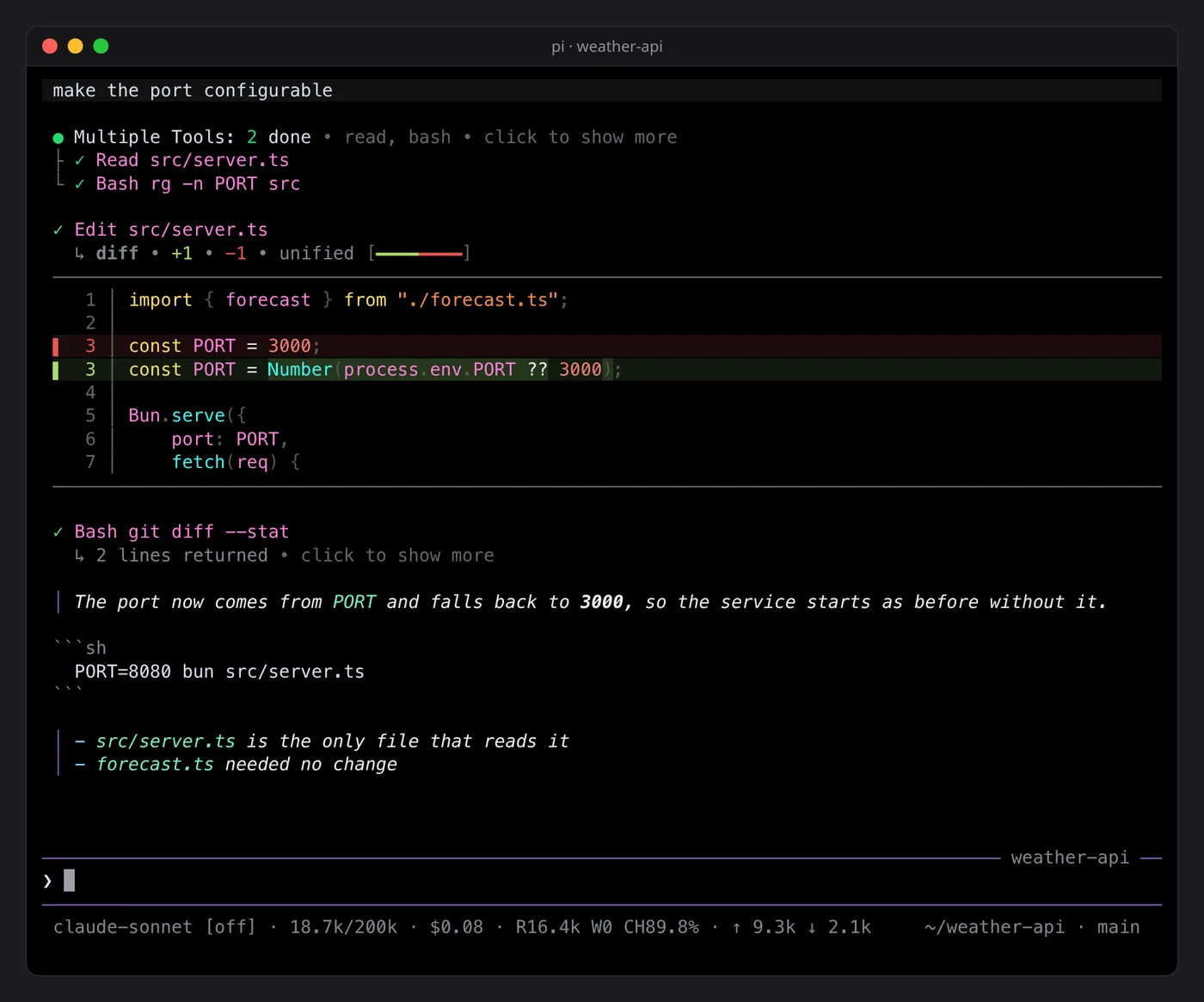
pi install npm:pi-umbra-themeIt needs no bundle patch. Settings go in ~/.pi/agent/settings.json under piUmbraTheme,
except the tool cards, which keep their own file.
Themes
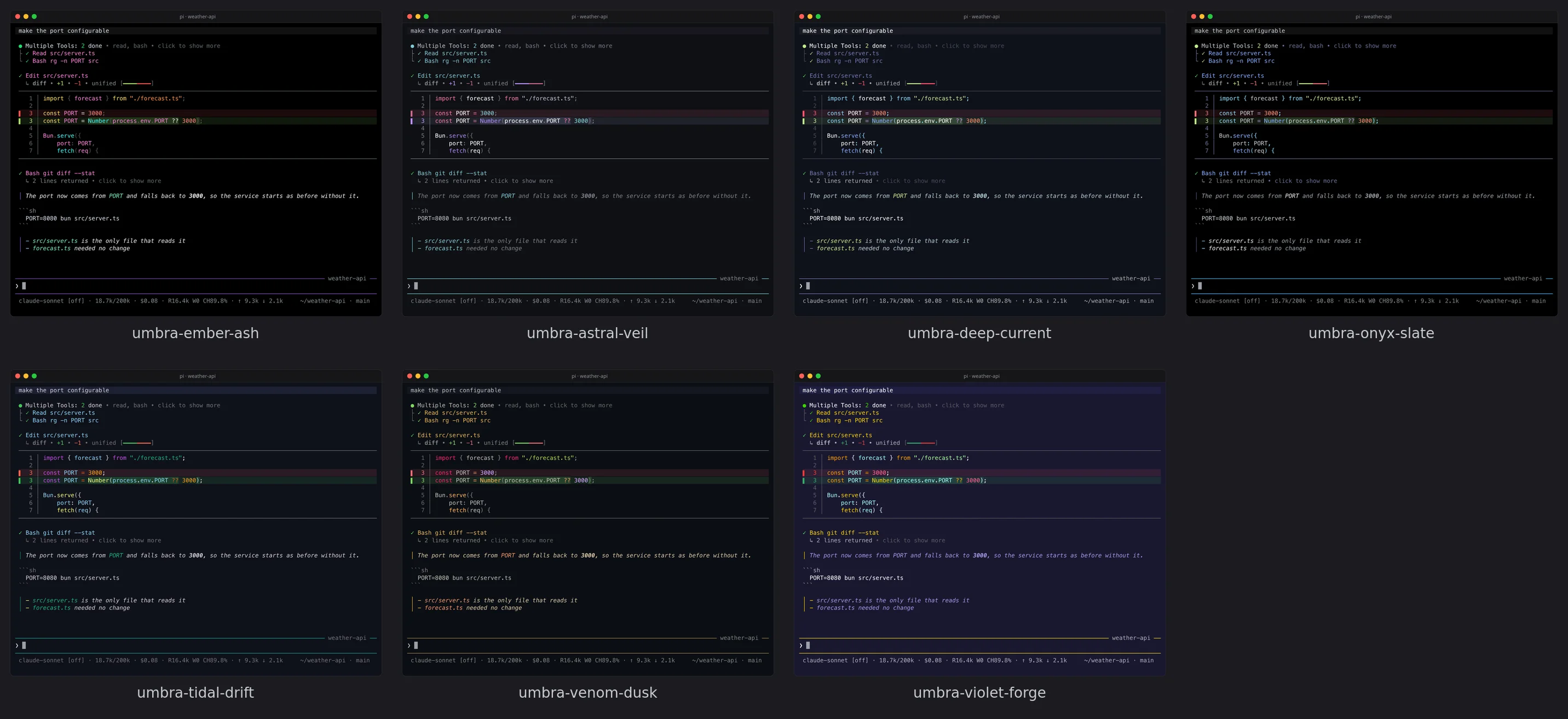
Pick one in /settings, or set "theme" in settings.json.
| Theme | Background | Accent |
|---|---|---|
umbra-ember-ash |
#000000 |
#7e57c2 |
umbra-astral-veil |
#0f1014 |
#7fc9d6 |
umbra-deep-current |
#0f111a |
#717cb4 |
umbra-onyx-slate |
#000000 |
#50bdfb |
umbra-tidal-drift |
#0f111a |
#00e8c5 |
umbra-venom-dusk |
#0b0e14 |
#e6b450 |
umbra-violet-forge |
#191830 |
#fad000 |
Terminal background
pi colours its own text but leaves the window behind it alone. umbra-background sets the
terminal background to the active theme's export.pageBg with OSC 11 when pi starts, and
again whenever you switch theme. On exit it sends OSC 111, which gives the terminal its own
colour back.
Some terminals ignore OSC 11 and keep their own colour. pi asks the terminal which colour it
has. If the answer is not the theme's colour, pi shows a warning once, and /umb-doctor tells
you where to set the colour in that terminal (VS Code, Windows Terminal, Terminal.app,
JetBrains, tmux).
piUmbraTheme.background |
Effect |
|---|---|
"auto" (default) |
the theme's export.pageBg |
"#rrggbb" |
that colour, whatever the theme |
"off" |
never touch the terminal |
| Command | Effect |
|---|---|
/umb-bg |
apply the theme's colour again and say whether it worked |
/umb-bg #rrggbb |
set that colour now |
/umb-bg off or /umb-bg reset |
give the terminal its own colour back |
A colour set with /umb-bg lasts until the next theme switch or session start.
Gutter
It draws a bar beside everything the model writes, so its text and yours stay apart in a long session. It is off by default:
"piUmbraTheme": { "messages": { "assistantPrefix": true } }Restart pi after changing it. The model's Markdown is shown as a quote, and pi draws the quote bar in theme colours. Code blocks stay outside the quote, because pi draws a code block inside one as plain italic text. Only the display changes; the stored message does not.
Footer
It replaces pi's footer and has no settings.
- Left: model and thinking level, context used against the window, session cost, the last turn's cache read and write with its hit rate, then tokens sent and received this session. When the ponytail or loop extensions set a status, it is added at the end.
- Right: the working directory and the git branch. When the line has no room for them they move to a line of their own.
Cost is the sum over the current branch of the session and appears once a provider reports
it. Numbers are shortened: 695, 7.0k, 224k, 1M.
Working line
It replaces pi's fixed "Working…" with the tool that is running:
◴ Running… (9s · ↓ 824 tokens)The label follows the running tool, then the turn's elapsed time, then the output tokens so
far. While a reply is still streaming the token count is an estimate and carries a ~.
While the model thinks, the line adds thought for 12s.
| Key | Label | Frames |
|---|---|---|
read |
Reading | ◜◠◝◞◡◟ |
ls |
Listing | ⎺⎻⎼⎽⎼⎻ |
find, grep |
Searching | ⎺⎻⎼⎽⎼⎻ |
write |
Writing | ▖▘▝▗ |
edit |
Editing | ▖▘▝▗ |
bash, powershell |
Running | ◴◷◶◵ |
ask_user_question |
Asking | ◇◈◆◈ |
thinking |
Thinking | ✶✸✹✺✻✼ |
idle |
Working | ⣻⢿⡿⣟⣯⣷⣾⣽ |
| any other tool | the title its card shows, such as Web Search |
◇◈◆◈ |
Set custom to give every tool in the last row one label instead.
Every entry can be changed, and any tool name can get its own:
"piUmbraTheme": {
  "working": {
    "tokens": true,
    "elapsed": true,
    "tools": {
      "bash": { "label": "Running", "cycleMs": 600 },
      "web_search": { "label": "Searching", "frames": ["◐", "◓", "◑", "◒"] }
    }
  }
}label, cycleMs (one pass through the frames, default 480) and frames are each
optional. tokens and elapsed hide their part when set to false. The settings are read
at every session start. With pi-umbra-shimmer installed, the spinner's speed is matched to
the shimmer wave unless cycleMs is set.
Tool cards
Every tool call is drawn as a card with a one-line summary. The result is folded under it, and an edit or a write shows a highlighted diff. Consecutive calls are grouped under one line.
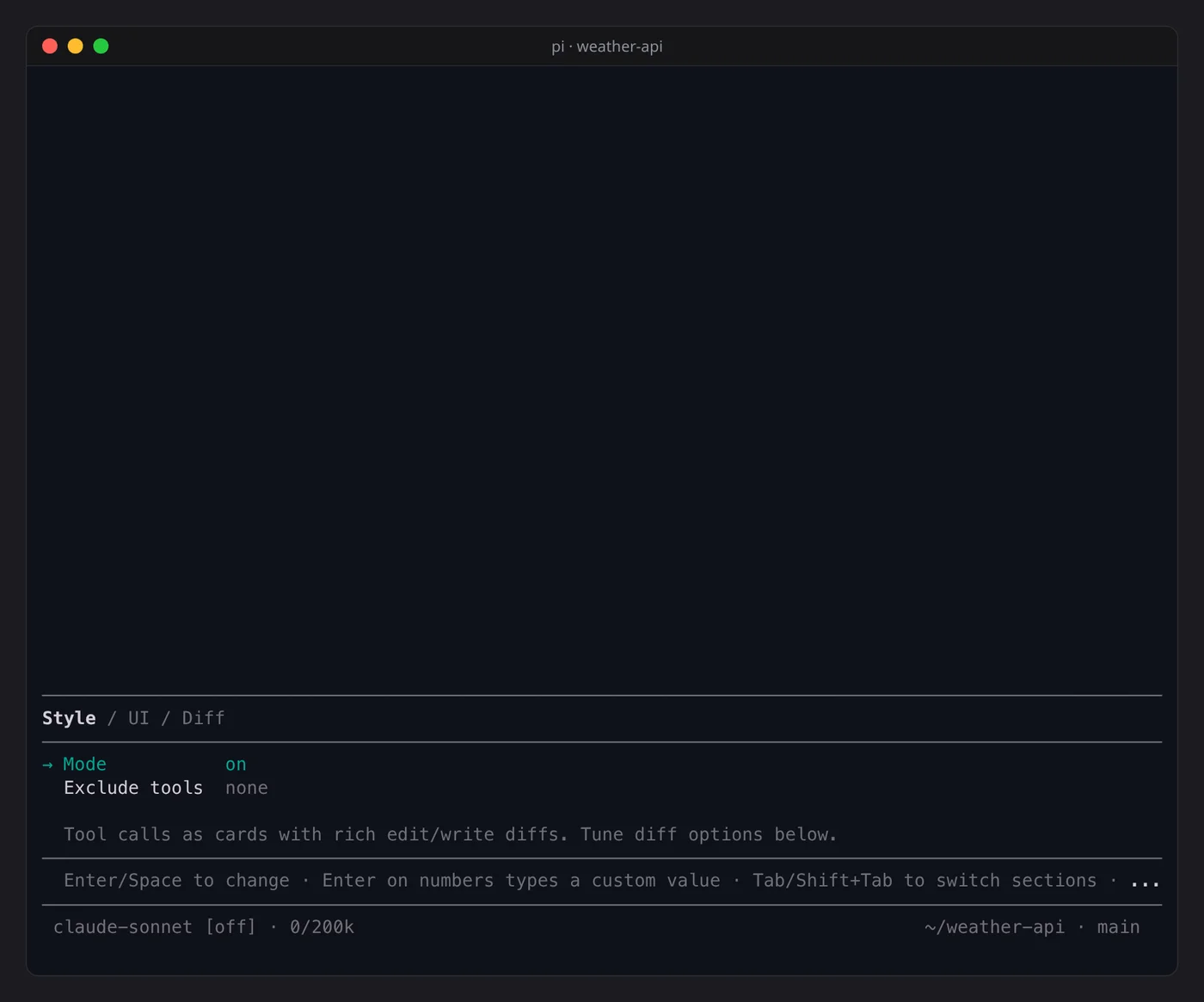
| Command | Effect |
|---|---|
/umb-toolbox or /umb-toolbox panel |
open the settings panel |
/umb-toolbox on |
cards (default) |
/umb-toolbox compact |
one summary line per model message, such as Ran for 4s, bash×2, read×1 (experimental) |
/umb-toolbox off |
pi's own rendering |
/umb-toolbox status |
print every setting |
The mode and every setting persist in ~/.pi/agent/umbra-toolbox.json.
Reading a card
- The icon spins while the tool runs, then turns into
✓or a failure mark. - The line under it says
N lines returned(loadedfor a read),Done, or the first line of an error. - A collapsed card ends with
click to show morein fullscreen mode, or with the expand key (ctrl+oby default) elsewhere. Expanded, it shows the call's input and output. - Runs of reads, searches and shell calls merge into one line, for example
Multiple Tools: 2 done • read, bash. Edits and writes are never grouped. - Edit and write diffs are highlighted with shiki. They are split side by side from 120
columns up and unified below that. Set
DIFF_THEMEto pick another shiki theme. - Skill blocks, compaction summaries and branch summaries collapse to one line too.
Keys and mouse
| Where | Input | Effect |
|---|---|---|
| any mode | ctrl+o (pi's expand key) |
expand or collapse cards |
| fullscreen | click the hint | expand that card |
| fullscreen | click an expanded card | collapse it |
| fullscreen | click a "show more" header | open the full text in a scrollable overlay |
| text overlay | ↑ ↓ PgUp PgDn Home End, wheel |
scroll |
| text overlay | Esc or Ctrl+C |
close |
| settings panel | Tab, Shift+Tab |
switch between Style, UI and Diff |
| settings panel | ↑ ↓, Enter or Space |
choose a setting, change it |
| settings panel | Enter on a number |
type your own value |
| settings panel | Esc |
close |
Settings
Change them in the panel, or edit umbra-toolbox.json while pi is closed.
| Key | Default | Range | Effect |
|---|---|---|---|
mode |
on |
on, compact, off |
how tool calls are drawn |
excludeRenderers |
[] |
tool names | keep a tool's own renderer, when the tool ships one |
diffViewMode |
auto |
auto, split, unified |
diff layout |
diffIndicatorMode |
bars |
bars, classic, none |
change markers in the gutter |
diffSplitMinWidth |
120 |
40 to 300 | width at which auto splits |
editDiffCollapsedLines |
24 |
1 to 500 | diff lines shown for a collapsed edit |
writeDiffCollapsedLines |
0 |
0 to 500 | lines shown for a collapsed write, 0 shows only created |
diffWordWrap |
true |
wrap long diff lines instead of cutting them | |
expandedInputMaxLines |
5 |
1 to 5000 | input lines in an expanded card |
expandedOutputMaxLines |
10 |
1 to 5000 | output lines in an expanded card |
expandedPreviewMaxLines |
40 |
10 to 50000 | lines in an expanded task list |
inputClip |
100 |
8 to 500 | characters of a path or command in a summary |
scrollStepLines |
3 |
1 to 50 | lines per mouse wheel step in fullscreen |
dimThinkingText |
false |
dim headings in compact mode |
/umb-toolbox status also prints keys for features that are not part of this package, such as
a footer and startup header. They have no effect here.
The write tool
To draw a diff for a write, the cards replace pi's write tool with one that records the
file before writing it. It takes the same arguments and writes the same bytes. It stays out
of the way when another extension already provides write.
A write card can show no diff in these cases: the session was resumed (the record lives in memory), the old file was over 512 KB or not UTF-8 text, or the path was not a regular file.
Image viewer
Click an image under a tool card, such as a screenshot the model read, and it opens full screen.
| Input | Effect |
|---|---|
| wheel, or two fingers up and down on a touchpad | zoom toward the pointer |
| double click | zoom in 2× at that point |
drag, ← ↑ → ↓ |
move |
+, - |
zoom toward the centre |
0 |
fit to the screen; an image smaller than the screen stays at 100% |
Esc, q |
close |
It needs kitty, and fullscreen mode ("tuiMode": "fullscreen"), where pi reports mouse clicks.
Kitty crops and scales the image itself, so the image is sent to the terminal once and each zoom
step sends only the new crop. Kitty on Linux does not pass pinch gestures on to programs, so a
pinch does nothing. The click reaches the viewer through the tool cards; without them, nothing
opens it.
Files
pi-umbra-theme/
├── checks/            one runnable check per extension (bun run <file>)
├── extensions/
│   ├── umbra-background.ts
│   ├── umbra-footer.ts
│   ├── umbra-gutter.ts
│   ├── umbra-image-viewer.ts
│   ├── umbra-toolbox/
│   └── umbra-working.ts
├── lib/
└── themes/
MIT.