pi-undo-tree
Emacs-style visual undo-tree for the Pi coding agent
Package details
Install pi-undo-tree from npm and Pi will load the resources declared by the package manifest.
$ pi install npm:pi-undo-tree- Package
pi-undo-tree- Version
1.0.1- Published
- Sep 11, 2026
- Downloads
- 481/mo · 421/wk
- Author
- ergenekonyigit
- License
- MIT
- Types
- extension
- Size
- 538.6 KB
- Dependencies
- 0 dependencies · 2 peers
Pi manifest JSON
{
  "image": "https://raw.githubusercontent.com/ergenekonyigit/pi-undo-tree/main/catalog-preview.png",
  "extensions": [
    "./index.ts"
  ]
}
Security note
Pi packages can execute code and influence agent behavior. Review the source before installing third-party packages.
README
pi-undo-tree 🌲
Interactive Emacs-style visual undo-tree extension for Pi.
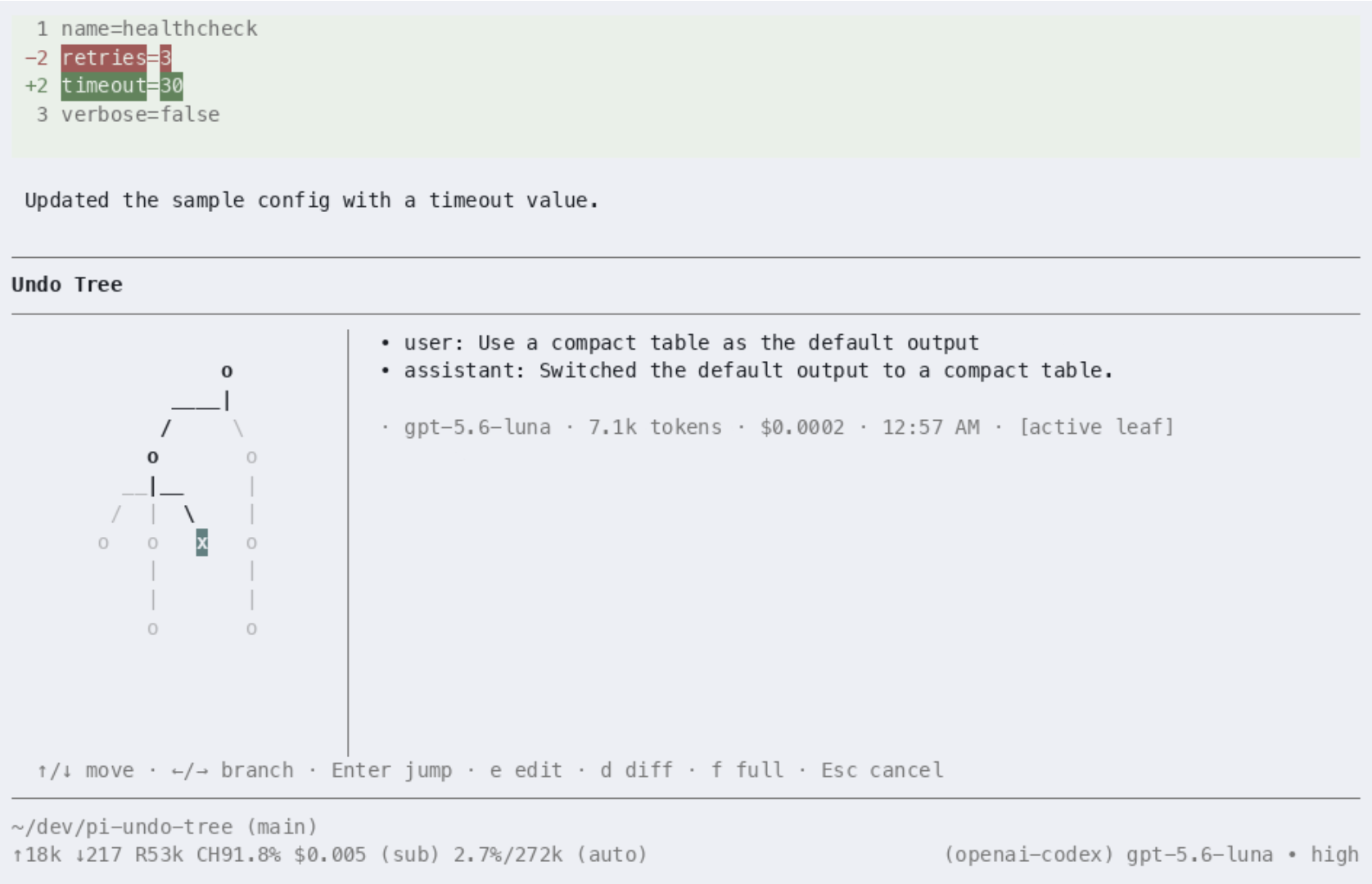
Transform Pi's session branching (/tree, /fork) into an intuitive, 2D split-screen visual undo-tree with instant navigation, branch switching, and unified diff preview.

The demo follows a realistic CLI workflow: review a health-check config change, open the undo tree, inspect the diff, move to an alternative branch, and jump to that branch with Enter.
✨ Features
- 2D Non-Overlapping Tree Layout: Implements Toby Cubitt's classic Emacs
undo-treecoordinate layout and collision-avoiding connector routing (┴,╱,╲,│). - Turn-Centric Graph Model: Aggregates raw Pi session JSONL entries (prompts, model responses, tool executions, compactions) into coherent, conversational turn nodes while preserving full entry fidelity.
- Split-Screen Interactive TUI:
- Left Pane: 2D tree canvas with active path highlighting (
●active branch,○inactive/historical branch,★labeled checkpoints). - Right Pane: Contextual inspector showing prompts, model metadata, tokens, tool calls, and assistant responses.
- Left Pane: 2D tree canvas with active path highlighting (
- Diff & Overview Toggle (
d): Instantly toggle between turn conversation preview and unified diffs of file modifications produced by tool calls (write_to_file,replace_file_content, edit tools). - Emacs-Style Keybindings:
↑/k: Move to parent turn (undo).↓/j: Move to child turn along active branch (redo).←/h: Switch to previous sibling branch.→/l: Switch to next sibling branch.Enter: Instant branch jump to selected turn.e: Fork prompt — rewind to selected turn and populate Pi's input editor with the original prompt.S/Shift+Enter: Jump to branch with automated AI branch summary.d: Toggle diff / overview mode.t: Toggle human-readable timestamps.[/]: Scroll preview pane up / down.q/Esc: Exit visualizer.
- Native Slash Command & Shortcut: Open anytime with
/undo-treeorCtrl+Shift+U.
🚀 Installation & Setup
Install from npm
pi install npm:pi-undo-tree
To try the latest checkout without installing it permanently:
pi -e git:github.com/ergenekonyigit/pi-undo-tree
Development
git clone https://github.com/ergenekonyigit/pi-undo-tree.git
cd pi-undo-tree
npm install
npm test
pi -e /absolute/path/to/pi-undo-tree
⌨️ Commands & Keybindings
| Key / Command | Action |
|---|---|
/undo-tree |
Open interactive undo-tree visualizer |
Ctrl+Shift+U |
Shortcut to open undo-tree visualizer |
↑ / k |
Undo (navigate to parent turn) |
↓ / j |
Redo (navigate to child turn on current path) |
← / h |
Navigate to previous sibling branch |
→ / l |
Navigate to next sibling branch |
Enter |
Switch active branch to selected turn |
e |
Rewind and edit prompt in Pi's editor |
S / Shift+Enter |
Switch branch with generated AI summary |
d |
Toggle diff view for tool modifications |
t |
Toggle absolute timestamps |
[ / ] |
Scroll preview pane |
q / Esc |
Quit undo-tree |
🧪 Testing
# Run unit & integration tests
npm test

# Run TypeScript typecheck
npm run typecheck
📐 Architecture
src/model/graph.ts: Dual-layer graph construction mapping raw JSONL entries (RawNode) to conversation turns (TurnNode).src/layout/layout.ts: 2-pass Emacs undo-tree algorithm computing subtree widths, column offsets, and routing ASCII/Unicode connectors.src/layout/canvas.ts: Virtual 2D canvas for coordinate placement and ANSI styling.src/tui/preview-pane.ts: Split-screen inspector supporting conversation overview, tool executions, and unified diffs.src/tui/tree-view.ts: Directional tree cursor handling 2D graph traversal.src/tui/visualizer.ts:@earendil-works/pi-tuifull visualizer component integrating keyboard events and render loops.src/index.ts: Pi extension hooks (registerCommand,registerShortcut,executeNavigation).