pi-video-tui
Inline synchronized video and audio in Pi's native TUI Widget. 在 Pi 原生 TUI Widget 中内联播放同步音视频。
Package details
Install pi-video-tui from npm and Pi will load the resources declared by the package manifest.
$ pi install npm:pi-video-tui- Package
pi-video-tui- Version
0.2.1- Published
- Jul 23, 2026
- Downloads
- 79/mo · 5/wk
- Author
- ggboy_520
- License
- MIT
- Types
- extension
- Size
- 535.8 KB
- Dependencies
- 0 dependencies · 2 peers
Pi manifest JSON
{
  "extensions": [
    "./src/index.ts"
  ],
  "image": "https://raw.githubusercontent.com/liu-qingyuan/pi-video-tui/main/docs/images/pi-video-tui-height-comparison.png"
}
Security note
Pi packages can execute code and influence agent behavior. Review the source before installing third-party packages.
README
pi-video-tui
Inline synchronized video and audio inside Pi's native TUI Widget. 在 Pi 原生 TUI Widget 中内联播放同步音视频。
video file -> libmpv -> system audio
                    -> Software Render API (rgb0)
                    -> PIV1 IPC -> latest frame -> half-block -> Pi aboveEditor Widget

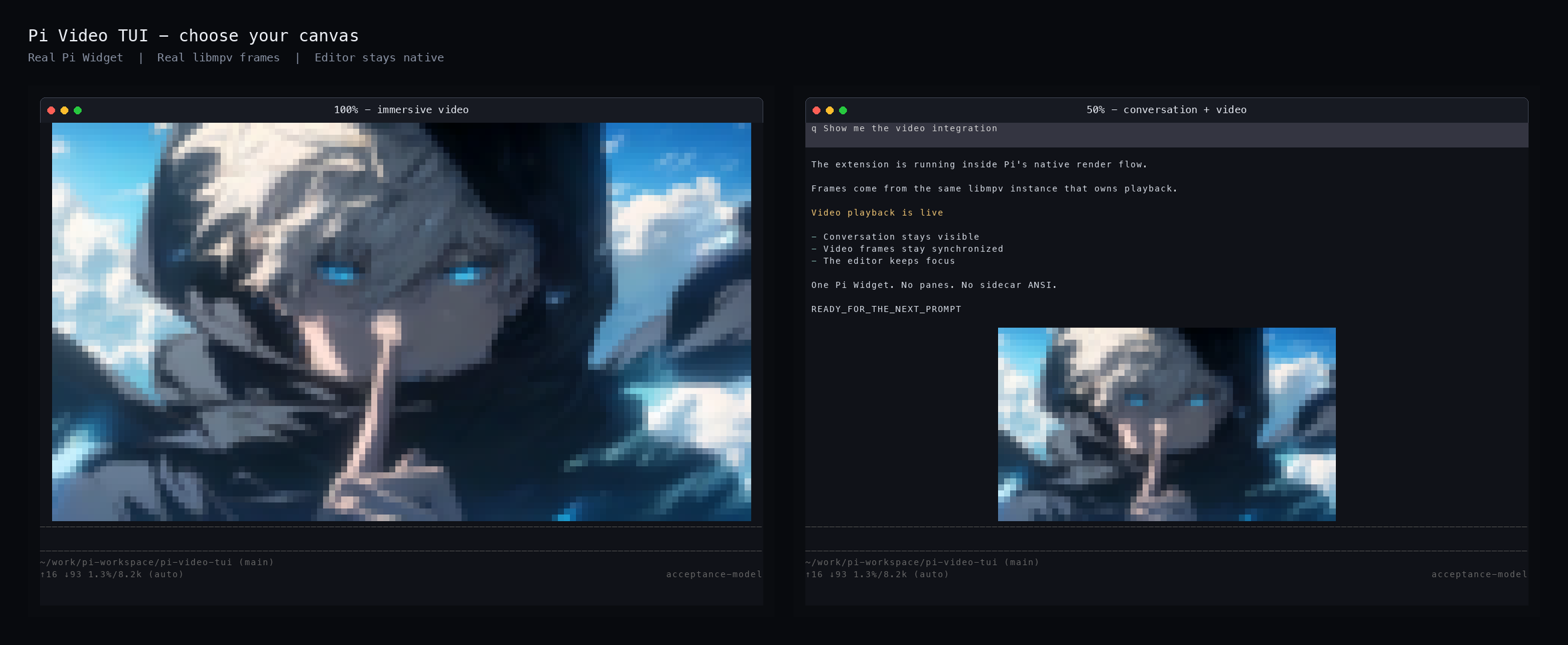
maxHeightPercent: 100 |
maxHeightPercent: 50 |
|---|---|
 |
 |
The captures come from a real Pi Widget, PTY output, and libmpv framebuffer. Demo media is user-supplied and is not distributed with the repository or npm package. 截图来自真实 Pi Widget、PTY 输出和 libmpv framebuffer。演示媒体由用户本地提供,不随仓库或 npm package 分发。
English
What it does
pi-video-tui mounts a real Pi aboveEditor Widget and plays a configured video when the initial interactive TUI session starts. Pi continues to own rendering, focus, input, conversation history, the editor, and the footer. The native Rust sidecar owns one libmpv instance for synchronized audio and video decoding, but it never writes terminal ANSI directly.
The visible layout is:
conversation
video
editor
footer
Highlights:
- Renders libmpv
rgb0framebuffers as true-color terminal half blocks through Pi's normal render flow. - Keeps audio and video on the same libmpv clock; there is no separate audio timer or player.
- Fits landscape, portrait, square, ultrawide, non-square-pixel, and common container-rotation media into the Widget render box without changing aspect ratio.
- Applies
maxHeightPercentto layout-available rows after fixed Pi UI and estimated editor rows.maxRowsremains an independent absolute cap; the stricter cap wins. - Recomputes the final render box when the terminal changes size or the editor wraps, while deduplicating unchanged native resize requests.
- Uses a latest-frame slot and an FPS budget so slow terminal output cannot accumulate stale frames.
- Leaves ordinary characters,
q, and Enter with Pi. Escape or Ctrl+C dismisses the video; natural EOF removes it automatically. - Works around Ghostty 1.3.1 synchronized-output corruption during playback and restores the original terminal writer during cleanup.
- Releases the Widget, terminal listener, render context, libmpv handle, pipes, threads, and sidecar on skip, EOF, error, reload, or shutdown.
Requirements
Currently verified on Apple Silicon macOS with Pi 0.81.1, Node.js 25, Homebrew mpv 0.41, and Rust 1.97.
brew install mpv rust pkgconf
The npm package contains native source, not prebuilt binaries. pi install runs the package postinstall script, so Rust, libmpv, and pkg-config must be available on the installation machine.
Confirm libmpv and its Software Render API:
pkg-config --modversion mpv
rg 'MPV_RENDER_API_TYPE_SW' "$(brew --prefix mpv)/include/mpv/render.h"
Install
pi install npm:pi-video-tui
Configure a video path, then restart Pi. To update an existing installation:
pi update npm:pi-video-tui
Configure
User-level configuration:
~/.pi/agent/pi-video-tui.json
A trusted project can override it with:
<project>/.pi/pi-video-tui.json
Example:
{
  "enabled": true,
  "videoPath": "/absolute/path/to/video.mp4",
  "fps": 15,
  "maxWidth": null,
  "maxRows": null,
  "maxHeightPercent": 50,
  "volume": 100,
  "nativeBinary": "/optional/custom/pi-video-tui-native"
}
| Field | Accepted values | Default |
|---|---|---|
enabled |
boolean | true |
videoPath |
non-empty readable video path | unset; configure explicitly |
fps |
integer from 1 to 60 | 15 |
maxWidth |
null or 20 to 1024 terminal columns |
null |
maxRows |
null or 1 to 512 terminal rows |
null |
maxHeightPercent |
integer from 1 to 100, applied to layout-available rows | 100 |
volume |
integer from 0 to 100 | 100 |
nativeBinary |
executable path or omitted | auto-detected |
maxHeightPercent defines the largest video render box, not a promise that media will fill that height. Native geometry still performs aspect-correct containment. Use 100 for an immersive video-first layout and start with 50 when conversation should remain visible. A lower percentage prevents ordinary tail-only streaming from repeatedly repainting the video, but an extension cannot guarantee that arbitrarily long retroactive Markdown updates will never make Pi perform a full redraw.
Configuration precedence is: defaults, user JSON, trusted-project JSON, then environment variables. Only the canonical pi-video-tui.json file is read.
export PI_VIDEO_TUI_VIDEO=/path/to/video.mp4
export PI_VIDEO_TUI_NATIVE=/path/to/pi-video-tui-native
export PI_VIDEO_TUI_DISABLED=1
Only those three canonical PI_VIDEO_TUI_* environment variables are supported. Height percentage is JSON-only. Legacy pi-video-intro.json, PI_VIDEO_INTRO_*, and minRows are not supported.
Lifecycle and input
- Playback starts only for the initial
session_startreasonstartupin interactive TUI mode. /reload,/new,/resume, and/forkdo not start another playback instance./reloadcan reload extension code during development, but a new Pi process is required to replay the configured startup video.- Ordinary input and Enter remain native Pi behavior.
- Escape or Ctrl+C is consumed once to dismiss active video playback.
- Empty-editor Ctrl+D and Pi shutdown still run full cleanup.
- With no configured
videoPath, the extension displays one setup notice and does not start the sidecar.
Develop and verify
git clone https://github.com/liu-qingyuan/pi-video-tui.git
cd pi-video-tui
npm install
npm run build:native
npm run check
npm test
npm run test:native
cargo fmt --manifest-path native/Cargo.toml -- --check
cargo clippy --manifest-path native/Cargo.toml --all-targets -- -D warnings
npm pack --dry-run
Load the source directly without changing Pi package settings:
pi --no-extensions -e ./src/index.ts
Probe the real native media path:
npm run probe -- "/absolute/path/to/video.mp4"
npm run probe -- --no-audio "/absolute/path/to/video.mp4"
Run the real Pi TUI acceptance harness:
npm run acceptance:tui -- \
  --video "/absolute/path/with spaces/video.mp4" \
  --scenario all
The seven isolated scenarios cover streamed conversation, terminal resize, editor wrapping, natural EOF, Ctrl+C, Ctrl+D, Ghostty output, Widget lifecycle, native frame progression, signal forwarding, and owned-process cleanup. See docs/acceptance.md and docs/verification.md for the machine-verdict contract and recorded evidence.
Repository map
src/
  index.ts                 Pi lifecycle integration
  config.ts                layered validated configuration
  video-widget.ts          responsive aboveEditor Pi Component
  half-block-renderer.ts   rgb0 to true-color half blocks
  frame-buffer.ts          PIV1 stream parser and latest frame type
  input-controller.ts      video dismissal input
  native-client.ts         sidecar lifecycle and IPC
native/
  src/main.rs              player loop and frame throttling
  src/mpv.rs               libmpv FFI and resource ownership
  src/renderer.rs          aligned rgb0 surface and native autofit
  src/protocol.rs          PIV1 output and control commands
docs/
  acceptance.md            real Pi TUI acceptance interface
  architecture.md          architecture and implementation gates
  arbitrary-aspect-design.md
  protocol.md              PIV1 and stdin control protocol
  feasibility.md           libmpv feasibility evidence
  verification.md          test and runtime evidence
Limitations
- Only Apple Silicon macOS with Homebrew libmpv has been tested end to end so far.
- Installation currently compiles the Rust sidecar from source. Prebuilt platform binaries are not yet published.
- Software Render API decoding and terminal RGB output are CPU-intensive at large dimensions or high FPS.
- Common container rotations of 0, 90, 180, and 270 degrees are supported. Other angles fail explicitly.
- mpv 0.41 has an upstream Software Render issue for rare frame-only H.264 display-orientation SEI. Container display matrices are unaffected; see the upstream mpv fix.
中文
功能说明
pi-video-tui 挂载一个真正的 Pi aboveEditor Widget,并在初始交互式 TUI session 启动时播放已配置的视频。Pi 继续拥有渲染、焦点、输入、conversation、editor 和 footer。原生 Rust sidecar 使用同一个 libmpv 实例解码同步音视频,但绝不直接向终端写 ANSI。
可见布局为:
conversation
video
editor
footer
主要能力:
- 通过 Pi 正常 render flow,将 libmpv
rgb0framebuffer 渲染为 true-color terminal half blocks。 - 音频和视频使用同一个 libmpv 时钟,不创建独立音频 timer 或播放器。
- 在 Widget render box 内按正确比例容纳横屏、竖屏、方形、超宽屏、非方形像素和常见 container rotation 素材。
maxHeightPercent作用于扣除固定 Pi UI 和 estimated editor rows 后的 layout-available rows;maxRows仍是独立绝对上限,最终使用更严格的 cap。- terminal resize 或 editor 折行时重新计算最终 render box,并去重未变化的 native resize 请求。
- 使用 latest-frame slot 和 FPS budget,避免终端输出较慢时积压旧帧。
- 普通字符、
q和 Enter 继续交给 Pi;Escape 或 Ctrl+C 关闭视频,自然 EOF 自动移除视频。 - 播放期间规避 Ghostty 1.3.1 synchronized-output 损坏,并在 cleanup 时恢复原 terminal writer。
- skip、EOF、错误、reload 或 shutdown 时释放 Widget、terminal listener、render context、libmpv handle、pipe、thread 和 sidecar。
环境要求
当前已完整验证 Apple Silicon macOS、Pi 0.81.1、Node.js 25、Homebrew mpv 0.41 和 Rust 1.97。
brew install mpv rust pkgconf
npm package 包含 native 源码,不包含预编译 binary。pi install 会运行 package 的 postinstall,因此安装机器必须提供 Rust、libmpv 和 pkg-config。
确认 libmpv 和 Software Render API:
pkg-config --modversion mpv
rg 'MPV_RENDER_API_TYPE_SW' "$(brew --prefix mpv)/include/mpv/render.h"
安装
pi install npm:pi-video-tui
配置视频路径后重新启动 Pi。更新已有安装:
pi update npm:pi-video-tui
配置
用户级配置:
~/.pi/agent/pi-video-tui.json
受信任项目可覆盖:
<project>/.pi/pi-video-tui.json
示例:
{
  "enabled": true,
  "videoPath": "/absolute/path/to/video.mp4",
  "fps": 15,
  "maxWidth": null,
  "maxRows": null,
  "maxHeightPercent": 50,
  "volume": 100,
  "nativeBinary": "/optional/custom/pi-video-tui-native"
}
| 字段 | 可接受值 | 默认值 |
|---|---|---|
enabled |
boolean | true |
videoPath |
非空、可读的视频文件路径 | 未设置;必须显式配置 |
fps |
1 到 60 的整数 | 15 |
maxWidth |
null 或 20 到 1024 个 terminal columns |
null |
maxRows |
null 或 1 到 512 个 terminal rows |
null |
maxHeightPercent |
1 到 100 的整数,作用于 layout-available rows | 100 |
volume |
0 到 100 的整数 | 100 |
nativeBinary |
可执行文件路径或省略 | 自动查找 |
maxHeightPercent 定义最大视频 render box,不保证素材填满该高度;native geometry 仍按正确宽高比最大内接。视频优先的沉浸布局使用 100,需要同时查看 conversation 时推荐从 50 开始。较低比例可避免普通 tail-only streaming 反复重画视频,但 extension 无法保证任意长度的 Markdown 回溯更新永远不会触发 Pi full redraw。
配置覆盖顺序是:默认值、用户 JSON、受信任项目 JSON、环境变量。只读取 canonical pi-video-tui.json。
export PI_VIDEO_TUI_VIDEO=/path/to/video.mp4
export PI_VIDEO_TUI_NATIVE=/path/to/pi-video-tui-native
export PI_VIDEO_TUI_DISABLED=1
只支持以上三个 canonical PI_VIDEO_TUI_* 环境变量;高度比例仅支持 JSON。旧 pi-video-intro.json、PI_VIDEO_INTRO_* 和 minRows 不受支持。
生命周期与输入
- 只在交互式 TUI mode 的初始
session_startreasonstartup自动播放。 /reload、/new、/resume和/fork不创建新的播放实例。- 开发时
/reload可以重载 extension code,但必须启动新的 Pi process 才会重新播放启动视频。 - 普通输入和 Enter 保持 Pi 原生行为。
- 视频活动时,Escape 或 Ctrl+C 只消费一次并关闭视频。
- 空 editor Ctrl+D 和 Pi shutdown 仍执行完整 cleanup。
- 未配置
videoPath时,只显示一条配置提示,不启动 sidecar。
开发与验证
git clone https://github.com/liu-qingyuan/pi-video-tui.git
cd pi-video-tui
npm install
npm run build:native
npm run check
npm test
npm run test:native
cargo fmt --manifest-path native/Cargo.toml -- --check
cargo clippy --manifest-path native/Cargo.toml --all-targets -- -D warnings
npm pack --dry-run
不修改 Pi package settings,直接加载源码:
pi --no-extensions -e ./src/index.ts
验证真实 native 媒体链:
npm run probe -- "/absolute/path/to/video.mp4"
npm run probe -- --no-audio "/absolute/path/to/video.mp4"
运行真实 Pi TUI 验收:
npm run acceptance:tui -- \
  --video "/absolute/path/含 空格/video.mp4" \
  --scenario all
七个隔离场景覆盖 streamed conversation、terminal resize、editor wrapping、自然 EOF、Ctrl+C、Ctrl+D、Ghostty output、Widget lifecycle、native frame progression、signal forwarding 和 owned-process cleanup。机器判定 contract 与验证记录见 docs/acceptance.md 和 docs/verification.md。
项目结构
src/
  index.ts                 Pi lifecycle integration
  config.ts                分层、验证后的配置
  video-widget.ts          响应式 aboveEditor Pi Component
  half-block-renderer.ts   rgb0 到 true-color half blocks
  frame-buffer.ts          PIV1 stream parser 与 latest frame type
  input-controller.ts      视频关闭输入
  native-client.ts         sidecar lifecycle 与 IPC
native/
  src/main.rs              player loop 与 frame throttling
  src/mpv.rs               libmpv FFI 与资源所有权
  src/renderer.rs          aligned rgb0 surface 与 native autofit
  src/protocol.rs          PIV1 output 与 control commands
docs/
  acceptance.md            真实 Pi TUI 验收 Interface
  architecture.md          架构与实现 gates
  arbitrary-aspect-design.md
  protocol.md              PIV1 与 stdin control protocol
  feasibility.md           libmpv 可行性证据
  verification.md          测试与 runtime 证据
限制
- 目前只在 Apple Silicon macOS + Homebrew libmpv 上完成端到端实测。
- 安装时仍从源码编译 Rust sidecar,尚未发布平台预编译 binary。
- 大尺寸或高 FPS 下,Software Render API 解码与 terminal RGB output 会增加 CPU 开销。
- 支持常见的 container 0、90、180、270 度旋转;其他角度会明确失败。
- mpv 0.41 的 Software Render 对少见的 frame-only H.264 display-orientation SEI 存在上游问题;container display matrix 不受影响,参见上游 mpv 修复。
MIT License. See LICENSE.