pi-vscode-fork
Fork a Pi conversation into a new session managed by Pi Coding for VS Code.
Package details
Install pi-vscode-fork from npm and Pi will load the resources declared by the package manifest.
$ pi install npm:pi-vscode-fork- Package
pi-vscode-fork- Version
0.1.2- Published
- Aug 6, 2026
- Downloads
- 432/mo · 432/wk
- Author
- dcalsky
- License
- MIT
- Types
- extension
- Size
- 172.6 KB
- Dependencies
- 0 dependencies · 1 peer
Pi manifest JSON
{
  "extensions": [
    "./extensions"
  ]
}
Security note
Pi packages can execute code and influence agent behavior. Review the source before installing third-party packages.
README
Pi VS Code Fork
/fork-with-vscode creates a new Pi session from any earlier user message.
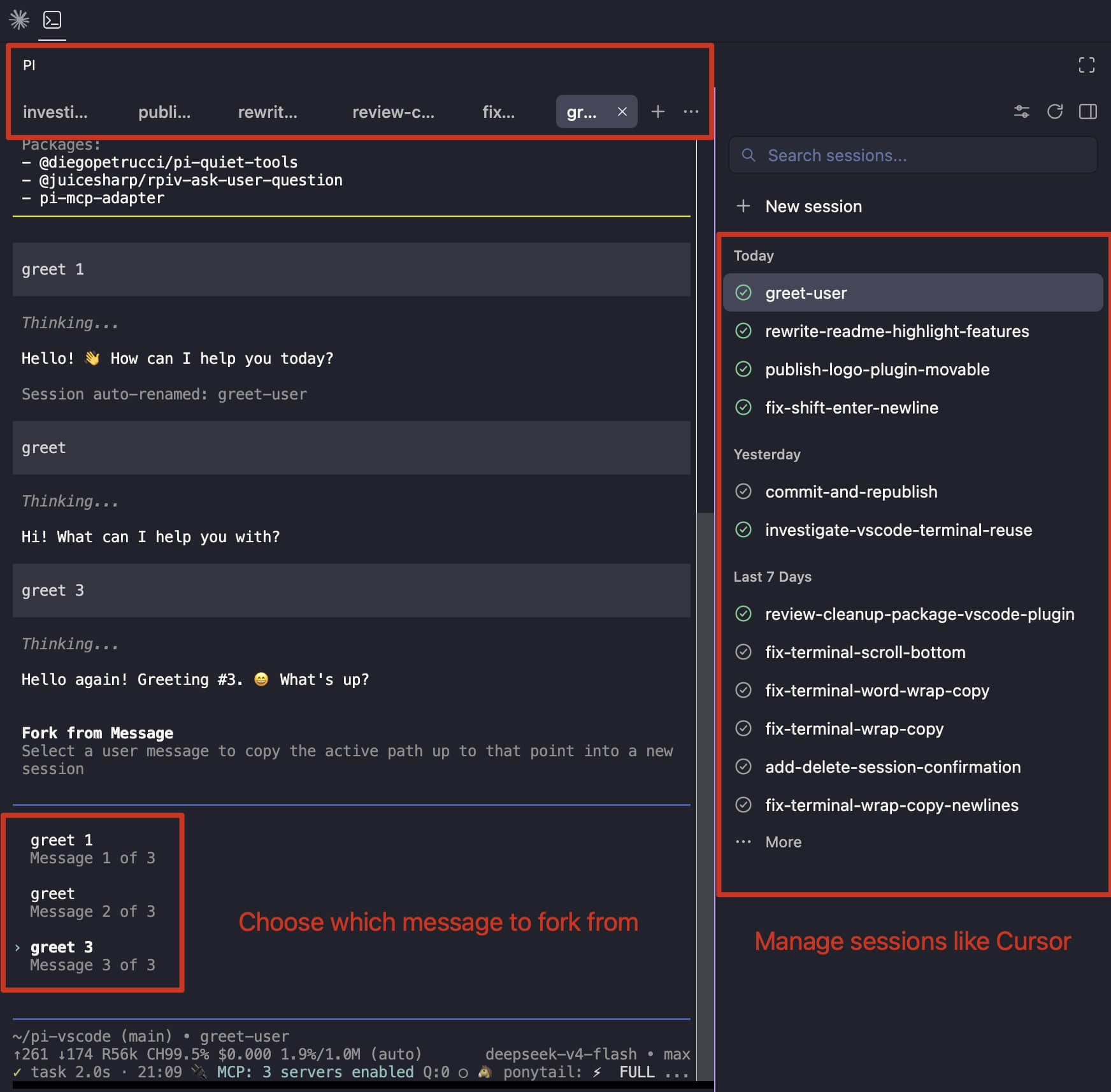
This package requires Pi Coding for VS Code. It is not a standalone terminal command: the VS Code extension creates the terminal, maintains the session list, and provides the local bridge.
Pi Coding for VS Code
Pi Coding provides the VS Code half of the workflow:
- Live Pi status. See whether each session is working, waiting for input, or stopped, similar to Herdr.
- Open files from Pi output. Command-click a path on macOS, or Ctrl-click on Windows and Linux, to open the file in VS Code. Line and column locations are supported.
- Workspace session management. Browse, resume, archive, close, and delete Pi sessions for the current workspace in a session list similar to Cursor.
Install the companion extension from the VS Code Marketplace.
Install
pi install npm:pi-vscode-fork
Start a new Pi session from Pi Coding after installation. Pi loads this package from its own package settings; the VS Code extension does not bundle or inject the command.
Use
- Open a workspace in VS Code and start a Pi session with Pi Coding.
- Send at least one message so Pi has a session transcript.
- Run
/fork-with-vscode. - Select the user message at which the new session should begin.
The new session keeps the conversation before the selected message, opens in VS Code, and receives focus. The selected message is placed in its input box and is not sent automatically. The title is copied from the source session with a sibling-fork prefix, for example (1) Investigate cache miss or (2) Investigate cache miss.