pi-vscode-terminal-notification
Pi extension for VS Code terminal notifications when Pi finishes a turn.
Package details
Install pi-vscode-terminal-notification from npm and Pi will load the resources declared by the package manifest.
$ pi install npm:pi-vscode-terminal-notification- Package
pi-vscode-terminal-notification- Version
0.1.3- Published
- Feb 6, 2026
- Downloads
- 22/mo · 9/wk
- Author
- patricktree
- License
- Apache-2.0
- Types
- extension
- Size
- 136.4 KB
- Dependencies
- 1 dependency · 0 peers
Pi manifest JSON
{
  "extensions": [
    "./pi-extension-vscode-terminal-notify.ts"
  ],
  "image": "https://raw.githubusercontent.com/patricktree/pi-vscode-terminal-notify/main/packages/pi-extension/assets/notification-example.png"
}Security note
Pi packages can execute code and influence agent behavior. Review the source before installing third-party packages.
README
Pi Extension — VS Code Terminal Notify
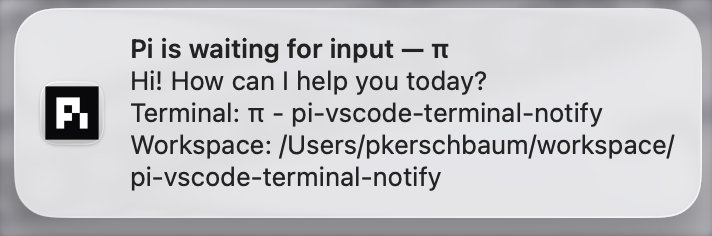
Pi extension that emits terminal notifications when the coding agent finishes a turn. Paired with the VS Code extension, this enables native macOS notifications when Pi is waiting for input.
What it does
On every agent_end event, this extension:
Extracts the last assistant text response from the conversation.
Truncates it to 200 characters.
Writes an OSC 777
notifyescape sequence to stdout:ESC ] 777 ; notify ; <title> ; <body> BEL
The VS Code extension picks up these sequences from the terminal output stream and shows a native macOS notification when the terminal is not focused.
Installation
1. Install Pi package from npm
pi install pi-vscode-terminal-notification
2. Install the VS Code extension
Install the companion VS Code extension to receive and display notifications.
Logging
Logs are written to ~/.pi/pi-vscode-terminal-notify/pi-extension-log.txt.
Attribution
Derived from Armin Ronacher's notify.ts (Apache-2.0).