pi-web-home
Local web UI for the pi coding agent — one directory per workspace, in the shell of deepseek-harness
Package details
Install pi-web-home from npm and Pi will load the resources declared by the package manifest.
$ pi install npm:pi-web-home- Package
pi-web-home- Version
0.9.1- Published
- Sep 30, 2026
- Downloads
- 989/mo · 66/wk
- Author
- chongyaaaa
- License
- MIT
- Types
- extension
- Size
- 3.9 MB
- Dependencies
- 2 dependencies · 0 peers
Pi manifest JSON
{
  "image": "https://raw.githubusercontent.com/woxihejinghao/pi-web/main/docs/images/overview-dark.png",
  "extensions": [
    "./extensions"
  ]
}
Security note
Pi packages can execute code and influence agent behavior. Review the source before installing third-party packages.
README
pi-web-home
English · 简体中文
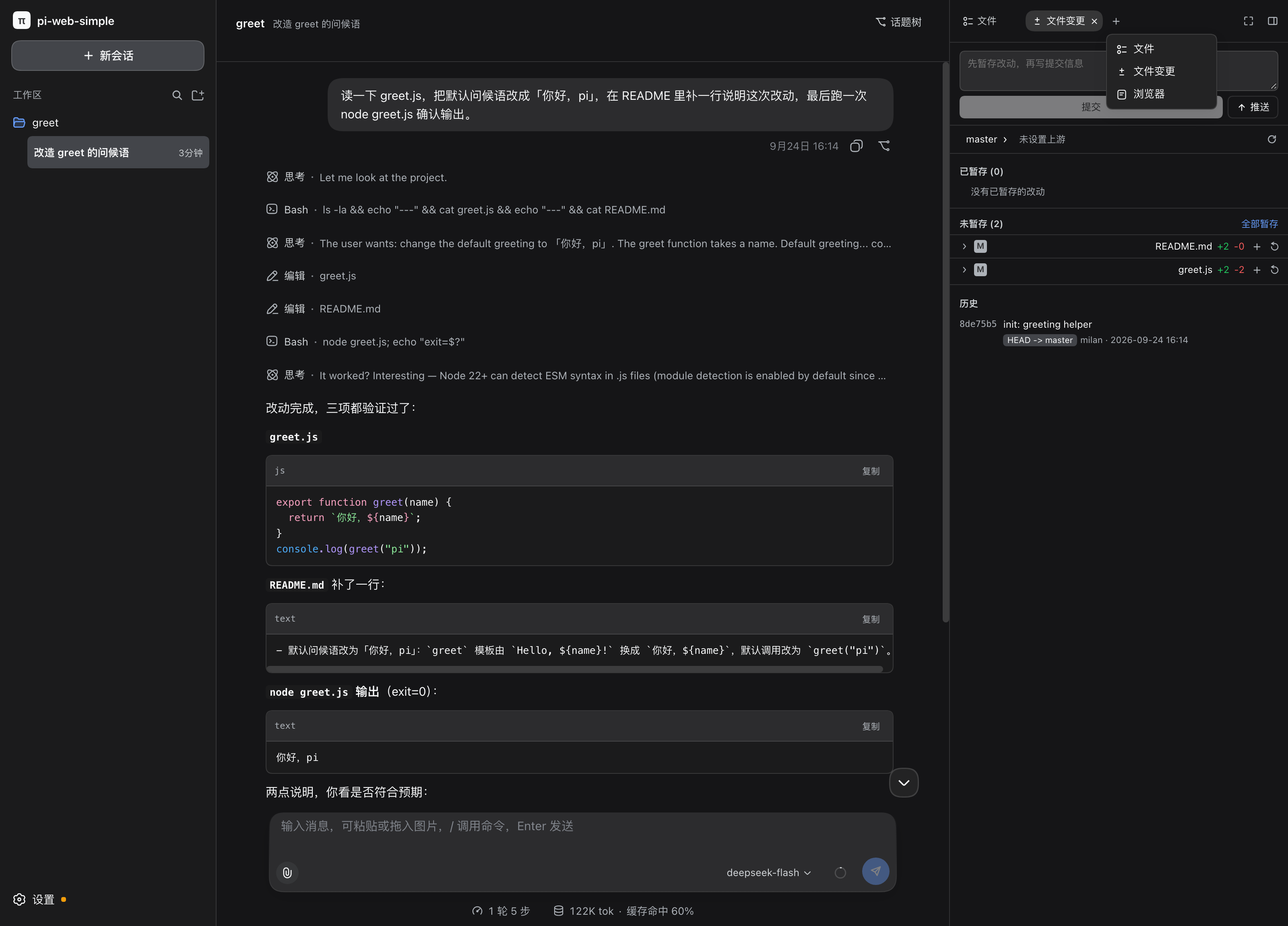
A web UI for the pi coding agent. Open a browser, add a project directory, and chat with pi — from your desktop or any other device on your home LAN. No terminal required.
npx pi-web-home # serves the UI on http://<your-ip>:8319| Dark theme | Light theme |
|---|---|
 |
 |
Features
Projects & sessions
- One directory = one project. Add any local directory through the built-in file picker; each project holds its own sessions.
- Multi-session with rename, delete, and per-session model selection.
- Session fork & topic tree — branch any message into a new line of work without losing the original.
- Slash commands & skills — pi's commands, prompt templates, and skills complete as you type.
Chat
- Live streaming responses with Markdown and syntax highlighting.
- Image input — paste or attach pictures into the prompt.
- Steer & follow-up — redirect a running turn or queue a follow-up without waiting.
- Real-time performance metrics in the status bar: turns, steps, LLM / tool time, TTFT, and output speed (tok/s), DeepSeek-Harness style. Click for the full breakdown.
- Abort any running turn instantly.
Workspace sidebar
- File tree with preview for files in the project directory.
- Git panel — stage, commit, push, restore, and switch branches without leaving the UI. Working-tree changes refresh automatically.
- Todo tracking and embedded browser for quick checks.
Settings
- Providers & models — manage API keys and model entries; fetch the model list from a provider directly.
- MCP servers — add, edit, enable/disable, and restart MCP servers.
- Plugins — view and manage installed pi extensions.
- Appearance — dark / light / system theme, font size, transcript and send behaviour. Bilingual UI (English / 简体中文).
Performance metrics (from pi-turn-metrics)
turns · steps— interaction rounds and agent steps per session.LLM time · Tool time— model inference vs. tool execution, shown separately so a slow turn is easy to attribute.TTFT · tok/s— average time to first token and decode throughput.
Requirements
- Node.js
>= 22.19.0 - A working pi installation with at least one configured provider
- pnpm (for building from source only)
Deployment
Option 1 — run once (no install)
npx pi-web-homeOption 2 — global install
npm install -g pi-web-home
pi-web-home
Option 3 — systemd service (recommended for always-on LAN use)
Build and install from source, then register a service:
git clone https://github.com/wooxi/pi-web-home
cd pi-web-home
pnpm install && pnpm build && npm link/etc/systemd/system/pi-web-home.service:
[Unit]
Description=pi-web-home — pi coding agent web UI (home LAN)
After=network-online.target
Wants=network-online.target

[Service]
Type=simple
Environment=PI_WEB_HOME_OPEN=0
ExecStart=/usr/bin/pi-web-home
Restart=always
RestartSec=3

[Install]
WantedBy=multi-user.target
sudo systemctl daemon-reload
sudo systemctl enable --now pi-web-homeThe service starts on boot, restarts after crashes, and survives terminal closure.
Option 4 — as a pi package
pi install npm:pi-web-homeThen, inside a pi session:
/web            # start the UI (opens the browser)
/web --no-open  # start without opening a browser
/web status     # is it running?
/web stop       # stop it
Configuration
All environment variables are optional:
| Variable | Default | Description |
|---|---|---|
PI_WEB_HOME_PORT |
8319 |
HTTP port |
PI_WEB_HOME_HOST |
0.0.0.0 |
Bind address. Set 127.0.0.1 for loopback only |
PI_WEB_HOME_OPEN |
1 (CLI) |
Set 0 to not open a browser |
PI_WEB_HOME_IDLE_MS |
600000 |
Idle timeout for a session process |
PI_WEB_HOME_MAX_SESSIONS |
8 |
Concurrent session process limit |
PI_WEB_HOME_SSE_BUFFER |
4194304 |
Per-connection SSE buffer cap (bytes) |
PI_WEB_HOME_STATIC_DIR |
auto | Override the built front-end directory; empty = API only |
PI_WEB_HOME_HOME |
~/.pi-web-home |
Data directory root |
PI_WEB_HOME_SESSION_DIR |
pi's default | Force pi sessions under this root |
Approval mode (built-in pi-auto-approval)
Every session ships with a pi-auto-approval gate (vendored under extensions/pi-auto-approval/, Apache-2.0). A switch next to the model picker (labels in Chinese) toggles it:
- 智能审批 (Smart, default): AI clears low-risk actions, asks you in a dialog when unsure
- 全自动 (Full auto): AI-only review — unsure or failed actions are blocked
- 关闭 (Off): no gating, tool calls run directly
Switching applies to running sessions immediately. The same menu picks the classifier model (defaults to the session's model — one extra LLM call per gated step); every decision lands in an audit log.
Getting started
- Open
http://<server-ip>:8319in a browser. - Click + in the left column, pick the project directory in the file picker, and confirm.
- Click + under the project to start a session and send your first prompt.
Security notice
The server has no authentication. It is designed for a trusted home LAN only:
- Do not expose it to the public internet or forward it through a reverse proxy from outside your router.
- If other people share your LAN and you do not trust them, set
PI_WEB_HOME_HOST=127.0.0.1to restrict it to the server machine itself. - Requests from public domains (non-private Host/Origin) are rejected; loopback and private LAN addresses are accepted.
See SECURITY.md and Network & privacy for details.
Known limitations
See Known limitations (Chinese) for the current list.
Development
pnpm install
pnpm dev         # front-end + back-end with live reload
pnpm build       # production build
pnpm typecheck   # typecheck both sides
pnpm test        # all tests (vitest)
License
MIT, see LICENSE.
The UI and parts of the server logic are ported and adapted from deepseek-harness (MIT, Copyright (c) 2026 DeepSeek), pi-web-simple (MIT), and @earendil-works/pi-coding-agent (MIT). THIRD_PARTY_NOTICES.md lists the copied ranges and their sources — that file ships with the source, please keep it.
This is an unofficial project, not affiliated with pi (Earendil Works) or DeepSeek; the π name and marks belong to their respective owners.