pi-web-search-research-llm-gcp
Vertex AI Gemini grounded web search, research, and direct URL extraction tools for Pi, using Google Cloud Agent Platform credentials.
Package details
Install pi-web-search-research-llm-gcp from npm and Pi will load the resources declared by the package manifest.
$ pi install npm:pi-web-search-research-llm-gcp- Package
pi-web-search-research-llm-gcp- Version
0.4.1- Published
- Oct 28, 2026
- Downloads
- 1,280/mo · 1,052/wk
- Author
- nilskluewer
- License
- MIT
- Types
- extension
- Size
- 2.1 MB
- Dependencies
- 0 dependencies · 3 peers
Pi manifest JSON
{
  "image": "https://raw.githubusercontent.com/nilskluewer/pi-web-search-research-llm-gcp/main/assets/screenshots/web-search-tools.png",
  "extensions": [
    "./extensions/vertex-gemini-search.ts"
  ]
}Security note
Pi packages can execute code and influence agent behavior. Review the source before installing third-party packages.
README
pi-web-search-research-llm-gcp
Web search & research tools for the Pi coding agent, backed by Vertex AI Gemini with Google Search grounding and Google Cloud Agent Platform credentials.
This uses Google Cloud credentials, not a Gemini API key.
Setup
- Install:
pi install npm:pi-web-search-research-llm-gcp - Authenticate:
gcloud auth login - In Pi:
/setup-search→ project ID → region → model and thinking level forweb_search→ model and thinking level forweb_research→ model and thinking level forweb_fetch. Saved across sessions; no restart needed. Enable Vertex AI in the project.
Commands
Enter these slash commands in Pi, not in your shell:
| Command | Action | Saved across sessions? |
|---|---|---|
/setup-search |
Set the Google Cloud project, region, and a separate model and thinking level for each tool. Requires interactive Pi. | Yes |
/search-pricing |
Show the pricing preference and whether Flex is unavailable for this session. | No |
/search-pricing status |
Same as /search-pricing. |
No |
/search-thinking or /search-thinking status |
Show the thinking level for all three tools. | — |
/search-thinking <tool> <level> |
Set thinking for web_search, web_research, or web_fetch. |
Yes |
/search-pricing flex |
Prefer Flex, with standard-tier fallback. Clear the session's previous Flex-unavailable state. | No |
/search-pricing standard |
Use standard pricing without trying Flex. | No |
Setup flow
/setup-search asks for:
- Google Cloud project ID.
- Vertex AI region (default:
eu). - Model for
web_search. - Thinking level for
web_search. - Model for
web_research. - Thinking level for
web_research. - Model for
web_fetch. - Thinking level for
web_fetch.
Leave the project or region blank to keep its current value. Select Keep … to leave a tool's model or thinking level unchanged. The thinking selector appears even when you keep the current model. Levels are minimal, low, medium, high, and default (let the model decide). Supported levels depend on the selected model. The command lists Gemini text models and checks access when you select a different model.
Project and region are saved after both inputs are accepted. Model and thinking changes are saved together only after all six tool choices are complete. If you cancel a selection or a model check fails, the project and region remain saved, but model and thinking changes from that run are not saved. Changes take effect without a restart.
Tools
These are tools the agent calls, not slash commands. Ask Pi to search, research, or read a URL; the agent chooses the tool.
Registers three tools the model can call:
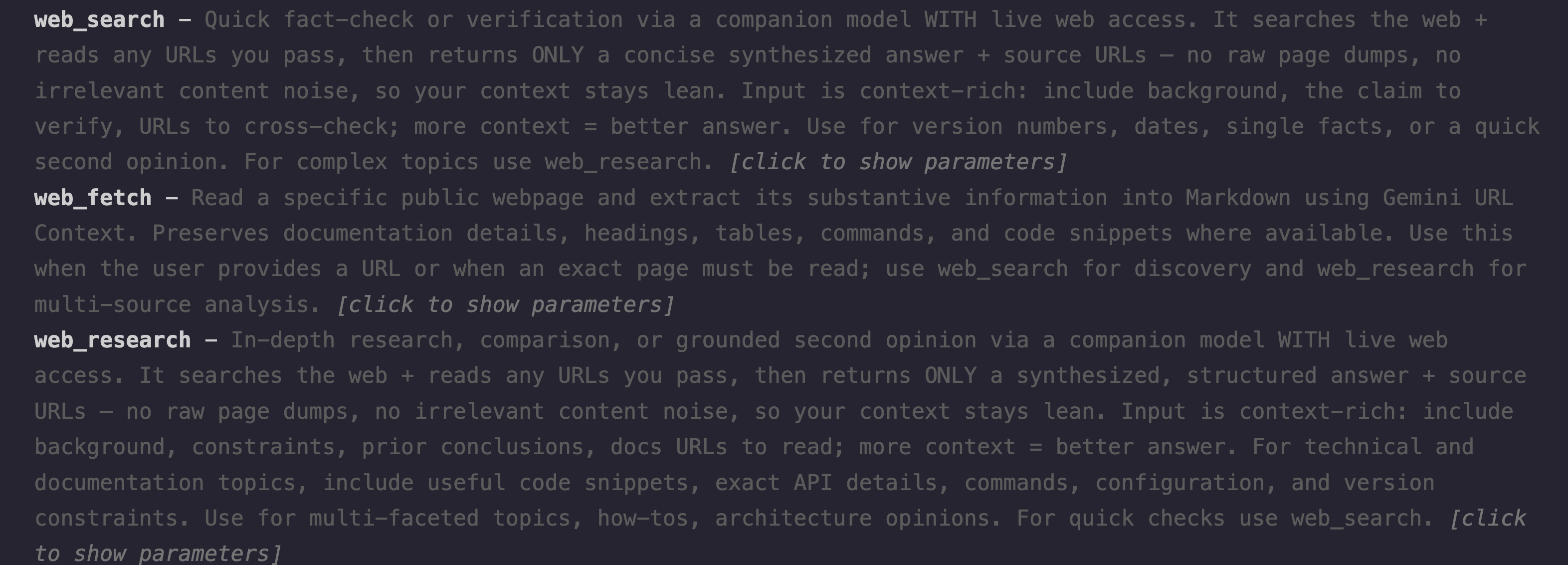
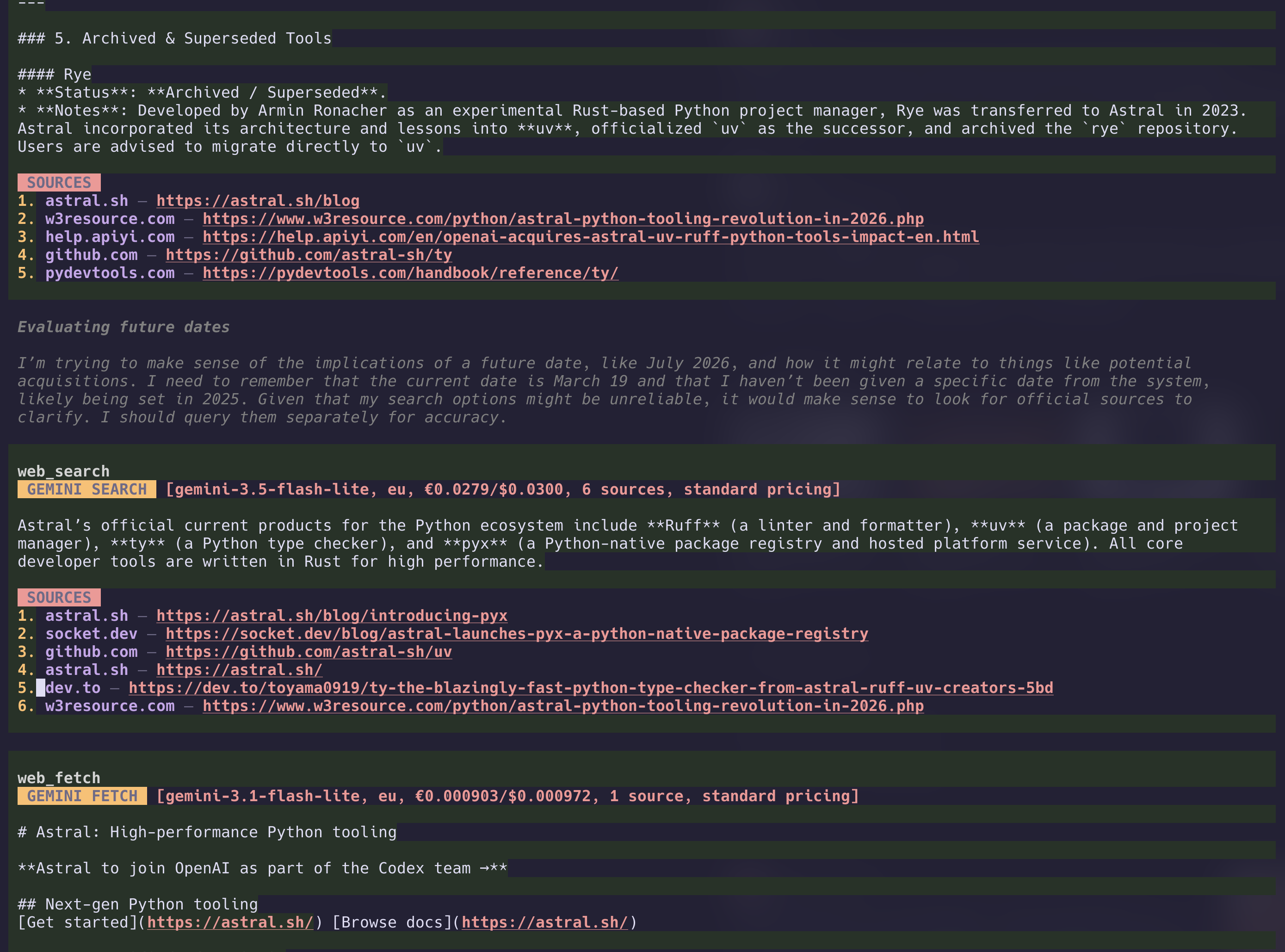
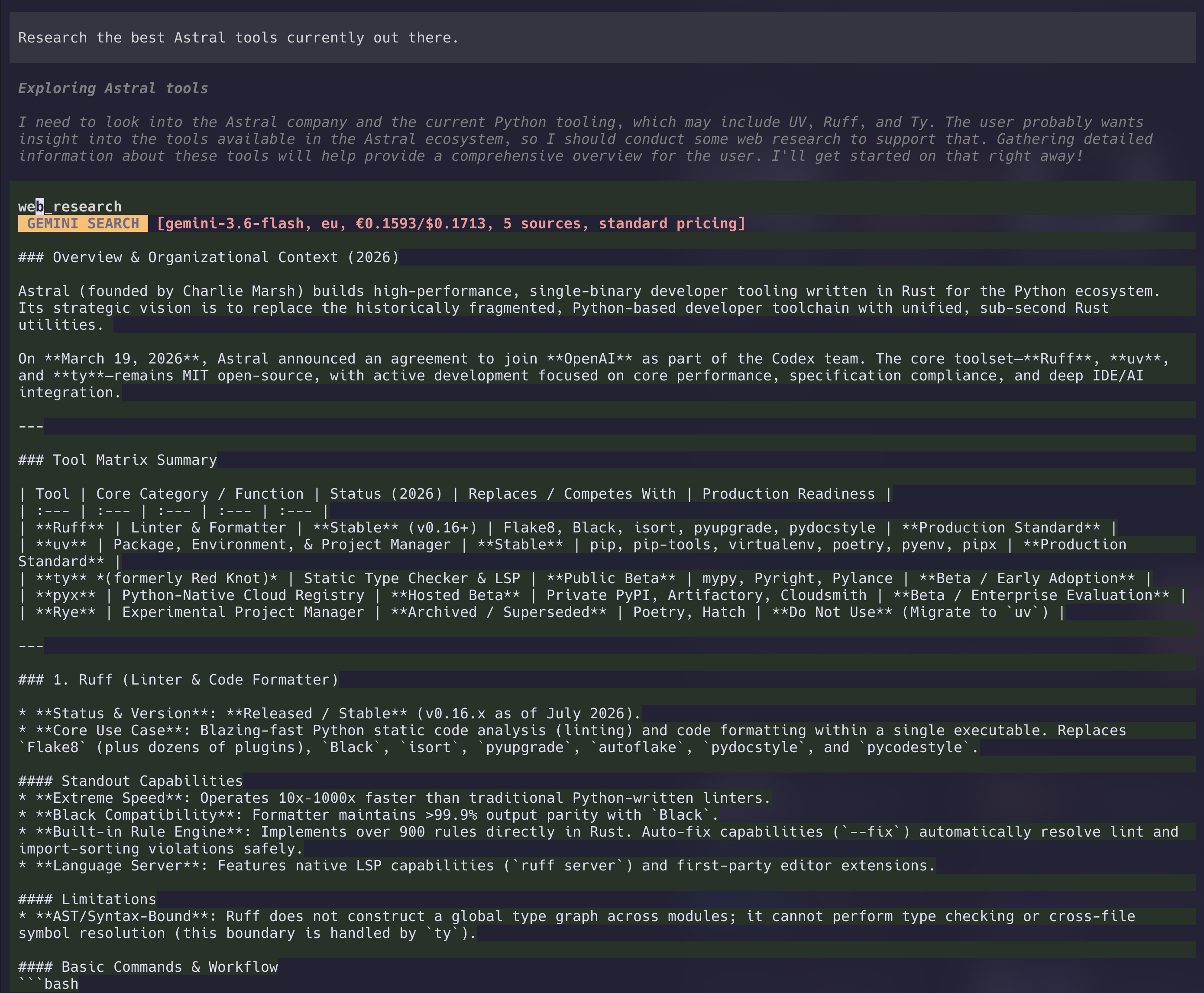
web_search— quick fact-check / verification. Returns a concise synthesized answer + source URLs.web_research— in-depth research on complex topics. Returns a structured answer with documentation details, code snippets, and source URLs.web_fetch— reads one public webpage through Geminiurl_contextand extracts its substantive content into Markdown.
The search and research tools:
- Ground answers with Google Search.
- Can read specific URLs passed in the query via Gemini
url_context. - Use a separate, adjustable thinking level for each tool (MEDIUM by default for search and research; LOW for fetch).
- Resolve Gemini
vertexaisearch.cloud.google.comredirect links to clean destination URLs. - Render source URLs as OSC-8 terminal hyperlinks in the Pi TUI when supported by your terminal.
- Prefix results with a compact, brutalist high-contrast Vertex AI provenance/cost summary in Pi TUI, including the actual
flex pricingorstandard pricingtier used for that call.
web_fetch uses URL Context only, without Google Search. It asks Gemini to:
Extract all information from this webpage into Markdown.The result is model-generated Markdown, not a byte-for-byte copy of the original webpage. Supply an absolute public HTTP(S) URL of at most 2048 characters. URLs with embedded credentials, localhost URLs, and private or reserved IP addresses are rejected. This tool does not use your browser login to read private pages.
Preview
Configuration
Settings are saved in vertex-gemini-search.json in Pi's agent directory. Saved project, region, and model values take precedence over environment variables. Use /setup-search again to change them.
For environment-only setup, set these variables before starting Pi:
| Variable | Purpose | Default |
|---|---|---|
VERTEX_PROJECT_ID |
Google Cloud project with Vertex AI enabled. | Required unless saved by setup |
VERTEX_REGION |
Vertex AI location. | eu |
GEMINI_MODEL_SHORT |
Model for web_search. |
gemini-3.8-flash |
GEMINI_MODEL_LONG |
Model for web_research. |
gemini-4-argon |
GEMINI_MODEL_FETCH |
Model for web_fetch. |
gemini-3.5-flash-lite |
VERTEX_ACCESS_TOKEN |
Explicit access token; overrides gcloud authentication. | Unset |
VERTEX_IMPERSONATE_SERVICE_ACCOUNT |
Service account email for gcloud token impersonation. | Unset |
Thinking levels
Use /setup-search to choose a model and thinking level independently for all three tools. You can also use these shortcuts:
/search-thinking web_search medium
/search-thinking web_research medium
/search-thinking web_fetch low
/search-thinking status
Accepted levels: minimal, low, medium, high, and default. default omits thinkingConfig from the Vertex request and lets the model choose; it does not disable thinking.
Defaults in version 0.4.0:
| Tool | Model | Thinking |
|---|---|---|
web_search |
gemini-3.8-flash |
medium |
web_research |
gemini-4-argon |
medium |
web_fetch |
gemini-3.5-flash-lite |
low |
Saved settings take precedence; upgrading does not overwrite your model or thinking choices. Settings are saved in vertex-gemini-search.json under thinking.short, thinking.long, and thinking.fetch. Changes apply to the next tool call without a restart and remain saved across sessions. Each tool result includes its configured thinkingLevel in the result details.
Supported levels depend on the selected model. Vertex rejects unsupported combinations; use default to omit the override. Lower thinking can reduce latency, but does not limit the time spent on web searches or page retrieval.
Authentication
Authentication follows this order:
- If
VERTEX_ACCESS_TOKENis set, use that token. This bypasses gcloud and the service-account environment variable. - Otherwise, run
gcloud auth print-access-token. IfVERTEX_IMPERSONATE_SERVICE_ACCOUNTis set, add--impersonate-service-accountto that command.
Normal user account (including an admin account):
unset VERTEX_ACCESS_TOKEN VERTEX_IMPERSONATE_SERVICE_ACCOUNT
gcloud auth login
The extension uses the active gcloud account. If you previously configured gcloud's auth/impersonate_service_account property, unset it with gcloud config unset auth/impersonate_service_account to use the user directly. The user needs access to Vertex AI and permission to consume services on the selected project. An admin title alone does not establish access to that project.
Service-account impersonation:
unset VERTEX_ACCESS_TOKEN
gcloud auth login
export VERTEX_IMPERSONATE_SERVICE_ACCOUNT="your-service-account@your-project.iam.gserviceaccount.com"
Your logged-in user needs roles/iam.serviceAccountTokenCreator on the service account. The service account itself needs Vertex AI access and serviceusage.services.use on the selected project; your user's admin permissions do not carry over to the service account. Common predefined roles are roles/aiplatform.user and roles/serviceusage.serviceUsageConsumer. The IAM Service Account Credentials API must be enabled for impersonation.
Both paths require Vertex AI to be enabled, billing to be configured, and the selected models to be available in your project and region. Organization restrictions can still block access. This extension uses gcloud CLI credentials, not gcloud auth application-default login.
Set or unset environment variables before starting Pi. A running Pi process does not inherit later changes from your shell.
Cost estimate configuration
Each result includes a compact estimated cost summary, for example:
◆ Gemini Search [gemini-3.5-flash-lite, eu, €0.0131/$0.0141, 2 sources, standard pricing]Defaults:
GEMINI_SEARCH_GROUNDING_USD_PER_1000=14USD_TO_EUR=0.93VERTEX_FLEX_TOKEN_DISCOUNT=0.5
The estimate uses response token counts from Vertex AI and approximate list token rates. For Gemini 3.7 Flash, the estimate uses the introductory rate of $0.75 per 1M input tokens and $3.75 per 1M output tokens through December 31, 2026. Regional endpoint pricing may differ. URL Context results report token costs, but the estimate does not add a Google Search grounding charge because web_fetch does not use Google Search.
Flex is preferred by default via the Vertex AI Flex PayGo headers.
If the project or region does not support Flex, the extension falls back to the standard tier and reports standard pricing in that result.
The pricing preference applies to all three tools. Each Pi session starts with flex. Use /search-pricing standard to bypass Flex, or /search-pricing flex to try Flex again after a fallback. These changes do not persist across sessions.
Migration from the old package
@nilskluewer/pi-vertex-gemini-search is deprecated. Use pi-web-search-research-llm-gcp instead. Remove the old package before installing the replacement so both extensions do not register the same tools and commands:
pi remove npm:@nilskluewer/pi-vertex-gemini-search
pi install npm:pi-web-search-research-llm-gcp
Both packages use the same vertex-gemini-search.json settings file.
License
MIT