pi-web-ui
Web chat interface for the pi coding agent, powered by the pi SDK (@earendil-works/pi-coding-agent) — one-command run, Docker/systemd/launchd deployable
Package details
Install pi-web-ui from npm and Pi will load the resources declared by the package manifest.
$ pi install npm:pi-web-ui- Package
pi-web-ui- Version
0.26.0- Published
- Aug 17, 2026
- Downloads
- 11.6K/mo · 3,304/wk
- Author
- xingshuyin
- License
- MIT
- Types
- extension
- Size
- 1.8 MB
- Dependencies
- 14 dependencies · 0 peers
Pi manifest JSON
{
  "extensions": [
    "./extensions"
  ]
}
Security note
Pi packages can execute code and influence agent behavior. Review the source before installing third-party packages.
README
pi-web-ui
English | 简体中文
A web chat interface for the pi coding agent — the agent runs in-process via the pi SDK and streams events to the browser over WebSocket. Chat with thinking blocks and tool calls, attach files, ask about images, use a built-in terminal, manage models, tweak the system prompt, toggle skills and extensions on/off, and save/apply settings presets — all from a settings panel. Requires Node.js ≥ 22.19 and a configured pi install.
Features
Chat
- Streaming agent chat over WebSocket — the pi SDK runs in-process; events are pushed as snapshots (60 ms throttled) and the browser renders them.
- Thinking blocks, tool-call cards and bash outputs with live status (running → finished · waiting for the model · duration).
- 补充 (steer) — send a follow-up while the agent is replying; it is queued and injected as soon as the current turn's tool calls settle (the "Interrupt" equivalent of the pi CLI).
- Slash commands —
/opens a command picker (built-in / extension / template / skill); built-ins include/new /model /compact /cwd /thinking /resume, plus/help(command list) and/copy(copy last reply). - Multiple conversations per project — each conversation gets its own agent runtime and keeps running in the background after you switch away; the "Running conversations" list shows stream progress and lets you switch back.
- Edit & re-ask — fork any past question into a new branch and re-prompt; the original conversation stays untouched.
- Long threads auto-collapse messages older than 30 into lazy summary rows (click to expand).
- Question navigation — a floating rail plus per-question tags to jump between questions.
Files, images & attachments
- Three attachment modes:
inline(≤12 KB),reference(path only),lines(selected ranges) — over-limit ones degrade automatically. - Paste / drag-drop / upload images — resized client-side and sent as image content when the model supports vision (warning otherwise).
- Vision bridge — when the current model is text-only, images are transcribed into text evidence by an auto-discovered vision model (cached per batch; model & on/off configurable in Settings).
- Attach arbitrary files without a workspace path — stored in a global uploads dir, inlined when small, referenced by absolute path otherwise.
- File preview — line numbers, click/drag/Shift selection (add to chat as
lines), GBK fallback decoding, binary hex view, media preview over HTTP with Range support, and a download button. - Live file tree — the server watches the listed directory (fs.watch) and re-lists on change; oversized directories show a truncation warning.
Terminal & Git
- Built-in terminal (xterm.js + node-pty) with per-client PTY management; Windows auto-selects Git Bash (busybox fallback).
- Source control (Git) panel — status / branch / diff / untracked files via a hidden query terminal; commit, switch branch, push and pull run in the visible terminal and auto-switch to the terminal view.
Models & settings
- Model management — edit
models.jsonin the UI and set per-provider API keys (keys/headers never leave the server). - Thinking level per model (only the levels the model actually supports are shown).
- First-run setup wizard.
- Settings panel — system prompt (append or replace), toggle skills/extensions on/off with immediate effect, save/apply/delete settings presets, and vision-bridge model & switch.
Goal mode
- Goal bar — set a target with a review model, max rounds and a lock switch.
- Goal wizard ("AI 提炼") — turns a raw request into a concrete goal through a guided questionnaire.
- Automatic review loop — after each turn an independent review session checks the goal against the final text and
git diff HEAD; on fail the feedback is injected as steer until it passes (or the round cap is hit).
Background tasks
- Background-task panel — servers launched by the agent are detected via port snapshots and listed (port/pid/name); stop one or kill all.
- Tool watchdog — a tool call running over 20 minutes is aborted automatically.
- Stop bash command only — abort a running bash tool without killing the conversation.
Safety & operations
- Loopback-only by default; set
PI_WEB_HOST=0.0.0.0for LAN / containers. - WebSocket Origin/Host same-authority check — cross-origin pages are rejected (403);
PI_WEB_ALLOW_ORIGINSwhitelist for reverse proxies. - Quiesce drain mode via a local control socket (
server status|quiesce|unquiesce). - Credentials stay server-side — provider headers are never sent to the browser.
- Sound alerts, Chinese/English UI, and a recent-projects list (click to switch workspace).
Deploy & update
- Foreground, global npm install, Docker (docker-compose), macOS launchd, Linux systemd, Windows Task Scheduler, and a desktop shortcut (
server shortcut). - In-app self-update — checks the npm registry, installs and auto-restarts the service.
Screenshots
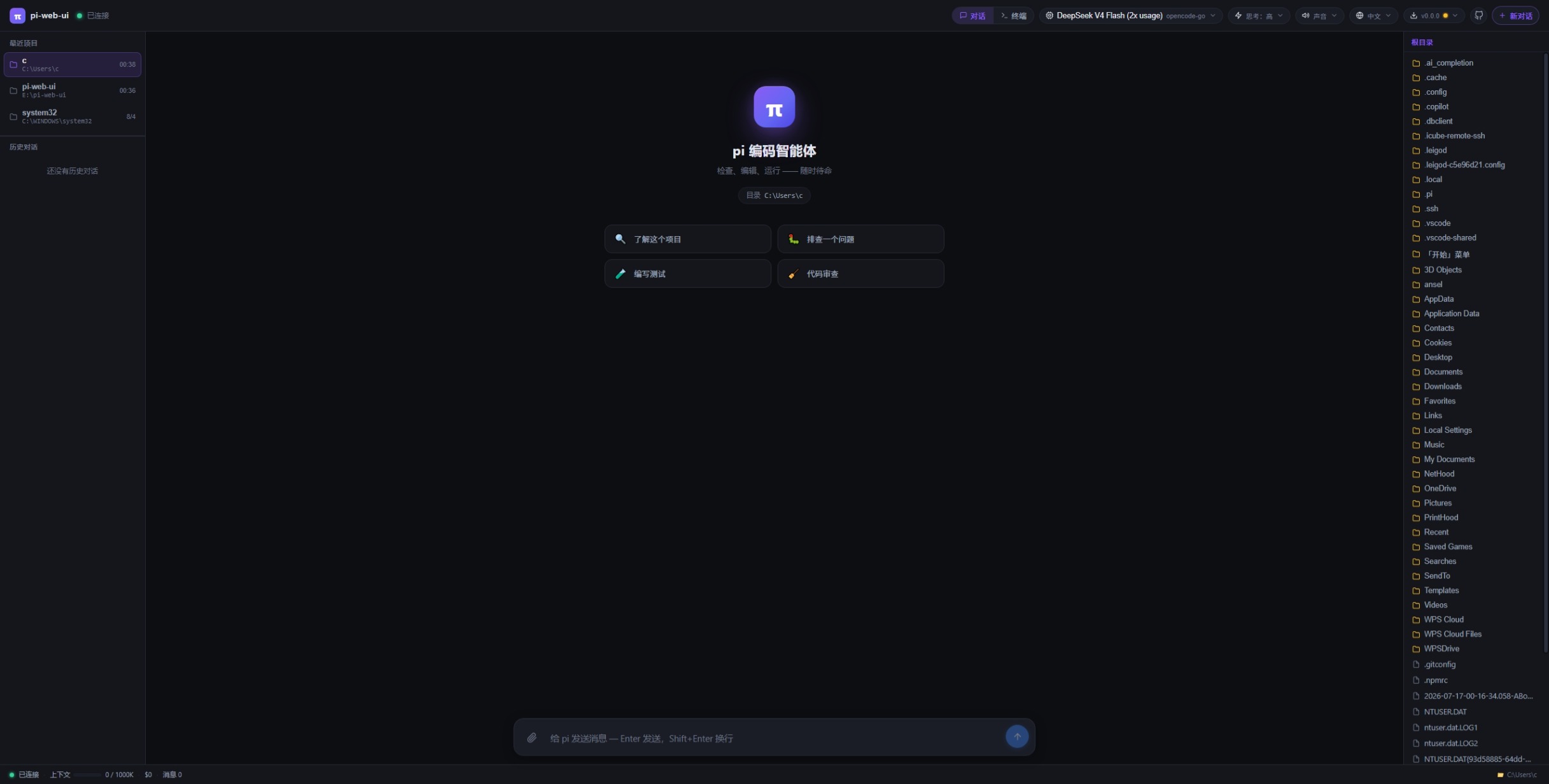
Install
npm i -g pi-web-ui            # global install (recommended)
npx pi-web-ui                 # or run without installing (latest, starts on :8787)
npm i -g .                    # or install the local checkout
npm ≥ 12? npm 12+ blocks dependency install scripts by default (you'll see
npm warn install-scripts … blocked). node-pty is a native module, so allow its
script (the other two packages it lists are harmless no-ops — allowing them just
silences the warning):
npm i -g --allow-scripts=node-pty,@google/genai,protobufjs pi-web-ui@latest
Start
pi-web-ui                                           # foreground, http://localhost:8787
PORT=9000 PI_WEB_CWD=/path/to/project pi-web-ui     # custom port / workspace
Stop
- Foreground: press
Ctrl+Cin the terminal running it. - As a service:
pi-web-ui server stop(stops the instance; auto-start stays untilserver uninstall).
Update
npm i -g pi-web-ui@latest     # upgrade to the latest published version
pi-web-ui server restart      # restart the service to apply it (foreground: restart manually)
Uninstall
npm uninstall -g pi-web-ui
Uninstalling does not delete your chats — session data lives in
<cwd>/.pi-web (or PI_WEB_DATA_DIR) and survives uninstall/upgrade.
Run as a system service (auto-start on boot)
pi-web-ui server install --port 9000 --cwd /path/to/project   # install + start
pi-web-ui server status                     # running? auto-start?
pi-web-ui server restart                    # restart (applies config/version changes)
pi-web-ui server stop                       # stop (auto-start stays)
pi-web-ui server start                      # start again
pi-web-ui server uninstall                  # remove the service entirely
pi-web-ui server shortcut                   # desktop one-click launch icon
pi-web-ui server quiesce                    # drain: refuse NEW chats/messages, let running ones finish
pi-web-ui server unquiesce                  # reopen admission
server status also shows live stats via a local control socket (version,
PID, quiesce state, connected browsers, running conversations) — the same
socket drives quiesce/unquiesce.
Security
Loopback-only by default — the server binds
127.0.0.1and is not reachable from the network unless you explicitly setPI_WEB_HOST=0.0.0.0(e.g. LAN access, Docker port mapping — the compose file sets it for you).WebSocket origin check — browser pages connecting to
/wsmust present anOriginwhose hostname and port match the requestHost; cross-origin pages are rejected with 403. Non-browser clients (noOrigin) are unaffected. AddPI_WEB_ALLOW_ORIGINS=http://your-host:portfor reverse-proxy setups.Quiesce —
server quiescerefuses new prompts/forks/session resumes until youserver unquiesce; in-flight runs finish cleanly (useful before upgrades/backups).Credentials stay server-side — provider
headers(which may carryAuthorization/ API keys) are never sent to the browser; the model management UI edits everything else and the server preserves the headers.macOS → launchd agent (no sudo), logs to
/tmp/pi-web-ui.log/.errLinux → systemd unit (
systemctl enable --now), logs viajournalctl -u pi-web-ui -fWindows → Task Scheduler logon task (hidden PowerShell window, no black console)
Options: --port (default 8787), --cwd (workspace), --data-dir (sessions),
--name (custom service name). Rerunning server install with new options
regenerates the config and restarts the service — that's how you change its
port/cwd.
License
MIT