pi-web-ui
Web chat interface for the pi coding agent, powered by the pi SDK (@earendil-works/pi-coding-agent) — one-command run, Docker/systemd/launchd deployable
Package details
Install pi-web-ui from npm and Pi will load the resources declared by the package manifest.
$ pi install npm:pi-web-ui- Package
pi-web-ui- Version
0.81.0- Published
- Sep 12, 2026
- Downloads
- 24.3K/mo · 6,441/wk
- Author
- xingshuyin
- License
- MIT
- Types
- extension
- Size
- 4.9 MB
- Dependencies
- 22 dependencies · 0 peers
Pi manifest JSON
{
  "image": "https://raw.githubusercontent.com/xing-shuyin/pi-web-ui/main/assets/chat-prompts.jpeg",
  "extensions": [
    "./extensions"
  ]
}Security note
Pi packages can execute code and influence agent behavior. Review the source before installing third-party packages.
README
💬 pi-web-ui
English | 简体中文
The polished browser cockpit for the pi coding agent.
Stream conversations, inspect tool calls, manage files, and run your workspace — all from one place.
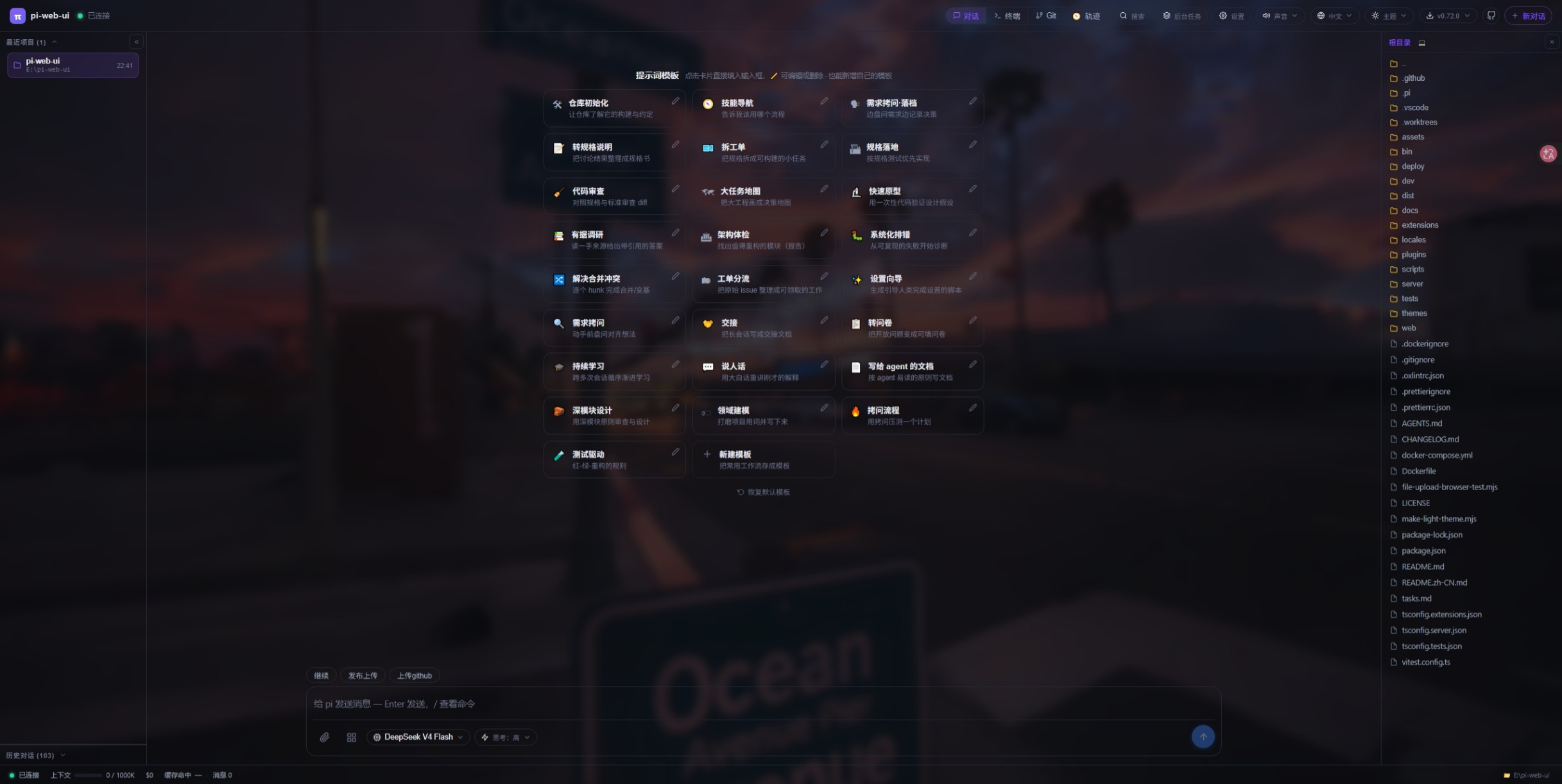
A web chat interface for the pi coding agent. The agent runs in-process via the pi SDK and streams events to the browser over WebSocket: thinking blocks, tool calls, file trees, a built-in terminal, model management, theme switching, and a full settings panel — tuned for daily development.
Requirements — Node.js ≥ 22.19 and a configured pi install.
More from the author
Building with DSH?
dsh-ui-tools is the author's companion project for building and extending UI tools in the DSH ecosystem.
✨ Highlights
| 💬 Chat that works like you do | 🖼️ Files & images | 🧩 Extensible by design | 🔒 Private by default |
|---|---|---|---|
| Streaming replies, steer & follow-up queueing, slash commands, multiple conversations per project, edit-&-re-ask. | Attach files, paste images, ask about pictures (vision bridge), preview anything with GBK fallback. | Drop-in UI plugins (extra top-bar tabs + agent tools) and standalone themes — no rebuild, no restart. | Loopback-only, credential-safe: provider keys & headers never reach the browser. |
📚 Table of Contents
- 🚀 Features
- ⌨️ Keyboard shortcuts
- 🖼️ Screenshots
- 📦 Install
- ⚡ Quick start
- 🖥️ System service
- 🐳 Docker
- 🧩 Plugins
- 🎨 Themes
- 🔧 Tuning & advanced environment variables
- 🔒 Security
- 🪪 Code signing policy
- 🔐 Privacy
- 🌐 Reverse proxy (nginx)
- 🤝 Contribute
- 📄 License
Features
💬 Chat
- Streaming agent chat over WebSocket — the pi SDK runs in-process; events are pushed as snapshots (60 ms throttled) and the browser renders them.
- Thinking blocks, tool-call cards and bash outputs with live status (running → finished · waiting for the model · duration).
- Steer (follow-up queueing) — send a follow-up while the agent is replying; it is queued and injected as soon as the current turn's tool calls settle (the "Interrupt" equivalent of the pi CLI).
- Slash commands —
/opens a command picker (built-in / extension / template / skill); built-ins include/new /model /compact /cwd /thinking /resume, plus/help(command list) and/copy(copy last reply)./newtakes an optional first prompt (/new fix the failing test) and sends it as the new chat's first message. - Multiple conversations per project — each conversation gets its own agent runtime and keeps running in the background after you switch away; the "Running conversations" list shows stream progress and lets you switch back.
- Edit & re-ask — fork any past question into a new branch and re-prompt; the original conversation stays untouched.
- Long threads auto-collapse messages older than 30 into lazy summary rows (click to expand).
- Question navigation — a floating rail plus per-question tags to jump between questions.
- Prompt templates — the empty chat state shows a one-click template gallery (repo init, code review, research, merge conflicts…); click a card to fill the input, or save the current draft as your own template.
- Auto-retry on model errors — configurable retry count per conversation (default 6,
0= fail immediately); when retries run out the failed turn is marked red with a one-click Retry button. - Queue control — a queued steer/follow-up bubble can be dropped (✕) or recalled (↩), which pulls its text back into the composer (appended on a new line if you already typed something — it never overwrites your draft).
- Message anatomy — each message header shows the role, the model that produced it and a local
HH:MMtimestamp, and every text block has a copy button. Attachments render as their own collapsible card with a mode chip (lines/ref/bridged/inline n lines), a copy button and a vision-bridge “transcribed” note; a skill invocation becomes a skill card with the fullSKILL.md, next to the arguments you typed. - Compaction, visible — compacted context shows up as a card (“compacted from N tokens”) that auto-expands and jumps when it arrives, and a live banner counts up (“compacting context · 12s”) naming the trigger (manual / threshold / overflow).
🗂️ Projects & sessions
- Switching projects — the workspace root (what the agent reads/writes and where the terminal starts) changes without a restart:
- Bottom-right path in the status bar — click
📁 <path>to open the folder picker: type a path (Tabcompletes),↑goes up one level,💻jumps to the computer root so you can change drives, click a folder to enter it and hit Select — or Select this folder to take the folder you are browsing. + New folder creates a directory on the spot;Escor a click outside closes it. - Right panel file tree — right-click any folder → Open as project (the same menu has Upload files to this folder).
- Left panel → Recent projects, or
/cwd <path>from the input box (/cwdalone reports the current directory). - The startup default comes from
--cwd <dir>/PI_WEB_CWD.
- Bottom-right path in the status bar — click
- Conversations run in parallel — each conversation has its own agent runtime and keeps streaming after you switch away; up to 8 can be open per project (subagents don't count).
- Running list — grouped by project (the current one first), with subagent children indented under their parent, badges for subagent / error (the tooltip carries the reason) / streaming, inline rename (✎) and a scoped ✕ that offers “dismiss finished subagents only” or “force-dismiss everything” (a second confirmation while a run is streaming). Right-clicking a row scopes the menu to that conversation's subtree.
- History — sessions are read from
<agentDir>/sessions/--<cwd>--/, i.e. the same transcripts the pi CLI/TUI writes, so the browser and a terminalpisession share one list per project. Rename (✎ — the samesession_infoentry pi's/namewrites) and two-step delete. - Recent projects — stored per browser, merged with every directory that has transcripts, minus the ones you removed (tombstones) and the ones that no longer exist, sorted by last use (20 shown, 30 stored).
- Coming back — reconnecting restores the last workspace the browser used (with a notice), the tab title can show the project folder, and each project remembers its own model + active provider key for new chats (a chat that already has messages keeps its own model).
- If the server was shut down mid-answer, the next attach reports it once (“last run was interrupted”) instead of leaving a silent gap in the history.
🔎 Search & navigation
- Global search (Ctrl/Cmd+K) — one box, three sources: conversation transcripts (full text, assistant output included; up to 50 hits, each with a jump anchor), recent projects, and workspace file names (bounded walk: 50 results / 20 000 entries / 4 s / depth 24 — it tells you when it truncated instead of hanging). ↑/↓ then Enter to open, Esc to close. Clicking a conversation restores it and jumps to the matching message, a project switches the workspace and re-runs the search, a file opens its preview.
- In-conversation search (Ctrl/Cmd+F) — searches the text actually rendered in the open chat (case-insensitive, highlighted through the CSS Custom Highlight API), Enter / Shift+Enter to step through hits, Esc to close. Messages collapsed by the summary view are indexed from their message data, so long threads stay searchable without force-expanding everything — only the message you land on is expanded.
- Long-thread ergonomics — messages older than 30 collapse into one-line summary rows (with thinking / tool / bash / image counts and a 90-character preview), the question rail lists every question you asked, a “back to bottom” chip appears once you scroll up, the list follows streaming output only while you are pinned to the bottom (a real scroll-up is respected), and messages far outside the viewport are swapped for equal-height placeholders.
🤖 Subagents & templates
- First-party subagents — spawn independent background conversations for parallel exploration / implementation / review (
subagent_spawn, with optionalmodeloverride or a template's model); collect results without polling viasubagent_wait_all(blocks until every subagent finishes, then summarizes results/errors). Manage them like a chat right in the left panel: view live output, inject follow-ups (steer), abort, dismiss — failed runs surface a red dot in the running list and an error notice in the main chat. In-memory sessions — they never touch the history / resume list, and can be nested. - Subagent templates — configure reusable presets in Settings → Subagent templates: a role system prompt (append or replace), skills & extensions whitelists, and an optional per-template model. The AI picks one via the
subagent_templatestool andsubagent_spawn(template="…"), or spawns without one (default = follow the main conversation's current model, or the global default subagent model set in the same panel). Disabled templates stay in the panel for re-enabling but become invisible to the AI tools (can't be listed or picked). Templates are shared globally across browser clients (<dataDir>/subagent-templates.json). Six built-in templates (review / implement / research / scout / audit / delegate, adapted from the pi-subagents community projects) seed the list on first run — marked 「Built-in」, editable and deletable like any other.
🖼️ Files, images & attachments
- Three attachment modes:
inline(≤12 KB),reference(path only),lines(selected ranges) — over-limit ones degrade automatically. - Paste / drag-drop / upload images — resized client-side and sent as image content when the model supports vision (warning otherwise).
- Vision bridge — when the current model is text-only, images are transcribed into text evidence by an auto-discovered vision model (cached per batch; model & on/off configurable in Settings).
- Attach arbitrary files without a workspace path — stored in a global uploads dir, inlined when small, referenced by absolute path otherwise.
- File preview — line numbers, click/drag/Shift selection (add to chat as
lines), GBK fallback decoding, binary hex view, media preview over HTTP with Range support, and a download button. - Live file tree — the server watches the listed directory (
fs.watch) and re-lists on change; oversized directories show a truncation warning. - Browse anywhere — the tree climbs past the workspace root to a 💻 “This computer” level that lists every mounted drive (
/on POSIX), the breadcrumb jumps straight to any level,..goes up, and a listing that vanished or lost its permissions degrades into an empty list plus a warning instead of an error page. - Row actions — hover a file for download / attach inline (+) / attach as reference (🔗) / copy name / copy path; folders offer reference-attach, copy name and copy path (copying falls back to a hidden textarea on plain-HTTP origins where the clipboard API is unavailable).
- Upload from the tree — right-click a folder row → Upload files to this folder (that folder's menu also offers Open as project), or right-click a file row / the panel body → Upload files to current directory (the directory you are browsing). Dragging OS files onto a folder row uploads into exactly that folder (the row highlights), dropping them on the panel uploads into the browsed directory, and dragging a folder warns that folders aren't supported instead of doing nothing. Uploads accept one file up to 100 MB, refuse empty files, strip the name to a basename with Windows-illegal characters replaced (200-char clamp), create the target directory if needed, and refresh the listing afterwards even if you are browsing somewhere else.
- Listings that stay honest — on Windows/macOS a recursive watcher on the workspace root refreshes the tree for changes in any subdirectory (400 ms debounce), with a 10 s polling fallback — announced once per workspace — on network drives where watching isn't supported; POSIX hides build noise (
node_modules,.git,dist,.venv, …) and caps at 500 entries, Windows hides only dependency/VCS/data directories and caps at 2000, and both say when they truncated. - The preview is an editor too — text files can be edited in place and saved with Ctrl/Cmd+S (2 MB cap, dirty-guarded; closing with unsaved changes asks first), Markdown toggles between rendered and source, HTML renders in a sandboxed iframe through a directory-mapped URL so relative CSS/images resolve (with a per-file “enable scripts” opt-in that never grants same-origin), images and videos stream over HTTP Range, binaries get a hex dump, and text gets line numbers, selection by click/drag/Shift (add to chat as
lines), zoom 50–200 %, a word-wrap toggle and fullscreen. - Download without Safe Browsing fights — downloads fetch the bytes and use the browser's save picker where available (falling back to a blob link, and to native streaming above 200 MB), sanitize Windows-illegal file names and report a cancelled dialog as “not an error”.
🖥️ Terminal & Git
- Built-in terminal (xterm.js + node-pty) with per-client PTY management; on Windows it picks Git Bash, falls back to a bundled busybox download, then
cmd. Up to 16 live terminals (agent-opened ones don't count), each keeping its own 8000-line scrollback while you switch tabs; tabs can be renamed inline, closed (which really kills the process) and show their exit code in the scrollback. - Saved commands — the sidebar's upper half is the project's
.pi/commands.jsonlist (name+command+cwd,${pwd}expands to the workspace): click a row to run it (a same-titled tab is reused and restarted, VS Code task style), add/edit/delete entries, and reload the file from disk. - AI bash grouping — terminals the agent opens through its bash takeover are folded into an “AI bash” group so they don't bury your own tabs.
- Terminal-backed bash (Settings → Tools, off by default) — the agent's
bashtool then runs inside a visible persistent terminal instead of a hidden process, so shell state (cd, venv, ssh) survives between calls; a silence threshold (default 15 s,0= wait forever) moves a quiet command to the background, andhead/tailtrim what the model has to read. - Liveness detection — when a terminal the agent is using goes silent while the chat is still streaming, the server steers the AI with the tail of its output (“read it / answer it / close it”) instead of letting the turn hang.
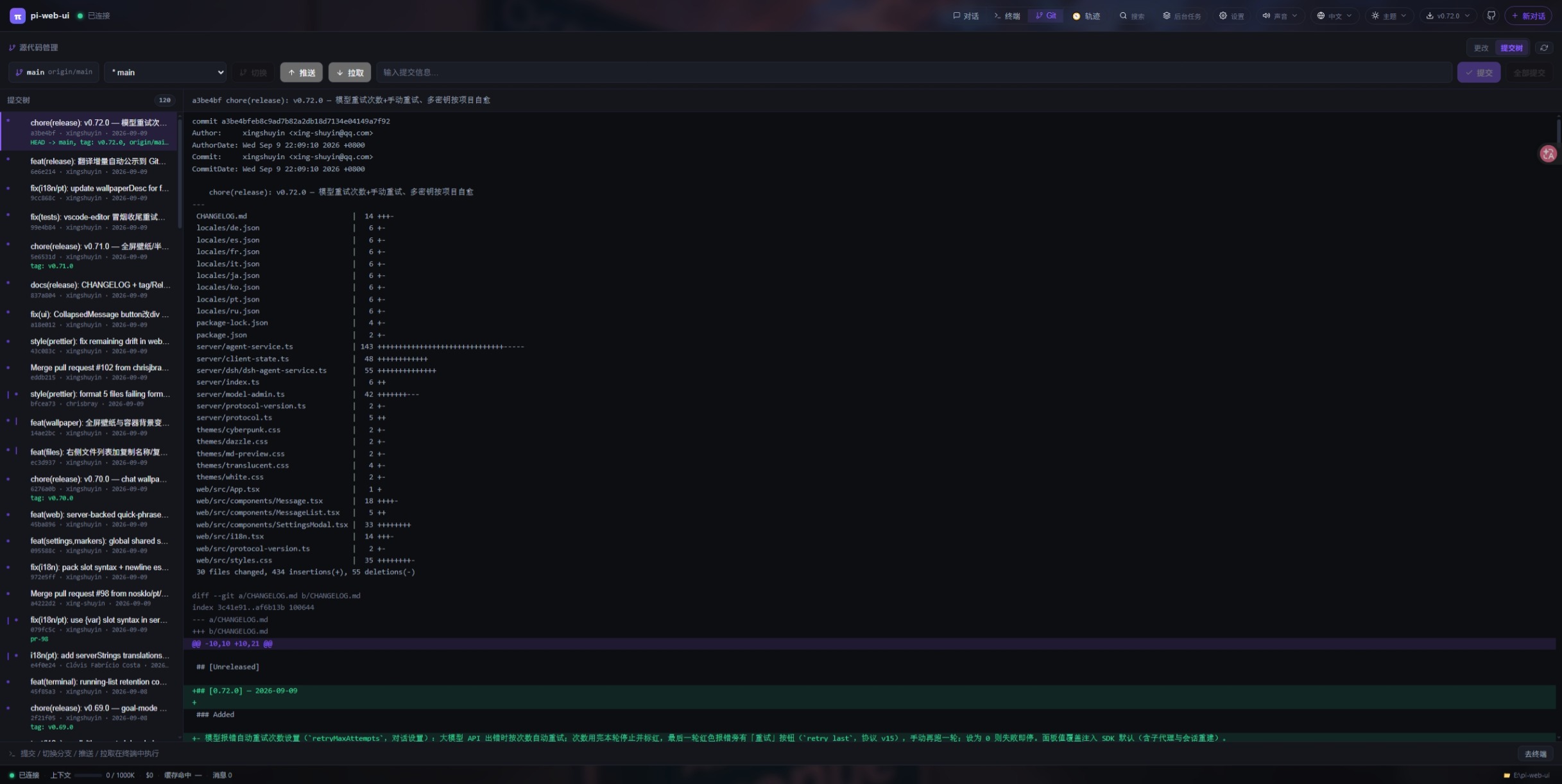
- Source control (Git) panel — status / branch / diff / history / untracked files via a hidden query terminal, plus per-file stage (+) and unstage (−), a commit box (Enter commits, IME-safe) with “Commit all” (
git add -A && git commit), a branch picker that groups local and remote-tracking refs (picking a remote one creates a local branch tracking it), and detached-HEAD /↑ahead ↓behindbadges. The “Commit tree” tab loadsgit log --graphwith per-commit diffs. Writes (commit / branch switch / push / pull) run in the visible terminal and the view follows them there; the panel refreshes itself when the repository's real git dir changes (worktrees included) and via a 30 s fallback poll, so commits made outside the browser show up by themselves.
🎛️ Models & settings
- Theme switching — pick a theme in the top bar; themes are pure
:rootpalette overrides on top of the single layout stylesheet (default dark + bundled light/dark palettes). See Themes for how to add your own or contribute one. - Model management — edit
models.jsonin the UI and set per-provider API keys (keys/headers never leave the server).- Model picker — searchable by name/provider/id, with a provider sidebar once you have several providers; models you pick often float to the top with a “used N×” badge plus reasoning/vision badges, opening it scrolls to the active model, and the footer keeps Refresh models and Manage models.
- Several keys per provider — built-in providers can store multiple named keys (
<agentDir>/provider-keys.json): add a second key without losing the first, activate another by name, remove one (dropping the active key promotes the next). The picker lists each key separately, so picking a model under a key switches to it — and only nicknames reach the browser. - Custom providers — add/edit/delete a provider (API type,
baseUrl, key, optional auth header) with per-model metadata (context window, max output, text/text-image, reasoning); Fetch models probes/modelsserver-side (so a LAN/loopback endpoint works despite CORS) and merges what it advertises, and an existing provider can be re-probed in place. Hand-editedmodels.jsonis picked up with Reload models.json (comments allowed, like the SDK).
- Thinking level per model — seven levels, but the ones the current model doesn't support are shown disabled rather than silently snapped to another.
- First-run setup wizard — installs the pi CLI for you when it's missing (with failure detail, Retry and Skip) and then takes a provider + API key so you can start immediately.
- Settings panel:
- System prompt — a
{{token}}compose template over 11 sources (soul / tools / guidelines / pi docs / append / persona / terminal / markers / context / skills / cwd) with click-to-append token chips, per-source overrides (anautobadge, “seed from default”, per-source reset; environment-derived sources stay read-only), and two viewers showing the prompt actually in effect and the tool schema actually sent to the model. - Input history & quick phrases — a bounded history (1–500 entries, optional per-entry character cap, two-step clear) that ↑/↓ walks through when the caret sits on the first/last visual line of the draft (auto-wrapped lines count), and the chips above the composer (edit / reorder / delete / reset to defaults).
- Skills — per-skill switches plus a Full chip that injects a whole
SKILL.mdinto the prompt instead of its catalog line (8 KB per file, 32 KB total). - Extensions — per-extension switches, and one-click uninstall for
npm:-installed ones (runspi remove npm:<pkg>in a reusable terminal tab). - UI plugins, goal review, vision bridge and subagent templates have their own pages — see Plugins.
- Presets — save the current combination (prompt template/mode/overrides, skill & extension switches, tool switches, terminal-bash settings, retry count, reviewer prompt, skill full-text list) under a name and re-apply or delete it; deliberately not captured (questionnaire, goal mode, display prefs, vision bridge, default subagent model, quick phrases) stay as they are.
- Apply timing — tool switches, retry count, display preferences, markers and the skill full-text list apply immediately; the prompt template/overrides and skill/extension switches need a session reload, and a change made mid-answer is deferred with a “takes effect after this reply” notice.
- Display preferences — thinking blocks expanded or collapsed by default, tool cards expanded by default, wide chat column (drops the 860 px cap on very wide viewports), project name in the browser tab title, and a chat wallpaper (image URL or upload, with dim and blur sliders).
- System prompt — a
🧩 Agent tools & inline markers
- Tool switches — Settings → Tools lists every optional agent tool as its own switch: the 7 terminal tools (default off), the 7
subagent_*tools (default on),edit_soft(default off),delegate_task,ask_user_questionandtodo_list(default on). Toggling is live (no reload) and the tools stay registered so they can come back;bashand the SDK's ownedit/readare deliberately outside the catalog and cannot be disabled. - Inline markers — instead of a tool round-trip the AI writes state changes straight into its reply:
[[todo:new:<subject>]]/[[todo:set:<id>,in_progress]]/[[todo:remove:<id>]]/[[todo:dep:<id>,blocks=<id>]]for the task list,[[notify:<level>:<message>]]for a non-interruptive notice, and[[conv:rename:<title>]]to retitle the chat. Markers are applied as soon as a reply bubble is final, a bad marker comes back as a browser notice, and the task list also renders as a live widget under the file tree (N/M donewith ✓ / ◐ / ○) that follows the active conversation and survives a reload — it is stored in that conversation's own session branch. Settings → Tools has a master switch plus one switch per marker (these are global, shared by all browsers). edit_soft— a looseredit(default off) for when indentation or whitespace makes the built-in tool fail: exact substring first, then trimmed line-core matching,newTextwritten verbatim with the file's line endings/BOM preserved, and a diff + unified patch in the result. It also tolerates sloppy input (a JSON string, a bare object, legacy top-leveloldText/newText).delegate_task— hands a specialist template a six-section brief (TASK / EXPECTED OUTCOME / REQUIRED TOOLS / MUST DO / MUST NOT DO / CONTEXT) validated on the server: a missing template, a task under 20 characters or any empty section is rejected, and the error tells the model which templates it may use. Cards render the brief as labelled sections, and a finished delegation gets a button that jumps to the subagent's conversation.ask_user_question— the pi engine has no questionnaire tool, so pi-web-ui adds one: the model asks structured questions (single/multi-select with rich option previews, plus free text) which open as a dialog; answers go back as the tool result, cancelling returns a tool error, waiting for you is exempt from the tool watchdog, and an unanswered questionnaire survives a page refresh or reconnect.- MCP servers — drop a
<dataDir>/mcp.json({"servers":{"github":{"command":"node","args":["mcp.js"],"cwd":"/x"}}}) and every tool a stdio MCP server advertises becomes an ordinary agent tool, executed server-side; one server failing to start only logs a line and leaves the others working. The file is read at startup, so restart pi-web-ui after editing it. - Extension UI bridge — pi extensions can drive the browser:
setWidgetrenders live panels under the file tree (click a title to open it centred),setStatusputs text in the status bar,notifyraises a toast, andselect/confirm/inputopen an inline request panel above the composer with Markdown-rendered options (Esc cancels). ANSI colour codes in widget text are stripped, so extension footers don't arrive as escape-sequence noise. - Plugin extras — plugins can register
/commands(badge “plugin”, executed server-side without spending tokens), register background tasks with their own stop button, declare a settings form, subscribe to run/tool/conversation events, and reach the host from their client bundle viawindow.__piWebUiHost. See Plugins.
🔔 Sounds & notifications
- Sound alerts — a master switch plus one cue per event (question asked / run finished / run started / error), each with its own preview button, and a volume slider (0–100 %).
- Desktop / OS notifications — off by default; enabling them asks the browser for permission from the click itself and switches back off (persistently) if you deny it. Notifications go through the service worker, so they also work when the installed PWA is in the background, they cover run-finished / question-asked / error, and clicking one brings the app window back to the front. They are suppressed while you are demonstrably watching the page — including the Windows case where the browser still reports focus and visibility while the window is minimised (detected from the native window rectangle instead).
📱 PWA & offline
- Installable — a web-app manifest (standalone window, 192/512/1024 + maskable icons,
./-relative so sub-path deployments work) means “Install app” in Chrome/Edge or “Add to home screen” on mobile gives you its own window and icon. - Offline app shell — the service worker serves navigations network-first with a cached shell fallback (the app reopens while your backend is down or restarting) and caches hashed assets cache-first, while never caching
/ws,/api,/themesor/plugins; a new worker takes over already-open pages immediately. - Refresh prompts when they matter — a persistent banner appears if the page was loaded from a build whose wire protocol differs from the server's (i.e. right after an update), and the browser tab title can show the current project folder.
🌍 Languages & language packs
- The top-bar language menu lists every language by its native name, and Get more languages opens a manager showing each downloadable pack's version with Download / Remove buttons (and a Refresh button) — packs land in
<dataDir>/locales/, so you can also drop a valid pack file there by hand for a fully offline install. - A first-time visitor without a stored choice gets the language their browser asks for, then the instance default (
PI_WEB_LOCALE), then English; once you pick one it sticks. - The server renders AI-facing text (tool return values, prompt sections, notices) in the same language, so a Chinese UI also gets Chinese answers from tools like
subagent_list.
🎯 Goal mode
- Goal bar — set a target with a review model, max rounds and a lock switch.
- Goal wizard (AI Refine) — turns a raw request into a concrete goal through a guided questionnaire.
- Automatic review loop — after each turn an independent review session checks the goal against the final text and
git diff HEAD; on fail the feedback is injected as steer until it passes (or the round cap is hit).
🤖 DeepSeek Harness engine
- Switchable engine —
PI_WEB_ENGINE=pi|dsh(defaultpi). The pi engine runs the agent in-process via the pi SDK; the DSH engine runs the official@deepseek-ai/dsh(DeepSeek Harness) runtime as a subprocess./api/healthreportsengine; the footer shows a DSH badge. - Same wire protocol — the DSH engine implements the same WebSocket protocol, so goal mode, SCM, background tasks, settings, plugins, terminals, message-delta & snapshots all work identically.
- Native goal machinery — DSH's own goal state machine + round-driver auto-continues rounds; the model judges completion/blocked (no separate review session). The goal wizard drives it via the model's
ask_user_question. - Real image blocks — photos are sent as true image content to vision-capable DeepSeek models (e.g.
deepseek-v4-flash-vision-exp); text-only models get a text-transcription bridge instead. - Question dialog — the model's
ask_user_questionsurfaces as a browser dialog (single/multi-select + free text) with queueing and a countdown. - Tools & MCP bridge — plugin AI tools and external MCP servers (
mcp.json) are bridged into the DSH runtime, so the DSH model can call them (executed server-side). - Skill enable/disable — the DSH skill catalog is exposed in Settings; disabling a skill filters it out of the model's view at runtime.
- DSH user patches — drop
.ymlCordis patches into<dataDir>/dsh-patches/to extend the runtime and reload from Settings; the Settings → Plugins page lists them with size/mtime and the resolved path, and a broken file is skipped with its error on the runtime's stderr.
How DSH differs from the pi engine (worth knowing before you switch):
- Thinking intensity is fixed to
high— asking for another level answers “DeepSeek V4 only supports high thinking”. - The footer's token/cost/context figures come from DeepSeek's published per-million pricing against a 1M-token window.
- Opening a past session replays it read-only: sending a prompt starts a new branch with the old conversation injected as context, because the runtime has no in-place resume. The same applies to edit-&-re-ask.
- Stop kills the runtime process tree, so every running DSH conversation stops (you get a notice), and a half-finished goal is cleared first. Stopping only the bash tool isn't supported.
- Sessions live in
<dataDir>/dsh-sessions/(separate from the pi engine's transcripts) and are swept afterPI_WEB_DSH_SESSION_RETENTION_DAYS(90); open conversations are capped at 8 per project; a crashed runtime is restarted with 1 s/3 s/9 s back-off, at most twice per 60 s, then it stops and points you at the API key and the DSH dependencies. - The tool runs in a
workspace-writesandbox with approvals off — your Stop button is the control. Questionnaires are a one-question-at-a-time wizard with option previews and a countdown. - pi-only features answer with an explicit notice (and their UI is hidden) instead of failing silently: session rename,
/compact,/reload, extension hot-reload, subagent templates, custom providers / multiple keys, provider model probing, installing the pi CLI, the vision bridge and the per-tool switches.
⚙️ Background tasks
- Background-task panel — servers launched by the agent are detected by diffing the listening ports before and after a bash run and listed with port / pid / name / command (click the command to expand it fully); stop one or kill all, and the top-bar chip carries a live count badge.
- The list belongs to the browser client, not the conversation: it survives project switches, conversation switches and reconnects, and is refreshed server-side every 30 s with processes that exited pruned. Detection deliberately ignores known desktop apps and processes whose parent chain traces back to
explorerrather than to the server, so a browser you opened yourself isn't reported as “started by the agent”. - Plugin-registered tasks show a 🧩 marker and their live status text, and stop through the plugin's own callback (a mail-polling task, for instance).
- Tool watchdog — a tool call running over 20 minutes is aborted automatically (
PI_WEB_TOOL_TIMEOUT_MS; questionnaires are exempt). - Stop bash command only — abort a running bash tool without killing the conversation.
- Stall warning — if a streaming run goes completely silent for 3 minutes (
PI_WEB_STALL_NOTIFY_MS,0= off) you get a warning naming the conversation, without aborting it.
🛡️ Safety & operations
- Loopback-only by default; set
PI_WEB_HOST=0.0.0.0for LAN / containers. - Token auth —
PI_WEB_TOKENaccepts any ofAuthorization: Bearer …,X-PI-Token: …,?token=…or thepi_web_tokencookie. A?token=link logs you in once, strips the token from the address bar and stores the cookie; every authorised request refreshes it and a stale cookie is expired on the 401 response, so after changing the password one correct?token=visit recovers permanently./api/healthstays open for probes. - WebSocket Origin/Host same-authority check — cross-origin pages are rejected (403),
Origin: null(afile://page) is rejected outright, and when a token is configured a bad credential is refused before the upgrade;PI_WEB_ALLOW_ORIGINSwhitelist for reverse proxies. - Host allow-list —
PI_WEB_ALLOW_HOSTS=host1,host2adds a strict hostname allow-list on top of the always-on same-authority check. - Instance scoping —
PI_WEB_TABS=chat,terminal,gitexposes only those tabs: hidden tabs are also refused server-side (their messages answer with an explanation), andchatcan never be switched off.PI_WEB_MANAGED=1declares the instance as deployed from outside: the server refuses self-update, pi-CLI installs and marketplace installs with a reason, and the UI hides those entry points (the version chip becomes a plain label saying the deployment owns updates). - File boundaries — workspace-relative reads/writes reject
..escapes (a path outside the workspace is only reachable through explicit absolute / machine browsing); inline/api/filestreaming is limited to images, video and HTML, so a binary can never be smuggled through an<img>tag — anything else needs?download=1(attachment disposition). The HTML preview route is always served sandboxed. - Quiesce drain mode via a local control socket (
server status|quiesce|unquiesce) — refuses new prompts/forks/resumes (and, on the DSH engine, brand-new client connections) while in-flight runs finish. - Credentials stay server-side — provider headers (which may carry
Authorization) are never sent to the browser, and provider API keys reach it only as nicknames. - 9 UI languages — Chinese/English built in, plus 8 downloadable packs (German, Spanish, French, Italian, Japanese, Korean, Portuguese, Russian); the top-bar language menu installs or removes packs — see Languages & language packs.
- Retention — uploaded files older than
PI_WEB_UPLOAD_RETENTION_DAYS(14;0= never) are swept at startup and every 6 h; DSH sessions have their own 90-day sweep. - Operational watchdogs — tool timeout, model-stall warning and terminal liveness are all tunable, see Tuning & advanced environment variables.
🚢 Deploy & update
- Foreground, global npm install, Docker (see Docker), macOS launchd, Linux systemd, Windows autostart (a per-user
Runkey with a console-free launcher and a crash watchdog), and a desktop shortcut (server shortcut). server install --printprints the launchd plist / systemd unit / Windows launcher it would write and exits, so you can review it before installing.- Update panel — the version chip shows an amber dot when a newer web UI exists and a badge with how many other components have updates. “Check all updates” compares the web UI, the globally installed pi core and the direct packages declared in
<agentDir>/npm/package.json; each row has its own Update, plus “Update all” and “Re-check all”, and the commands run in a visible terminal (pi update npm:<name>for pi extensions — the only command that updates the copy pi actually loads — andnpm i -g <name>@latestfor the rest). A “just published (<30 min)” warning tells you npm's cached metadata may be stale. On an instance owned by launchd/systemd/the Windows watchdog there is also a Restart service button; on a foreground instance there isn't, because nothing would bring it back. - Plugin updates from the CLI —
pi-web-ui plugins --check-updatescompares each installed plugin's recorded commit with the remote HEAD and prints the exact update command; everyinstall --forcesnapshots the outgoing version into<dataDir>/plugin-backups/(newest 3 kept, and it auto-rolls back if the copy fails), sopi-web-ui plugins --rollback <id>can undo an upgrade. - In the pi CLI there is also
/webui(from the bundledextensions/webui.ts):/webuistarts a server on the first free port from 8787, and/webui --port 9000,--cwd <path>,--no-browser,statusandstopmanage it — one subprocess per pi session, killed when the session shuts down so no orphan servers linger.
Keyboard shortcuts
| Keys | What it does |
|---|---|
Enter |
Send. On touch-first devices Enter inserts a newline instead and Ctrl/Cmd+Enter sends (Windows touch laptops are treated as desktops). |
Shift+Enter |
Newline in the composer. |
↑ / ↓ |
Walk the global prompt history (persisted across conversations) when the caret is on the first/last visual line — auto-wrapped lines count, so ↑ inside a long one-paragraph draft moves the caret up a line instead of switching history; Esc returns to your draft. |
Ctrl/Cmd+K |
Global search over conversations, projects and workspace file names. |
Ctrl/Cmd+F |
Search inside the open conversation — Enter next hit, Shift+Enter previous, Esc closes. |
/ |
Open the slash-command picker (↑/↓ to move, Tab or Enter to complete, Esc to dismiss; typing a space closes it). |
Ctrl/Cmd+S |
Save while editing a file in the preview. |
Ctrl/Cmd+A |
Select all lines in the preview (when the caret isn't in a text field). |
Ctrl/Cmd+Enter |
Submit the edit-&-re-ask editor. |
Ctrl/Cmd+C / Ctrl/Cmd+V |
In the terminal: copy the current selection (no selection = ^C goes to the shell) / paste natively. |
Esc |
Close the preview, a dialog, the command picker, a questionnaire or an extension request panel — with unsaved preview edits it asks first. |
| Drag & drop | Dropping files anywhere in the window attaches them to the chat; over the file tree it uploads into the folder you dropped on; folders can't be dropped (expand and pick files). |
Screenshots
Chat with prompt templates
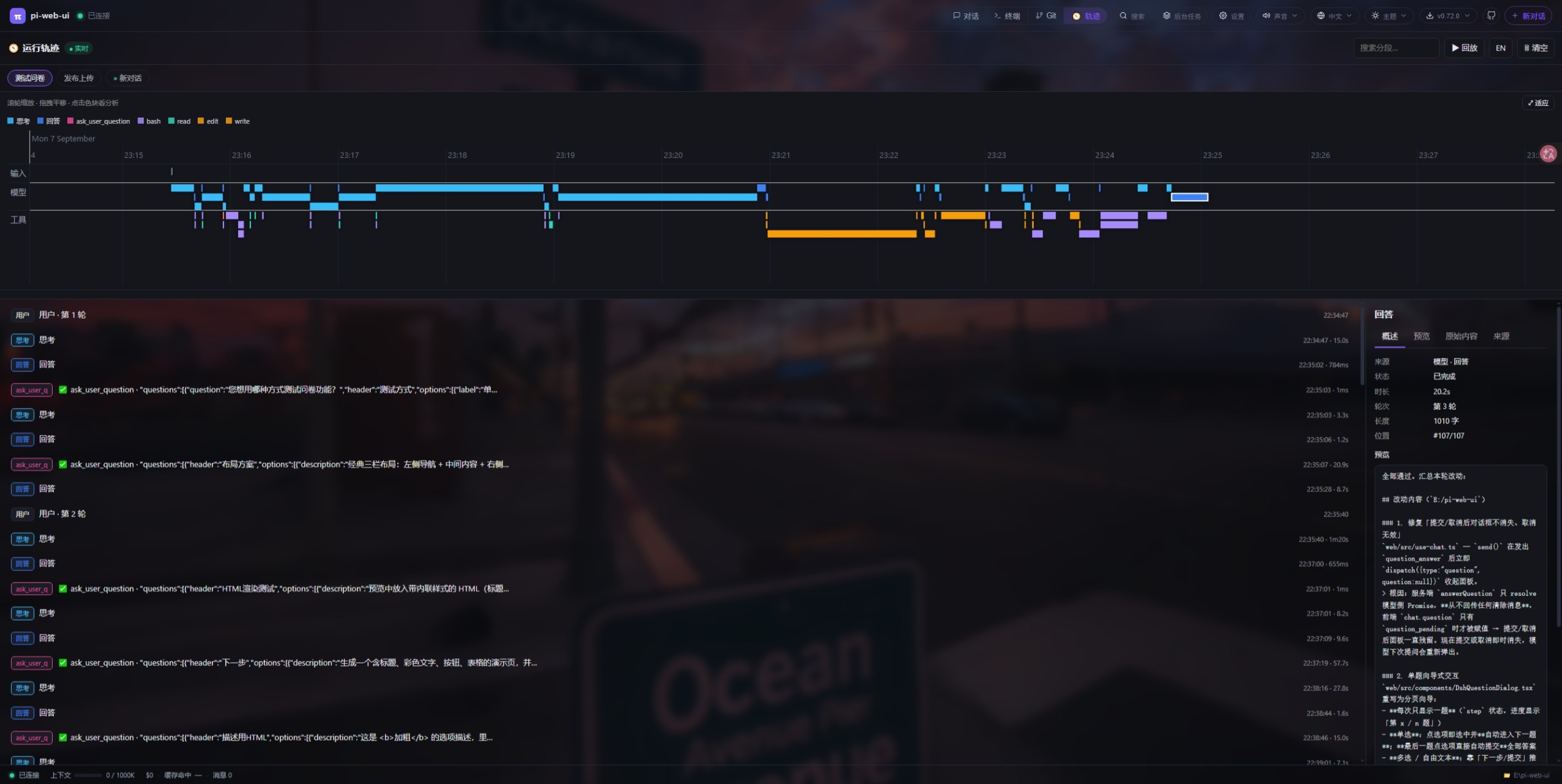
Run trajectory timeline (run-trace plugin)
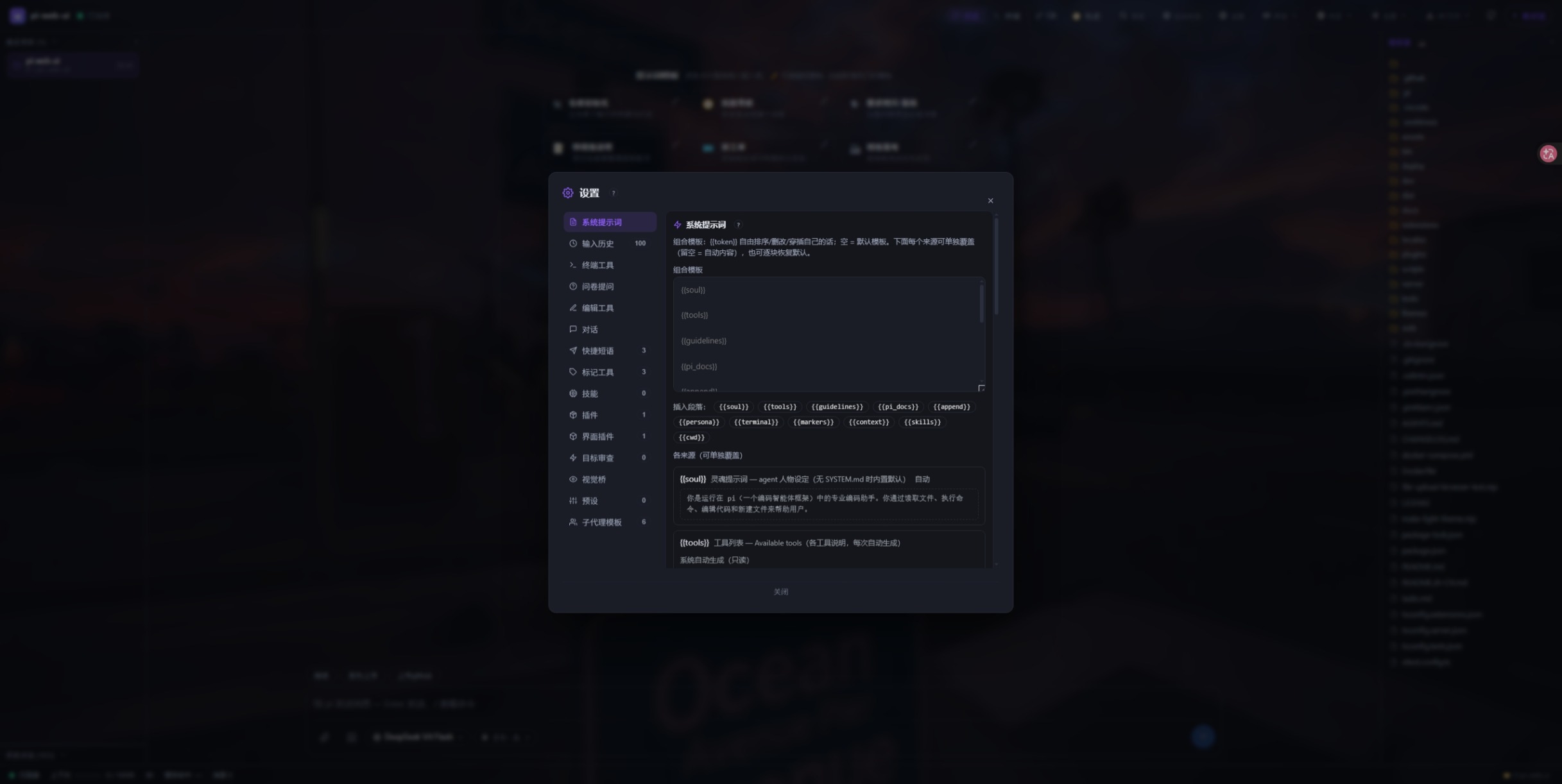
Settings panel
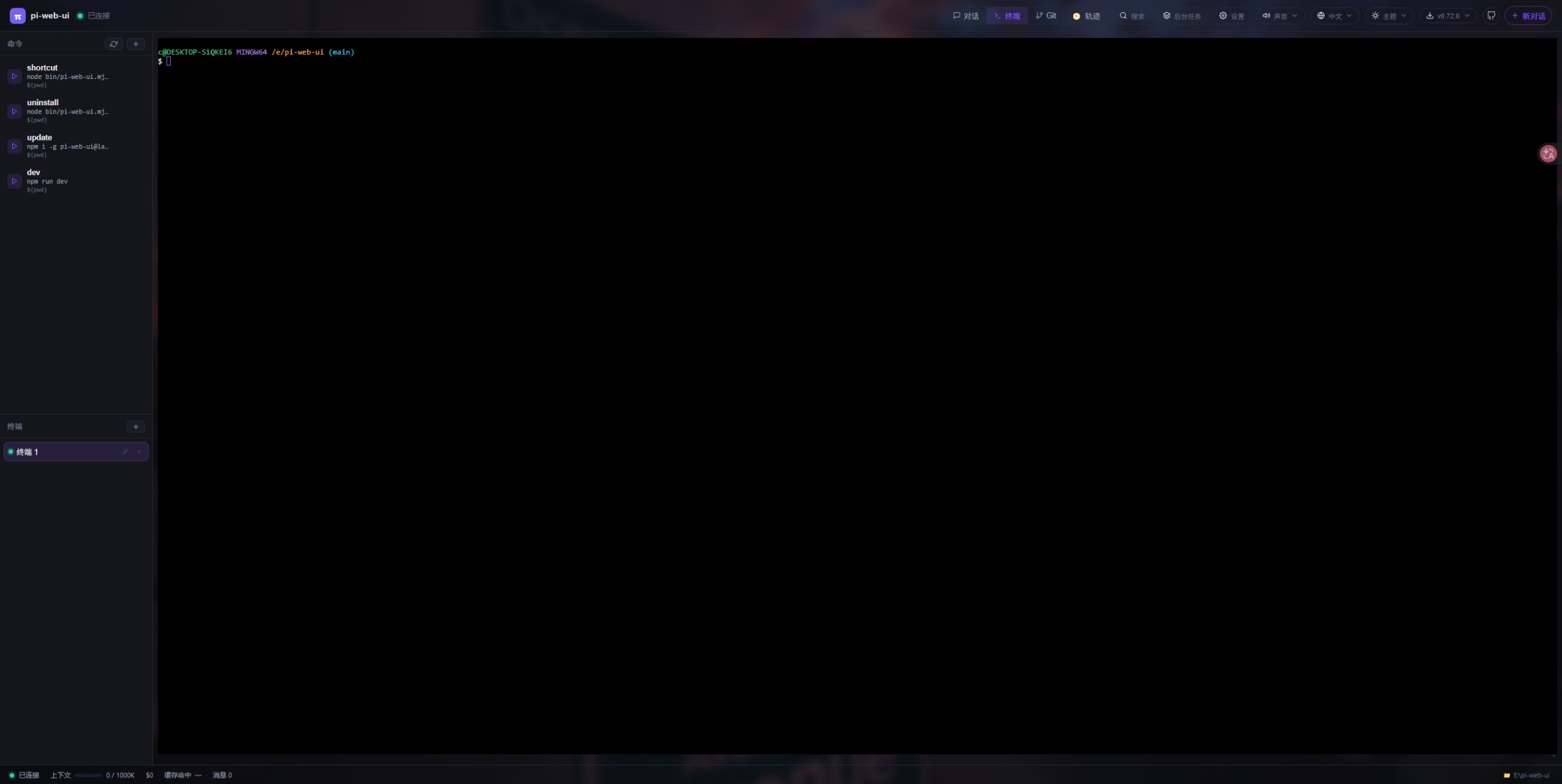
Built-in terminal
Git source control panel
Install
npm i -g pi-web-ui            # global install (recommended)
npx pi-web-ui                 # or run without installing (latest, starts on :8787)
npm i -g .                    # or install the local checkout
npm ≥ 12? npm 12+ blocks dependency install scripts by default (you'll see
npm warn install-scripts … blocked). node-pty is a native module, so allow its
script (the other two packages it lists are harmless no-ops — allowing them just
silences the warning):
npm i -g --allow-scripts=node-pty,@google/genai,protobufjs pi-web-ui@latest
🖥️ Desktop app (Windows installer)
Prefer a window over a browser tab? Every release ships installers built from this repository by GitHub Actions:
⬇ Download the latest installers
— Windows (pi-web-ui-desktop Setup <version>.exe), macOS (.dmg) and Linux
(.AppImage).
The desktop shell reuses this very server: it spawns dist/server/index.js on a
random free loopback port and opens a window pointed at it (see
desktop/README.md). The web version is untouched — no
fight over port 8787, separate data directory, both can run side by side.
Nothing is code signed yet: on Windows SmartScreen shows an “unknown
publisher” prompt, and on macOS you have to right-click → Open the app the
first time (Gatekeeper is stricter than SmartScreen) — see the
code signing policy. Build it locally with
npm run desktop:dist.
Termux (Android)
pi-web-ui runs fine on Android via Termux, but node-pty
(the native dependency) needs a toolchain, and Android has a few quirks worth
knowing:
Install the build toolchain first —
node-ptyneeds Python and a C toolchain:pkg install python clang make binutilsPoint the node-pty build at a dummy NDK path. On Android, gyp fails with
Undefined variable android_ndk_pathunless the variable is defined:GYP_DEFINES="android_ndk_path=' '" npm i -g --allow-scripts=node-pty,@google/genai,protobufjs pi-web-ui@latestIf
pi-web-uiwon't execute after install (the exec bit and/or shebang can get mangled on Android): restore it:chmod +x "$(command -v pi-web-ui)" sed -i 's/\r$//' "$(command -v pi-web-ui)"Run it in the background with
--no-browser(there is no desktop browser to auto-open):setsid nohup pi-web-ui --no-browser --cwd /path/to/workspace >~/pi-web.log 2>&1 &setsiddetaches the server from the launching shell's process group, so closing the Termux session doesn't take the server down —nohupalone is not enough when the parent process group gets killed.
The [control] socket error: EACCES …/.pi-web/pi-web-ui.sock warning at startup
is harmless on Android: pi-web-ui server stop/restart won't work over the
control socket, but the web UI itself is unaffected.
Quick start
Start (foreground)
pi-web-ui # foreground, http://localhost:8787
Start flags & environment variables — every setting can be passed as a --flag on the command
line or set as an environment variable (flag wins). Pick whichever you prefer:
| Flag | Env var | Default | Purpose |
|---|---|---|---|
--port <n> |
PI_WEB_PORT |
8787 |
HTTP port |
--cwd <dir> |
PI_WEB_CWD |
current dir | workspace root (read/write/terminal) |
--data-dir <dir> |
PI_WEB_DATA_DIR |
~/.pi-web |
data dir (UI state, plugins, uploads, themes, locales) |
--engine <pi|dsh> |
PI_WEB_ENGINE |
pi |
agent engine; --engine dsh = DeepSeek Harness |
--host <addr> |
PI_WEB_HOST |
127.0.0.1 |
listen address (0.0.0.0 for LAN/Docker) |
--agent-dir <dir> |
PI_CODING_AGENT_DIR |
~/.pi/agent |
pi config dir (auth.json, models.json, sessions, skills) |
--no-browser |
— | off | start without auto-opening the browser |
| env only | PI_WEB_TOKEN |
empty | optional shared auth token |
| env only | PI_WEB_DSH_* |
— | dsh runtime, patches & debug settings |
The two are equivalent — pick one:
pi-web-ui --engine dsh --port 9000 --cwd /path/to/project
PI_WEB_ENGINE=dsh PI_WEB_PORT=9000 PI_WEB_CWD=/path/to/project pi-web-ui
For the DSH engine also install the runtime (npm i -g @deepseek-ai/dsh@0.1.1-rc.2) and set a
DeepSeek API key (read from ~/.pi/agent/auth.json, set in the provider/API-key panel).
Stop
- Foreground: press
Ctrl+Cin the terminal running it. - As a service:
pi-web-ui server stop. On Linux and Windows auto-start is kept (the next login/boot brings it back, untilserver uninstall); on macOSstopunloads the launchd agent, so it no longer starts at login —pi-web-ui server startbrings it back.
Update
npm i -g pi-web-ui@latest     # upgrade to the latest published version
pi-web-ui server restart      # restart the service to apply it (foreground: restart manually)
Uninstall
npm uninstall -g pi-web-ui
Uninstalling does not delete your chats: the transcripts you see in the history panel live in <agentDir>/sessions/ (default ~/.pi/agent/sessions/, per project), and the rest of your state — UI settings, recent projects, plugins, uploads, themes, language packs — lives in <dataDir> (default ~/.pi-web/). Both survive uninstall, upgrade and reinstall; rerunning pi-web-ui server install afterward picks them up again (and if you plan to delete them, back up sessions/ and plugins/ first — an uninstall never touches either).
System service
pi-web-ui server install --port 9000 --cwd /path/to/project   # install + start
pi-web-ui server status                     # running? auto-start?
pi-web-ui server restart                    # restart (applies config/version changes)
pi-web-ui server stop                       # stop (auto-start stays)
pi-web-ui server start                      # start again
pi-web-ui server uninstall                  # remove the service entirely
pi-web-ui server shortcut                   # desktop one-click launch icon
pi-web-ui server quiesce                    # drain: refuse NEW chats/messages, let running ones finish
pi-web-ui server unquiesce                  # reopen admission
server status also shows live stats via a local control socket (version,
PID, quiesce state, connected browsers, running conversations) — the same
socket drives quiesce/unquiesce.
- macOS → launchd agent (no sudo), logs to
/tmp/pi-web-ui.log/.err - Linux → systemd unit (
systemctl enable --now), logs viajournalctl -u pi-web-ui -f - Windows → Task Scheduler logon task (hidden PowerShell window, no black console)
Options: --port (default 8787), --cwd (workspace), --data-dir (sessions),
--engine <pi|dsh>, --host, --agent-dir, --name (custom service name). Rerunning
server install with new options regenerates the config and restarts the service — that's how
you change its port/cwd/engine. --engine / --host / --agent-dir are baked into the service
automatically; env-only vars (PI_WEB_TOKEN, PI_WEB_DSH_*) must be added to the service config
by hand. See the start flags table above.
pi-web-ui server install --engine dsh --port 9000 --cwd /path/to/project
Docker
The image builds the frontend and the server, keeps the compiler toolchain node-pty needs, pre-installs the DSH runtime (so PI_WEB_ENGINE=dsh works without extra steps), runs as the non-root node user and declares /app/.pi-web as a volume:
docker compose up -d # then open http://localhost:8787
docker-compose.yml already sets PI_WEB_HOST=0.0.0.0 (required for port mapping) and persists the data dir in the named volume pi-web-data. The commented blocks in that file cover the usual container tweaks — switching to the DSH engine, mounting a dsh-patches directory, mounting your project as PI_WEB_CWD, and mounting ~/.pi/agent read-only as PI_CODING_AGENT_DIR so the container sees your API keys and model config:
services:
  pi-web-ui:
    build: .
    ports: ["8787:8787"]
    environment:
      PI_WEB_HOST: 0.0.0.0
      # PI_WEB_ENGINE: dsh
    volumes:
      - pi-web-data:/app/.pi-web
      # - ./my-project:/workspace:ro
      # - ~/.pi/agent:/root/.pi/agent:ro
volumes:
  pi-web-data:
Plugins
Plugins are optional UI components (extra top-bar tabs backed by their own
client view, optionally with a server-side entry and agent tools). They live in
your data-dir plugins folder (<dataDir>/plugins/<id>/, default
~/.pi-web/plugins/) — a plugin is simply a directory containing
manifest.json, an optional server entry (index.mjs) and an optional view
entry (client/entry.mjs). No plugin directories = no plugins, nothing shows
up in the UI.
Plugin catalog
These plugins ship in this repository (plugins/<id>/) and can be installed
straight from GitHub:
| Plugin | What it does |
|---|---|
| 📬 webmail | IMAP inbox browsing / search / read / mark / delete + SMTP sending, new-mail notifications, and an optional "allow AI to manage my mailbox" switch (six mail_* agent tools). Auto-installs its npm deps on first activation. |
| 🗄️ db-client | Database workbench: connection manager + schema tree for MySQL / PostgreSQL / SQLite / SQL Server / MongoDB / Redis — table structure, paginated data with sorting, SQL editor, and row editing. Drivers auto-install on first use. |
| 📝 vscode-editor | VS Code-like workbench: multi-root file tree (local + SSH hosts), CodeMirror multi-tab editor, Remote-SSH remote file browsing/editing, draggable multi-terminal panel (xterm.js), SFTP sync & upload/download to your computer. Auto-installs ssh2. |
| 📊 mermaid | Renders ```mermaid fences in chat messages as SVG diagrams (fenced-code renderer plugin, offline-first local engine). |
| 🧭 run-trace | Run trajectory: task → thinking → tools → file changes → result timeline with replay and node details. |
| 📖 legado-web | Legado book reader (📖 阅读): search / discovery / book info / TOC / chapter reading on top of Android-compatible book sources, with source import, health checking and dead-source cleanup, and four agent tools (legado_rules, legado_book_sources, legado_source_probe, legado_run_rule) plus an “🤖 AI fix this source” button that opens a new chat with the failure context. Sources/shelf/progress persist under <dataDir>/legado-web/. |
plugins/demo-mailbox stays in the repo as the minimal plugin template (server entry + client view + two-way message protocol) and test fixture — start there if you want to write your own.
Example — install the webmail plugin:
pi-web-ui install https://github.com/xing-shuyin/pi-web-ui/tree/main/plugins/webmail
You can also install from inside the UI: 设置 → 界面插件 → 插件市场 lists
maintainable plugins (the same set, shipped in plugins/catalog.json) with
full 安装 / 更新 / 卸载 controls (updates keep config.json), and lets you
drop any third-party plugin into the list via 添加插件 (paste owner/repo
or an owner/repo/subdir source) — your additions are stored in
<dataDir>/plugin-catalog.json. A plugin author can contribute to the built-in
list with a one-line PR to plugins/catalog.json.
Each plugin's directory in the repo has its own README.md with full feature
lists, configuration and per-plugin caveats.
Installing
From GitHub (any of these source forms):
pi-web-ui install owner/repo                                  # shorthand
pi-web-ui install https://github.com/owner/repo               # full URL (.git optional)
pi-web-ui install https://github.com/o/r/tree/dev/sub/dir     # branch + subdirectory inside the repo
pi-web-ui install owner/repo#v1.2                             # pin a branch/tag (#suffix works on any form above)
pi-web-ui install /path/to/plugin-dir                         # local directory (for development)
Useful options:
--name <id>— custom plugin id / directory name (defaults to the repo or subdirectory name; letters/digits/-/_only).--force— overwrite an existing installation. Your plugin's localconfig.json(credentials etc.) is preserved across upgrades.--data-dir <dir>— override the data dir (default~/.pi-web).
The CLI clones the repo (shallow; falls back to a tarball download without
git), locates the manifest.json (including inside subdirectories) and copies
the plugin into <dataDir>/plugins/<id>/.
No git? No network? You can also just copy a plugin directory into
~/.pi-web/plugins/ by hand — same result.
Updating
Re-run install against the same source with --force:
# example: update the webmail plugin to the latest version in the repo
pi-web-ui install https://github.com/xing-shuyin/pi-web-ui/tree/main/plugins/webmail --force
- The upgrade preserves the plugin's local
config.jsonautomatically. - Plugins that store other local state inside their directory (e.g. db-client's
db-connections.json, vscode-editor'sssh-hosts.json) are not covered by that preservation — back those up before a forced reinstall. - Refresh the browser afterwards; no server restart needed.
- Which plugins are outdated?
pi-web-ui plugins --check-updatescompares each plugin's recorded commit against the remote HEAD and prints the exact update command.pi-web-ui plugins --rollback <id>restores the newest pre-upgrade snapshot (every--forceinstall snapshots the old directory into<dataDir>/plugin-backups/, keeping the latest three, and rolls itself back if the copy fails).
Activating
If the server is running, just refresh the browser — new plugins are picked up on attach without a restart. If it isn't, they load on next start. Each plugin appears as a tab (🧩 or its own icon) in the top bar.
Listing / disabling / uninstalling
pi-web-ui plugins             # list installed plugins (id / name / version / description)
pi-web-ui uninstall <id>      # remove a plugin
- To temporarily hide a plugin without uninstalling, use the Settings panel (⚙) → UI plugins switches — stored per client, purely visual, no restart needed. Re-enable any time.
uninstalldeletes the plugin directory; refresh the browser and its tab disappears. Plugin configuration written inside the plugin dir is removed too — back up<dataDir>/plugins/<id>/config.jsonfirst if you need it.
Browser extension
🎯 Web element picker (page-picker)
Pick elements on the site you are developing and turn them into context an AI can act on, then drop it
straight into the pi-web-ui composer (Alt+Shift+P or the toolbar icon → hover highlight → click to pick
→ Shift+click for multi-select → add a note → "Add to chat").
It is a browser extension, not a pi-web-ui server plugin (so pi-web-ui install does not apply):
Download & install (no Node required): page-picker-extension.zip → unzip →
open chrome://extensions, enable "Developer mode", choose "Load unpacked" and select the unzipped
folder → open the extension options and set your pi-web-ui address (click "Authorize this address"
first for remote/LAN addresses).
See plugins/page-picker/README.md for the interaction details,
what gets captured, remote/LAN setups and known limitations.
It captures what actually lets an AI fix the code in one shot — not a screenshot: the React component
source location from the fiber (Card.tsx:18:5 plus the component chain), the Vue SFC file, the
source file and line of the CSS rules that matched (reverse-computed in Vite dev), a computed-style
subset limited to values that differ from the defaults, a short unique selector, an HTML skeleton and
truncated text. An optional element screenshot rides along as a chat attachment.
Themes
Each theme is a pure :root palette override — a small CSS file that only sets CSS variables (see the :root block in web/src/styles.css for the full variable list: base colors --bg/--accent/--term-* plus derived colors like --tooltip-bg/--code-bg/--notice-*). The layout lives ONLY in the bundled web/src/styles.css; picking a theme overrides the variables, so every theme works with every build and layout changes never touch themes. Built-in themes are generated by node make-light-theme.mjs.
Built-in themes ship in the npm package (themes/): white (light), cyberpunk / dazzle (dark), and translucent / transparent (wallpaper-friendly, pair with a chat wallpaper). The theme picker lives in the top bar (🌞 icon); the current choice is stored per browser in localStorage.
Using a theme
Just pick it in the top bar — built-in and user themes are merged in the same menu. User themes win over built-ins on the same id.
Providing a theme locally (no GitHub needed)
Any CSS file dropped into your data-dir themes folder shows up in the theme menu automatically — no restart, no rebuild:
- Find your data dir (default
~/.pi-web, override withPI_WEB_DATA_DIR). - Create
<dataDir>/themes/and drop your stylesheet in: e.g.~/.pi-web/themes/my-theme.css. - Reload the page and pick it in the top bar. The file name (without
.css) is the theme id shown in the menu.
~/.pi-web/
└── themes/
    └── my-theme.css          # appears in the menu as "my-theme"
Easiest way to write one: copy a built-in palette (e.g. themes/white.css from the source repo) and change the :root colors — list every variable you want to override; unlisted ones fall back to the dark defaults in styles.css. Notes:
- The terminal follows the theme — set the
--term-*variables (terminal ANSI palette +--term-bg) in your:rootand both the xterm canvas and its padded container adapt automatically (see the defaults instyles.css). - Syntax-highlight colors (
highlight.js'sgithub-dark.cssis bundled) must be overridden in your theme file or code will be unreadable on light themes — see the.hljsoverrides at the bottom ofthemes/white.cssfor the pattern (dark themes can skip it). - Theme ids must match
^[A-Za-z0-9_-]+$(no dots/slashes — path-traversal guard on the server).
Contributing a theme to the repository (GitHub)
Want your theme shipped to everyone? Open a pull request at github.com/xing-shuyin/pi-web-ui:
- Fork the repo and clone it.
- Create your theme as
themes/<id>.css— a pure:rootpalette. Copythemes/white.css(orthemes/cyberpunk.cssfor a dark palette) as the starting template. - Verify locally: run
npm run dev, then use the top bar theme picker — your theme must be listed and render correctly (chat cards, code blocks, tool-call cards, git/terminal panels). - Regenerate all built-in themes with
node make-light-theme.mjswhen you changed the variable list instyles.css. - Commit (
git add themes/<id>.css) and open the PR. Thethemes/folder is already in the npm packagefileswhitelist, so once merged and released,npm i -g pi-web-uiwill ship your theme to everyone.
Rules for merged themes: the file must be a single CSS file, set the --term-* variables for a readable terminal, and override .hljs syntax colors for readable code on light themes.
Tuning & advanced environment variables
All optional — the defaults are what the app is developed against. Full reference: docs/env-vars.md.
| Variable | Default | What it changes |
|---|---|---|
PI_WEB_TOOL_TIMEOUT_MS |
1200000 (20 min) |
Per-tool-call watchdog; a tool still running is aborted (ask_user_question is exempt). |
PI_WEB_STALL_NOTIFY_MS |
180000 (3 min) |
Warn — without aborting — when a streaming run produces no event at all; 0 disables. |
PI_WEB_TERMINAL_IDLE_MS |
15000 |
Nudge the AI when a terminal it opened goes silent for this long; 0 disables. |
PI_WEB_TERMINAL_IDLE_LINES |
10 |
How many trailing terminal lines that nudge quotes back (1–500). |
PI_WEB_INLINE_FILE_MAX |
12288 (12 KB) |
Size under which a path-less uploaded file is inlined instead of referenced. |
PI_WEB_VISION_TIMEOUT_MS |
90000 |
Timeout for one whole vision-bridge transcription batch. |
PI_WEB_UPLOAD_RETENTION_DAYS |
14 |
Retention for <dataDir>/uploads/; 0 never sweeps. |
PI_WEB_SHELL |
auto | Windows only: which shell node-pty spawns (auto: PI_WEB_SHELL → $SHELL → Git Bash → bundled busybox → %COMSPEC% → PowerShell). |
PI_WEB_TABS |
all tabs | Comma-separated tab allow-list (chat,terminal,git,search,tasks,settings,plugins); hidden tabs are refused server-side, chat can't be turned off. |
PI_WEB_MANAGED |
off | 1/true declares the instance externally deployed: self-update, pi-CLI install and plugin installs are refused with a reason and hidden in the UI. |
PI_WEB_ALLOW_HOSTS |
empty | Strict hostname allow-list for the HTTP/WS Host header, on top of the always-on same-authority check. |
PI_WEB_LOCALE |
empty | Fallback UI language for first-time visitors (an explicit choice and the browser's languages win over it). |
PI_WEB_LOCALE_BASE_URL |
GitHub raw | Where language packs are downloaded from — point it at a mirror for offline/intranet installs. |
PI_WEB_PKG_ROOT |
auto | Overrides where the server looks for package.json, themes/, plugins/catalog.json and web/dist (non-standard install layouts). |
PI_CODING_AGENT_SESSION_DIR |
empty | Flat session layout for pi instead of <agentDir>/sessions/--<cwd>--/ (changes what the history list reads). |
DSH_* |
— | DSH runtime knobs: PI_WEB_DSH_RUNTIME, PI_WEB_DSH_DATA_DIR, PI_WEB_DSH_PATCH_DIR, PI_WEB_DSH_QUESTION_TIMEOUT_MS, PI_WEB_DSH_TOOL_TIMEOUT_MS, PI_WEB_DSH_SESSION_RETENTION_DAYS, PI_WEB_DSH_DEBUG. |
Security
- Loopback-only by default — the server binds
127.0.0.1and is not reachable from the network unless you explicitly setPI_WEB_HOST=0.0.0.0(e.g. LAN access, Docker port mapping — the compose file sets it for you). - WebSocket origin check — browser pages connecting to
/wsmust present anOriginwhose hostname and port match the requestHost; cross-origin pages are rejected with 403. Non-browser clients (noOrigin) are unaffected. AddPI_WEB_ALLOW_ORIGINS=http://your-host:portfor reverse-proxy setups. - Quiesce —
server quiescerefuses new prompts/forks/session resumes until youserver unquiesce; in-flight runs finish cleanly (useful before upgrades/backups). - Credentials stay server-side — provider
headers(which may carryAuthorization/ API keys) are never sent to the browser; the model management UI edits everything else and the server preserves the headers.
🪪 Code signing policy
Free code signing provided by SignPath.io, certificate by SignPath Foundation.
Release binaries — the Windows installer pi-web-ui-desktop Setup <version>.exe
attached to every release —
are built from the tagged commit by
.github/workflows/desktop-release.yml
and signed in that CI run, so a valid signature means the file is an automated
build of the source code at that tag.
Team roles
| Role | Who |
|---|---|
Authors / committers (may push to main) |
@xing-shuyin |
| Reviewers (every non-committer change arrives as a PR and is reviewed before merge) | @xing-shuyin — community contributions are credited in the contributors graph |
| Approvers (must approve each signing request) | @xing-shuyin |
All team members use multi-factor authentication for both GitHub and SignPath. Our release artifacts contain no binaries we did not build ourselves, except upstream open-source components bundled by npm and electron-builder (see License).
Privacy policy: see Privacy below.
🔐 Privacy
pi-web-ui runs entirely on your own machine and has no telemetry, no analytics
and no accounts of its own. Conversations, attachments, settings and terminal
history stay on your disk: chat transcripts in the pi agent dir
(~/.pi/agent/sessions/ by default), everything else (UI settings, recent
projects, plugins, uploads, themes, language packs) in the data dir
(~/.pi-web/, or %APPDATA%\pi-web-ui\data for the desktop app). The HTTP
server binds loopback unless you explicitly expose it.
Network requests happen only in these cases:
| When | To | What leaves your machine |
|---|---|---|
| You send a message, or the agent calls a model | the model providers you configure (e.g. api.openai.com, api.opencode.ai, a local endpoint) |
your prompt, the attached file contents and the conversation context |
| Model catalog refresh (startup, then every 4 h) | pi.dev |
nothing but the request itself |
| You install or update a plugin, theme or language pack | github.com / raw.githubusercontent.com |
nothing but the request itself |
| You check for or install an update | registry.npmjs.org |
nothing but the request itself |
Terminals on Windows, when neither Git Bash nor a bash on PATH exists |
frippery.org |
one download of busybox64u.exe into ~/.pi-web/bin/bash.exe, reused offline afterwards |
Reverse-proxy setups, the optional PI_WEB_TOKEN password and Docker port
mappings are under your control — see Security.
Reverse proxy (nginx)
Serve pi-web-ui behind nginx on the same host (it binds loopback only, so a
same-machine reverse proxy is the supported remote-access path — no
PI_WEB_HOST=0.0.0.0 needed):
# pi-web-ui on 127.0.0.1:8787, exposed as https://your-host/pi/
server {
    listen 443 ssl;
    server_name your-host;
    # ssl_certificate ... / ssl_certificate_key ...

    # App entry at a sub-path (strips the /pi/ prefix)
    location /pi/ {
        proxy_pass http://127.0.0.1:8787/;
        proxy_http_version 1.1;
        # $http_host keeps the port — the server's origin check compares the
        # full authority (hostname AND port). $host would drop it and get 403.
        proxy_set_header Host $http_host;
        proxy_set_header X-Real-IP $remote_addr;
        proxy_set_header X-Forwarded-For $proxy_add_x_forwarded_for;
        proxy_set_header X-Forwarded-Proto $scheme;
    }

    # WebSocket — MUST forward Host identically or the upgrade is 403'd
    # (page loads, but chat/terminal keep reconnecting)
    location /ws {
        proxy_pass http://127.0.0.1:8787;
        proxy_http_version 1.1;
        proxy_set_header Host $http_host;
        proxy_set_header Upgrade $http_upgrade;
        proxy_set_header Connection "upgrade";
        proxy_read_timeout 3600s;
        proxy_send_timeout 3600s;
    }

    # Absolute-path assets/API the built frontend requests (root, not /pi/)
    location /assets/  { proxy_pass http://127.0.0.1:8787; }
    location = /favicon.svg           { proxy_pass http://127.0.0.1:8787; }
    location = /api/file   { proxy_pass http://127.0.0.1:8787; }
    location = /api/health { proxy_pass http://127.0.0.1:8787; }
}
Key points:
Hostmust be$http_host(keeps the port) on both/pi/and/ws— the origin check compares hostname and port.proxy_set_header Host $hostor leaving it unset (defaults to the upstream127.0.0.1:8787) both fail with 403.- Same-origin works automatically: as long as the browser's
Originequals the forwardedHost(it does through a plain proxy), noPI_WEB_ALLOW_ORIGINSis needed. Only set it when the browser origin differs from the Host the server sees (e.g. a TLS-terminating proxy that changes the port). - No
proxy_protocolunless you really need real client IPs: it makes nginx reject every connection that does not send a PROXY header, which breaks direct LAN access and any non-frp clients. With frp, droptransport.proxyProtocolVersionfrom the proxy config unless nginx listens withproxy_protocoltoo. - LAN access without a proxy: just set
PI_WEB_HOST=0.0.0.0(and a firewall rule) — or put the whole server block above on port 80/443.
Full working example (with an frp tunnel): deploy/nginx-subpath.conf.
Contribute
pi-web-ui is a small open-source project — your contributions are what make it grow. Code, plugins, themes, docs, translations, ideas: everything is welcome, and every merged PR ships to all users with the next npm publish. ❤️
| Way to contribute | How to get started |
|---|---|
| 🧩 Write a plugin | Build your own UI tab + agent tools. Copy plugins/demo-mailbox as the minimal template (it doubles as the test fixture), develop locally, then either open a PR to ship it in the catalog or publish it standalone. |
| 🎨 Contribute a theme | Copy themes/white.css (light) or themes/cyberpunk.css (dark) as a pure-palette template, tweak the :root palette + --term-* + .hljs, verify with npm run dev, then open a PR — full walkthrough in Contributing a theme. |
| 💻 Fix a bug / add a feature | Look for open issues or propose something new. Fork → branch → PR. Keep the code conventions in AGENTS.md (tabs, i18n keys in both languages, protocol changes in server/protocol.ts). |
| 📖 Docs & translations | Improve the READMEs, write plugin docs, fix typos, or help translate the UI / docs into more languages. |
| 💡 Ideas & feedback | Open an issue or start a discussion — feature requests, bug reports, UI polish ideas, deployment experience reports. |
Before opening a PR, a quick sanity pass keeps reviewers happy:
npm run format— prettier formatting (tabs, width 120; CI checks it).npm run lint— oxlint (unused vars, risky patterns; CI runs it).npm run check:protocol+npm test— protocol sync and unit tests.npm run typecheck— no type errors.npm run build— both frontend and backend compile.- For protocol changes: add branches in both
server/index.tsandweb/src/use-chat.ts(see the "Protocol single source" note inAGENTS.md).
Enjoying pi-web-ui? Give the repo a ⭐ — it helps others find it. And if you built something cool on top (plugin, theme, deployment recipe), tell us — we love showcasing community work.