pi-web-ui
Just open your browser to get all your work done — browser cockpit for AI coding agents (chat, code, files, terminal, Git in one tab)
Package details
Install pi-web-ui from npm and Pi will load the resources declared by the package manifest.
$ pi install npm:pi-web-ui- Package
pi-web-ui- Version
0.116.0- Published
- Nov 4, 2026
- Downloads
- 15.3K/mo · 4,689/wk
- Author
- xingshuyin
- License
- MIT
- Types
- extension
- Size
- 14.5 MB
- Dependencies
- 12 dependencies · 2 peers
Pi manifest JSON
{
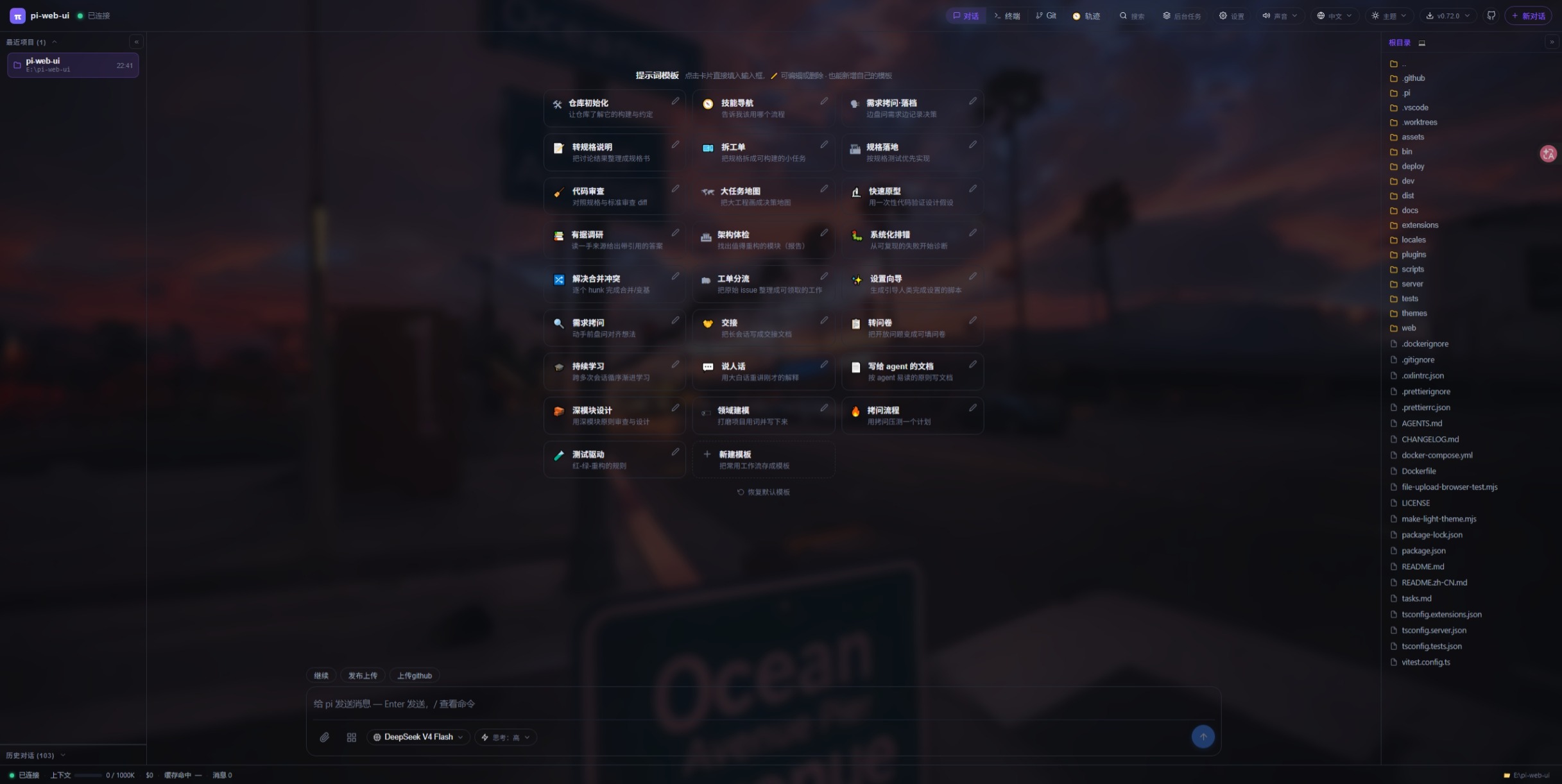
  "image": "https://raw.githubusercontent.com/xing-shuyin/pi-web-ui/main/assets/chat-prompts.jpeg",
  "extensions": [
    "./extensions"
  ]
}
Security note
Pi packages can execute code and influence agent behavior. Review the source before installing third-party packages.
README
pi-web-ui
A browser and desktop workspace for AI coding agents.
Website · Documentation · Downloads



pi-web-ui brings chat, files, terminals, Git and agent workflows into one workspace. Run it locally in a browser, use the Electron desktop app, or connect to remote SSH projects. The pi SDK and DeepSeek Harness (DSH) have different capabilities; choose the engine and model that suit your task.
Quick start
For the command-line version, install Node.js 22.19.0 or newer. Desktop installers include their runtime. Git and shell availability affect terminal and repository features.
npm install -g pi-web-ui@latest
cd /path/to/your/project
pi-web-ui
Open http://127.0.0.1:8787 if the browser does not open automatically. Configure a model provider and its credentials in workspace settings, select a model, and send your first task. Stop a foreground process with Ctrl+C.
For a first try without a global installation:
npx pi-web-ui@latestIf npm blocks native dependency scripts, follow the installed npm version's script-approval instructions. See the installation guide for platform dependencies and troubleshooting.
Choose an installation
| Method | When to use it | Instructions |
|---|---|---|
| npm / npx | Local development or a server with Node.js | Commands above; complete guide |
| Desktop installers | A desktop app with an included runtime | Download the matching Windows, macOS or Linux asset from Releases |
| Windows portable ZIP | Keep the app and portable data together | Extract pi-web-ui-desktop-<version>-portable.zip; follow its included launcher instructions. Bundled Git/Node depend on the build; see portable details |
| Docker Compose | Container deployment built from source | See the commands below |
| Android / Termux | Browser access from an Android terminal environment | Termux prerequisites and commands |
| Source checkout | Contributing or testing local changes | Development |
On Linux, native dependency compilation may require Python, make and a C++ compiler. On Windows, install Git for Windows when Bash-based workflows are needed. Portable data placement does not guarantee that the operating system, browser or external tools leave no traces.
Run as a background service
After global npm installation, install and start the service with explicit project and data paths. Stop any foreground process already using the port first.
pi-web-ui server install --cwd "/path/to/project" --data-dir "/path/to/pi-data" --port 8787
pi-web-ui server status
Windows PowerShell example:
pi-web-ui server install --cwd "D:\Projects\app" --data-dir "D:\pi-data" --port 8787
pi-web-ui server status
Visit http://127.0.0.1:8787 and verify the project and a model response. macOS uses a user launchd agent, Linux systemd, and Windows the current user's login Run key. Linux installation may require elevated privileges; Windows login autostart is not a system-level Windows Service.
pi-web-ui server stop
pi-web-ui server start
pi-web-ui server restart
pi-web-ui server status
pi-web-ui server shortcut
# Remove the service only when it is no longer needed:
pi-web-ui server uninstall
Use --name my-pi consistently when installing and managing named services. Services may not inherit interactive-shell credentials or PATH. See service configuration.
Common startup options
pi-web-ui --cwd "/path/to/project" --port 9000 --no-browser
pi-web-ui --host 0.0.0.0 --port 9000 --cwd "/path/to/project"
pi-web-ui --help| Flag | Environment | Purpose / default |
|---|---|---|
--cwd <dir> |
PI_WEB_CWD |
Workspace: current directory in foreground; ~/pi-web-ui for service installation |
--port <n> |
PI_WEB_PORT |
HTTP and WebSocket port; 8787 |
--host <addr> |
PI_WEB_HOST |
Listen address; 127.0.0.1 is local-only |
--data-dir <dir> |
PI_WEB_DATA_DIR |
Service data; ~/.pi-web under the running account |
--agent-dir <dir> |
PI_CODING_AGENT_DIR |
pi agent configuration; ~/.pi/agent |
--engine <pi|dsh> |
PI_WEB_ENGINE |
Execution engine; pi |
--no-browser |
— | Do not automatically open a browser |
Paths with spaces need quoting. 0.0.0.0 is a listen address; other devices connect using the server's actual IP or domain. Configure authentication and appropriate network protection before sharing access. Full startup reference.
Local /setup page
Open http://127.0.0.1:8787/setup on the server's machine, substituting the actual port. This page configures server access and networking; API keys and models belong in workspace settings.
- Set or generate an access token, then save. Token changes apply immediately; an empty saved token disables token authentication.
- Configure listen address, port, Host allowlist and extra Origins; these require a restart.
- Check the displayed
<dataDir>/server-config.jsonpath. Startup flags and environment take precedence over saved settings on restart. - LAN and proxy access to
/setupis restricted. A remote server can be reached through an SSH local port forward; see the step-by-step setup guide.
Docker from source
git clone https://github.com/xing-shuyin/pi-web-ui.git
cd pi-web-ui
# Review docker-compose.yml: authentication, ports, project and credential mounts.
docker compose up -d --build
docker compose logs -f
The repository Compose configuration builds the image locally. Persist service data at /app/.pi-web in the container. Mount projects and credentials deliberately; container paths differ from host paths. Do not assume a published container port satisfies /setup's loopback checks. See container installation and deployment.
Update and remove
npm install -g pi-web-ui@latest
pi-web-ui server restart  # For an installed service; restart foreground processes yourself.
Desktop and portable users should follow the matching package's update instructions and retain their actual data directories. Before removal, back up needed conversations, settings and credentials. For npm users, uninstall the service first if installed, then run npm uninstall -g pi-web-ui. Removing the package does not remove separately stored user data.
What you can do
- Chat and context: streaming responses, tool outputs, attachments, file references, structured questions and multiple conversations.
- Work on projects: file browsing and previews, uploads, integrated terminals, Git diffs, staging and commits. Remote SSH capabilities depend on the engine, host tools and connection configuration.
- Organize agent work: planning, goal review/execution, delegated work and subagents. File claims coordinate parallel edits through advisory notices; they are not edit locks.
- Extend the workspace: plugins, MCP tools, skills, configuration presets and customizable layouts and themes. Availability depends on installed components and permissions.
Approval controls, task modes and isolated project directories have specific implementation boundaries; they are not universal operating-system security sandboxes. See approval and security.
See the workspace
| Chat | Terminal |
|---|---|
 |
 |
| Git | Settings |
|---|---|
 |
 |
Plugins and documentation
Browse plugins in the workspace or install from a repository:
pi-web-ui install owner/repo
pi-web-ui plugins
pi-web-ui plugin create my-plugin
Plugin permissions and external-service requirements vary. For submissions, follow the community registry; automation is governed by that repository's current checks and policies.
- Getting started and installation
- Remote SSH projects
- Plan, goal and review workflows
- MCP and browser tools
- Plugin SDK · Desktop · Windows portable launcher
- Environment variables · Deployment · Architecture
Development
git clone https://github.com/xing-shuyin/pi-web-ui.git
cd pi-web-ui
npm ci
npm run dev
Node.js 22.19.0+ and the platform's native build dependencies are required. The dev frontend is normally on port 5173 and the backend on 8788. For a production checkout, run npm run build, then npm start.
Before submitting a change, follow development guidelines and run the applicable formatting, type, lint and test checks. Desktop build details live in desktop/README.md.
Community and license
Issues · Discussions · QQ group: 1126050727 · dsh-ui-tools