pi-webaio
All-in-one web tools for pi with search (Google, Brave, DDG) and fetch with headless browser AI summarization
Package details
Install pi-webaio from npm and Pi will load the resources declared by the package manifest.
$ pi install npm:pi-webaio- Package
pi-webaio- Version
0.3.4- Published
- May 18, 2026
- Downloads
- 1,029/mo · 217/wk
- Author
- apmantza
- License
- MIT
- Types
- extension
- Size
- 560.1 KB
- Dependencies
- 7 dependencies · 2 peers
Pi manifest JSON
{
  "extensions": [
    "./index.ts"
  ]
}
Security note
Pi packages can execute code and influence agent behavior. Review the source before installing third-party packages.
README
pi-webaio
All-in-one web access tools for pi with search, fetch, crawl, extraction, anti-bot TLS fingerprinting, and intelligent resilience.
What does pi-webaio do?
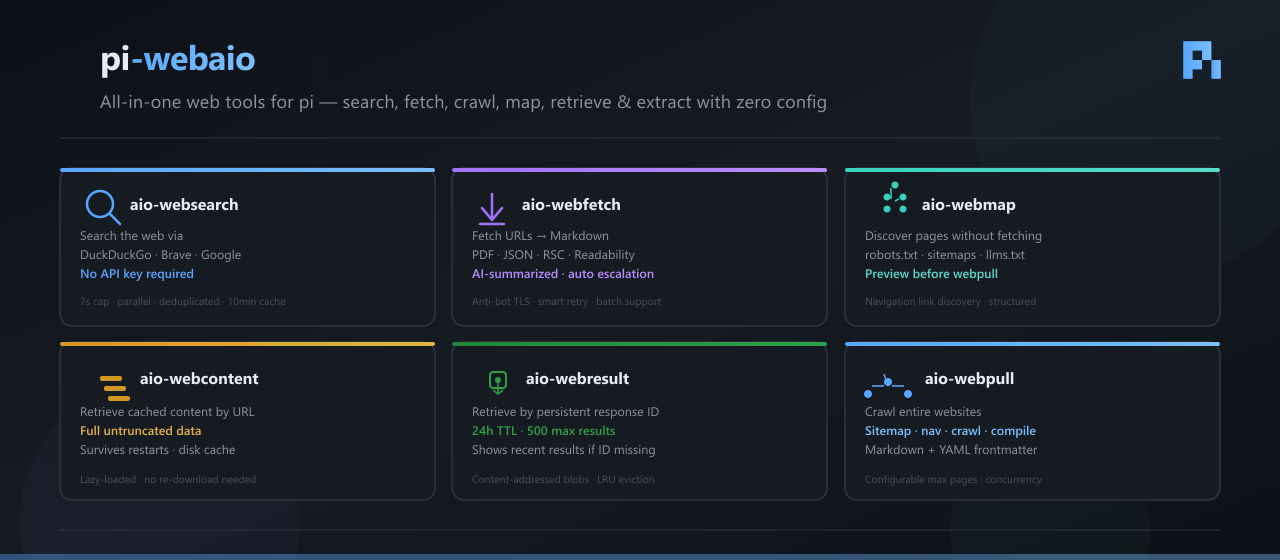
pi-webaio is a pi extension that gives your agent eyes on the web. It registers six tools that let pi search, fetch, discover, and archive web content — all without API keys or paid services.
When you search, pi-webaio queries 5 engines in parallel (DuckDuckGo, Brave, Yahoo, Bing, and Google via headless Chrome). Results that show up across multiple engines rank higher — consensus is a signal of quality. When you fetch a page, it tries 14 different extraction backends in order, stripping cookie banners and anti-bot noise along the way, so you get clean markdown instead of raw HTML soup.
Long pages are automatically AI-summarized via Google AI Mode (headless Chrome) — you get a concise overview instantly, while the full content is always saved to disk for later inspection. For sites with API-first extractors (GitHub, YouTube, npm, PyPI, Reddit, Hacker News, arXiv), pi-webaio bypasses HTML scraping entirely and pulls structured data directly.
It's built for agents that need to:
- Research — find current information, documentation, or references
- Read — pull articles, docs, GitHub repos, PDFs, or YouTube transcripts into markdown
- Explore — map out a website's pages before pulling them all
- Remember — cached results survive restarts and can be retrieved by URL or ID
No API keys. No subscriptions. No brittle scraping scripts. Just pi install npm:pi-webaio and go.
Installation
pi install npm:pi-webaio
Or from git:
pi install git:github.com/apmantza/pi-webaio
How AI summarization works
When you fetch a single URL with aio-webfetch, long pages are automatically summarized using Google AI Mode (via headless Chrome CDP). Here's the logic:
- Short pages (under ~1800 chars) — displayed in full, no summarization needed.
- Long pages — if Google Chrome is available, pi-webaio launches a headless Chrome instance, navigates to the URL, and captures the AI Mode summary.
- Fallback — if Chrome is unavailable or AI Mode fails, the first ~1800 chars are shown with a note that the full file was saved to disk.
Summarization is automatically skipped for content that already comes from a structured pipeline:
| Source | Why skipped |
|---|---|
| GitHub (repos, blobs, issues, PRs, raw files) | Clean structured data from git clone / REST API — no HTML noise to summarize |
| YouTube | Transcript + metadata via Innertube API — the transcript IS the content |
| SonarCloud | Quality metrics fetched via API — structured data in table form |
| npm / PyPI / Reddit / Hacker News / arXiv / docs sites | API-first extractors return clean markdown directly |
Skipping is enforced by both a content marker (> via <source>) and a URL hostname check (covers github.com, raw.githubusercontent.com, gist.github.com), so even if an extractor fails and falls through to the HTML pipeline, GitHub URLs never get AI-summarized.
Special pipelines: GitHub, YouTube, and more
Instead of scraping HTML, pi-webaio routes known sites through purpose-built extractors that fetch structured data directly. This means faster results, cleaner markdown, and no AI summarization of already-clean content.
GitHub
GitHub URLs are intercepted before any HTTP request and handled by a dedicated pipeline:
| URL pattern | Method | What you get |
|---|---|---|
github.com/owner/repo |
git clone (or gh repo clone) + README extraction |
File tree, architecture hints, full README |
github.com/owner/repo/blob/branch/path |
raw.githubusercontent.com fetch |
Raw file content |
github.com/owner/repo/tree/branch/path |
GitHub REST API | Directory listing |
github.com/owner/repo/issues |
GitHub REST API | Issue list with states |
github.com/owner/repo/pull/123 |
GitHub REST API | Single PR details |
github.com/owner/repo/commit/sha |
GitHub REST API | Commit details |
github.com/owner/repo/actions/runs/123 |
GitHub REST API + logs | Run status, jobs, step results, error log excerpts |
github.com/owner/repo/security/* |
GitHub REST API | Security advisories, code scanning, Dependabot alerts |
raw.githubusercontent.com/owner/repo/branch/path |
Direct fetch + fallback to pipeline | Raw file content with source marker |
All GitHub results are tagged with > via GitHub and AI summarization is skipped.
YouTube
YouTube video URLs are matched by a vertical extractor that uses youtube-transcript-plus (Innertube API — no API key required):
- Extracts metadata: title, channel, duration, views, language, tags (first 10), description
- Extracts the full transcript (up to ~40K chars, truncated beyond that)
- Supports
youtube.com/watch?v=,youtu.be/,/shorts/,/embed/formats - Playlist URLs are detected but not yet supported (fetch individual videos instead)
SonarCloud
SonarCloud URLs (sonarcloud.io/project/...) are fetched via the SonarCloud REST API:
- Security hotspots — grouped by category with severity breakdown
- Issues — severity, type, file, line number, message
- Overview — quality gate metrics in table form
- Activity — chronological analysis events
API-first extractors (vertical registry)
These sites are handled by dedicated extractors that use their public APIs:
| Site | Extractor | API |
|---|---|---|
| npm | src/verticals/npm.ts |
npm registry JSON API |
| PyPI | src/verticals/pypi.ts |
PyPI JSON API |
| Hacker News | src/verticals/hackernews.ts |
Firebase API |
src/verticals/reddit.ts |
.json endpoint |
|
| arXiv | src/verticals/arxiv.ts |
Atom export API |
| Docs sites | src/verticals/docs-site.ts |
Docusaurus, GitBook, MDN, VitePress extraction |
All vertical extractors tag their output with > via <name>, which automatically skips AI summarization.
Auto-escalation: when scraping gets blocked
When the normal fetch pipeline hits a bot wall (Cloudflare, Anubis, DataDome, PerimeterX, etc.), pi-webaio escalates automatically:
- Fingerprint rotation — retries with alternate browser profiles (
firefox_147,safari_26,edge_145) - Browser mode — last resort: renders the page with Playwright (headless Chromium)
This is all transparent — the mode parameter controls escalation: auto (default, escalates on detection), fast (no escalation), fingerprint (alternate browsers only), or browser (Playwright always).
How search ranking works
When you search, pi-webaio queries 5 engines in parallel: DuckDuckGo, Brave, Yahoo, Bing, and Google (via headless Chrome). Results are scored by two signals:
- Engine authority — Google (5), Bing (3), DDG (2), Brave (2), Yahoo (1)
- Cross-engine consensus — +2 for each additional engine that agrees on the same URL
A result returned by all 5 engines outranks a Google-only result. Metadata (title/snippet) comes from the highest-weight engine for each URL.
Usage Examples
Search the web
Use aio-websearch to find the latest React documentation
Google search is on by default (via headless Chrome CDP). To skip it:
Use aio-websearch to search for "Rust serde" (google: false)
Fetch a single URL
Use aio-webfetch to download https://example.com/article
After fetching, use the built-in read tool to inspect the full saved file.
Fetch multiple URLs in batch
Use aio-webfetch to download these URLs:
  - https://example.com/page1
  - https://example.com/page2
  - https://example.com/page3
Fetch with a specific browser fingerprint
Use aio-webfetch to download https://example.com (browser: "firefox_147", os: "linux")
Retrieve stored content (no re-download)
Use aio-webcontent to get the full content from https://example.com/article
Pull an entire site
Use aio-webpull to download https://docs.example.com (max: 50 pages)
Pull a site with custom fingerprint
Use aio-webpull to download https://docs.example.com (max: 50, browser: "edge_145", os: "macos")
Tools
| Tool | Description |
|---|---|
aio-websearch |
Search the web using DuckDuckGo, Brave, Yahoo, Bing, and Google in parallel (no API keys required). Returns compact results with title, URL, and snippet. Results are ranked by cross-engine consensus — URLs returned by multiple engines rank higher. 7s cap. Google runs via headless Chrome CDP (auto-launched). 10-minute cache. |
aio-webfetch |
Fetch a single URL (or batch of URLs) and convert to markdown with anti-bot TLS fingerprinting. Long content is AI-summarized via Google AI Mode; full file always saved. Detects PDFs, GitHub repos, and Next.js RSC. Supports auto escalation. |
aio-webcontent |
Retrieve previously fetched content from session storage by URL. Returns full untruncated content — no data loss. |
aio-webmap |
Discovery-only tool — finds pages via robots.txt, sitemaps, navigation links, and llms.txt without fetching content. Returns structured URL list. |
aio-webresult |
Retrieve a previously fetched result by persistent response ID. Survives restarts. Shows recent results if ID not found. |
aio-webpull |
Pull any public website or docs site into local markdown files. Discovers pages via sitemap, navigation links, or crawling. Rewrites internal links to relative .md paths. Supports auto escalation and context package compilation. |
Tool Parameters
aio-websearch
| Parameter | Type | Default | Description |
|---|---|---|---|
query |
string |
— | Search query (e.g. 'React Server Components RFC') |
max |
number |
15 |
Max results per engine. Up to 25 total after dedup across all engines. |
google |
boolean |
true |
Also search Google via headless Chrome CDP. Set to false to use only DDG/Brave. |
aio-webfetch
| Parameter | Type | Default | Description |
|---|---|---|---|
url |
string |
— | Single URL to fetch. Use either url or urls, not both. |
urls |
string[] |
— | Multiple URLs to fetch in parallel. Use either url or urls, not both. |
out |
string |
auto-derived | Output file path under temp (for single url only) |
mode |
string |
auto |
Scrape mode: auto (escalates), fast, fingerprint, or browser |
browser |
string |
latest | Browser profile for TLS fingerprinting. Options: chrome_145, firefox_147, safari_26, edge_145 |
os |
string |
windows |
OS profile for fingerprinting. Options: windows, macos, linux, android, ios |
proxy |
string |
— | Proxy URL (http://user:pass@host:port or socks5://host:port). Supports HTTP, HTTPS, SOCKS5. |
cacheTtlSeconds |
number |
— | Opt-in cache TTL in seconds. Omit for fresh fetches. |
compile |
boolean |
false |
Compile batch results into a single context package |
prune |
number |
— | Prune markdown to token budget (e.g. 3000) |
interactive |
boolean |
false |
Extract interactive elements as numbered refs |
start_index |
number |
0 |
Return content starting from this character index (0-based). Use with max_length for pagination. |
max_length |
number |
unlimited | Maximum characters to return. Use with start_index for pagination. |
aio-webcontent
| Parameter | Type | Default | Description |
|---|---|---|---|
url |
string |
— | URL of previously fetched content |
aio-webmap
| Parameter | Type | Default | Description |
|---|---|---|---|
url |
string |
— | URL to discover pages for |
max |
number |
100 |
Max URLs to discover |
browser |
string |
latest | Browser profile for TLS fingerprinting |
os |
string |
windows |
OS profile for fingerprinting |
aio-webresult
| Parameter | Type | Default | Description |
|---|---|---|---|
id |
string |
— | Response ID from a previous webfetch call |
aio-webpull
| Parameter | Type | Default | Description |
|---|---|---|---|
url |
string |
— | URL to pull (e.g. https://docs.example.com) |
out |
string |
<hostname> |
Output directory under temp |
max |
number |
100 |
Max pages to pull |
mode |
string |
auto |
Scrape mode: auto (escalates), fast, fingerprint, or browser |
browser |
string |
latest | Browser profile for TLS fingerprinting. Options: chrome_145, firefox_147, safari_26, edge_145 |
os |
string |
windows |
OS profile for fingerprinting. Options: windows, macos, linux, android, ios |
proxy |
string |
— | Proxy URL (http://user:pass@host:port or socks5://host:port). Supports HTTP, HTTPS, SOCKS5. |
compile |
boolean |
false |
Compile pulled pages into a single context package |
License
MIT