pi-webapp
A browser interface for Pi with live chat, workspaces, models, and attachments
Package details
Install pi-webapp from npm and Pi will load the resources declared by the package manifest.
$ pi install npm:pi-webapp- Package
pi-webapp- Version
0.1.7- Published
- Oct 3, 2026
- Downloads
- 1,203/mo · 1,203/wk
- Author
- chengzhiyi
- License
- MIT
- Types
- extension
- Size
- 6.5 MB
- Dependencies
- 25 dependencies · 2 peers
Pi manifest JSON
{
  "image": "https://cdn.jsdelivr.net/npm/pi-webapp@0.1.7/assets/cover-webapp.png",
  "extensions": [
    "./dist/extension.js"
  ]
}Security note
Pi packages can execute code and influence agent behavior. Review the source before installing third-party packages.
README
pi-webapp
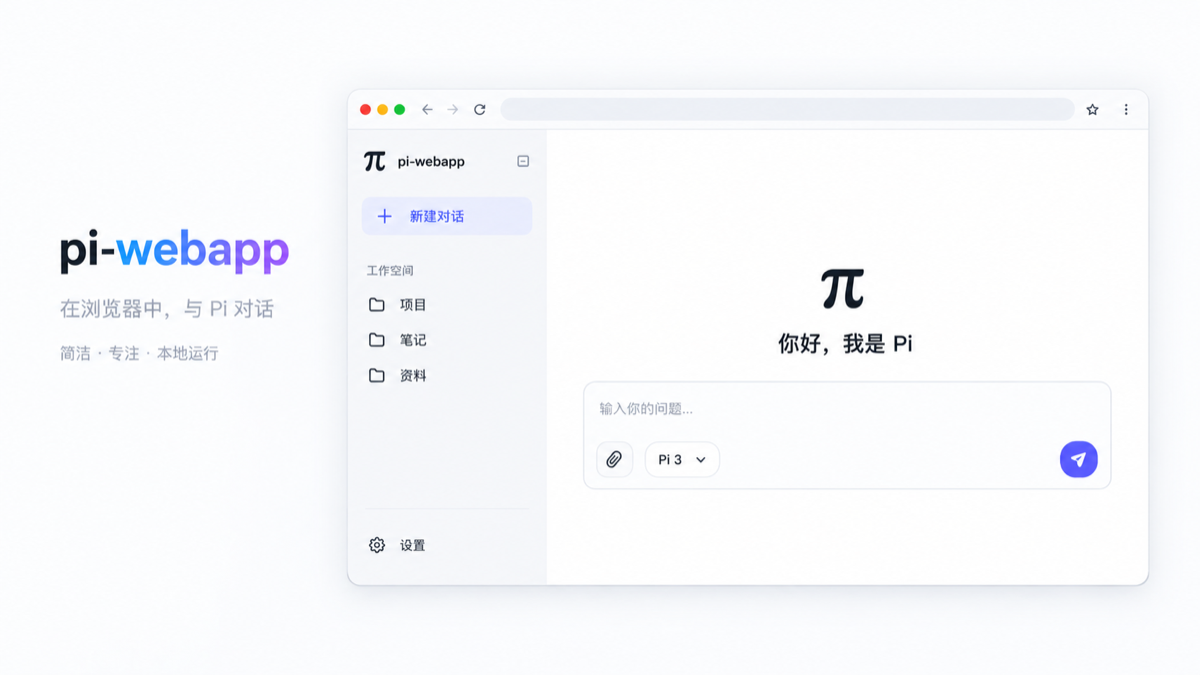
pi-webapp opens the active Pi coding agent session in a local browser. Pi continues to run the agent, tools, and session storage; the browser provides a live interface for conversation and control.
Install and open
Requires Node.js 22.19 or later. To open the web interface directly:
npx pi-webappThis starts Pi in the background and opens the default browser on a local graphical desktop, leaving the terminal free. If Pi is missing, the launcher installs the official @earendil-works/pi-coding-agent package with npm. An existing Pi installation must be version 0.87.1 or later. The launcher does not replace an older installation automatically. Running the launcher again reopens the existing server. Remote or headless sessions print the address instead; set PI_WEBAPP_AUTO_OPEN=0 to disable automatic opening.
In Settings → General → App updates, the web page checks npm for a newer pi-webapp release. When started by the background launcher from an npm package, Update and restart installs the verified release under Pi's pi-web/releases/ data directory, restarts the server, and reloads the same browser address. Wait for any active reply to finish first. If the new version cannot start, the launcher restores the previous service. This works for both npx and global-command launches; later launches select the managed release automatically. It does not change the npm global installation. Source checkouts and /web pages opened from an existing Pi terminal show version information but cannot restart from the web page. If the service does not return, run pi-webapp status and check ~/.pi/agent/pi-web/launcher.log.
Use npx pi-webapp status to show the address and npx pi-webapp stop to stop the background service. After a global install, use pi-webapp status and pi-webapp stop.
You can also install the launcher globally:
npm install -g pi-webapp
pi-webapp
To use the extension inside an existing Pi terminal, the original workflow remains available:
pi install npm:pi-webapp
pi
In Pi, enter /web to open the interface in your default browser. Pi also prints the local URL for remote or headless environments. The URL contains a random token valid only for the current Pi process. Enter /web again to reopen it.
Features
- View the current conversation with Markdown, streaming output, expandable reasoning and tool calls, token usage, and a turn-by-turn trace.
- Send messages, pause and continue a run, start a new Pi session, and change the current model or thinking level. The bottom-right control pauses an active run; an empty composer offers Continue after pausing, including after refreshing or reopening the session. Continue uses an internal control action without adding a user message; the model makes a new request based on existing progress, and plan mode still requires fresh approval.
- Browse workspaces and saved sessions. Add a workspace with the native directory picker when available, or use the built-in directory browser over SSH.
- Attach up to 20 files of 20 MB each by selecting, dropping, or pasting them. Images show previews and are also sent as Pi image content.
- Manage appearance, Pi packages, extensions, skills, and models from the settings panel. The Models page can add models, edit display names, context windows, output limits, and input types, and restore built-in defaults; changes are saved to Pi's
models.json. Browser sign-in opens the provider's authorization page automatically; manual code entry remains available when a callback cannot reach Pi. Stored provider credentials can also be removed there. Credentials stay in Pi's localauth.jsonand are never returned to the browser.
If you enter /web manually in a Pi terminal, that terminal session stays synchronized with the browser. With the launcher, Pi runs in the background. Sessions opened in other workspaces use the Pi SDK and load that workspace's skills and project context. They load enabled Web plugin Pi entries explicitly while keeping other Pi extensions isolated from the parent bridge.
On startup, the app discovers workspaces from Pi's saved sessions, so conversations from other directories appear in the sidebar. Workspace records and attachments stay under Pi's existing pi-web/ data directory. Removing a workspace from the sidebar does not delete its files or sessions; you can add it again manually.
Develop locally
npm install
npm run check
npm run test
npm run build
npm run start
npm run status
npm run stop
npm run start builds the project, starts Pi in the background, and opens the web interface. After editing the extension, run npm run stop followed by npm run start. If you develop with pi -e ., enter /reload and /web in Pi after rebuilding. Refreshing an old browser page alone does not replace the running bridge.
For local Web plugin development with the sibling pi-extensions workspace, follow its README.md. Set PI_WEBAPP_PLUGIN_DEV_ROOTS=../pi-extensions/packages/plan-mode when starting this app; browser asset changes refresh automatically and Pi entry changes trigger a safe reload when the agent is idle.
The source lives in extension/, shared/, and web/src/. The npm package contains only the bundled, minified JavaScript extension, built web assets, cover image, and the English and Chinese READMEs. No TypeScript source or source maps are published. Minification makes the shipped code harder to read; it does not encrypt JavaScript.
Publish
CI resolves the published @chengzhiyi/pi-web-protocol version before npm ci.
Until the first protocol publication, verification builds a pinned pi-extensions
commit in an ignored .ci/ checkout and uses that local package. Checks, tests,
and builds still run; the Actions summary explains why host publication is waiting.
Release builds always require the published npm dependency. Once it exists, the
next workflow uses its exact version and the release commit records the lockfile.
Use Actions' manual run after initializing npm; protocol releases do not trigger
this repository automatically.
npm publish runs the checks, tests, and production build. The pi-package keyword makes the published npm package eligible for the Pi package catalog; catalog updates may lag behind npm.
GitHub Actions runs check, test, and build on pull requests to main. A push to main repeats those checks, chooses the next patch version from the source version and npm latest, then commits the updated package.json and package-lock.json to main before publishing. The release commit uses the workflow's GITHUB_TOKEN and does not start another workflow run. To start a new minor or major series, raise the version in both package files in the pull request. Each release also updates the package's pi.image URL to its own version. The repository must allow the workflow to push to main for publishing to proceed.
Before the first automated release, configure npm Trusted Publishing for the pi-webapp package: GitHub owner chengzhiyi, repository pi-webapp, workflow filename ci.yml, no environment, and allow direct npm publish. This workflow uses GitHub's OIDC identity and does not need an npm token. Keep the package's repository URL in package.json aligned with the GitHub repository.
License
MIT. See the LICENSE file.