pi-webapp
A browser interface for Pi with live chat, workspaces, models, and attachments
Package details
Install pi-webapp from npm and Pi will load the resources declared by the package manifest.
$ pi install npm:pi-webapp- Package
pi-webapp- Version
0.1.50- Published
- Nov 1, 2026
- Downloads
- 7,739/mo · 5,151/wk
- Author
- chengzhiyi
- License
- MIT
- Types
- extension
- Size
- 9 MB
- Dependencies
- 34 dependencies · 2 peers
Pi manifest JSON
{
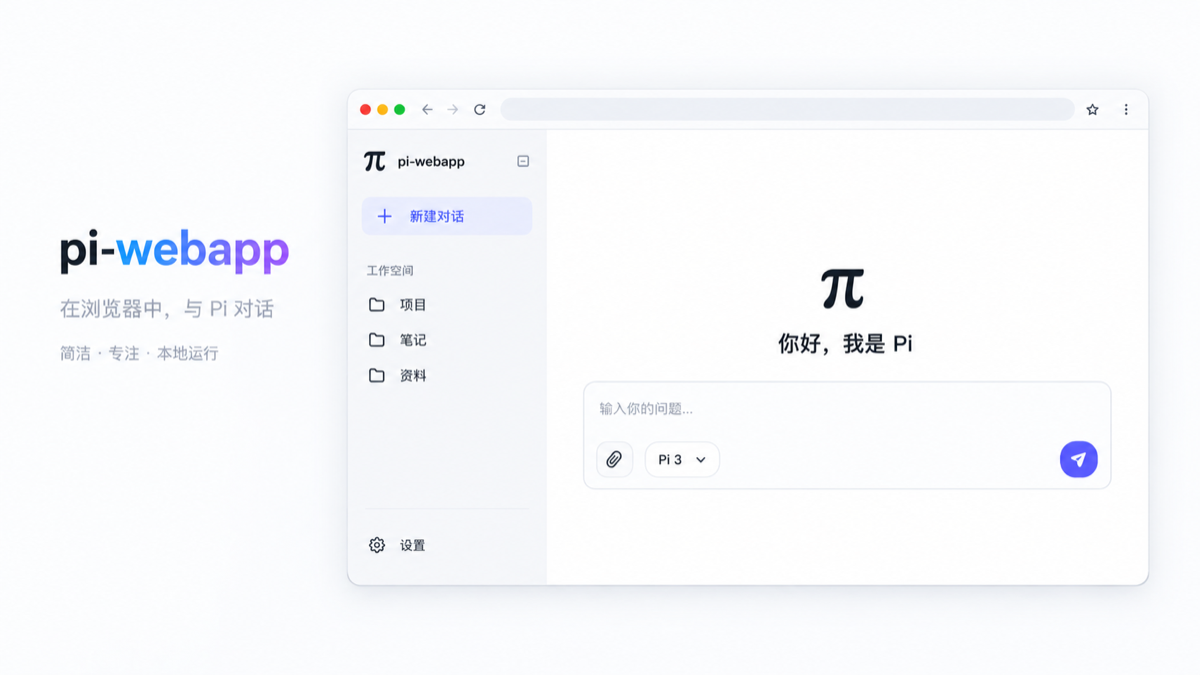
  "image": "https://cdn.jsdelivr.net/npm/pi-webapp@0.1.50/assets/cover-webapp.png",
  "extensions": [
    "./dist/extension.js"
  ]
}
Security note
Pi packages can execute code and influence agent behavior. Review the source before installing third-party packages.
README
pi-webapp
One workspace for your Pi coding agent.
Conversations, project files, terminals, and Git—side by side. Use the same workbench in your browser or on desktop, while keeping Pi's tools, skills, extensions, and terminal workflow.
简体中文 · Get started · Download desktop · Architecture · User guide · npm
Desktop test build 14: macOS Apple Silicon DMG · Intel, Windows & Linux downloads · SHA-256 checksums. These are unsigned/unnotarized test packages. See safe installation.
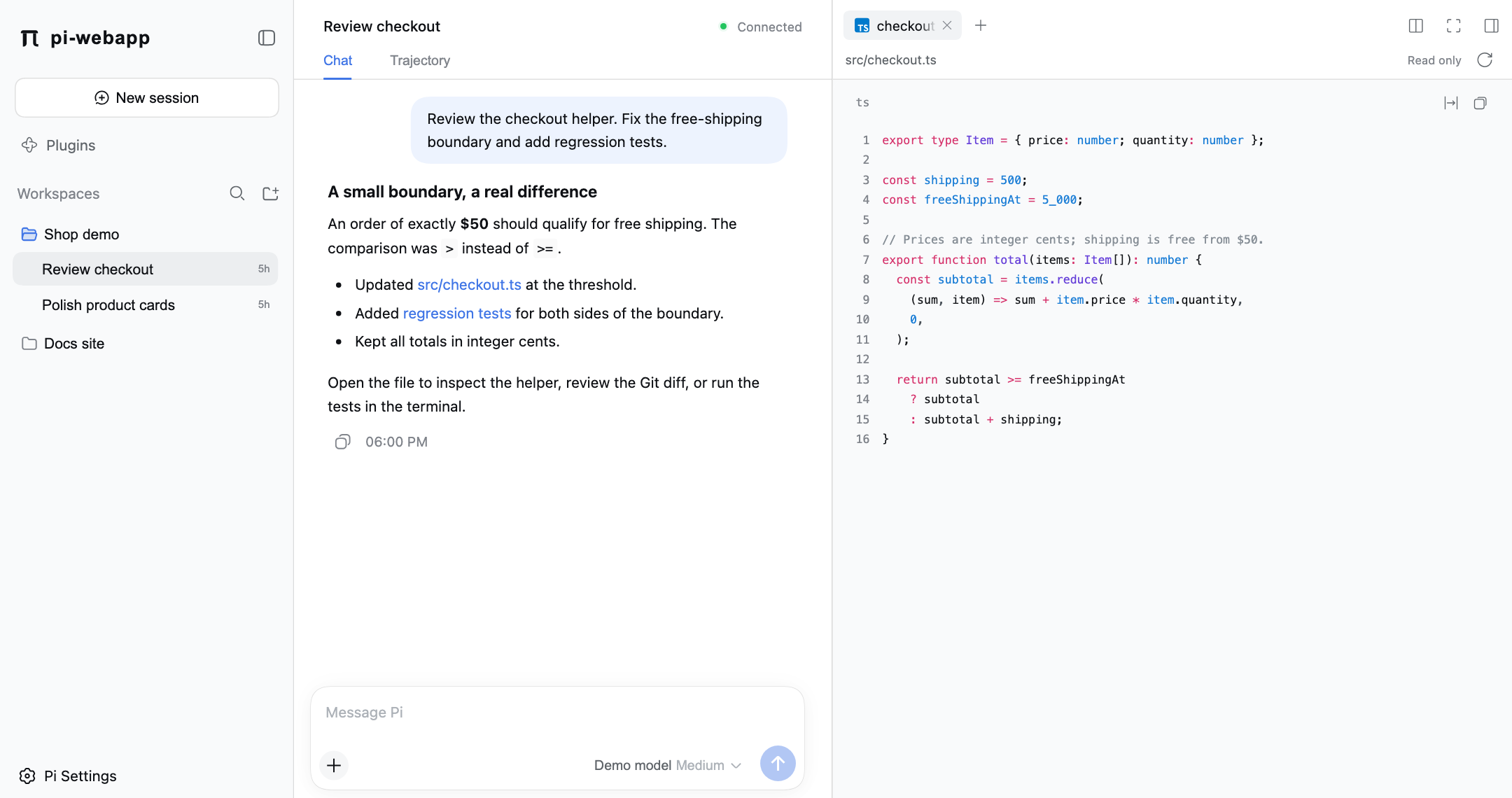
Follow the conversation and inspect the linked source file in the same workspace. Real UI, seeded demo data—not a live model transcript.
npx pi-webappOne command for the Web. A bundled runtime for desktop. The same Pi underneath.
Why pi-webapp?
- Keep your coding context together. Follow the agent, inspect a file, run a command, and review a diff without leaving the workspace.
- Work across projects without interrupting tasks. Chats run independently; switching projects or starting another conversation leaves existing work running in the background.
- See what the agent is doing. Streaming replies, expandable reasoning and tool calls, token usage, and execution traces make progress easier to follow.
- Build on Pi, not around it. Keep Pi's session storage, model choices, skills, and extension ecosystem. The interface adds a workbench, not a replacement agent engine.
See the workflow
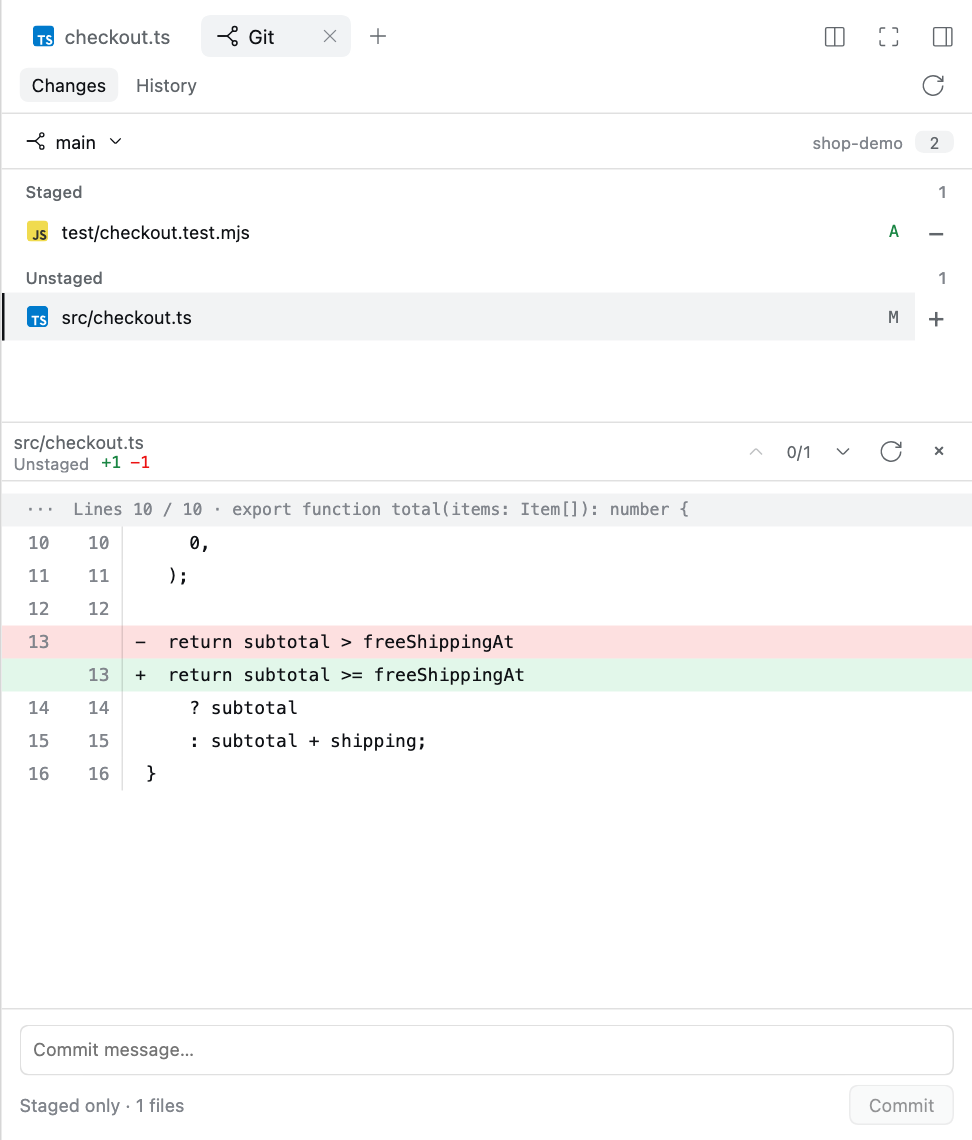
Discuss → inspect → review → verify. The workbench above keeps your conversation and source side by side; the same tool panel takes you from reviewing a change to running its tests.
| Review before committing | Verify in a real terminal |
|---|---|
 |
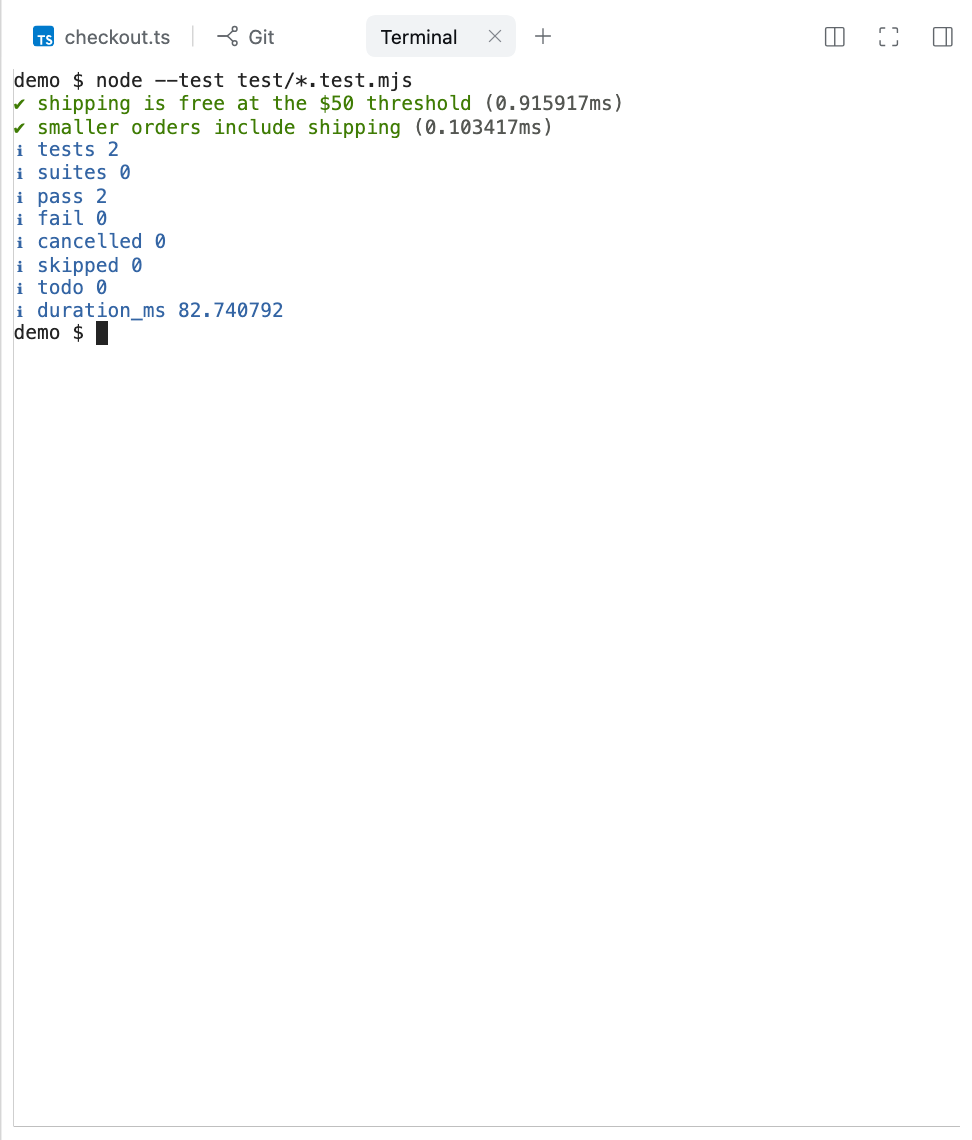 |
| Inspect the diff and stage only what you intend to commit. | Run project commands without losing the conversation. |
Click any image for full size. Screenshots use an isolated demo repository. The terminal really runs its two regression tests; no provider credentials or private project data are used. How these images are made.
Excalidraw: turn conversations into editable diagrams
Describe it → refine it → keep it. Ask Pi for an architecture diagram, flowchart, or concept sketch. The drawing appears in the conversation; Edit opens the native Excalidraw canvas—not a flattened image.
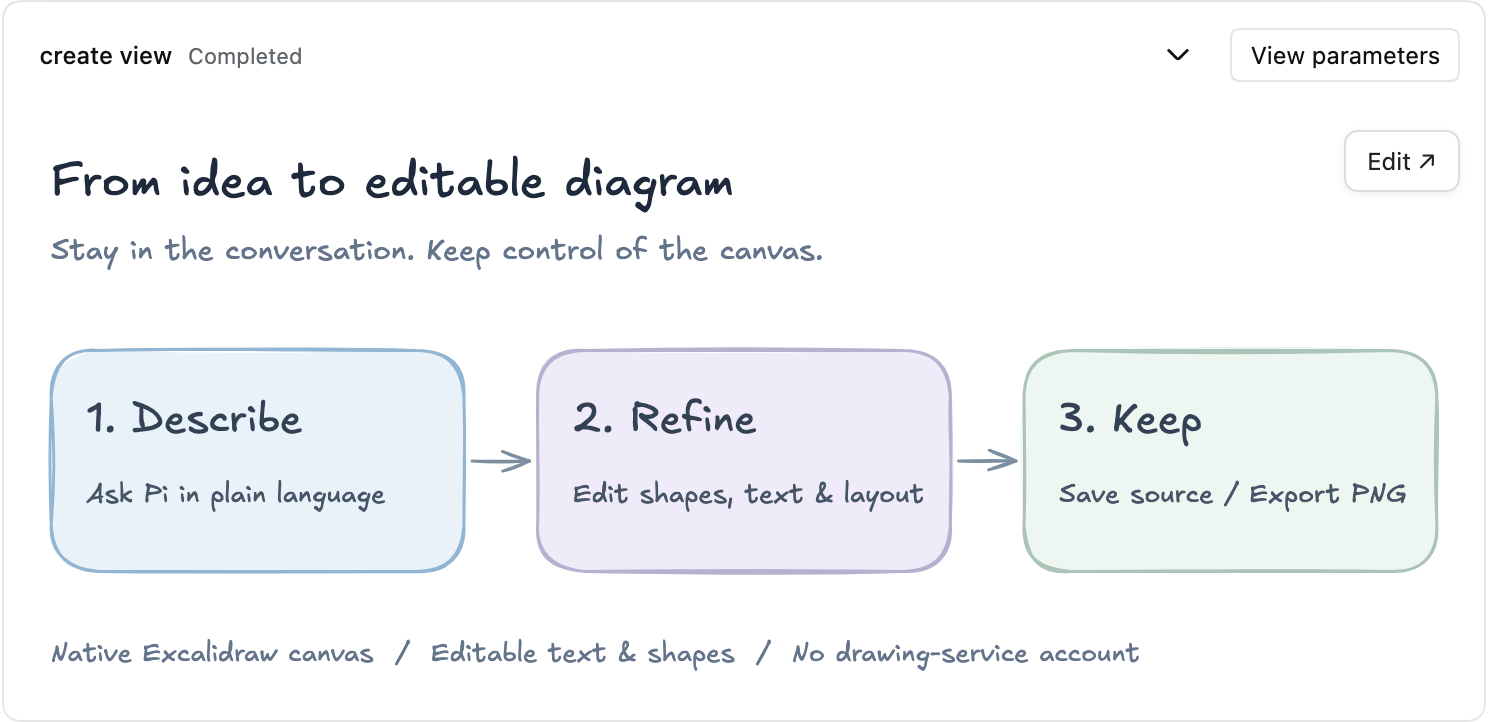
Real plugin UI with a seeded example, not a live model transcript. Click the image for full size.
- Create in context: describe the drawing in the main conversation, without opening another drawing service.
- Make it yours: move shapes, edit labels, adjust layout, and use native undo/redo.
- Keep the result: save editable
.excalidrawsource to the workspace or export a PNG from the editor.
Optional plugin: explicitly install and enable @chengzhiyi/pi-excalidraw in Plugins → Official plugins, using an available compatible release. It is not bundled or auto-installed, and needs no drawing-service account. Setup, saving & recovery.
Core features
| Capability | What you can do |
|---|---|
| Live agent conversations | Send messages and image/file attachments; pause and continue tasks; switch models and thinking levels. Render Markdown, code, reasoning, and tool results in context. |
| Multi-project sessions | Discover saved Pi sessions, add workspaces, and switch between independently running chats. Return to ongoing output and pending plugin interactions. |
| Files beside the conversation | Browse the workspace, follow file links from chat, and preview highlighted code, Markdown, and images in read-only tabs. |
| Real integrated terminals | Run interactive shells in the workspace, use Ctrl+C, and keep processes and output when switching chats or panels. |
| Git review and workflow | Review changes and inline diffs, stage/unstage files, commit the staged index, create/switch local branches, and explore commit history with a branch graph. |
| A flexible workbench | Resize, split, or expand tool panels; use workspace focus mode while keeping navigation within reach. Each chat retains its own tool tabs until the page reloads. |
| Models, skills, and plugins | Configure providers and models, manage Pi packages/extensions/skills, and toggle bundled Files, Terminal, and Git capabilities. Supported Web plugins can add their own UI. |
| Browser and desktop entry points | Use the background launcher, open /web from Pi's terminal, or launch the Electron desktop app with bundled Node/Pi. |
Chats run independently, but files and Git changes in the same worktree are shared. Switching chats does not stop work; stopping the service ends its background tasks. Terminals and agent tools run with your system permissions, not in a sandbox.
Get started
Web: run one command
Requires Node.js 22.19+ and npm. Run in your project directory:
npx pi-webappThe launcher starts a local background service with the package's pinned Pi SDK 1.3.0 and opens your browser. No global Pi installation is needed or changed. Run the command again to reopen the existing service.
On headless machines, it prints the local address. Set PI_WEBAPP_AUTO_OPEN=0 to disable automatic browser opening.
- Open Settings → Models to configure a provider and choose a model you have access to.
- Select or add a workspace, then start a conversation.
- Open the conversation's upper-right tool panel to explore Files, Terminal, or Git changes alongside the agent.
Model access is required separately; a local interface does not mean offline inference. Keep token-bearing local URLs private and do not expose the service directly to the public internet.
npx pi-webapp status   # Show the running service address
npx pi-webapp stop     # Stop the service after active work finishes
Prefer a global command? Run npm install -g pi-webapp, then pi-webapp.
Updates: npm-launcher installations support Settings → General → App updates → Update and restart, with rollback if the new service fails to start. Finish active work first. Source checkouts and terminal /web sessions show version information but cannot restart from the page. See the update guide.
Already using Pi in a terminal?
pi install npm:pi-webapp
pi
Enter /web inside Pi. The browser stays synchronized with that terminal session; Pi continues to own the agent, tools, and session storage. Exiting that Pi process ends its service.
Desktop downloads
Latest desktop test release: pi 0.1.39 · build 14. Download the installer for your operating system and CPU:
| Platform | Download |
|---|---|
| macOS · Apple Silicon (arm64) | Download DMG |
| macOS · Intel (x64) | Download DMG |
| Windows · x64 | Download EXE installer |
| Linux · x64 | Download AppImage |
All releases · SHA256SUMS · Build/runtime metadata
Build 12 fixes desktop quit responsiveness. Quit confirmations focus the main window, closing a loading window no longer opens a blocking error alert, and a failed backend stop offers a desktop-only exit. Existing background services remain available.
Build 14 adds safe transfer from an old shared launcher. Build 12 already supports preview updates, but attaching it to a build 10 backend preserves the old launcher's capabilities. With build 14 installed, first update the business package on Stable, then use pi → 安全切换到当前桌面启动器…. Handoff waits for idle chats, closed terminals and real drawing save confirmation, preserves the local address and recovery copies, and never force-stops the old owner. Then select Preview and update; the selected channel/release persist across restarts. Preview chooses the newer of npm’s latest and alpha; an older alpha is not offered as an upgrade. Current-window, launcher and business-package versions are shown separately. Existing npm 0.1.26/0.1.27 services remain available for attachment without taking over their tasks.
The pi desktop app bundles Node and Pi—no separate runtime installation needed. It can reuse a compatible Web service, open the same service in your browser, and let you choose whether background tasks continue after closing the app. Bring your own model credentials, Git/SSH setup, and project toolchains.
- Install: macOS: drag pi.app from the DMG into Applications. Windows: run the EXE installer. Linux: make the AppImage executable and run it; see the release notes for the FUSE alternative.
- Verify: compare the installer with
SHA256SUMSfrom the same release. Confirm build 14 in pi → 关于 pi (About pi). Quit the old desktop before replacing it; do not delete~/.pi. - Test-release limits: these are opt-in prereleases, not publisher-signed stable distributions. macOS uses ad-hoc signatures without Apple notarization and may be blocked by Gatekeeper; follow the macOS test installation guide and stop if verification fails. Windows/Linux packages are unsigned. Never disable system security globally. Desktop shell updates require manual installation; business-package updates use the app's Settings. Windows ARM and Linux ARM are not included.
Architecture highlights
Shared React workbench → local Node host → Pi execution. This is a local, modular application—not a microservice cluster. Pi owns agent execution and session persistence; pi-webapp adds the interface, session orchestration, and workspace capabilities.
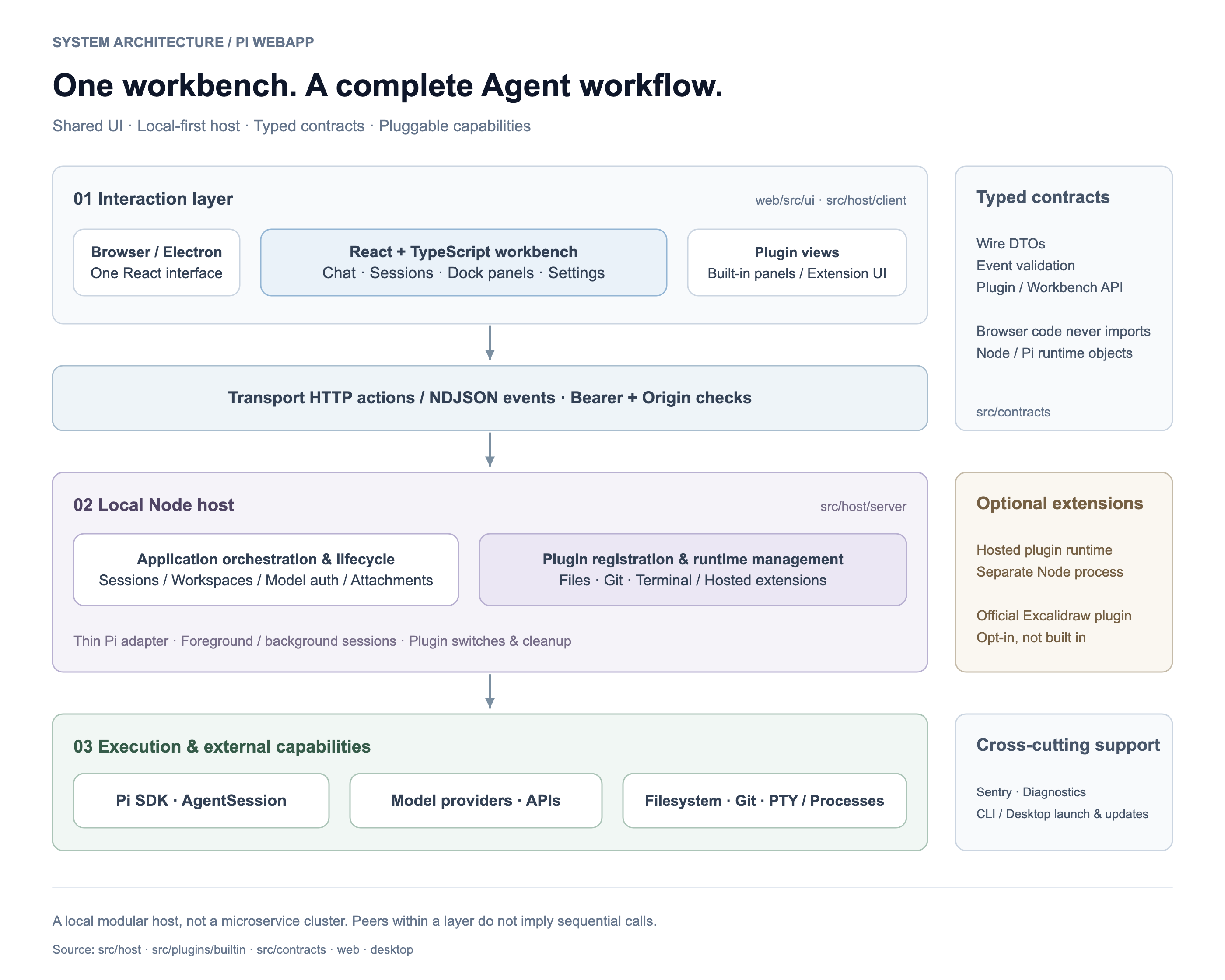
Three main connectors show the layer boundaries. Components within a layer are peers, not a sequential call chain. Click to view full size.
| Design choice | Why it matters |
|---|---|
| Thin Pi adapter, separate host | Agent integration stays small; server orchestration, browser UI, and workspace capabilities have explicit ownership instead of growing inside one extension entry point. |
| Typed, validated cross-boundary contracts | Browser code uses wire DTOs rather than Node/Pi runtime objects. HTTP actions and NDJSON events keep commands and live state updates explicit. |
| Plugin-owned capabilities | Built-in Git, Files, and Terminal each own their server/client/contracts and cleanup. A registry dispatches requests; the host workbench manages tabs, docking, focus, and session identity. |
| Lifecycle-aware sessions | Background sessions retain progress and pending interactions when you navigate away. Switching a chat preserves tool resources; closing a tab disposes its resource. |
| Guardrails at the host boundary | Loopback transport uses token/origin checks; file previews enforce workspace and symlink boundaries. Git writes reject stale state and coordinate known chats sharing the worktree. These checks are not an OS sandbox. |
| One UI across entry points | React + TypeScript power the workbench, Vite/esbuild bundle the app, and Electron provides the desktop shell without a separate conversation UI. |
Optional, not built in: drawings belong to the official @chengzhiyi/pi-excalidraw plugin, installed and enabled explicitly in Plugins. The host ships no editor/fonts and does not auto-install it on offline startup. Hosted plugins use a separate Node process for lifecycle management—not a security sandbox. Development protocol/plugin artifacts on this branch are verification-only, not a published release. See drawing migration and recovery for update behavior and preserved backups.
Source map
| Directory | Responsibility |
|---|---|
web/src/ui/ · src/host/client/ |
Shared UI, conversation shell, workbench, and browser plugin management |
src/host/server/ |
Transport, sessions, workspaces, model configuration, and plugin lifecycle |
src/adapters/pi/ |
Thin Pi extension entry point |
src/plugins/builtin/ |
Files, Git, and Terminal; each owns server, client, and contracts |
src/contracts/ · src/platform/telemetry/ |
Wire contracts and shared diagnostics |
bin/ · desktop/ |
CLI launcher and Electron shell |
Read the architecture and ownership guide or Web plugin integration notes for lifecycle and extension details.
Guides & development
- New users: Quick start · Conversations · Sessions and workspaces · Files, terminal and Git · Diagrams
- Configuration: Overview · Models and providers · Packages, skills and plugins · Updates · Security and privacy
- Help and reference: Troubleshooting · FAQ · Command line · Environment variables
- Contributors: Architecture · Web plugins · Desktop builds · Developers
The guides are also built as a searchable site with npm run docs:build (preview it with npm run docs:dev, after npm --prefix docs ci). They are written as VitePress pages under docs/en/ (Chinese in docs/zh/) and published at https://pi.emath.top.
The guides follow the source tree; installed versions may differ. For desktop availability, use the verified release links above and their release notes.
Develop locally
npm ci
npm run check
npm test
npm run start   # Build and launch the local service
npm run start builds and launches the background service. After changing extension code, run npm run stop and npm run start; reloading the browser alone does not replace the bridge. With pi -e ., rebuild and enter /reload, then /web in Pi.
For desktop development: npm run desktop:prepare → npm run desktop:start. npm run desktop:package creates a host-native installer in desktop-release/. For trusted local plugin development, see PI_WEBAPP_PLUGIN_DEV_ROOTS in the plugin notes.
Report a bug or request a feature · Star on GitHub
MIT licensed. See LICENSE.