pi-when
Pi extension: message time in the top-right corner of every box (user, assistant, tool). Display-only, keeps the layout and the model context unchanged.
Package details
Install pi-when from npm and Pi will load the resources declared by the package manifest.
$ pi install npm:pi-when- Package
pi-when- Version
0.2.0- Published
- Sep 21, 2026
- Downloads
- 326/mo · 16/wk
- Author
- abberlaber
- License
- MIT
- Types
- extension
- Size
- 18.4 KB
- Dependencies
- 0 dependencies · 1 peer
Pi manifest JSON
{
  "extensions": [
    "./when.ts"
  ]
}
Security note
Pi packages can execute code and influence agent behavior. Review the source before installing third-party packages.
README
pi-when
A Pi extension that paints each message's time into the top-right corner of its own box, for user, assistant and tool boxes alike. It stays out of the layout and out of the model context: the stamp is drawn on a line that already exists, and it is display-only.
Today's messages show 14:32. Resume the session tomorrow and the older ones widen to Fri 14:32, so a long-running session never leaves you guessing which day a message came from. Both formats are configurable.
pi install npm:pi-when
How it looks
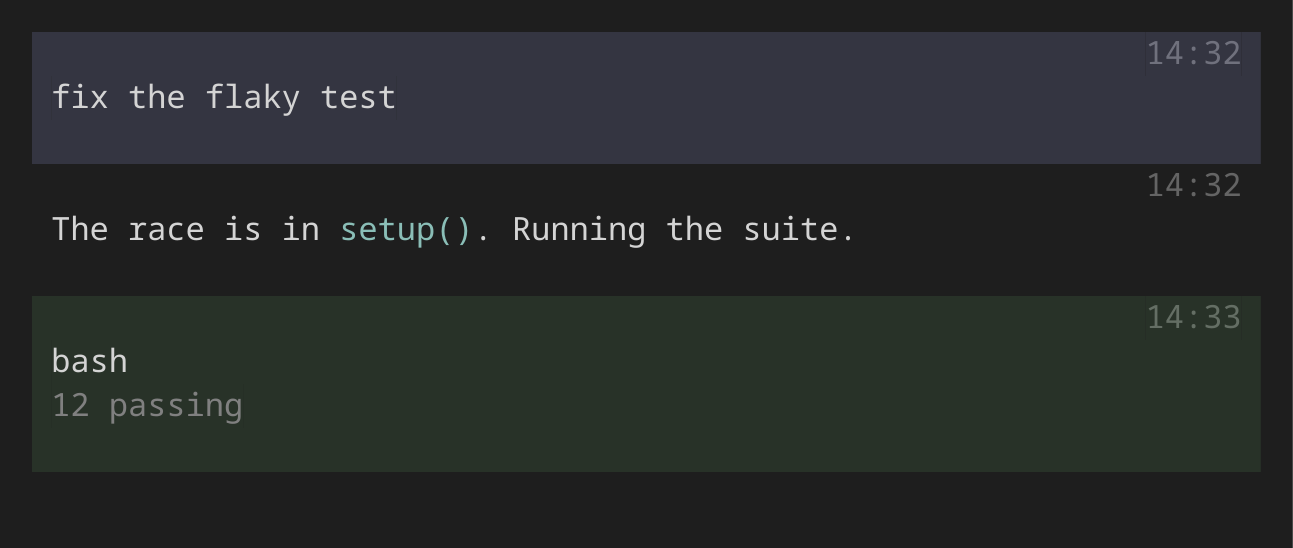
Rendered by Pi's own components (docs/render-example.ts), so the picture is what you get.
The stamp is drawn on the box's existing top padding line, so layout doesn't change. Its color is the box's own background nudged toward contrast (brighter on dark themes, darker on light ones), so it stays discreet and follows a tool box when it turns green/red on completion. On 256-color terminals it uses the terminal's dim attribute instead.
Timestamp sources
- User message: the session entry's recorded timestamp. Repeated identical prompts each get their own time.
- Assistant message: the message's own timestamp.
- Tool box: the timestamp of the assistant message that issued the tool call.
Times are in your local time zone. A tool box created while its assistant message is still streaming has no recorded time yet, so it shows the current time until the next redraw, then the recorded one.
Configuration
Drop a when.json next to Pi's other configuration. A file in the current project wins over the one in your home directory, and the environment wins over both:
| Source | Scope |
|---|---|
~/.pi/when.json |
every session |
<cwd>/.pi/when.json |
sessions started in that project |
PI_WHEN_FORMAT, PI_WHEN_FORMAT_OLDER |
one session, for trying a format out |
{
  "format": "%H:%M",
  "formatOlder": "%a %H:%M"
}
Those are the defaults: format for messages from today, formatOlder for everything earlier. Set "formatOlder": null to use one format throughout. PI_WHEN_FORMAT on its own sets both, so PI_WHEN_FORMAT="%F %T" pi shows full timestamps everywhere.
Formats are strftime(3) strings, and any other text is kept as written:
%H %M %S |
24-hour parts | 14 32 07 |
%I %p |
12-hour, AM/PM | 02 PM |
%a %A |
weekday | Fri Friday |
%b %B |
month | Sep September |
%d %m %Y %y |
date parts | 19 09 2026 26 |
%F %T %R |
%Y-%m-%d, %H:%M:%S, %H:%M |
2026-09-19 14:32:07 14:32 |
%% |
a literal % |
Names are English whatever your locale is, so the stamp keeps a predictable width. An unrecognised %q is left in place rather than dropped, so a typo is visible. Edits apply on /reload; a malformed file falls back to the defaults instead of breaking the display.
Control characters are stripped from a format before it is used. A project's .pi/when.json belongs to whoever wrote that repository, and the stamp goes straight to your terminal, so a format is not allowed to carry escape sequences.
The corner has to fit: when the box is narrower than the stamp, the line is left blank rather than truncated.
Tuning
Edit these constants at the top of when.ts, then restart Pi (/reload keeps the first-loaded values):
STAMP_DELTA(default60): contrast offset from the box background. Raise for more contrast.STAMP_NO_BG(default100): gray level for lines without a background (assistant messages on a black terminal).
How it works (and the known limit)
Pi has no hook for decorating its built-in message boxes, so pi-when wraps render() on UserMessageComponent, AssistantMessageComponent and ToolExecutionComponent and paints onto the first blank line that has the box background. Content lines are left alone. /reload is safe: the patch is applied once per process, and a stale session context falls back to "now".
Whether a message counts as "older" is decided once, when its stamp is first drawn. Messages already on screen when midnight passes keep the short form until the chat is rebuilt. Because it patches exported classes, a Pi release that restructures those components may stop showing stamps. Everything else in Pi keeps working. After pi remove pi-when, restart Pi to drop the patch.
Development
npm install
npm run typecheck
npm test          # node --test, no framework; needs Node 22.18+ for type stripping
pi -e ./when.ts   # try it in a session
MIT