pi-working-vibe
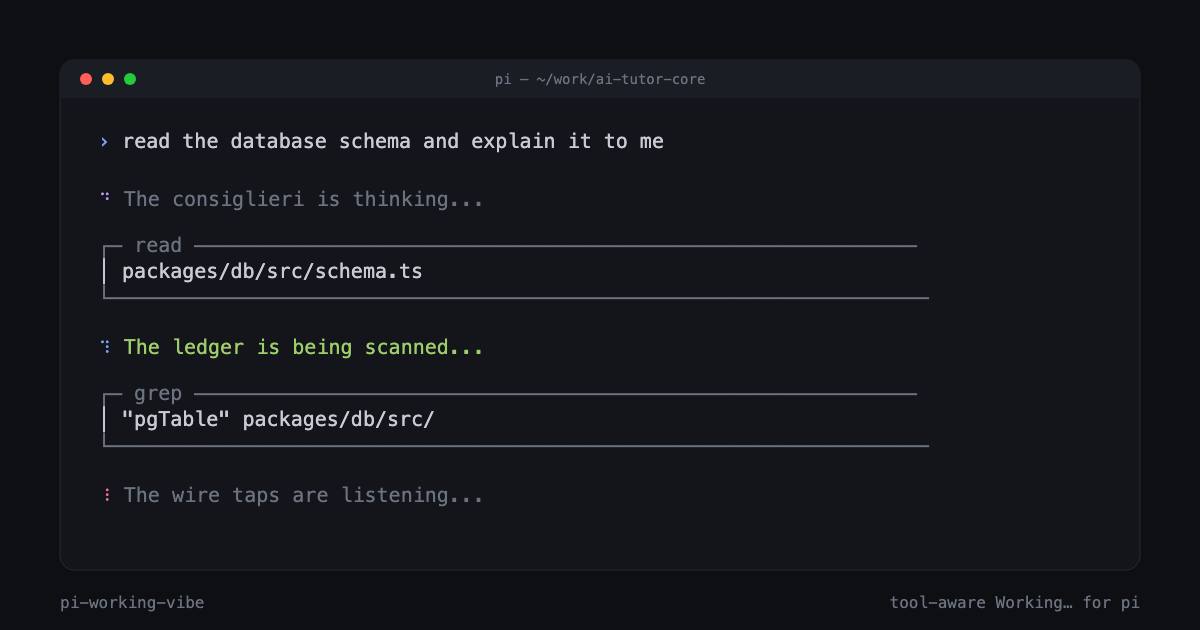
Custom Working… message + tool-aware spinner for pi. Vibe files with [default] and [tool:<name>] sections; ships with mafia, hacker, pirate, zen.
Package details
Install pi-working-vibe from npm and Pi will load the resources declared by the package manifest.
$ pi install npm:pi-working-vibe- Package
pi-working-vibe- Version
0.1.2- Published
- May 14, 2026
- Downloads
- 70/mo · 14/wk
- Author
- davecodes
- License
- MIT
- Types
- extension
- Size
- 110.1 KB
- Dependencies
- 0 dependencies · 2 peers
Pi manifest JSON
{
  "extensions": [
    "./index.ts"
  ],
  "image": "https://raw.githubusercontent.com/Davidcreador/pi-working-vibe/main/assets/demo.png"
}
Security note
Pi packages can execute code and influence agent behavior. Review the source before installing third-party packages.
README
pi-working-vibe
Custom Working… message and tool-aware spinner for pi.

Replace pi's default ⠋ Working… with themed flavor text that rotates while
the agent is thinking, and automatically switches when the model calls a
tool. Ships with four ready-to-use vibes: mafia, hacker, pirate,
zen.
⠋ The Don is stirring...                        (default thinking)
⠙ The boys are kicking down doors...            (when calling bash)
⠹ The ledger is being scanned...                (when calling read)
⠸ The contract is being amended...              (when calling edit)
Install
# From npm (recommended)
pi install npm:pi-working-vibe

# From GitHub (always latest main)
pi install git:github.com/Davidcreador/pi-working-vibe

# Project-local (writes to .pi/settings.json instead of global)
pi install -l npm:pi-working-vibe

# Try without installing (single-run, ephemeral)
pi -e npm:pi-working-vibe
That's it. Default vibe (mafia) activates immediately on the next session.
Update later with pi update npm:pi-working-vibe. Remove with pi remove npm:pi-working-vibe.
What it does
- Rotating message: picks random lines from
vibes/<name>.txtevery ~3.5s while pi is in a turn. - Tool-aware: switches to a tool-specific pool the instant the model
invokes
bash,read,edit,grep,find,ls,write,web_search,web_fetch,todo, or any custom tool you've authored a section for. - Customizable spinner: swap the
⠋⠙⠹⠸glyphs for one of six presets (dots,line,pulse,braille,arrow) or fully custom frames, with a themeable color. - Safe: atomic settings writes, path-traversal guards, mtime-cached file IO, file-size caps, graceful degradation when a vibe pool is missing.
Vibe file format
Vibes are plain text. One message per line. # for comments. Optional
[section] headers split lines into named pools:
# mafia.txt
The Don is stirring...
Shadows tally the books...

[tool:bash]
The boys are kicking down doors...
A package is being delivered...

[tool:read]
The ledger is being scanned...

[tool:edit]
The contract is being amended...
Pools fall back to [default] when the active tool doesn't have its own
section. A file with no headers becomes one big default pool (backward
compatible with any flat vibe file).
Customize your own vibe
Drop a .txt file into ~/.pi/agent/vibes/ and switch to it:
# in pi
/vibe list                  # shows installed vibes (bundled + user)
/vibe vibe:hacker           # switch
/vibe info                  # current settings + line counts
/vibe pools                 # sections in the active vibe
/vibe preview               # show a sample line
User files in ~/.pi/agent/vibes/ override bundled files of the same name,
so you can fork mafia.txt without losing the package update.
/vibe command reference
| Form | Effect |
|---|---|
/vibe |
Toggle master switch |
/vibe info |
Show active settings + line counts |
/vibe list |
List installed vibes (user + bundled) |
/vibe pools |
List sections in the active vibe |
/vibe on | /vibe off |
Enable / disable |
/vibe reload |
Re-read settings + vibe file from disk |
/vibe preview |
Pick a sample line from the active pool |
/vibe vibe:<name> |
Switch active vibe |
/vibe indicator:<preset> |
default | dots | line | pulse | braille | arrow | custom |
/vibe color:<token> |
Theme color for spinner (e.g. accent, primary, dim) |
/vibe rotate:<ms> |
Message rotation interval (0 = no rotation) |
/vibe interval:<ms> |
Spinner frame interval |
Settings reference
All keys live at the top level of settings.json. Project file
<cwd>/.pi/settings.json overrides global ~/.pi/agent/settings.json.
| Key | Type | Default | Effect |
|---|---|---|---|
workingVibe |
boolean | true |
Master switch |
workingVibeName |
string | "mafia" |
Vibe file name (no .txt) |
workingVibeRotateMs |
number | 3500 |
Rotation interval; 0 = static. Floor 750ms |
workingIndicator |
enum | "default" |
Spinner preset |
workingIndicatorColor |
string | "accent" |
Theme color token |
workingIndicatorFrames |
string[] | [] |
Custom frames (when workingIndicator: "custom") |
workingIndicatorIntervalMs |
number | 90 |
Spinner frame interval. Floor 40ms |
Legacy: a string value workingVibe: "<name>" from earlier ad-hoc usage is
auto-migrated to {workingVibe: true, workingVibeName: "<name>"} on first
load.
Lifecycle (how it hooks into pi)
session_start         → load settings, install indicator, build picker
agent_start           → reset state, set message, start rotation timer
tool_call             → activePool=tool:<name>, refresh message
tool_execution_end    → if no more active tools, back to default
message_start (asst.) → snap to a fresh line as model resumes talking
agent_end             → stop rotation, reset state
session_shutdown      → tear down timer + null out ctx ref
Built on the extension API
patterns: setWorkingMessage, setWorkingIndicator, and the tool_call /
tool_execution_end event pair.
Authoring tips
- Pi only renders the working line during the streaming/tool phase. Compaction and retry loaders keep their own built-in styling — this is a pi constraint.
- Custom frames are rendered verbatim; colors come from pi's theme.
- Parallel tool calls: the most-recently-started tool wins. When that tool ends, the pool falls back to the next most-recent surviving tool, or to default if there are none.
- Edit a
.txtfile while pi is running —mtimecaching auto-invalidates on the next read, or run/vibe reload.
Bundled vibes
| File | Theme |
|---|---|
mafia.txt |
1930s mob / made-men / consigliere |
hacker.txt |
90s cyberpunk / phreakers / ICE |
pirate.txt |
High seas / treasure / plunder |
zen.txt |
Calm / contemplative / minimalist |
Each ships with ~110–140 lines across 11 sections (default + 10 tool pools).
Contributing
PRs welcome — especially new vibe themes. Each vibe should cover the standard
tool taxonomy (bash, read, edit, write, grep, find, ls,
web_search, web_fetch, todo) plus a meaty [default] pool.
License
MIT