pi-workspace-history
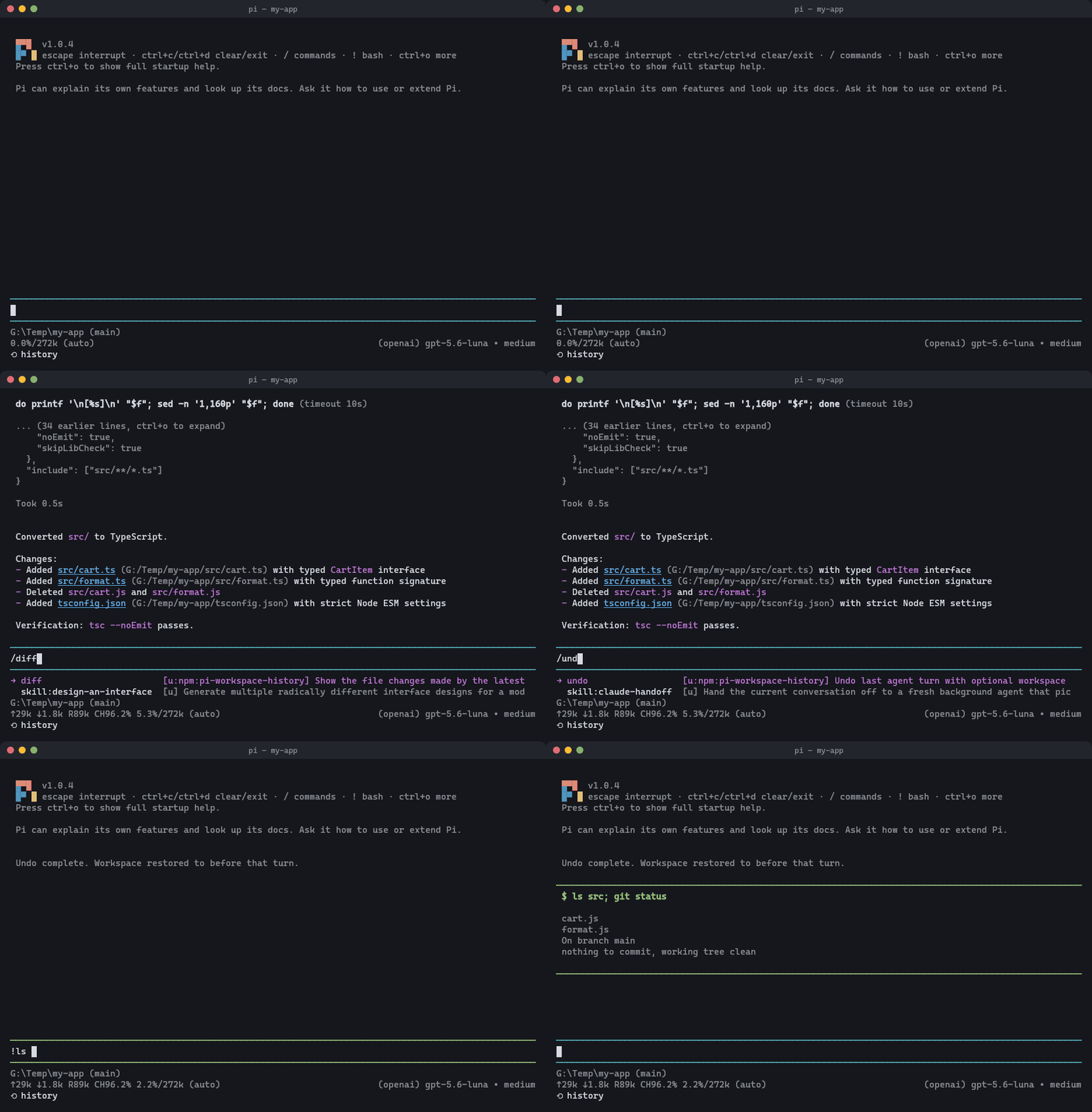
Undo, roll back, and revert code changes made by the Pi coding agent: files and conversation together. One-step /undo and /redo, /tree workspace restore, /diff, and manual checkpoints, with history kept outside your repository.
Package details
Install pi-workspace-history from npm and Pi will load the resources declared by the package manifest.
$ pi install npm:pi-workspace-history- Package
pi-workspace-history- Version
0.5.0- Published
- Oct 8, 2026
- Downloads
- 4,274/mo · 1,067/wk
- Author
- wcldyx1000
- License
- MIT
- Types
- extension
- Size
- 192.5 KB
- Dependencies
- 1 dependency · 2 peers
Pi manifest JSON
{
  "image": "https://raw.githubusercontent.com/wcldyx/pi-workspace-history/main/demo.gif",
  "extensions": [
    ".pi/extensions/workspace-history.ts"
  ]
}
Security note
Pi packages can execute code and influence agent behavior. Review the source before installing third-party packages.
README
pi-workspace-history
Undo for the Pi coding agent. When the agent breaks something, /undo puts your files and the conversation back to before that prompt, in one step.

Quick Start
pi install npm:pi-workspace-history       # all projects
pi install -l npm:pi-workspace-history    # current project only (.pi/settings.json)
pi -e npm:pi-workspace-history            # try it for one run without installing
Start pi in a project directory. The footer shows ⟲ history when the extension is active. Use Pi normally; when the agent breaks something, type /undo.
Requirements: Pi 0.84.4 or newer (tested on 0.84.4, 1.0.4, and 1.1.0), Node.js 22.19.0 or newer, and git on PATH. Your project does not need to be a Git repository.
Commands
| Command | What it does |
|---|---|
/undo |
Go back to before the last agent operation: files and conversation (or conversation only), and put the prompt back in the editor |
/redo |
Reapply what /undo just removed |
/tree / double Escape |
Jump to any point in the conversation; choose whether files follow |
/diff [n] |
Show what the latest agent operation changed (/diff 2 for the one before) |
/checkpoint [label] |
Save the current files, for example before editing by hand |
/history-status |
Show whether history is active, where it is stored, skipped files, and recent errors |
/undo asks one question (files and conversation, or conversation only) and does the rest. /redo reuses that answer. /diff is read only and separate, so checking changes never adds a step to undoing them.
What Undo Covers
- The whole operation. Everything from your prompt until the agent is done is one unit: every tool round, automatic retries, compaction, and messages you send while it runs. One
/undoremoves all of it. - Every file change. Files the agent edits, creates, deletes, or renames, including changes made through shell commands.
- Your own edits are safe. Changes you make between prompts are saved before the next prompt. If the workspace has changes that are not in history yet, a file restore is refused instead of overwriting them. Use
/checkpointto save them, or choose "Conversation only". - Your repository is untouched. History lives in a private Git repository outside your project. Your commits, branches, index, stash, refs, and Jujutsu operations are never changed; undo restores file contents only, so
git statusshows the restored files as changes.
What it leaves alone:
- Ignored paths (your
.gitignore) and these paths, which are never stored or overwritten:.git/,.jj/,node_modules/,dist/,build/,.cache/,.next/,.turbo/,coverage/,.env,.env.*,.pi/workspace-history/. A.gitignorenegation such as!.env.localdoes not add them back. - New files larger than 10 MB. They are reported once and left in place by undo and redo. Files already in history are kept at any size.
- Nested Git repositories (including worktrees). A warning names each one once; open Pi in that repository to manage its history.
- File permissions. On Linux and macOS, a file that is executable stays executable after a restore, but a permission-only change such as
chmod +xis not undone, and a file that a restore recreates is not executable. - Anything outside the workspace: deployments, API calls, databases.
FAQ
Can I undo only the conversation and keep my files?
Yes. /undo and /tree offer "Conversation only (keep current files)". The current files are saved first, so you can still return to them later.
I undid by mistake. Can I get it back?
Yes, /redo.
How is this different from Pi's built-in /tree?
Pi's /tree moves the conversation only. With this extension, /tree can restore the files that belong to the selected point too. When the files there are the same as now, it skips the question.
What about /fork?
/fork copies the conversation into a new session and leaves your files as they are. The new session starts with its own empty history: operations from the original session cannot be undone there, but new ones can. To return files to an earlier point, use /tree or /undo in the original session.
Is it slow on large repositories or WSL?
Prompts are sent without waiting for the snapshot. See Performance. On WSL, keep projects on the Linux filesystem rather than /mnt/c.
It isn't active in my directory.
Run /history-status; it says why. By default the extension needs a project marker such as .git, .jj, package.json, Cargo.toml, go.mod, or pyproject.toml in the directory or a parent, and it stays off in your home directory and in folders that only contain several repositories. Set "workspaceHistory": { "enabled": true } to turn it on anyway.
The footer says snapshot failed.
A snapshot could not be saved, so the operations that follow may not be undoable. /history-status shows the error. The message clears once an operation is captured again.
Configuration
Settings go under workspaceHistory in ~/.pi/agent/settings.json (global) or .pi/settings.json (project). On Pi 1.x, project settings apply only after you trust the project folder, the same rule Pi uses for its own project settings.
{
  "workspaceHistory": {
    "storageDir": "D:\\pi-history",
    "maxSessionsPerWorkspace": 3,
    "maxWorkspaces": 10
  }
}| Setting | Default | Description |
|---|---|---|
enabled |
"auto" |
"auto" turns on in projects (see the FAQ above); true always on; false off |
requireProjectMarker |
true |
With false, "auto" accepts any directory except a filesystem root or your home directory, and skips the multi-repository check |
allowHomeDirectory |
false |
Allow history in your home directory |
storageDir |
~/.pi/agent/state/workspace-history |
Where history is stored. Must be outside the workspace, or the extension turns itself off |
maxSessionsPerWorkspace |
3 |
Sessions kept per workspace; the least recently used inactive ones are removed |
maxWorkspaces |
10 |
Workspaces kept in total; the least recently used inactive ones are removed |
maxUntrackedFileSizeMB |
10 |
New files larger than this are skipped; 0 removes the limit |
showStatus |
true |
Show ⟲ history in the footer |
gitTimeoutMs |
60000 |
Timeout for each internal Git command; raise it for very large workspaces |
maxScanFiles, maxScanDirs, maxScanMs |
20000, 3000, 5000 |
Limits for the restore-time scan that finds excluded paths; above them, Git lists the paths instead |
Optional Pi settings that make history navigation quicker:
{
  "doubleEscapeAction": "tree",
  "treeFilterMode": "user-only"
}
doubleEscapeAction: "tree" (Pi's default) opens /tree with double Escape. treeFilterMode: "user-only" lists only your prompts in /tree, so picking an undo point is faster.
Performance
Measured with a 2,000-file workspace and one file write per prompt:
| Environment | Wait before a prompt is sent | Added time per prompt |
|---|---|---|
| Windows 11, native | 2–5 ms | about 0.5–1 s |
WSL2, project on /mnt/g |
about 12 ms | about 3 s |
The first prompt of a session waits for the initial snapshot, which usually finishes in the background before you type. On Windows 11, the initial snapshot of a 20,000-file repository takes about 5 s. Reproduce with npm run bench:first-turn -- 2000 256.
/undo and /redo on Windows 11 take about 0.7 s in a 2,000-file repository, 1 s at 5,000 files, and 1.5 s at 20,000 files. On Linux (WSL2, project on the Linux filesystem), they take about 0.1 s at 2,000 files and 0.6 s at 20,000 files.
How It Works
Before each prompt, the extension snapshots the workspace into a private Git repository for the session; after the agent is done, it snapshots again. Each snapshot is linked to its place in the conversation tree, so /undo and /tree can restore the files that belong to any point. A restore writes only the files the extension manages; it never cleans the rest of the workspace.
- Prompts don't wait. After the first prompt, the snapshot runs while the model responds, and the agent's first tool call waits for it. If it fails, the operation is not added to history, the error is reported when the turn ends, and the footer shows it.
- Sessions are separate. Each session has its own history and redo state, so a new session cannot undo into an older one.
- Conversation-only navigation saves the current files first and continues the new branch from them.
- Locked files on Windows are retried briefly. If a lock persists, the restore is cancelled without skipping the file, and the recovery is kept across reloads; edits made after a failed restore are never overwritten automatically.
- Git timeouts. A Git command that exceeds
gitTimeoutMsis tracked until it finishes, and no other Git command starts for that workspace in the meantime, so two writers never share the index. A leftoverindex.lockof unknown origin is reported with its path, never deleted. - Damaged history is detected before use. A damaged repository is kept as
repo.git.invalid-<timestamp>-<uuid>and a new one is created; snapshots stored only in the damaged one may be unavailable. - Snapshot commits are never signed, so saving history never asks for a signing key. Your Git configuration is unchanged.
Storage layout:
~/.pi/agent/state/workspace-history/
  workspaces/
    <workspaceHash>/
      meta.json
      sessions/
        <sessionId>/
          active-session.json
          repo.git/
          redo.json
          meta.json
  logs/
    timemachine.log
Running sessions hold a lease, so cleanup never removes their history. Cleanup also keeps any entry whose metadata it cannot read.
For AI Agents
To install for a user:
- Check prerequisites:
node --version(22.19.0 or newer),pi --version(0.84.4 or newer),git --version. - Run
pi install npm:pi-workspace-history(orpi install -l npm:pi-workspace-historyfor the current project only). - Restart Pi or run
/reload. Verify: the footer shows⟲ history, and/history-statusreportsWorkspace history: active. If it reports inactive, the reason is shown; in a directory without a project marker, set"workspaceHistory": { "enabled": true }in.pi/settings.json.
A plain-text summary is in llms.txt.
Development
npm ci
npm test
npm run typecheck
This repository loads the extension from .pi/extensions/workspace-history.ts through .pi/settings.json: start pi here, or run /reload after a change. To install a local checkout elsewhere, run pi install /path/to/pi-workspace-history.
Development uses Pi 1.0.4 and Node.js 22.19.0. CI runs on Linux and Windows against Pi 1.0.4 and the oldest supported release, 0.84.4.
See CHANGELOG.md for release notes.