projectops
ProjectOps: installer CLI for a fully automated GitHub project management template (versioning, CI/CD, release notes, agent skills)
Package details
Install projectops from npm and Pi will load the resources declared by the package manifest.
$ pi install npm:projectops- Package
projectops- Version
4.36.4- Published
- Oct 7, 2026
- Downloads
- 10.9K/mo · 4,164/wk
- Author
- suhsaechan
- License
- MIT
- Types
- skill
- Size
- 507.1 KB
- Dependencies
- 0 dependencies · 0 peers
Pi manifest JSON
{
  "skills": [
    "./skills"
  ]
}
Security note
Pi packages can execute code and influence agent behavior. Review the source before installing third-party packages.
README




Status: actively maintained. New versions ship often, sometimes several a day. To stay on a version you have tested, run npx projectops@<version> (releases).
Latest version : v4.36.3 (2026-10-07)
Get started in 30 seconds
| I want to... | Run this |
|---|---|
| Start a new project | Click Use this template on GitHub (auto-setup in about a minute) |
| Add it to an existing project | npx projectops |
| Install Agent Skills only | npx projectops --mode skills |
| Check the install state (read-only) | npx projectops --mode doctor |
You only need Node.js 20.12+. An interactive wizard runs with no separate install.

This is a real run on a sample Spring project (the wizard follows your system language, or use
--lang en|ko). Version numbers shown were current when it was recorded. For non-interactive use and every option, see the CLI reference.
Why this template?
This project automates your development workflow on two axes.
① GitHub Actions: one push to main handles versioning, changelogs, and CI/CD deployment.
② Agent Skills: commands such as /pro-github, /pro-commit, and /pro-report let an AI agent write issues, commit messages, and implementation reports for you.
| The usual way | With Projectops |
|---|---|
| Bump versions and create tags by hand | At release time the version is bumped from your commit titles and a tag is created |
| Write the changelog yourself | Generated for every release PR (commit analysis, or an AI summary if you add an AI key) |
| Set up CI/CD from scratch | Workflows for your project type, ready immediately |
| Format every issue by hand | /pro-github writes and files an issue from the standard template in one step |
| Copy the issue URL into commit messages | /pro-commit completes the message from the issue context |
| Write PR descriptions and reports by hand | /pro-report analyzes the git diff and generates one |
| Re-type prompts for every code review or analysis | 20 Skills give consistent results without re-typing |
Compared with other tools
If you only need one piece of this, a smaller tool may suit you better.
| projectops | release-please | semantic-release | changesets | |
|---|---|---|---|---|
| Version decided from | Commit titles (feat → minor, feat! → major) |
Conventional Commits | Conventional Commits (configurable) | Changeset files written in each PR |
| Review step before a release | A release PR (develop → main), merged automatically | A release PR you merge | None by default, releases on push | A "Version Packages" PR |
| Changelog | Written in the release PR (commit analysis, or an AI summary) | Generated | Generated (plugin) | Assembled from changeset files |
| CI/CD workflows for your project type | Yes (Spring, Flutter, React, Node, Python ...) | No | No | No |
| Issue and PR helpers, Agent Skills | Yes | No | No | No |
| What it adds to your repo | About 50 files (below) | A workflow and a config file | A config file and a CI step | A .changeset/ folder and a CI step |
- Want only versioning and a changelog? release-please or semantic-release is smaller.
- Publishing npm packages from a monorepo where each PR should say what changed? changesets fits better.
- Want the whole cycle (issue → branch → release PR → deploy) in one install, with agent skills on top? That is what projectops is for.
Footprint, measured. With v4.36.2 on 2026-10-08, npx projectops --mode full --type basic --force in an empty repository added 52 files: 8 workflows, 26 helper scripts under .github/scripts/, issue, PR and discussion templates, version.yml and a setup guide. --type spring added 56 files (12 workflows).
What it actually looks like
Below is a real run, recorded after installing projectops in a sample repo in a test organization. The timer in the top right is real elapsed time; only the waiting parts are played back fast.
1. Open an issue and a branch name and commit message arrive automatically
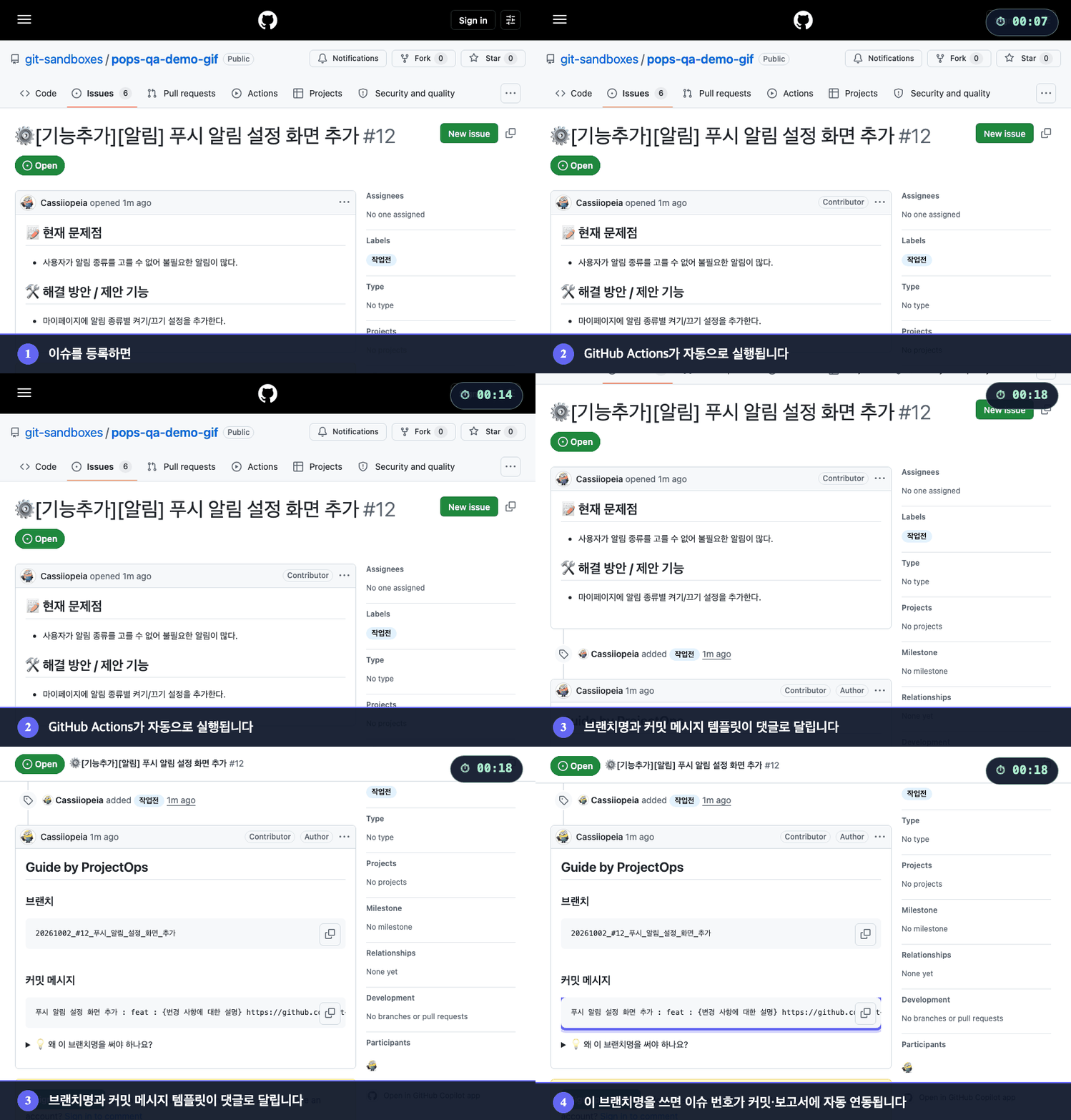
When an issue is opened, GitHub Actions runs on its own and comments a branch name and a commit message template. Work on that branch name and the issue number links into your commits and reports automatically.
2. Open a PR and a change summary arrives automatically
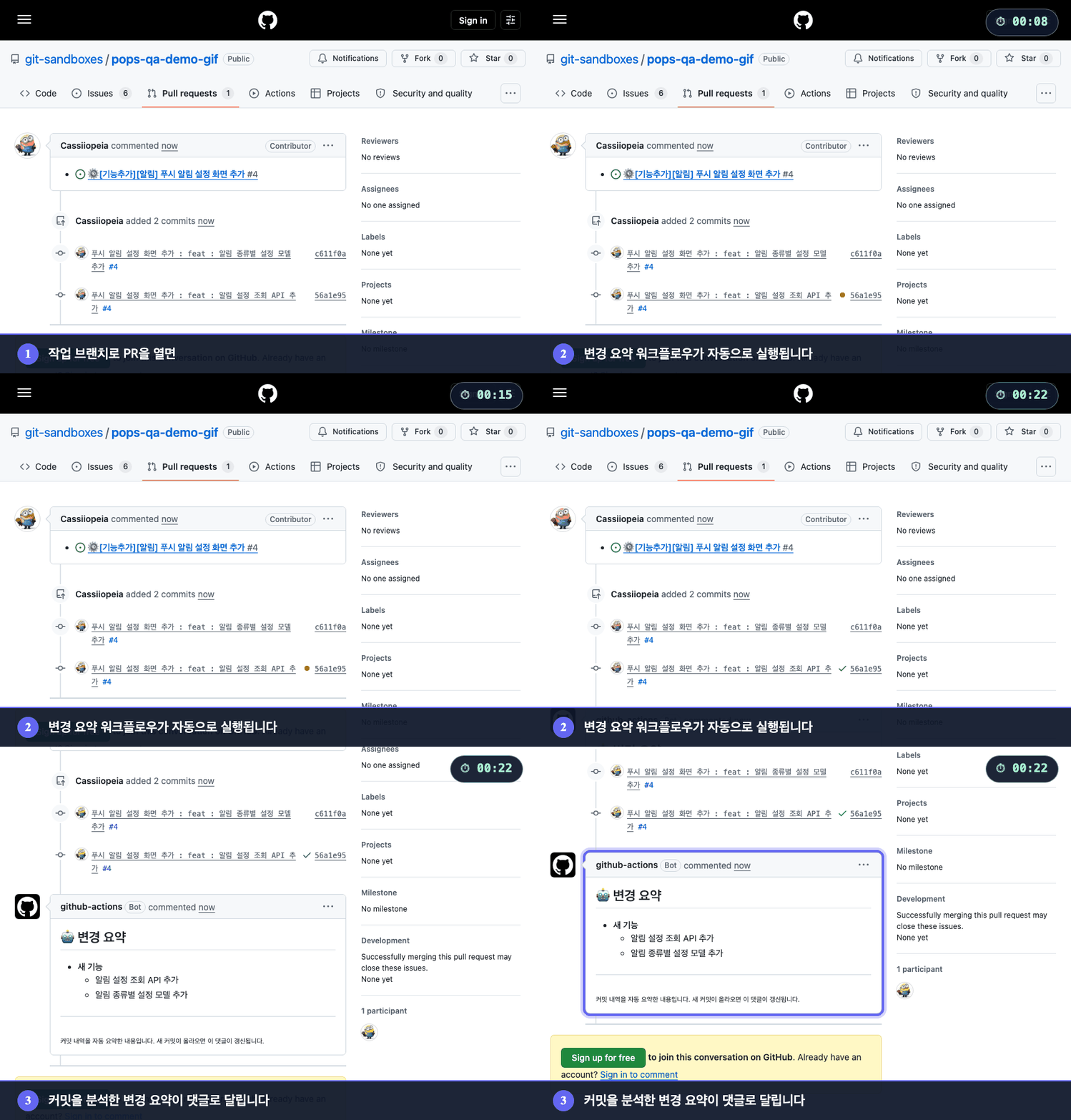
Open a PR from a work branch and a change summary built from the commits is posted as a comment. Push more commits and the same comment is updated instead of piling up new ones.
3. Open a release PR and everything from versioning to merge and tag is automatic
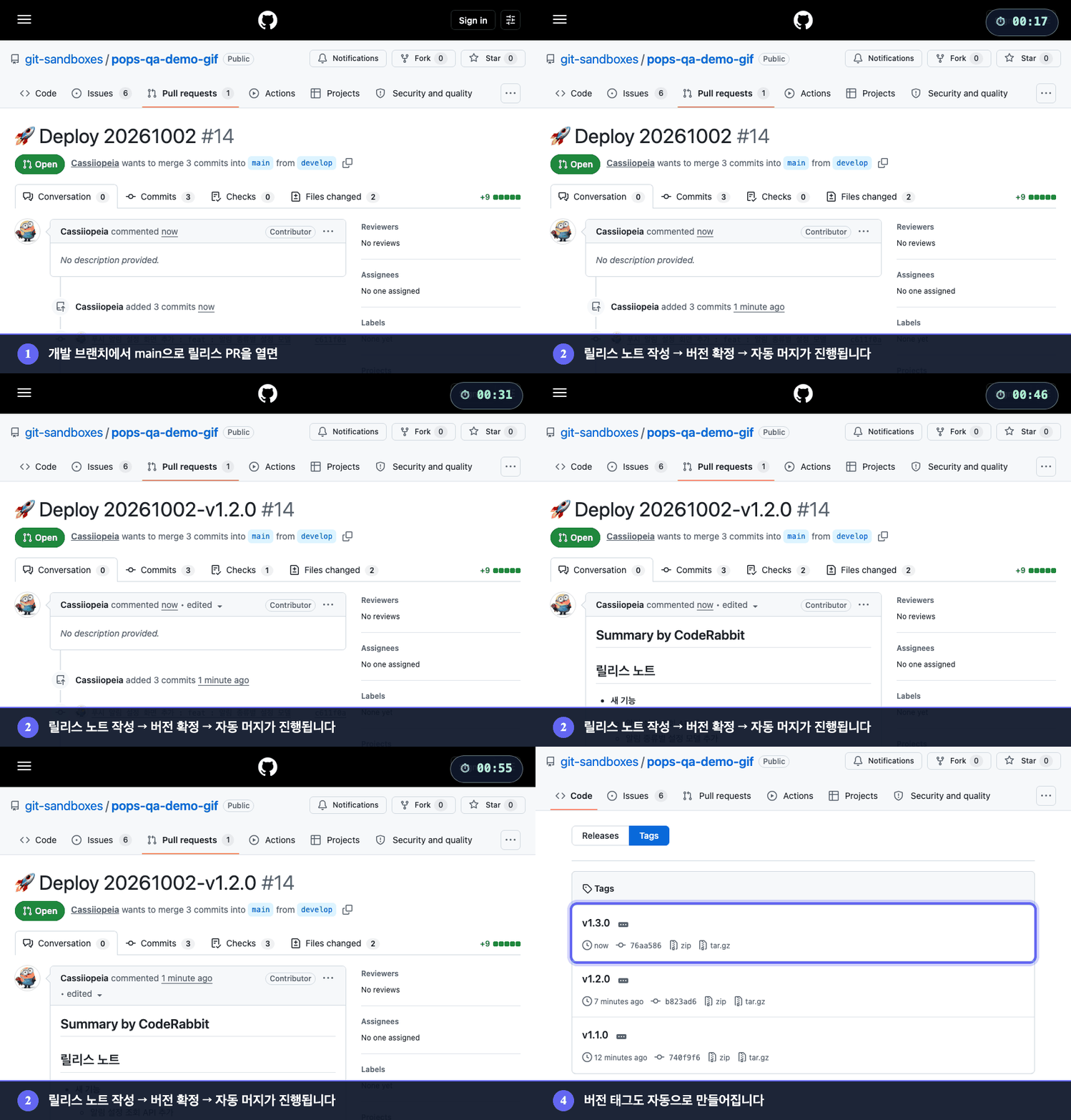
Open a PR from the development branch to main and it writes the release notes, decides the version from commit titles (feat, fix, ...) and puts it in the PR title, merges automatically, and creates the version tag. This example had feat commits, so the minor version went up.
The warning banner GitHub shows for Korean branch names is hidden in the recording. Everything else is the unedited screen.
What is inside
| Part | What it does | Docs |
|---|---|---|
| GitHub Actions | One push to main handles versioning, changelogs, and CI/CD deployment | Versioning (Korean) |
| Agent Skills (20) | /pro-github, /pro-commit, /pro-report and more let an AI agent write issues, commit messages, and implementation reports |
Skills guide (Korean) |
| npx CLI | Installs and updates workflows in an existing project, and diagnoses its state | CLI reference |
🔄 Development cycle automation
| Skill | Purpose |
|---|---|
/pro-init-worktree |
Create a Git worktree and copy sensitive files automatically |
/pro-commit |
Complete a commit message from the issue context (follows superpowers) |
/pro-report |
Analyze the git diff → generate an implementation report and post it as a GitHub comment |
/pro-changelog-deploy |
Push develop → open the main release PR + write release notes + automerge |
/pro-github |
GitHub in general: create issues (one-line description → template + file), view/edit/comment/label/assign, create/merge/view PRs, explore repos, manage Actions and Secrets |
📊 Analysis (no code changes)
| Skill | Purpose |
|---|---|
/pro-review |
Review from 6 angles (security, performance, bugs, quality...), classified Critical/Major/Minor |
/pro-note |
When stuck, search past notes; save what you found out as an actionable note |
🔧 Implementation (writes real code)
| Skill | Purpose |
|---|---|
/pro-figma-verify |
Move a Figma design into code, then compare the result with the design pixel by pixel |
/pro-build |
Run the project build, analyze errors, suggest optimizations |
/pro-launch |
Launch, drive, and capture apps, web, and servers: fixed status bar, width changes, response mocking (empty list, failures), render from code |
/pro-design-brief |
A design request for a screen you built before the mockup exists: state captures, alternatives, copy candidates, and must-keep rules as a board for the designer |
/pro-oss-consult |
Diagnose a GitHub repo as an open-source project: type detection, 6-axis scoring, maturity stage, and edits to About, topics, labels, and files only after approval. One repo or a whole account |
Design, planning, and implementation flow is handled by
superpowers(brainstorming → writing-plans → executing-plans)./pro-plan,/pro-analyze, and/pro-implementare the previous generation of the same roles and only run when invoked explicitly. Together with the 17 in the tables above, that makes 20 in total.
📝 Documents and artifacts
| Skill | Purpose |
|---|---|
/pro-testcase |
Analyze an issue → generate a QA checklist |
/pro-agent-test |
QA that actually runs apps, web, and servers to find bugs, reporting reproduction steps, evidence, and severity (it does not fix code) |
/pro-synology-expose |
Guide to exposing a Synology NAS service on an external domain |
/pro-ssh |
Connect to a remote server over SSH and run commands (AWS EC2, Synology NAS, Linux, and more) |
/pro-skill-creator |
Create, review, and improve a Skill (CREATE / REVIEW / IMPROVE modes) |
AI development cycle
Agent Skills cover the entire development cycle.
flowchart TD
    A(["Start work"]) --> B["/pro-github<br/>File an issue"]
    B --> C["/pro-init-worktree<br/>worktree + copy sensitive files"]
    C --> D{"Type of work"}

    D -->|New feature / design / refactor| E1["superpowers:brainstorming<br/>Decide what and why"]
    D -->|Bug / outage| E2["/pro-note<br/>Search past notes + investigate"]

    E1 --> P["superpowers:writing-plans<br/>Implementation plan"]
    P --> F["superpowers:executing-plans<br/>Run the plan"]
    E2 --> F
    F --> H["/pro-review<br/>Self-review"]
    H --> I["/pro-commit<br/>Issue-linked commit"]
    I --> J["/pro-report<br/>Implementation report + GitHub comment"]
    J --> K(["Open PR"])
    K --> L["/pro-changelog-deploy<br/>Release PR + automerge"]
Full list of Skills and usage: docs/SKILLS.md (Korean)
GitHub Actions pipeline
flowchart TD
    A([Push to develop]) --> B[Integrate]
    B --> C[develop→main release PR]
    C --> D["Finalize version in the PR<br/>commit-based bump + tag + AI changelog"]
    D --> E[Auto-merge]
    E --> F["Push to main → CI/CD deploy<br/>Flutter / Spring / React, etc."]
    F --> G([Done])
# Claude Code
claude plugin marketplace add Cassiiopeia/projectops
claude plugin install projectops@projectops-marketplace --scope user# Gemini CLI
gemini extensions install https://github.com/Cassiiopeia/projectops# Codex CLI (macOS / Linux)
codex plugin marketplace add Cassiiopeia/projectopsThe --mode skills wizard registers the Codex marketplace and also prepares the native skills fallback. Use /plugins only to check or manage the install.
Where the Codex plugin marketplace is unavailable, use the fallback install described in the Skills guide.
# Cursor / the full Agent Skills install menu (recommended: npx)
npx projectops --mode skills
Claude Code prefers
/pro-autocomplete, Gemini prefers its extension, and Codex prefers its plugin marketplace. See the Skills guide for details.
Supported project types
| Type | Version file | CI/CD |
|---|---|---|
spring |
build.gradle | SSH + Docker deploy, Nexus |
flutter |
pubspec.yaml | TestFlight, Play Store |
react (including Next.js) |
package.json | Docker |
node |
package.json | Docker |
python |
pyproject.toml | SSH + Docker deploy |
react-native |
Info.plist + build.gradle | — |
react-native-expo |
app.json | — |
basic |
version.yml only | — |
Comment commands
Run automation by commenting on an issue or PR.
| Command | What it does | Applies to |
|---|---|---|
@projectops server build |
Deploy a temporary server | Spring, Python |
@projectops server destroy |
Delete the server | Spring, Python |
@projectops server status |
Check server status | Spring, Python |
@projectops build app |
Build iOS + Android | Flutter |
@projectops apk build |
Build Android only | Flutter |
@projectops ios build |
Build iOS only | Flutter |
@projectops create qa |
Create a QA issue automatically | All projects |
Details: PR Preview | Flutter builds | Issue automation
Setup
Personal access token (optional)
Everything runs with the built-in GITHUB_TOKEN. Add a personal access token as the repository secret _GITHUB_PAT_TOKEN only if you need one of these:
| You want | Why the built-in token is not enough | Classic token scopes |
|---|---|---|
| Release PRs to merge even when branch protection blocks the Actions bot | The release workflow retries the merge with --admin, which needs an admin's token |
repo, workflow |
| Issue labels synced to a GitHub Projects board | GITHUB_TOKEN cannot use the Projects API |
repo, project |
| Other workflows to react to the issue helper's comment in a private repository | Events created with GITHUB_TOKEN do not start other workflows |
repo |
Without a token, workflows that should run after a release merge are started with an explicit dispatch, so you do not need a token for that.
A fine-grained token with Contents, Pull requests, Issues and Workflows set to Read and write should cover the first row. We have not verified fine-grained tokens end to end yet; for Projects sync we have only tested a classic token. If a fine-grained token fails, please open an issue.
Repository Settings → Secrets → Actions → New repository secret
Name: _GITHUB_PAT_TOKEN
Organization settings
Settings → Actions → General
├─ ✅ Allow GitHub Actions to create and approve pull requests
└─ ✅ Read and write permissions
Things to know
We would rather tell you up front when this is not a fit.
- GitHub only. It assumes GitHub Actions and GitHub issues/PRs, so GitLab and others are not supported.
- Releases assume a develop branch → default branch PR flow. Branch names can be changed in
version.yml, but it does not suit a repo that does not use two branches. - A personal access token is optional. You need one only to merge past branch protection or to sync a Projects board. See Setup.
- It adds about 50 files to your repository (workflows, helper scripts, templates). See the measurement.
- New versions ship often. Pin a version you have tested with
npx projectops@<version>. - Server deploy workflows assume a Docker server reachable over SSH.
Documentation
Browse and search everything on the docs site. Most guides are currently Korean only.
- Getting started
- CLI reference
- Agent Skills guide (Korean)
- Versioning (Korean)
- Changelog automation (Korean)
- PR Preview (Korean)
- Issue automation (Korean)
- SSH + Docker deploy (Korean)
- Flutter CI/CD (Korean)
- Troubleshooting (Korean)
Support
- Issues: bug reports and feature requests
- Finished issues are marked with the
status: donelabel and closed automatically when a release is merged (close_on_release).
- Finished issues are marked with the
- CONTRIBUTING.md: contribution guide
- SECURITY.md: please report security vulnerabilities privately, not in a public issue
MIT License