resume-from
Continue a coding session in a different agent, or a different profile.
Package details
Install resume-from from npm and Pi will load the resources declared by the package manifest.
$ pi install npm:resume-from- Package
resume-from- Version
0.5.4- Published
- Nov 4, 2026
- Downloads
- 564/mo · 118/wk
- Author
- alexeiled
- License
- MIT
- Types
- extension
- Size
- 358 KB
- Dependencies
- 1 dependency · 1 peer
Pi manifest JSON
{
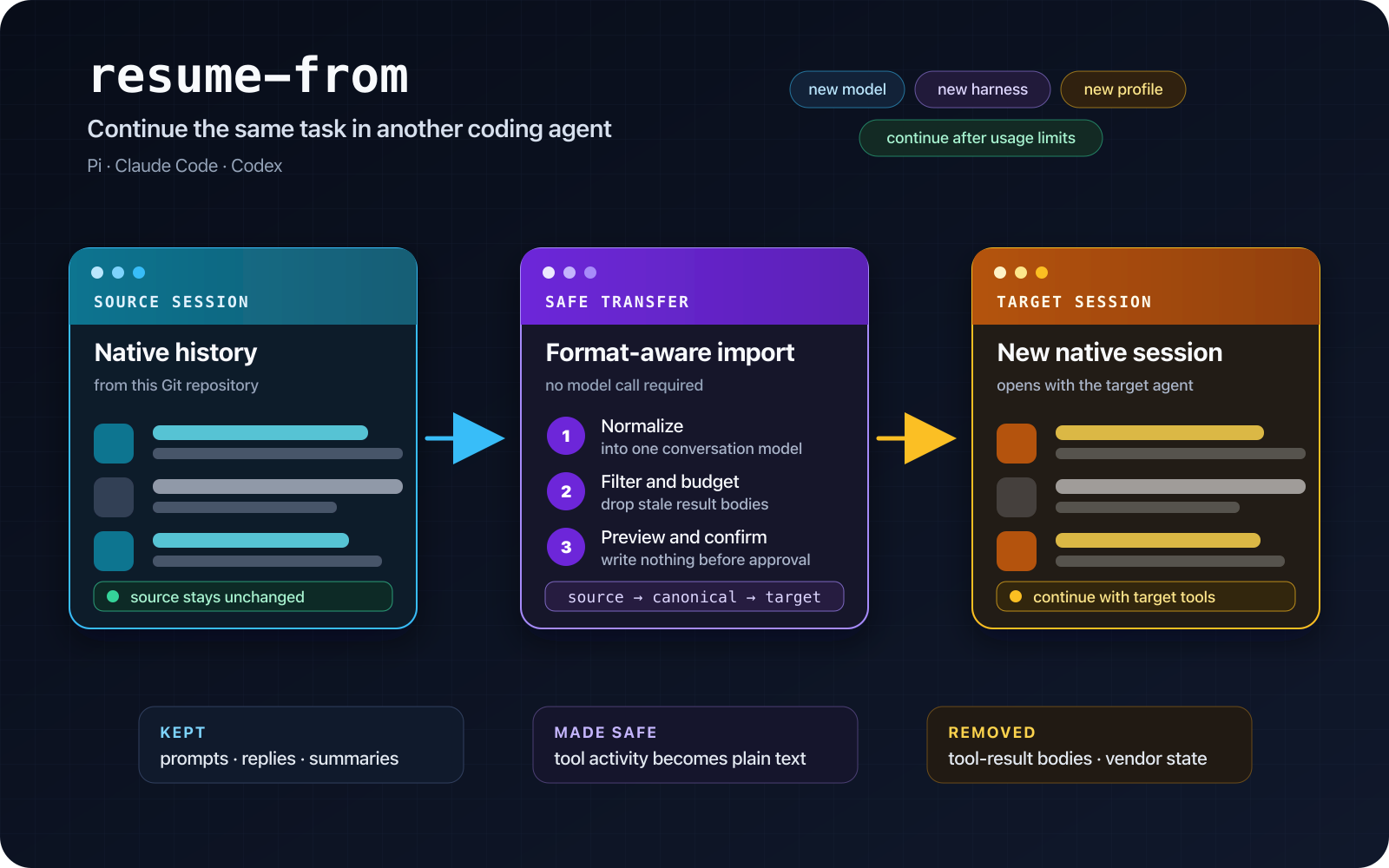
  "image": "https://raw.githubusercontent.com/alexei-led/resume-from/fa0bfa778b52c64accc53155f12f3b895476ea08/assets/resume-from-card.png",
  "extensions": [
    "./shims/pi/extensions/resume-from.js"
  ]
}
Security note
Pi packages can execute code and influence agent behavior. Review the source before installing third-party packages.
README
resume-from


Continue an AI coding session in another terminal agent, another profile, or another directory.
Give resume-from a session ID. It finds that session anywhere on disk, works out the agent, profile
home, directory and branch, recreates a missing worktree when you confirm it, and either resumes the
session in its own agent or imports it into the agent you are running.
resume-from dc601a22            # bare shell: print the native resume command
/resume-from dc601a22           # plugin: resume or import
resume-from converts saved sessions between Pi, Claude Code, and Codex.
Why this exists
Coding agents save conversations in different locations and vendor-specific formats. A Codex thread is not a Pi session. A Claude Code session cannot be opened directly by Codex, and a session recorded in a removed worktree is not in the current repository's list.
resume-from performs the conversion — or the native resume — before the target agent starts:
- Find the session by ID or prefix across every known agent home, or by file path.
- Read the agent's own format into a common conversation model.
- Remove tool-result bodies and vendor-only state.
- Fit the useful history to the target context budget.
- Show a short summary and exactly what will be imported.
- Same agent: print its own resume command and write nothing. Different agent: after confirmation, write a new native session.
The source session is never changed.
Use it when
- You know the session ID but not where it lives. Restore it from any directory, including a removed worktree.
- You want another model or provider. Start the target agent with the model you want, then restore.
- You want another harness. Keep the task context while changing terminal UI, tools, permissions, extensions, or agent behavior.
- You hit a rate or usage limit. Continue through another installed agent or account.
- You need another profile. Move between work, personal, or team homes.
- The current context is too large. Import a budgeted history into a fresh native session.
resume-from moves conversation context. It does not copy the repository, transfer uncommitted work,
switch branches, or migrate a running process.
Supported transfers
Every source-to-target direction is supported, including transfers within the same agent:
| Source \ Target | Pi | Claude Code | Codex |
|---|---|---|---|
| Pi | ✓ | ✓ | ✓ |
| Claude Code | ✓ | ✓ | ✓ |
| Codex | ✓ | ✓ | ✓ |
What the command does depends on the situation:
| Situation | Result |
|---|---|
Bare shell (no --target-agent) |
Prints the session's own resume command. Never imports. |
Claude Code or Codex, same agent and profile home, no --to |
Nothing written. Prints Resume in place: /resume <id> to type in the running agent, plus the shell command. |
Claude Code or Codex, different agent or profile home, or --to <dir> |
Import preview. After confirmation, prints Resume in place: /resume <new-id>, plus the shell command. |
| Pi, native session | Switches Pi to the original session in process, from any directory. |
| Pi, import | Import preview. After confirmation, switches Pi into the new session. |
| Missing directory | Shows Recover: commands; runs them only with the printed Confirm: token. |
What crosses the boundary
The importer keeps the parts needed to continue the task, subject to the target token budget:
- User prompts and agent replies.
- Compaction summaries.
- Tool activity as non-replayable plain text: tool name, recorded arguments, and a one-line outcome.
- Changed-file paths derived from mutating tool activity.
- Source provenance and a summary of anything dropped.
It excludes tool-result bodies, replayable tool-call structures, hidden reasoning, system prompts, environment blocks, API keys, telemetry, and vendor process state.
By default, the imported history may use up to 30% of the target context window. The first request, recent turns, summaries, and changed-file records are pinned. If pinned content alone does not fit, the import stops before writing.
Install in the destination agent
Install resume-from in the agent that will restore or receive the session.
Pi
See the Pi guide for supported Pi versions.
pi install npm:resume-fromRestart Pi, then run /resume-from.
Claude Code
claude plugin marketplace add alexei-led/resume-from
claude plugin install resume-from@alexei-led-resume-from
Update with claude plugin marketplace update alexei-led-resume-from, then
claude plugin update resume-from@alexei-led-resume-from.
Codex
codex plugin marketplace add alexei-led/resume-from
codex plugin add resume-from@alexei-led-resume-from
In Codex, run the resume-from skill as $resume-from <id>. Claude Code and Codex run the matching
published resume-from package through npx. The first use needs
npm registry access.
Run the first restore
/resume-from dc601a22An exact ID wins. A prefix of at least six characters selects the session when exactly one matches; several matches are listed as candidates. You can also pass a session file path. Row numbers come from the list in Claude Code, Codex, and the CLI; Pi uses its session picker.
The tool prints a short summary:
↻ claude-code dc601a22 · ~/.claude · 2026-11-03 10:04Z · fix the parser crash
  ~/.local/share/chezmoi · master
Resume in place: /resume dc601a22-64e3-410b-9321-bb8f86bdc5ad
Resume: cd /Users/alexei/.local/share/chezmoi && claude --resume dc601a22-64e3-410b-9321-bb8f86bdc5ad
Same agent: type the Resume in place: command in the running agent. It keeps that agent's launch
settings and moves it to the session's directory. The Resume: line opens the session from another
terminal; a bare shell prints only that line. Different agent: the tool shows an import preview and the exact
Confirm: command to re-run. A missing recorded directory is shown first as one or more Recover:
git commands, also gated by Confirm:. Pi uses its own interactive Import this session? (y/N)
confirmation instead of a Confirm: line.
Options in the CLI, Claude Code, and Codex (Pi accepts a selector only):
--to <dir>imports into another existing checkout of the same repository.--prompt <text>appends an initial prompt to the native resume command.--contextprints the conversation an import into the current agent would keep, read-only.
--to and --context need an agent to act for: run them from the slash command or prompt, or from
a shell as resume-from --target-agent <agent> -- <selector> --to <dir> (or --context). A bare
resume-from <selector> --to <dir> is refused, because a bare shell only prints commands.
--agent and --home still narrow the repository list and the lookup, but they are not needed to
find a session by ID.
Recovery summary
The imported session starts with a three-line marker, and the tool prints the same lines:
↻ Restored from claude-code dc601a22 (~/.claude) · 2026-11-03 10:04Z
  ~/.local/share/chezmoi · master
  4 turns kept · Dropped on import: 2 tool result bodies.
The channels differ by agent:
| Agent | Marker channel |
|---|---|
| Claude Code | One gray system entry (informational/info), outside model context. |
| Pi | One custom transcript entry, rendered dim; collapsed shows the first line. |
| Codex | Printed in the command output only. |
Recovery of a missing worktree
When the recorded directory is gone, the tool looks for a parent repository in the usual worktree
layouts (<repo>.worktrees/<name>, <repo>/.worktrees/<name>, <repo>/.claude/worktrees/<name>).
It shows the exact commands, then recreates the worktree only with the printed Confirm: token, in
this order: the recorded local branch, origin/<branch>, the recorded commit, then the repository's
HEAD with a warning. It never fetches, forces, deletes, or writes into an existing path.
Safety properties
- Read-only source: source homes and session files are not modified.
- Explicit write: an import writes nothing until you confirm; recovery runs only with its token.
- Add-only target: the importer creates target files; it does not replace or delete existing sessions.
- Native validation: the new file is validated and read back before it is reported as openable.
- No model call during transfer: conversion, filtering, budgeting, and writing are deterministic local operations.
- Visible provenance: the imported session states its source and what was dropped without putting that marker in model context.
Documentation
The user and maintainer documentation is organized in docs/.
Development
Development requires Node 24 LTS and pnpm 11.20.0.
pnpm install
pnpm build
pnpm test
pnpm typecheck
pnpm lint
Run the command help after a build:
node dist/bin.js --helpLicense
MIT.