split-editor
Open pi prompt editing in a live tmux split editor without freezing the pi UI.
Package details
Install split-editor from npm and Pi will load the resources declared by the package manifest.
$ pi install npm:split-editor- Package
split-editor- Version
0.1.8- Published
- May 15, 2026
- Downloads
- not available
- Author
- kaioqb
- License
- MIT
- Types
- extension
- Size
- 3.3 MB
- Dependencies
- 0 dependencies · 2 peers
Pi manifest JSON
{
  "image": "https://raw.githubusercontent.com/kyleqbnguyen/split-editor/main/assets/screenshot.png",
  "video": "https://raw.githubusercontent.com/kyleqbnguyen/split-editor/main/assets/demo_compressed.mp4",
  "extensions": [
    "./index.ts"
  ]
}
Security note
Pi packages can execute code and influence agent behavior. Review the source before installing third-party packages.
README
split-editor
Edit pi prompts in a live tmux split without blocking pi's TUI.
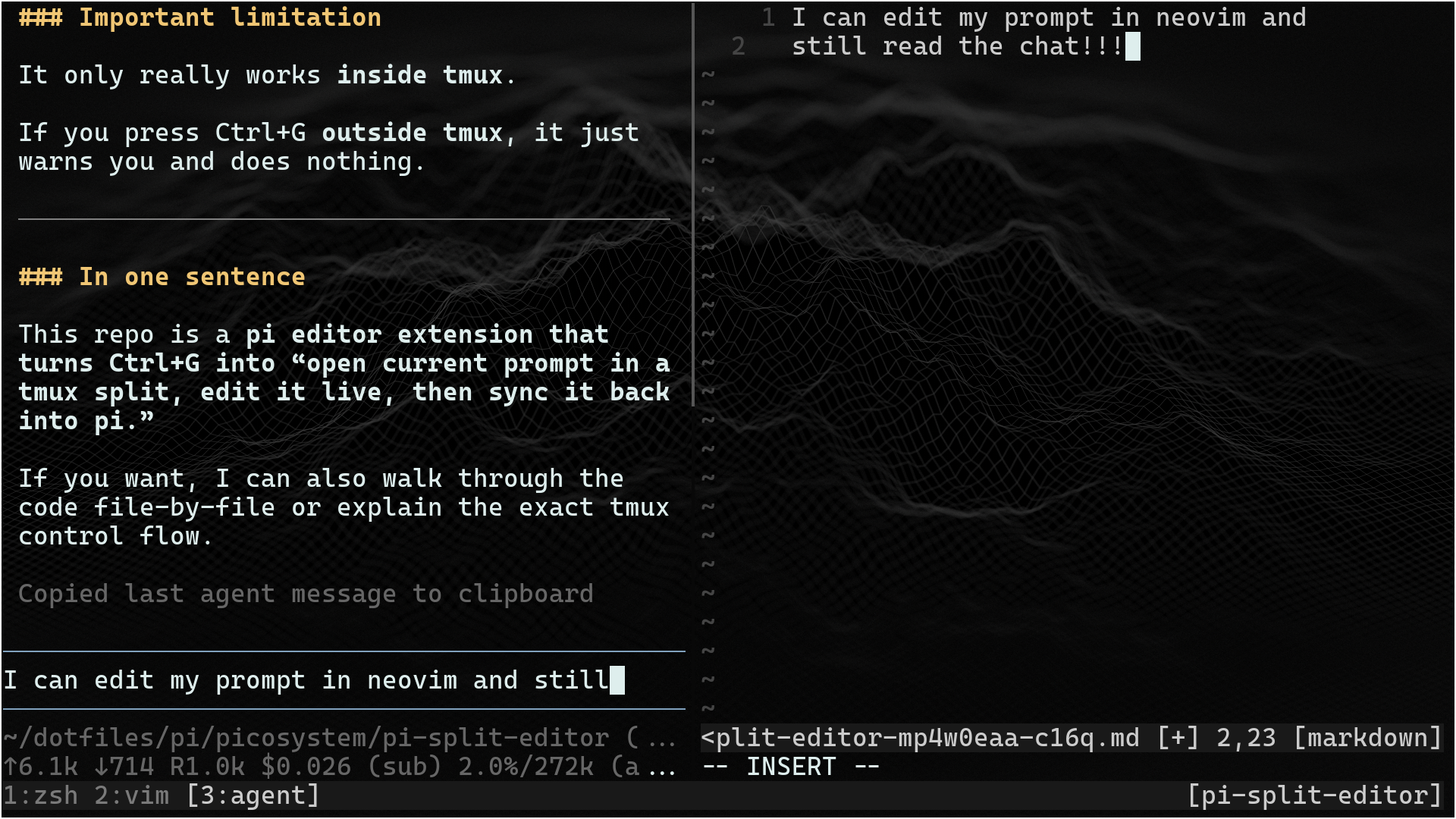
split-editor replaces pi's blocking Ctrl+G external-editor workflow. Press
Ctrl+G in pi's prompt editor to open the current prompt in your editor (nvim
by default) in a tmux split. When the editor exits, the edited text is read back
into pi's prompt.
Pi stays visible and resize-aware in the original pane while the split is open. The prompt is locked during editing so it cannot be mutated in two places at once.
Demo
https://github.com/user-attachments/assets/47a81b03-8292-45b9-8c85-508719c5f585
Requirements
- pi
- tmux
nvimby default; set theeditoroption to use a different terminal editor (see Configuration)
Installation
From npm:
pi install npm:split-editor
From a local checkout:
pi install /path/to/split-editor
For development:
pi -e .
Usage
- Start pi inside tmux with this package loaded.
- Type a prompt.
- Press Ctrl+G.
- Edit in the tmux split.
- Save and quit the editor.
- The edited text replaces the pi prompt.
Pressing Ctrl+G again while the split editor is already open will not open a second editor.
Configuration
Configuration is read each time Ctrl+G opens the split editor, so file/env changes are picked up without reloading the extension.
Options:
| Option | Env var | Default | Description |
|---|---|---|---|
editor |
SPLIT_EDITOR_EDITOR |
nvim |
Editor command to run in the tmux pane. |
size |
SPLIT_EDITOR_SIZE |
50% |
tmux split size passed to tmux split-window -l. |
direction |
SPLIT_EDITOR_DIRECTION |
h |
h/horizontal for side-by-side, v/vertical for top/bottom. |
showIndicator |
SPLIT_EDITOR_SHOW_INDICATOR |
true |
Show SPLIT EDITOR OPEN in the editor border while locked. |
Precedence, lowest to highest:
- Defaults
- Global config:
~/.pi/agent/extensions/split-editor.json - Global pi settings:
~/.pi/agent/settings.jsonundersplitEditor - Project config:
.pi/split-editor.json - Project pi settings:
.pi/settings.jsonundersplitEditor - Environment variables
Standalone config files use the options directly:
{
  "editor": "nvim",
  "size": "50%",
  "direction": "horizontal",
  "showIndicator": true
}
Pi settings.json uses a splitEditor object:
{
  "splitEditor": {
    "editor": "nvim",
    "size": "50%",
    "direction": "vertical",
    "showIndicator": false
  }
}
Environment example:
SPLIT_EDITOR_EDITOR="nvim" \
SPLIT_EDITOR_SIZE=50% \
SPLIT_EDITOR_DIRECTION=h \
SPLIT_EDITOR_SHOW_INDICATOR=false \
pi
SPLIT_EDITOR_SHOW_INDICATOR accepts 1, true, yes, on, 0, false,
no, or off.
Notes and limitations
- Requires tmux for live split behavior; falls back to pi's default external editor outside tmux.
- The pi prompt editor ignores input while the split editor is open.
- If the editor exits non-zero, the temp file is still read back into pi and a warning is shown.
- Temporary files are removed on a best-effort basis after the editor closes.