stepstone
A shared roadmap of project goals for coding agents and the humans working beside them.
Package details
Install stepstone from npm and Pi will load the resources declared by the package manifest.
$ pi install npm:stepstone- Package
stepstone- Version
0.12.1- Published
- Sep 17, 2026
- Downloads
- 2,614/mo · 701/wk
- Author
- max_mill03
- License
- MIT
- Types
- extension
- Size
- 7.6 MB
- Dependencies
- 2 dependencies · 5 peers
Pi manifest JSON
{
  "extensions": [
    "./src/extension.ts"
  ]
}
Security note
Pi packages can execute code and influence agent behavior. Review the source before installing third-party packages.
README
stepstone


stepstone keeps a repository's roadmap inside the repository.
Project Goals are a list committed alongside the code, which any coding agent and any human at a terminal reads and changes through the same CLI.
Goals carry dependency edges, so next, ready, and waves answer what to start, what can run in parallel, and what each finished goal unblocks.
Interfaces
Run npx -y stepstone@latest project web from the main worktree to open the local web application. Use it to manage the roadmap and prepare approved goal workspaces.
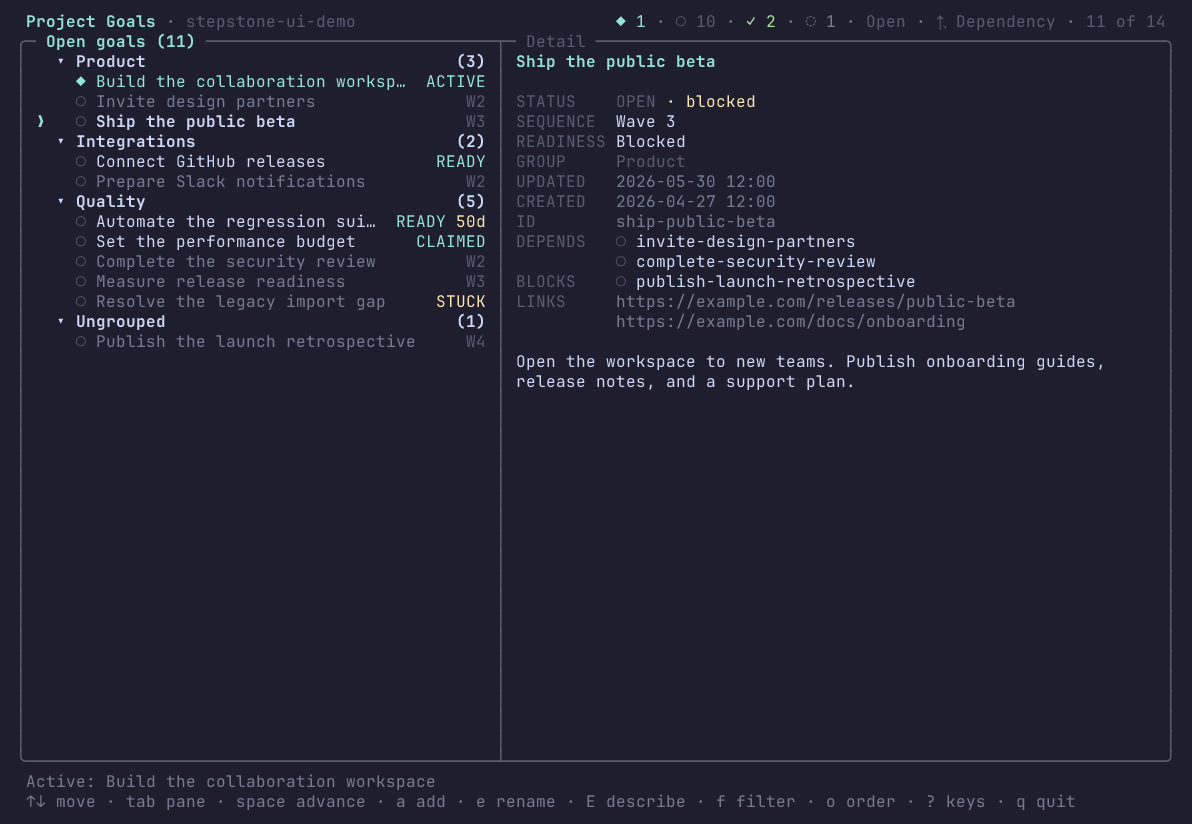
Run npx -y stepstone@latest project ui to open the Project Goal board. This view uses dependency order.
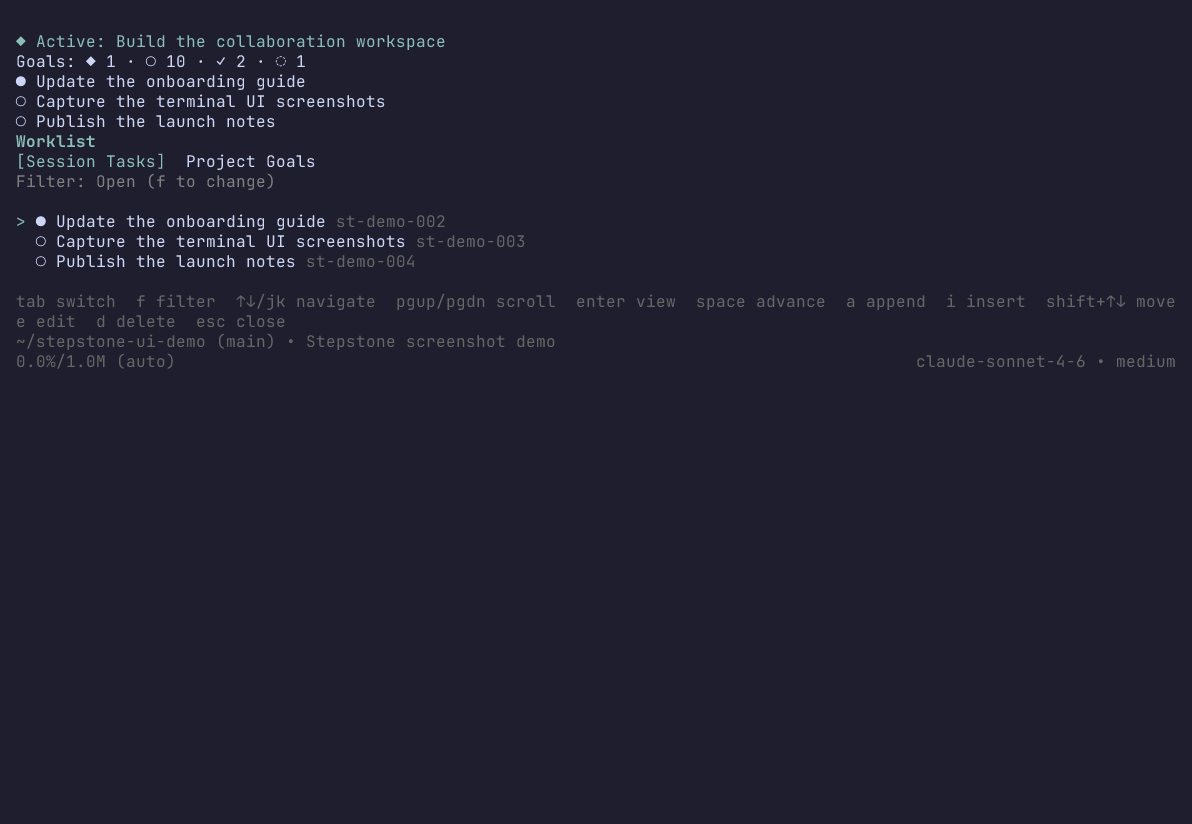
Install the Pi extension and run /tasks to open the Stepstone dashboard in Pi.
Workspace dispatcher
The workspace dispatcher prepares and claims approved goals in isolated Git worktrees. It writes each goal handoff to STEPSTONE_GOAL.md without starting an agent.
https://github.com/user-attachments/assets/8c88cfab-dc71-46a9-ae81-dcb13e51e606
Read the workspace guide for commands and safety rules.
Install
Agent Skill.
Install the standalone Agent Skill when your coding agent supports the skills CLI:
npx skills add max-miller1204/stepstone --skill stepstone -g
The skill teaches the agent the full workflow and invokes the CLI from npm when needed.
Drop -g to install it only for the current project.
Any shell, script, or coding agent. There is nothing to install. Run the CLI from npm on demand in any Git repository with Node:
npx -y stepstone@latest project list
Optional shell completion. Install the package globally to use the packaged Bash or Zsh completion script:
npm install stepstone --global
stepstone completion install
Restart the shell after installation. See docs/usage.md for paths and requirements.
Pi extension.
Install the extension when you want /tasks, a session widget, a model-facing tool, and Session Tasks:
pi install npm:stepstone
The npm package and Agent Skill are separate installations. The package provides the CLI and Pi extension. The skill provides guidance that a harness loads from its skills directory. See docs/skill.md for details.
Try it
npx -y stepstone@latest project add Replace legacy authentication \
  --description "Migrate every supported client first"
# Added project goal replace-legacy-authentication: Replace legacy authentication

npx -y stepstone@latest project add Retire the legacy auth service \
  --depends-on replace-legacy-authentication

npx -y stepstone@latest project waves
# Wave 1 (1 goal):
#   [open] replace-legacy-authentication: Replace legacy authentication
# Wave 2 (1 goal):
#   [open] retire-the-legacy-auth-service: Retire the legacy auth service

npx -y stepstone@latest project set_active replace-legacy-authentication
add prints the ID it minted from the title, and that is the name every other command takes; the ID is frozen, so renaming the goal later never invalidates a reference to it.
waves reads the dependency edge rather than the file order, which is why retiring the old service sits in a later layer than replacing it, and next names the one goal to start right now.
All of it lands in .worklist/worklist.json at the repository root, which is meant to be committed.
Add --json to any command for a deterministic result envelope instead of prose, which is how agents and scripts should read it.
Run npx -y stepstone@latest project ui for a full-screen terminal board over the same goals.
Documentation
| Document | Contents |
|---|---|
| docs/how-it-works.md | Goal identity, lifecycle, dependency state, persistence, and executable boundaries |
| docs/usage.md | Running the CLI: reads, writes, --json envelopes, exit codes, conflicts |
| docs/cli.md | Generated project command reference: every action, flag, and rule |
| docs/goals.md | The goal model: fields, statuses, IDs, order, groups, JSON plans |
| docs/dependencies.md | Dependency edges and the sequencing reads behind next, ready, and waves |
| docs/workspaces.md | Preparing and claiming approved goal workspaces without starting an agent harness |
| docs/web.md | The loopback web application, its workflows, and its security boundary |
| docs/storage.md | Where the goal file lives, its schema, locking, revisions, and migrations |
| docs/board.md | The terminal goal board and its key map |
| docs/skill.md | The standalone generated Agent Skill and how to install it |
| docs/pi.md | The Pi extension: Session Tasks, /tasks, the widget, the model tool, the module API |
| docs/ROADMAP.md | This repository's own Project Goals, generated from the goal file it commits |
| docs/development.md | Working on stepstone: checks, generated files, and the invariants behind them |
| docs/releasing.md | How a release is published, and the one-time registry setup |
Pi extension
Pi is one supported harness rather than the product.
In a Pi session, stepstone adds Session Tasks: a branch-aware queue of the concrete chunks in the session at hand, kept separate from the roadmap because a session's next steps and a repository's outcomes are not the same thing.
It also adds the /tasks dashboard over both lists, a compact widget naming the active goal and the next unfinished tasks, and a model-facing worklist tool.
Session Tasks are documented and kept working, but they are not where the project is heading: new work goes into Project Goals and the interfaces every harness can reach. docs/pi.md covers installation, the dashboard, the direct commands, Session Task storage, the model tool, and importing the application service from another extension.
Development
git clone https://github.com/max-miller1204/stepstone.git
cd stepstone
mise install
mise exec -- npm ci
mise exec -- npm run check
docs/development.md covers the rest, including the generated files that must never be hand-edited.
Formerly pi-worklist
stepstone was published as pi-worklist through 0.17.0, which is frozen and no longer updated.
Everything continues here, under a name that does not imply the tool only serves one coding agent.
License
MIT