symphony-pi
Generic Symphony autonomous issue orchestration extension for pi.
Package details
Install symphony-pi from npm and Pi will load the resources declared by the package manifest.
$ pi install npm:symphony-pi- Package
symphony-pi- Version
0.4.1- Published
- May 3, 2026
- Downloads
- not available
- Author
- jkbjhs
- License
- MIT
- Types
- extension
- Size
- 423.8 KB
- Dependencies
- 3 dependencies · 2 peers
Pi manifest JSON
{
  "extensions": [
    "./src/index.ts"
  ]
}
Security note
Pi packages can execute code and influence agent behavior. Review the source before installing third-party packages.
README
pi-symphony
A pi extension that implements the OpenAI Symphony draft service shape: load repo-owned WORKFLOW.md, poll an issue tracker, create per-issue workspaces, launch Codex app-server in each workspace, retry/reconcile, and expose operator-visible logs/status.
Tracker support
Core spec compatibility:
linear— implemented per the Symphony draft.
pi-symphony extensions beyond the OpenAI spec:
jira— Jira Cloud using email + API token.beads— local Beads CLI (bd) for project-local task queues.
All trackers normalize into the Symphony Issue model, so orchestration/workspaces/prompts remain tracker-independent.
Command
/symphony [--port PORT] [path-to-WORKFLOW.md]
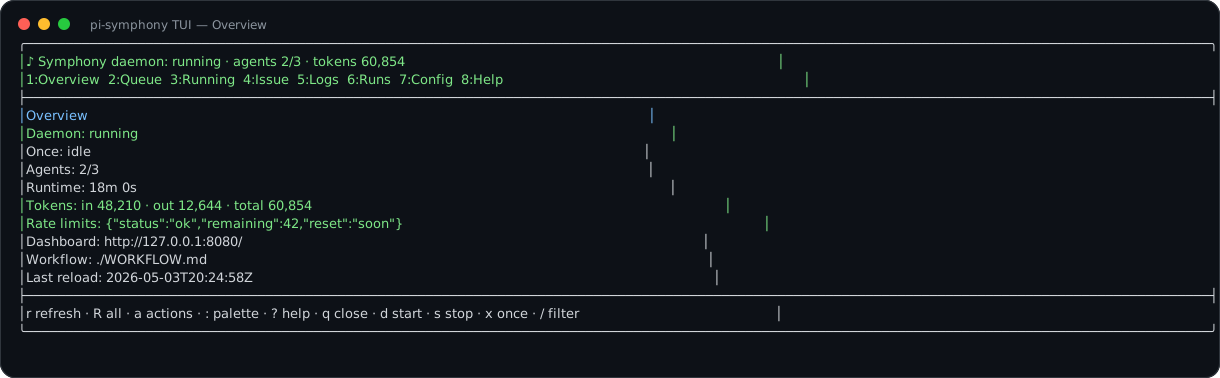
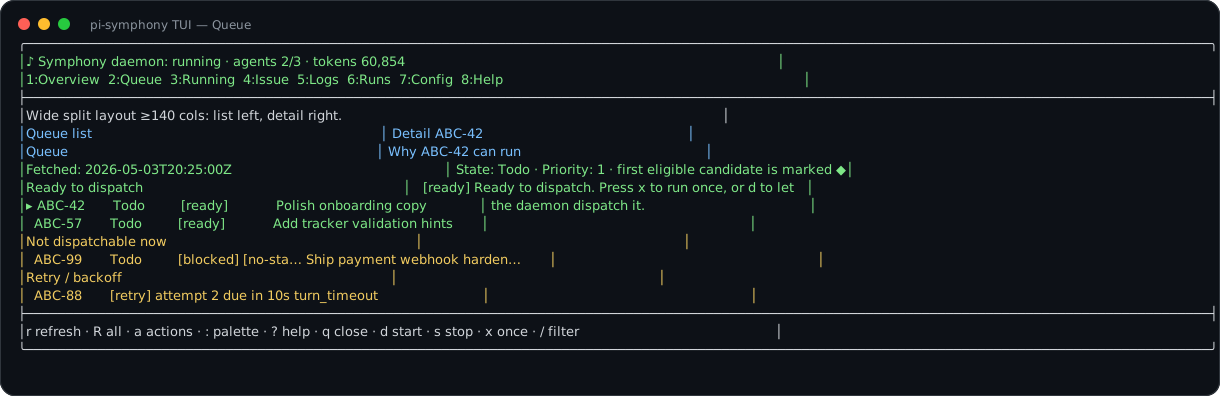
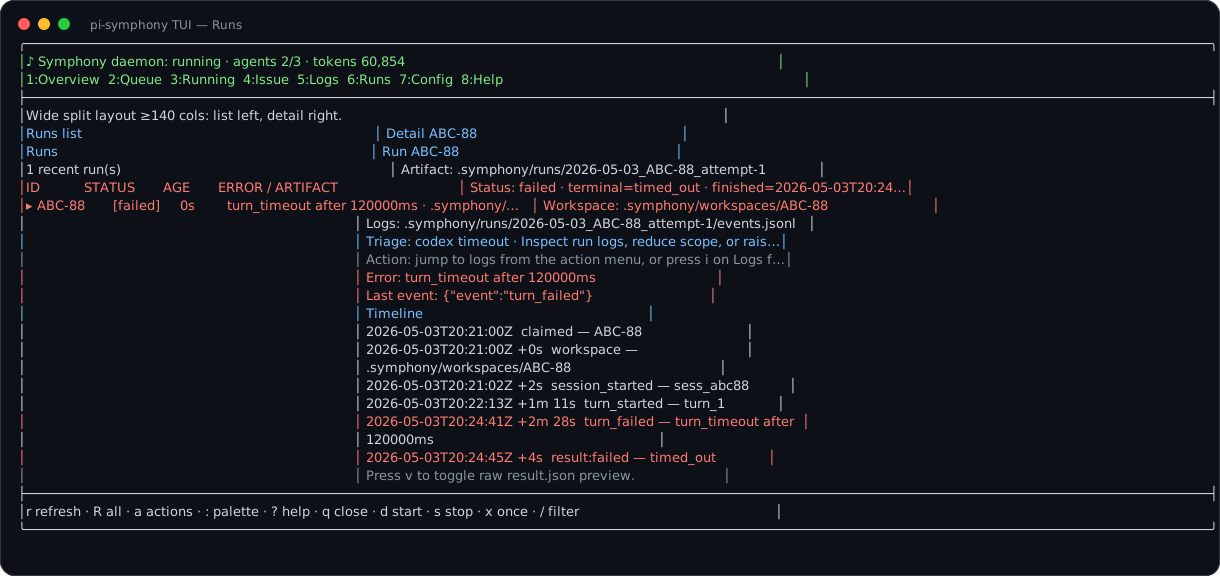
/symphony opens the full-screen operator console. Start/stop daemon mode, run once, validate/reload config, inspect queue/running/runs/logs, and open dashboard/artifacts from inside the TUI.
TUI screenshots
The console is a keyboard-first terminal UI for operating the daemon without leaving pi.
Overview
Queue triage
Run artifacts
Installation / pi package consumption
Install from npm into another repository's project pi settings:
pi install -l npm:symphony-pi
Install from GitHub instead:
pi install -l git:git@github.com:juhas96/symphony-pi.git
Local development from another repository:
pi install -l /absolute/path/to/pi-symphony
Equivalent project settings shape:
{
  "packages": ["npm:symphony-pi"]
}
The package advertises the pi extension entry in package.json:
{
  "pi": {
    "extensions": ["./src/index.ts"]
  }
}
CLI binary metadata is also provided as pi-symphony for non-interactive daemon smoke tests.
Local package smoke:
npm run smoke:pi-extension
The smoke starts pi in RPC mode with this package loaded via --extension, creates a temporary Beads-backed WORKFLOW.md, and verifies the single /symphony command is registered. It skips with an explicit message when pi is unavailable.
Known limitations:
- Real tracker/Codex integration tests require external credentials and are documented in
docs/runbook.md. - Jira and Beads trackers are pi-symphony implementation-defined extensions beyond the OpenAI Symphony draft.
LLM-assisted setup in another repository
For a copy/paste guide that an LLM coding agent can follow in a target repository, see docs/llm-developer-setup.md.
Shortest path:
- Install this package with
pi install -l npm:symphony-piorpi install -l git:git@github.com:juhas96/symphony-pi.git. - Copy and customize one of
examples/WORKFLOW.*.mdas the target repo'sWORKFLOW.md. - Set tracker credentials in exported environment variables or the target repo's ignored
.env, not in git. - Add
.env,.symphony/runs/, and.symphony/workspaces/to the target repo's.gitignore. - Run
/symphony, inspect Config, then run once for a safe issue from inside the console.
CLI host
For non-interactive daemon usage during development:
npm run cli -- [--port 8080] [path-to-WORKFLOW.md]
npm run cli -- --once ABC-123 [path-to-WORKFLOW.md]
No workflow path means ./WORKFLOW.md from the current directory.
WORKFLOW.md examples
tracker.kind is required for dispatch validation. Use kind: linear for the Symphony-required Linear tracker. Jira Cloud and Beads are implementation-defined extensions and must also be explicitly selected with kind: jira or kind: beads; pi-symphony no longer silently defaults a missing kind to Linear.
Linear
---
tracker:
  kind: linear
  api_key: $LINEAR_API_KEY
  project_slug: ABC
  active_states: [Todo, In Progress]

workspace:
  root: .symphony/workspaces

server:
  port: 8080 # optional dashboard/API at http://127.0.0.1:8080

codex:
  command: codex app-server
  approval_policy: never
  turn_sandbox_policy:
    type: workspaceWrite
    writableRoots: []
    networkAccess: true
---
Work on {{ issue.identifier }}: {{ issue.title }}.

Description:
{{ issue.description }}
Jira Cloud
---
tracker:
  kind: jira
  endpoint: https://your-org.atlassian.net
  email: $JIRA_EMAIL
  api_token: $JIRA_API_TOKEN
  project_key: ABC
  active_states: ["To Do", "In Progress"]
  terminal_states: [Done, Canceled]
  # Optional override. If omitted, pi-symphony builds a project/status JQL query.
  # jql: 'project = ABC AND status in ("To Do", "In Progress") ORDER BY priority ASC, created ASC'

workspace:
  root: .symphony/workspaces
---
Implement Jira issue {{ issue.identifier }}: {{ issue.title }}.
Beads
---
tracker:
  kind: beads
  command: bd
  ready_command: bd ready --json
  active_states: [open, in_progress]
  terminal_states: [closed]

workspace:
  root: .symphony/workspaces
---
Implement task {{ issue.identifier }}: {{ issue.title }}.
HTTP dashboard/API
The /symphony console can run a single selected issue, start/stop daemon scheduling, inspect live workers, tail .symphony/logs/symphony.log, and browse .symphony/runs/ artifacts. Closing the console does not stop the daemon; stop it explicitly inside the TUI. Start /symphony --port PORT or set server.port for a browser dashboard.
When server.port is configured, or /symphony --port PORT / CLI --port PORT is used, pi-symphony binds loopback and exposes:
GET /— human-readable dashboard.GET /api/v1/state— runtime snapshot.GET /api/v1/queue— eligibility-backed queue snapshot.GET /api/v1/<issue_identifier>— issue-specific runtime state for currently tracked issues.GET /issue/<issue_identifier>— visual issue telemetry page.POST /api/v1/refresh— best-effort immediate poll/reconcile trigger.
Use port 0 for an ephemeral test port.
Run artifacts
Each run attempt writes a local artifact bundle under .symphony/runs/ beside WORKFLOW.md:
prompt.mdevents.jsonlmetadata.jsonresult.json
Artifact paths are surfaced in runtime snapshots and issue API responses. result.json includes normalized status (succeeded, failed, cancelled) and terminal_reason values (succeeded, failed, timed_out, stalled, user_input_required, cancelled_by_reconciliation, cancelled). Issue API log entries use { label, path, url } objects for logs.codex_session_logs. Keep .symphony/runs/ and .symphony/logs/ ignored because they are mutable operator output.
Security posture
This implementation is intended for trusted operator environments unless configured otherwise. Workspace isolation invariants are enforced: sanitized issue directory names, workspace path containment under workspace.root, and Codex launched only with the per-issue workspace as cwd.
Hooks are trusted shell scripts from WORKFLOW.md and run inside the workspace. Secrets may be referenced via $VAR; pi-symphony validates presence without logging secret values.
Approval and sandbox config are passed through to the installed Codex app-server version. High-trust approval callbacks for command execution, file changes, and additional permissions are auto-approved so autonomous runs do not stall; use restrictive Codex sandbox/approval settings and external isolation for untrusted work. User-input-required signals are treated as run failures to avoid indefinite stalls.
The optional Symphony linear_graphql dynamic tool is advertised on thread/start for Linear sessions with valid auth and handled for Codex item/tool/call requests. It reuses configured Linear credentials, rejects invalid/multi-operation inputs, and returns success=false for GraphQL errors while preserving response bodies. Unsupported app-server tool/server requests receive structured errors and do not stall the run. See docs/validation-matrix.md.
Development
npm install
npm run check
npm test
npm run smoke:pi-extension
npm run smoke:codex-schema
npm run smoke:codex-app-server
npm run smoke:beads-e2e
npm run smoke:linear-live # opt-in via PI_SYMPHONY_LIVE_LINEAR=1
npm run smoke:jira-live   # opt-in via PI_SYMPHONY_LIVE_JIRA=1
smoke:codex-schema runs codex app-server generate-json-schema --out <tmp> when Codex is installed and verifies the generated thread/start and turn/start schemas contain the fields pi-symphony sends. It skips with an explicit message when Codex or schema generation is unavailable.
smoke:codex-app-server launches the installed Codex app-server and runs one harmless prompt through CodexAppServerClient. It skips when Codex/auth/model readiness is unavailable. smoke:beads-e2e initializes a temporary Beads project, creates one safe issue, runs pi-symphony --once with the Beads adapter and fake Codex app-server, and verifies workspace creation.
smoke:linear-live and smoke:jira-live are opt-in, non-mutating live tracker checks. They require isolated test projects/JQL and credentials via environment variables; see docs/runbook.md.
pi loads TypeScript extensions directly; no build step is required.