@adeildo/pi-ask-permission
A permission dialog for the Pi coding agent. Approve, always approve, or deny a tool call, and attach a note the model reads with the result.
Package details
Install @adeildo/pi-ask-permission from npm and Pi will load the resources declared by the package manifest.
$ pi install npm:@adeildo/pi-ask-permission- Package
@adeildo/pi-ask-permission- Version
5.5.0- Published
- Oct 6, 2026
- Downloads
- 807/mo · 807/wk
- Author
- adeildo
- License
- MIT
- Types
- extension
- Size
- 267.5 KB
- Dependencies
- 3 dependencies · 3 peers
Pi manifest JSON
{
  "image": "https://raw.githubusercontent.com/felipeadeildo/pi-harness/main/packages/ask-permission/assets/preview.png",
  "extensions": [
    "./src/index.ts"
  ]
}
Security note
Pi packages can execute code and influence agent behavior. Review the source before installing third-party packages.
README
The ask
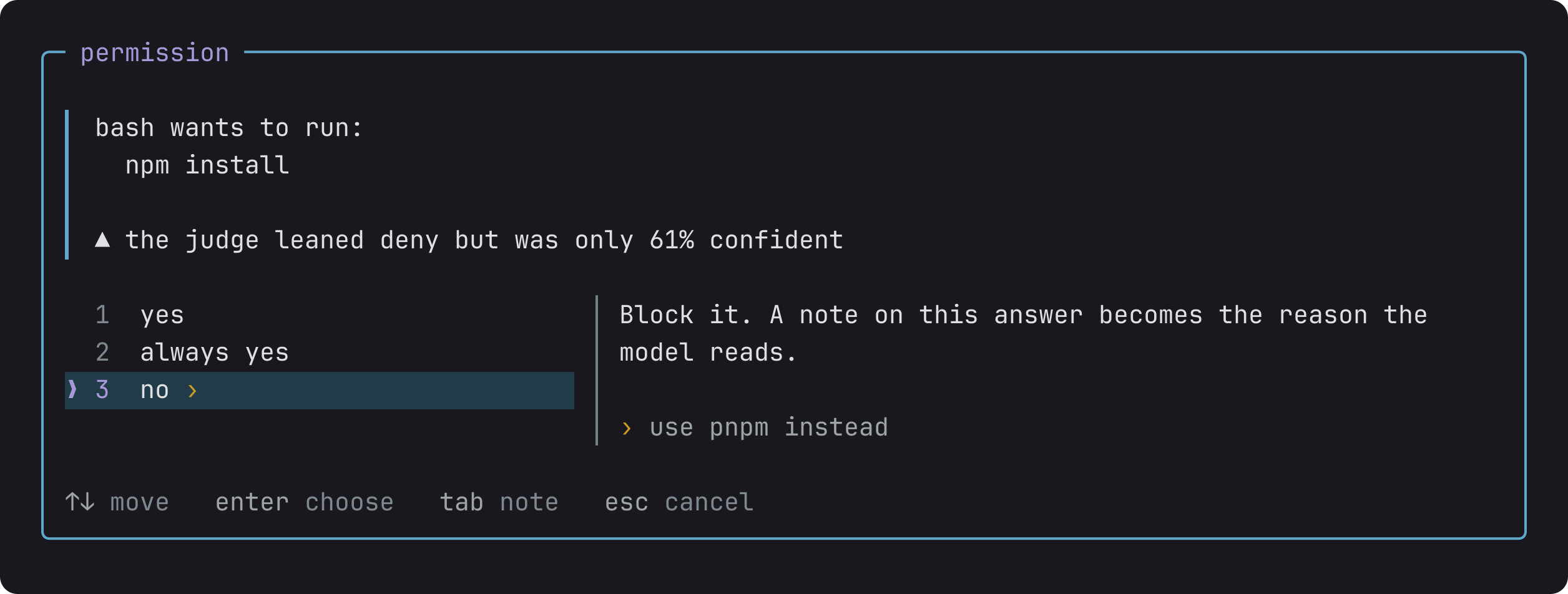
The dialog opens before the command runs. enter picks the answer under the cursor and esc cancels, which denies. tab writes a note there, and a note on no is the reason the model reads. A command longer than three lines shows the first three and how many are left.
Reads inside the project never ask: read, grep, find, ls, and shell commands that only read, like cat, git log or rg. An edit or a write shows the diff it would make.
The dialog comes from @adeildo/pi-ask-questions, so a permission ask and a question from the model take the same keys and hold the same notes. Turn that piece off in pi config, or run in an RPC host that cannot draw a terminal component, and Pi asks through its own selector instead, with the same answers and no panel.
Always yes
Pick always yes and it asks what to remember, then for how long.
The first option is the narrowest, and the one to prefer: pnpm would also approve pnpm publish.
| Scope | Lasts | Stored in |
|---|---|---|
| this session | until the session ends, reloads included | the session file |
| this project | every session in this project | .pi/extensions/pi-ask-permission/always-yes.json |
| everywhere | every session | ~/.pi/agent/extensions/pi-ask-permission/always-yes.json |
The Always yes section of the settings counts the rules per scope and forgets them.
Modes
Alt+M switches modes, and the status bar shows the one you are in.
| Mode | Runs without asking |
|---|---|
manual |
reads (the allow list and read-only shell) and always yes |
edits |
the same, plus file edits and writes |
judge |
the same as edits, and the judge decides the rest |
full |
everything |
The workspace comes before the mode: a call outside workspace.roots asks you in every mode, full included. Alt+W lets calls outside through for the session, and a second press puts the check back, with anywhere in red on the status bar while it is off. A resumed session keeps its mode and its choice.
A folder next door
In a monorepo, a session in apps/api that reads apps/web leaves the workspace. The dialog says so and offers to open the repository for reads.
Take it and the next reads there run without asking, for as long as you choose. A write outside gets yes, and add … to the workspace instead, and a folder opened for reads never lets a write through. The dialog never offers your home or a folder above it. The status bar counts the open folders, like +1 folder, and the Folders section of the settings closes them.
A call to an MCP server
Pi registers each tool an MCP server offers as mcp__<server>__<tool>, and the settings have a row per server.
| Policy | Runs without asking |
|---|---|
ask me |
Nothing, in any mode |
trust hints |
A call the server declares read-only. The rest follows the mode you are in |
allow |
Every call |
deny |
Nothing, whatever the mode says |
trust hints is the default, and the hint is what the server claims about its own tool. Pi does not verify it, so a server you do not fully trust belongs on ask me. Both deny and ask me outrank the mode, full included. The dialog names the server, repeats what it declares, and says when a script issued the call.
Let a model decide
In the judge mode a model answers every call that is not a read or an edit, so you only see the ones it doubts. A good way in:
- Run
/login typesafefor Jev, the default judge. It is a classifier model: it answers typed questions with a confidence instead of chatting. Pi ships Jev through OpenRouter, Cloudflare, Vercel and opencode as well, and a local llama.cpp model works too. Pick one inModel. - Switch to
judgewithAlt+M, openAlt+S, and turn onDry runin the Judge section. The judge then writes its verdict on the call and you still decide. - Pick a policy.
Standard developmentallows edits, tests, builds and local git, and asks about installs, network and anything destructive. - After a few sessions of agreeing with it, turn
Dry runoff.
A call runs when the judge approves it with at least the confidence of the rigor you picked, and its risk stays under the ceiling. Anything else comes to you.
| Rigor | Confidence | Risk ceiling |
|---|---|---|
cautious |
85% | 0.45 |
balanced, by default |
70% | 0.50 |
relaxed |
55% | 0.60 |
A line under each call says who decided and why, like judge approved 97% sure, risk 0.12 or you said no › use pnpm instead, and ctrl+o adds the judge's numbers. When the model sends several calls at once, the judge reads them together, so each call shows its own answer while the dialog asks about the next.
The policy is plain text, so start from a preset and edit it:
# May run without asking
- Running tests, linters, type checks, and builds
- git status, diff, log

# Must always ask first
- sudo, or anything that changes system-wide state
- Anything that reaches the network

# When in doubt
Ask me.
Always ask me lists patterns the judge never approves, like git push*. The judge also reads your last message to tell whether a call is a step of what you asked, and nothing in the message overrides the policy or Always ask me. With @adeildo/pi-goal installed, the judge also reads the session's goal and current step, when they came from your own words. After you send a message, it waits up to 3 seconds for the goal to take that message in. When calls come back as the judge could not decide, Test the judge in the Judge section of the settings sends one request and reports the model, the latency and the error.
Limits
- Always yes matches text.
cd /repo && pnpm testofferscd,cd /repoand the whole line, notpnpm test. - The read-only check is a classifier and not a sandbox. It refuses anything it cannot prove harmless, so a few safe commands still ask.
- The judge is a model and can be wrong. It sees the tool call and your last message, so do not send it calls or messages carrying secrets you would not send to its provider.
- For rules that never waver and no human in the loop, use a sandbox instead.
The reference has every setting, the exact order in which a call is decided, the limits in full, and the events other extensions can listen to. pi-ask-permission on npm is this same extension under an older name, and it reads the same settings, grants and sessions: pi remove npm:pi-ask-permission, then install this one.
Part of pi-harness, which brings every piece in one install.