@adeildo/pi-ask-permission
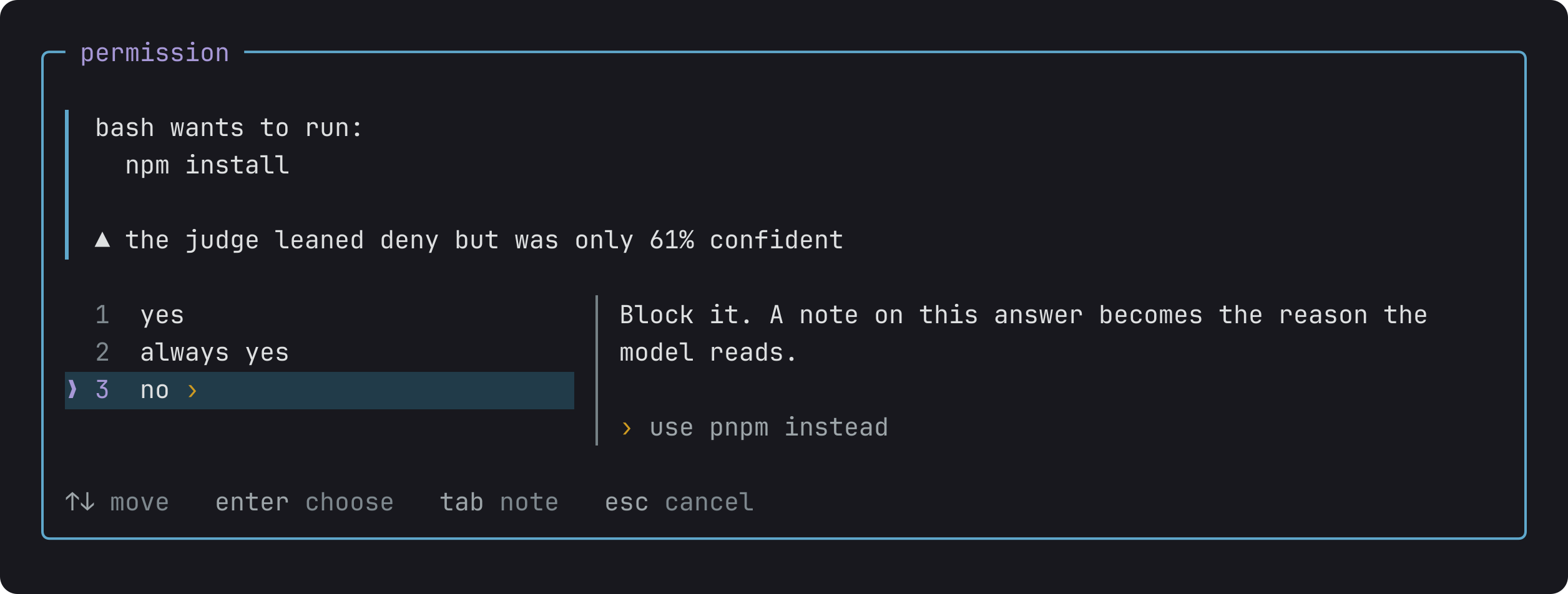
A permission dialog for the Pi coding agent. Approve, always approve, or deny a tool call, and attach a note the model reads with the result.
Package details
Install @adeildo/pi-ask-permission from npm and Pi will load the resources declared by the package manifest.
$ pi install npm:@adeildo/pi-ask-permission- Package
@adeildo/pi-ask-permission- Version
6.0.0- Published
- Nov 2, 2026
- Downloads
- 3,249/mo · 883/wk
- Author
- adeildo
- License
- MIT
- Types
- extension
- Size
- 267.2 KB
- Dependencies
- 3 dependencies · 3 peers
Pi manifest JSON
{
  "image": "https://raw.githubusercontent.com/felipeadeildo/pi-harness/main/packages/ask-permission/assets/preview.png",
  "extensions": [
    "./src/index.ts"
  ]
}
Security note
Pi packages can execute code and influence agent behavior. Review the source before installing third-party packages.
README
Out of the box, pi runs every command the model writes. With this package, pi asks you first. You answer yes, always yes or no, and you can leave a note on any answer. The model reads the note, so a no can tell it what to do instead. In judge mode, a small model answers the routine calls for you.
Answering
The dialog opens before the command runs.
yesruns it once.always yesruns it, and stops asking for the same command in this session, this project or everywhere.noblocks it. PressTabfirst to add a note, like "use pnpm instead", and the model reads it.
Reads never ask, and for an edit you see the diff before you answer.
Modes
Alt+M switches between modes, and the status bar shows the current one.
| Mode | What runs without asking |
|---|---|
manual |
Reads, and what you marked always yes. The default |
edits |
The same, plus file edits and writes |
judge |
The same as edits, and a model answers the rest |
full |
Everything |
A call outside your project asks you in every mode, full included. Alt+W lets those through for the rest of the session.
Let a model decide
In judge mode, a small model reads each call and lets through the ones it is sure about. You only see the calls it doubts.
- Run
/login typesafeto use Jev, the default judge. - Switch to
judgewithAlt+M, and turn onDry runinAlt+S. The judge writes its verdict on each call, but you still decide. - Pick a policy, such as
Standard development. - Once you agree with the judge for a few sessions, turn
Dry runoff.
Every call shows who let it run and why, like judge approved 97% sure, risk 0.12.
Learn more
- How it works: always yes in detail, folders outside the project, MCP servers, how the judge decides, and the limits.
- Reference: every setting, the exact order in which a call is decided, and the events other extensions can listen to.