@bismawy/pi-arnative
Refined aesthetics. Cohesive tools. Built for Pi. Warm themes, rounded tool boxes, tabbed header, compact footer and a /usage dashboard.
Package details
Install @bismawy/pi-arnative from npm and Pi will load the resources declared by the package manifest.
$ pi install npm:@bismawy/pi-arnative- Package
@bismawy/pi-arnative- Version
0.3.5- Published
- Oct 4, 2026
- Downloads
- 2,448/mo · 2,377/wk
- Author
- bismawy
- License
- MIT
- Types
- extension, theme
- Size
- 328.4 KB
- Dependencies
- 0 dependencies · 3 peers
Pi manifest JSON
{
  "image": "https://raw.githubusercontent.com/bismawy/pi-arnative/main/assets/banner.webp",
  "themes": [
    "./themes/*.json"
  ],
  "extensions": [
    "./extensions/*.ts"
  ]
}
Security note
Pi packages can execute code and influence agent behavior. Review the source before installing third-party packages.
README
Arnative
Refined aesthetics. Cohesive tools. Built for Pi.



Overview
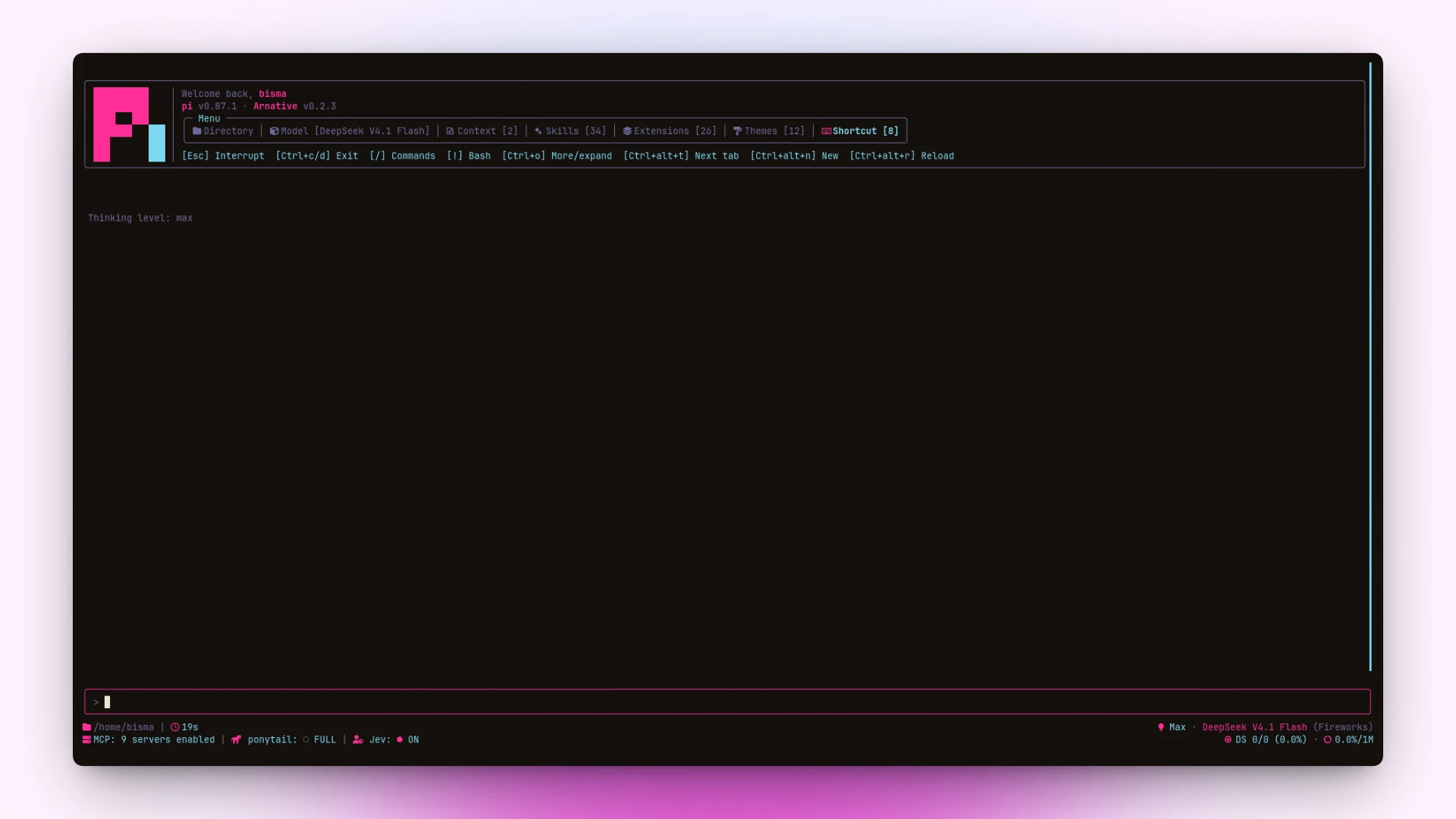
pi-arnative replaces pi’s default terminal chrome with a unified, cohesive visual aesthetic.
- Warm Themes: Cohesive, contrast-checked color palettes generated without drift.
- Tabbed Header: Greeting, version line, and a compact box menu over Directory, Model, Context, Skills, Extensions, and Shortcut.
The Context/Skills/Extensions counts read pi's startup listing, which
"quietStartup": true(and"header") hides. Under those settings the counts show—rather than a misleading0; set"quietStartup": falseto see the real numbers. - Rounded Tool Boxes: Clear status, spinner, and duration for every tool call. Built-in
codemodeis boxed and collapsed to two rows (title + first script line) likebash/grep/read; nested calls and output sit behind[ctrl+o to expand](shown whenever the collapsed summary hides more, includingeditdiffs); a failed run always shows its full output. Thechrome_devtools_*tools box too, replacing their bare "Chrome DevTools: …" lines. - Enhanced Footer: fixed 3-row grid — directory/git line, then extension status paired with token metrics.
The branch is read straight from
.git/HEAD, so it shows up without a git install. Tag, dirty count, and ahead/behind need thegitbinary — when it is missing (or the repo is owned by another user, which git refuses to touch) that half is left out rather than shown wrong. Rungit config --global --add safe.directory <repo>(a local, non-synced setting) to makegitcooperate with such a repo. - Transcript Clock: Timestamps for messages with clean bubble backgrounds.
- Usage Dashboard: /usage command to track tokens and session costs.
Install
pi install npm:@bismawy/pi-arnativeSelect a theme via /settings → Theme → arnative (or any arnative-* variant).
To test locally without installing:
pi --extension ./extensions/footer.tsPrerequisite: Requires a Nerd Font (e.g. JetBrains Mono Nerd Font) for icons and rounded box borders.
Shortcuts
| Key (Linux / Win) | Action |
|---|---|
ctrl+alt+t · alt+t |
Cycle header tabs |
ctrl+alt+r · alt+r |
Quick reload (/reload) |
ctrl+alt+n · alt+n |
New session (/new) — requires keybinding below |
/usage |
Show session usage & token metrics |
/arnative |
Settings menu — Themes, Headers, Footers |
| Click tab | Open selected header tab |
Click tool / ctrl+e |
Toggle tool output box |
Notes:
- Windows / WSL: Windows Terminal aliases
Ctrl+Altto AltGr; usealt+…(or set"altGrAliasing": falsein WT profile).- macOS: uses
ctrl+option+…(plain Option composes special characters).- Herdr / tmux glitch: if shortcuts feel delayed or type stray letters, set
PI_TUI_ESC_TIMEOUT=100in your shell profile.
Keybindings
Add to ~/.pi/agent/keybindings.json to bind app.session.new:
{
  "app.session.new": ["ctrl+alt+n", "alt+n"]
}
Architecture
| File | Role |
|---|---|
extensions/tools.ts |
Rounded tool boxes, spinners, and duration |
extensions/section-headers.ts |
Tabbed header and resource box (preset: /arnative headers) |
extensions/footer.ts |
3-row status grid footer and boxed editor (preset: /arnative footers) |
extensions/arnative.ts |
/arnative settings menu — live-preview theme/header/footer pickers |
extensions/timestamps.ts |
Message clock and bubble background fixes |
extensions/ui-render-tweaks.ts |
Contrast tweaks, selection style, and UI polish |
extensions/usage.ts |
/usage token dashboard |
themes/gen-themes.mjsis the single source of truth: it writes everythemes/*.json, including the basearnative.json.- Each theme is a few parameters (accent hue, chroma, canvas lightness, neutral tint) plus optional hue overrides for the strong palettes; all colors are derived as OKLCH from a shared ramp, so lightness/saturation stay consistent and no two
varscollapse to the same value. lib/color.tsholds the OKLCH↔sRGB math and WCAG contrast used by both the generator and the self-check.
Variants: sun · zinc · violet · emerald · matrix · cyberpunk · synthwave · gruvbox · nord · dracula
npm test        # Run self-checks & theme generator check
npm run themes  # Rebuild all theme variants
Releasing: scripts/release-check.mjs is a read-only preflight (never writes, tags, pushes or publishes) with one stage per step of the release:
| Stage | Run before | Checks |
|---|---|---|
pre-tag |
git tag |
clean tree on main, in sync, no open PRs, CHANGELOG.md entry, tag free, version unpublished |
pre-publish |
npm publish |
the above, plus the tag exists and is pushed, and points at HEAD |
post-publish |
done | the above, plus the version is live on the registry, latest points at it and its tarball URL answers |
pre-publish runs automatically through npm's prepublishOnly (after npm test), so a red build or a missing/unpushed tag aborts the publish (npm error code 1) instead of shipping a version whose tag was forgotten. The open-PR check uses gh when present and falls back to the public GitHub API otherwise. npm run release:check is the pre-tag shorthand. Exit codes: 0 pass, 1 a check failed, 2 bad usage.
License
Distributed under the MIT license.