@bismawy/pi-arnative
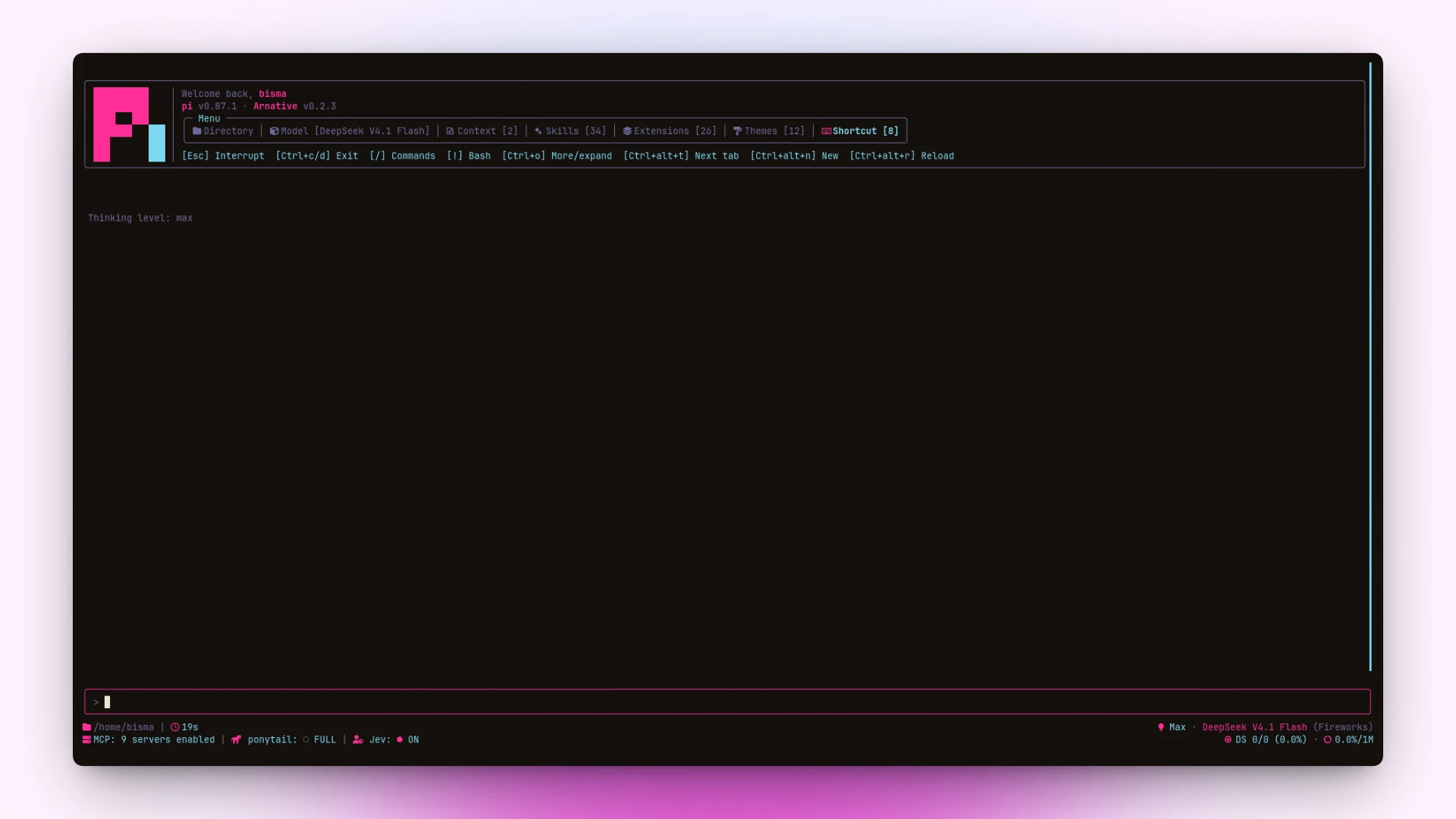
Refined aesthetics. Cohesive tools. Built for Pi. Warm themes, rounded tool boxes, tabbed header, compact footer and a /usage dashboard.
Package details
Install @bismawy/pi-arnative from npm and Pi will load the resources declared by the package manifest.
$ pi install npm:@bismawy/pi-arnative- Package
@bismawy/pi-arnative- Version
0.3.10- Published
- Oct 11, 2026
- Downloads
- 4,048/mo · 1,804/wk
- Author
- bismawy
- License
- MIT
- Types
- extension, theme
- Size
- 340.8 KB
- Dependencies
- 0 dependencies · 3 peers
Pi manifest JSON
{
  "image": "https://raw.githubusercontent.com/bismawy/pi-arnative/main/assets/banner.webp",
  "themes": [
    "./themes/*.json"
  ],
  "extensions": [
    "./extensions/*.ts"
  ]
}
Security note
Pi packages can execute code and influence agent behavior. Review the source before installing third-party packages.
README
Arnative
Refined aesthetics. Cohesive tools. Built for Pi.



Overview
pi-arnative replaces pi’s default terminal chrome with a unified, cohesive visual aesthetic.
- Warm Themes: Cohesive, contrast-checked color palettes generated without drift.
- Tabbed Header: Greeting, version line, and a compact box menu over Directory, Model, Context, Skills, Extensions, and Shortcut.
The Context/Skills/Extensions counts read pi's startup listing, which
"quietStartup": true(and"header") hides. Under those settings the counts show—rather than a misleading0; set"quietStartup": falseto see the real numbers. - Rounded Tool Boxes: Clear status, spinner, and duration for every tool call. Built-in
codemodeis boxed and collapsed to two rows (title + first script line) likebash/grep/read; nested calls and output sit behind[ctrl+o to expand](shown whenever the collapsed summary hides more, includingeditdiffs); a failed run always shows its full output. Thechrome_devtools_*tools box too, replacing their bare "Chrome DevTools: …" lines. - Enhanced Footer: fixed 3-row grid — directory/git line, then extension status paired with token metrics. The clock keeps the session's real age across
/resume, and the working tree's diff (+500 -100) sits beside it while there is one.Three presets via
/arnative→ Footers:Arnative (Full),Pi (system), andArnative (Minimal)— a single head row whose two sides expand independently on click (ctrl+alt+mtoggles both). The branch is read straight from.git/HEAD, so it shows up without a git install. Tag, dirty count, and ahead/behind need thegitbinary — when it is missing (or the repo is owned by another user, which git refuses to touch) that half is left out rather than shown wrong. Rungit config --global --add safe.directory <repo>(a local, non-synced setting) to makegitcooperate with such a repo. - Transcript Clock: Timestamps for messages with clean bubble backgrounds.
- Usage Dashboard: /usage command to track tokens and session costs.
Install
pi install npm:@bismawy/pi-arnativeSelect a theme via /settings → Theme → arnative (or any arnative-* variant).
To test locally without installing:
pi --extension ./extensions/footer.tsPrerequisite: Requires a Nerd Font (e.g. JetBrains Mono Nerd Font) for icons and rounded box borders.
Shortcuts
| Key (Linux / Win) | Action |
|---|---|
ctrl+alt+t · alt+t |
Cycle header tabs |
ctrl+alt+r · alt+r |
Quick reload (/reload) |
ctrl+alt+n · alt+n |
New session (/new) — requires keybinding below |
ctrl+alt+m · alt+m |
Expand/collapse both sides of the Minimal footer |
/usage |
Show session usage & token metrics |
/arnative |
Settings menu — Themes, Headers, Footers |
| Click tab | Open selected header tab |
Click tool / ctrl+o |
Toggle tool output box |
Notes:
- Windows / WSL: Windows Terminal aliases
Ctrl+Altto AltGr; usealt+…(or set"altGrAliasing": falsein WT profile).- macOS: uses
ctrl+option+…(plain Option composes special characters).- Herdr / tmux glitch: if shortcuts feel delayed or type stray letters, set
PI_TUI_ESC_TIMEOUT=100in your shell profile.
Keybindings
Add to ~/.pi/agent/keybindings.json to bind app.session.new:
{
  "app.session.new": ["ctrl+alt+n", "alt+n"]
}
Architecture
| File | Role |
|---|---|
extensions/tools.ts |
Rounded tool boxes, spinners, and duration |
extensions/section-headers.ts |
Tabbed header and resource box (preset: /arnative headers) |
extensions/footer.ts |
3-row status grid footer and boxed editor (preset: /arnative footers) |
extensions/arnative.ts |
/arnative settings menu — live-preview theme/header/footer pickers |
extensions/timestamps.ts |
Message clock and bubble background fixes |
extensions/ui-render-tweaks.ts |
Contrast tweaks, selection style, and UI polish |
extensions/usage.ts |
/usage token dashboard |
themes/gen-themes.mjsis the single source of truth: it writes everythemes/*.json, including the basearnative.json.- Each theme is a few parameters (accent hue, chroma, canvas lightness, neutral tint) plus optional hue overrides for the strong palettes; all colors are derived as OKLCH from a shared ramp, so lightness/saturation stay consistent and no two
varscollapse to the same value. lib/color.tsholds the OKLCH↔sRGB math and WCAG contrast used by both the generator and the self-check.
Variants: sun · zinc · violet · emerald · matrix · cyberpunk · synthwave · gruvbox · nord · dracula
npm test        # Run self-checks & theme generator check
npm run themes  # Rebuild all theme variants
CI: .github/workflows/ci.yml runs npm install + npm test on every push to main and every pull request, against Node 22.x (the floor the peer packages require) and 24.x (current LTS). No lockfile is committed, so the workflow installs without a cache key. The suite must pass in a clean checkout — a test that reads process.cwd() or a machine-local path will fail there.
Releasing: scripts/release-check.mjs is a read-only preflight (never writes, tags, pushes or publishes) with one stage per step of the release:
| Stage | Run before | Checks |
|---|---|---|
pre-tag |
git tag |
clean tree on main, in sync, no open PRs, CHANGELOG.md entry, tag free, version unpublished |
pre-publish |
npm publish |
the above, plus the tag exists and is pushed, and points at HEAD |
post-publish |
done | the above, plus the version is live on the registry, latest points at it and its tarball URL answers |
pre-publish runs automatically through npm's prepublishOnly (after npm test), so a red build or a missing/unpushed tag aborts the publish (npm error code 1) instead of shipping a version whose tag was forgotten. The open-PR check uses gh when present and falls back to the public GitHub API otherwise. npm run release:check is the pre-tag shorthand. Exit codes: 0 pass, 1 a check failed, 2 bad usage.
License
Distributed under the MIT license.