@trycedar/pi-mdiff
Markdown-aware edit tools for pi coding agent — normalized SEARCH matching and block-level anchored editing for .md files
Package details
Install @trycedar/pi-mdiff from npm and Pi will load the resources declared by the package manifest.
$ pi install npm:@trycedar/pi-mdiff- Package
@trycedar/pi-mdiff- Version
0.4.0- Published
- May 27, 2026
- Downloads
- not available
- Author
- jacobwang1992
- License
- MIT
- Types
- extension
- Size
- 139.4 KB
- Dependencies
- 6 dependencies · 3 peers
Pi manifest JSON
{
  "extensions": [
    "./src/index.ts"
  ],
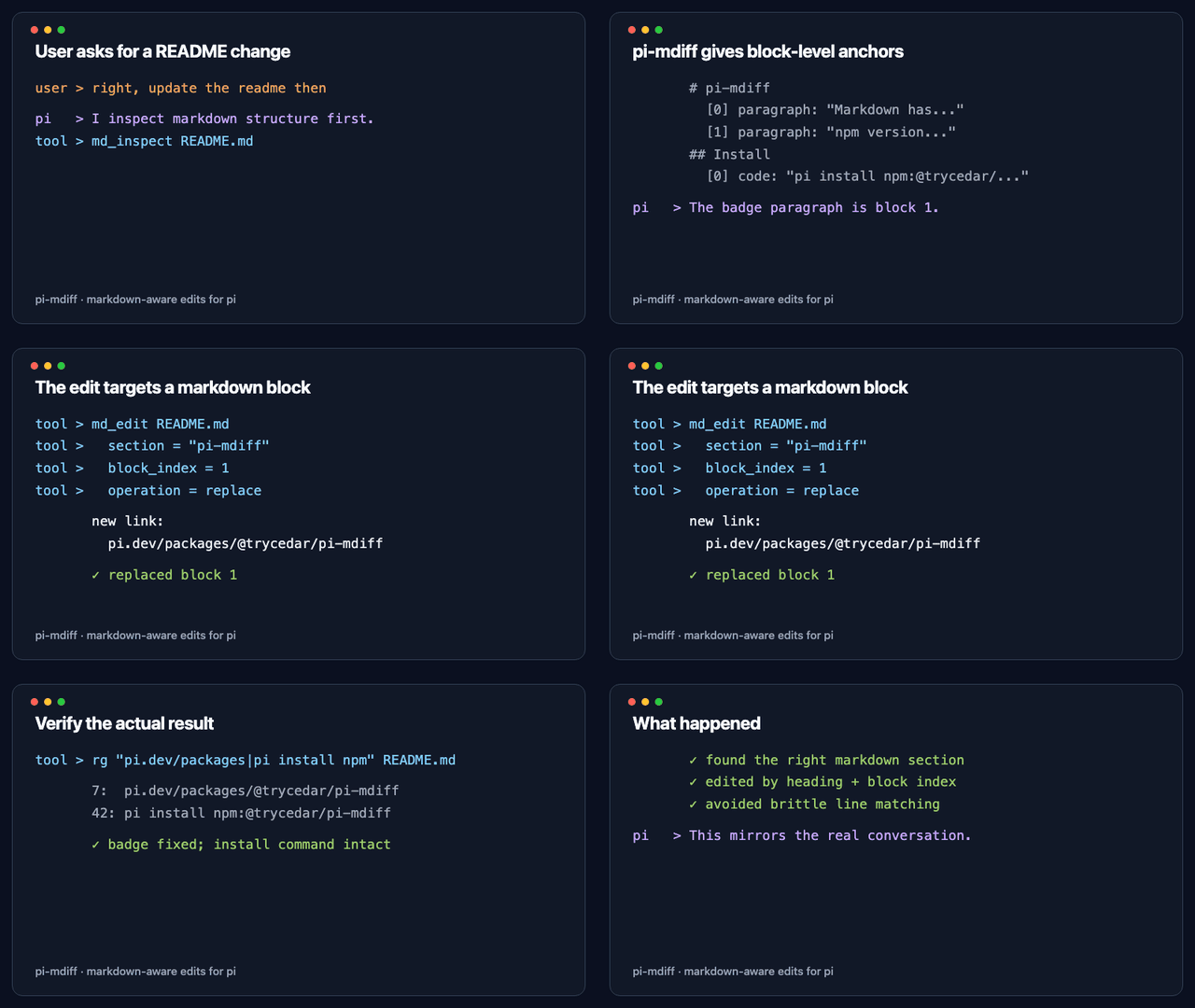
  "image": "https://raw.githubusercontent.com/trycedar0x/pi-mdiff/main/assets/demo/pi-mdiff-demo.gif"
}
Security note
Pi packages can execute code and influence agent behavior. Review the source before installing third-party packages.
README
pi-mdiff
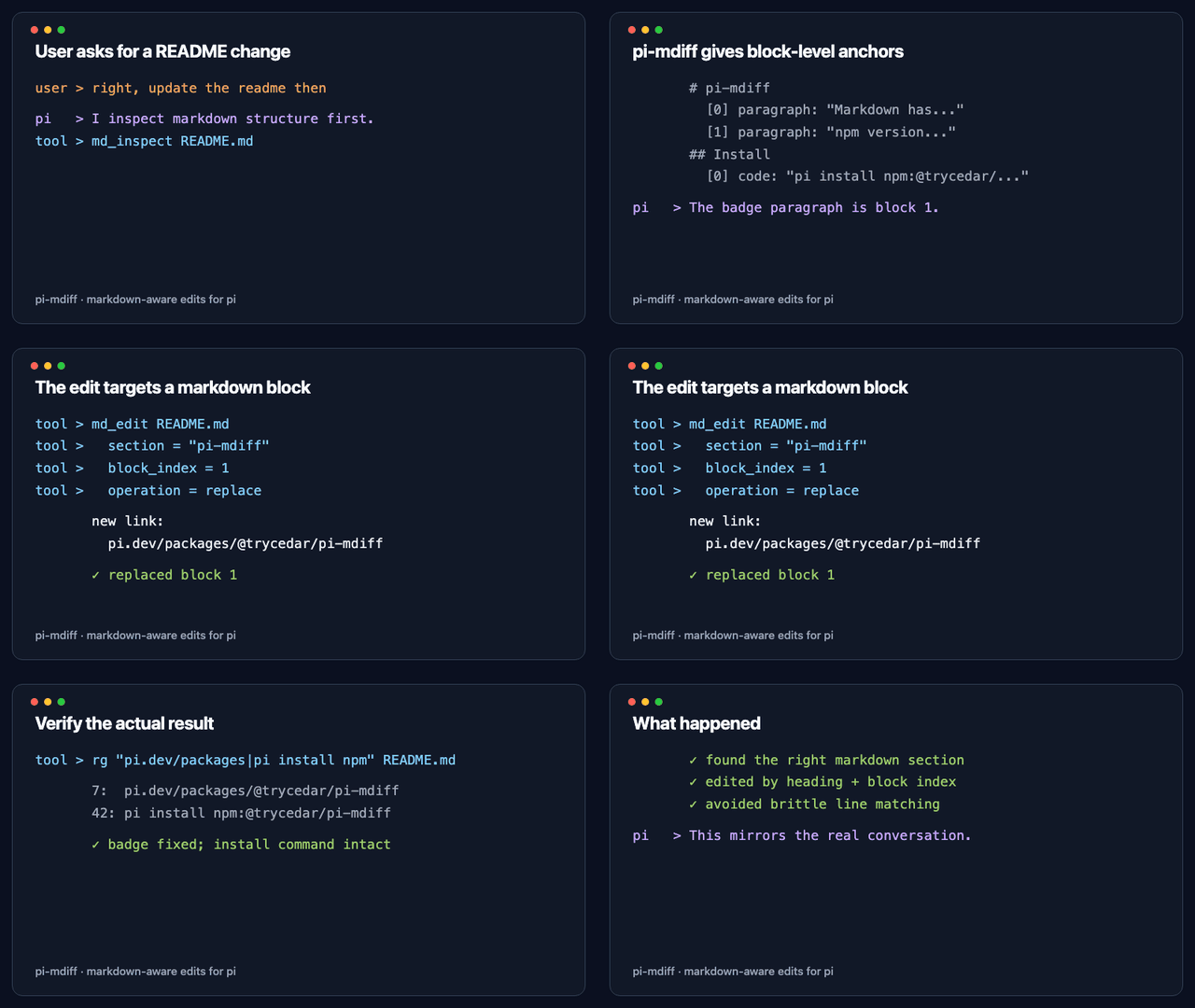
Markdown has a granularity problem that code doesn't. In code, a line is a unit of meaning. In markdown, a paragraph is — but it can span 1 line or 10 depending on who last ran the formatter. pi-mdiff fixes this for the pi coding agent.


The problem
Pi's normal edit tool uses exact text matching. That is brittle for Markdown because prose is semantically paragraph-based, but physically line-wrapped by whatever formatter, editor, or human last touched the file.
A paragraph like this:
The system uses PostgreSQL for all storage.
The schema is defined in schema.sql.
All queries go through the repository layer.
…is identical in meaning to this:
The system uses PostgreSQL for all storage. The schema is defined in schema.sql. All queries go through the repository layer.
A formatter rewraps it. The content is equivalent, but an exact SEARCH block no longer matches the physical lines in the file. The agent sees a tool error even though it identified the right paragraph.
Error: cannot find matching context in docs/architecture.md
<<<<<<< SEARCH
The system uses PostgreSQL for all storage.
The schema is defined in schema.sql.
All queries go through the repository layer.
pi-mdiff fixes the agent workflow around Markdown: normal edit calls get soft-wrap-aware matching, and larger prose changes can use section/block anchors instead of fragile exact text.
Install
pi install npm:@trycedar/pi-mdiff
No config, no API keys.
Try this first
After installing, ask pi naturally:
Update the Architecture section of docs/README.md to mention that we moved to PostgreSQL.
Inspect docs/CONTRIBUTING.md and rewrite the Getting Started section.
Delete the "Legacy Notes" section from docs/api.md.
Add a new "Troubleshooting" section after Installation in README.md.
pi will use md_inspect to find the right section and md_edit to apply the change — no fragile text matching involved.
What this adds
Transparent fix for edit on .md files
Every edit call on a markdown file is intercepted. SEARCH blocks are normalized to paragraph granularity before matching — soft-wrapped lines joined, blank lines collapsed, bullets standardized. Fenced code and frontmatter are never touched.
Before pi-mdiff: formatter reflows paragraph → SEARCH fails → LLM retries → confusion.
After pi-mdiff: normalization runs silently → match found → edit applied → done.
If the built-in edit still cannot match, pi-mdiff attempts normalized soft-wrap recovery and returns success only when it can apply the intended edit.
md_inspect — see section structure before editing
md_inspect path="docs/architecture.md"
## Overview  (path: Overview, lines 1-6)
  [0] paragraph lines 3-4: "This project is a web application that helps…"
## Database Layer  (path: Database Layer, lines 7-13)
  [0] paragraph lines 9-10: "We use PostgreSQL for all persistent storage…"
  [1] paragraph lines 12-13: "Migrations are managed via Alembic…"
## API Layer  (path: API Layer, lines 14-18)
  [0] paragraph lines 16-18: "The REST API is built with Express…"
Shows every section heading, heading path, line range, and block inside it, with 0-based block indices. Call this before md_edit so you know exactly what to target. Heading paths disambiguate repeated section names such as API > Usage and CLI > Usage.
md_edit — section-anchored editing
md_edit path="docs/architecture.md"
        operation="replace"
        section="## Database Layer"
        block_index=0
        content="We use PostgreSQL for all persistent storage.
The schema is defined in schema.sql and managed via Alembic."
Anchors to a heading + block index. No text matching at all. Formatters can reflow the entire file — this still works.
| Operation | What it does |
|---|---|
replace |
Replace the block at block_index with new content |
insert_after |
Insert a new block after block_index |
delete |
Remove the block at block_index |
append |
Add a new block at the end of the section |
rename_section |
Rename the section heading itself |
delete_section |
Remove the entire section including its heading |
add_section |
Insert a brand-new section after another; content includes the heading line |
md_diff — review Markdown structurally
md_diff before_path="/tmp/architecture.before.md"
        after_path="docs/architecture.md"
Reports changes by heading path and block index instead of raw physical lines:
~ section Database Layer
  ~ [0] paragraph lines 9-10 → 9-11
    - "We use SQLite for local storage…"
    + "We use PostgreSQL for persistent storage…"
Use this when a normal line diff is noisy because prose was reflowed. It helps the agent verify what changed at the Markdown block level.
Common workflows
| Task | How to ask |
|---|---|
| Update a specific section | "Rewrite the Deployment section of docs/README.md to mention Docker." |
| Add content to a section | "Add a note about rate limiting at the end of the Authentication section." |
| Add a new section | "Add a Troubleshooting section after Installation in README.md." |
| Rename a section | "Rename the 'Legacy API' section to 'Deprecated API' in docs/api.md." |
| Delete stale content | "Remove the 'Legacy API' section from docs/api.md." |
| Bulk doc update | "Update all references to 'SQLite' to 'PostgreSQL' in docs/architecture.md." |
| Inspect before editing | "Show me the structure of CONTRIBUTING.md before we edit it." |
What the normalizer preserves
Only prose lines are joined. Everything structurally meaningful is left exactly as-is:
| Element | Example | Touched? |
|---|---|---|
| Fenced code blocks | ```…``` |
Never |
| YAML frontmatter | ---\ntitle: …\n--- |
Never |
| Table rows | | Col A | Col B | |
Never |
| Headings | ## Section Name |
Never |
| List items | - item, - nested |
Never |
| Blockquotes | > quoted text |
Never |
| Horizontal rules | ---, *** |
Never |
| Explicit line breaks | line ending with |
Never |
| Inline code | `code` |
Never |
Tools
md_inspect
| Parameter | Description |
|---|---|
path |
Path to the markdown file (.md or .markdown) |
Returns a formatted section map with heading paths, section line ranges, block line ranges, block type, and preview text. Use before md_edit to find the right section and block_index.
md_edit
| Parameter | Description |
|---|---|
path |
Path to the markdown file (.md or .markdown) |
operation |
See table above |
section |
Heading text to anchor to — case-insensitive, ## prefix optional. For add_section: the section to insert after (use (end) to append at end of file) |
block_index |
0-based index of the target block (not needed for append, rename_section, delete_section, add_section) |
content |
New content — required for replace, insert_after, append, add_section; new heading text for rename_section |
md_diff
| Parameter | Description |
|---|---|
before_path |
Path to the before/original markdown file (.md or .markdown) |
after_path |
Path to the after/modified markdown file (.md or .markdown) |
Returns a Markdown-aware structural diff grouped by heading path and block index. Use it when a normal line diff is dominated by prose reflow.
Note:
md_edit,md_inspect, andmd_diffsupport.mdand.markdownfiles only. For.mdxfiles, use the built-inedittool (normalization still applies automatically).
How it works
Normalization path (fixes edit calls transparently):
LLM calls edit() on .md file
  → pi-mdiff intercepts tool_call
  → normalizes SEARCH block to paragraph granularity
  → built-in edit runs with normalized text
  → if still fails: normalized findInMarkdown(), writes file, returns success
Block-anchor path (md_edit, most robust):
LLM calls md_edit()
  → parse file into mdast AST
  → find section by heading (case-insensitive)
  → locate nth block node
  → splice at exact character offsets
  → write file
Structural review path (md_diff):
LLM calls md_diff(before, after)
  → parse both files into section/block maps
  → compare heading paths and block indices
  → report section/block changes with line ranges
Eval coverage
npm run eval # 79 cases, 100% pass rate
| Category | Cases | Covers |
|---|---|---|
| normalize | 20 | Tables, frontmatter, fences, lists, blockquotes, headings, setext, unicode |
| find | 10 | 2-line/3-line reflow, reverse reflow, flowmark vs 80-char, multi-paragraph, no-match |
| md_edit | 30 | All 7 operations, blast-radius, frontmatter, section ops, error cases |
| reflow | 9 | 3×3 format matrix — all 6 off-diagonal mismatches recover correctly |
| edge | 10 | Empty files, preamble, duplicate headings, long paragraphs, inline code |
Next steps
pi-mdiff currently focuses on reliable prose edits and structural review for Markdown. Broader agent/documentation workflows could still benefit from:
- Formatter-aware writing: detect the file's wrapping style and reflow inserted prose to match it.
- Structural table and list operations: update a table cell, insert a list item, or move list items without exact text matching.
- MDX-aware block editing: parse MDX safely and treat JSX nodes as protected structural blocks.
- Intent-level search: add
md_find/md_queryfor prompts like "find sections that mention auth tokens". - Markdown validation: check links, duplicate anchors, malformed tables, and frontmatter after edits.
Development
git clone https://github.com/trycedar0x/pi-mdiff
cd pi-mdiff && npm install
npm test          # 67 unit tests
npm run eval      # 79 scenario evals
npm run typecheck # strict TypeScript check
pi -e ./src/index.ts  # load in pi for manual testing