pi-agent-edit
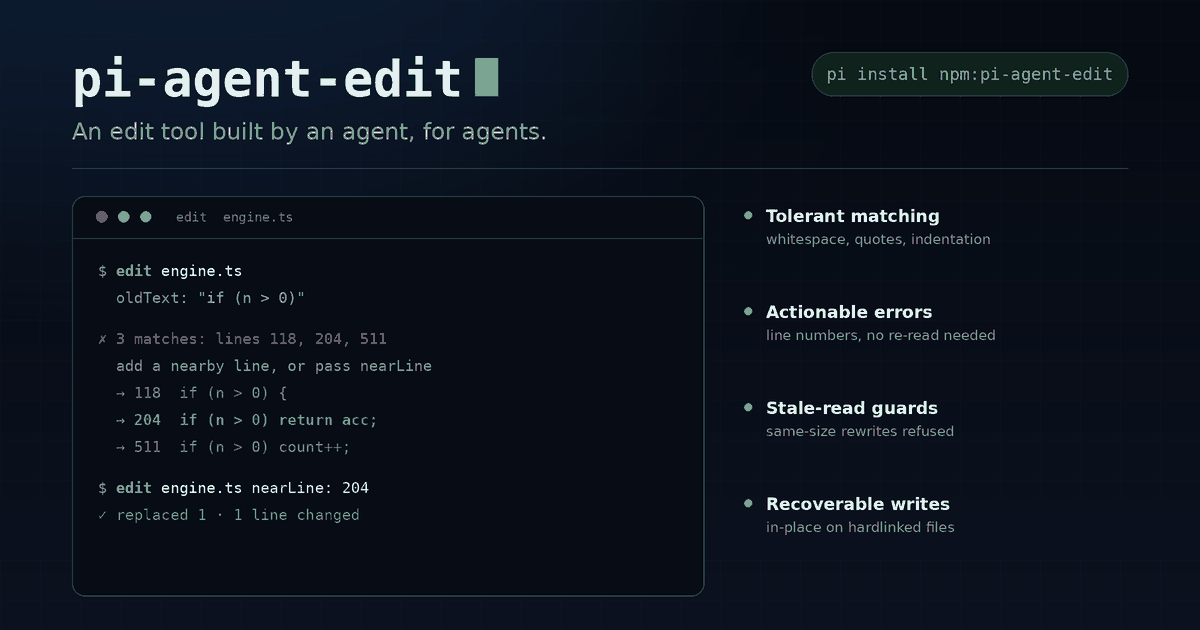
An agent-built edit tool for Pi: lossless tolerant matching, actionable ambiguity recovery, stale-read guards, and recoverable file writes.
Package details
Install pi-agent-edit from npm and Pi will load the resources declared by the package manifest.
$ pi install npm:pi-agent-edit- Package
pi-agent-edit- Version
0.2.12- Published
- Nov 1, 2026
- Downloads
- 1,534/mo · 385/wk
- Author
- bjstan1979
- License
- MIT
- Types
- extension
- Size
- 180.6 KB
- Dependencies
- 0 dependencies · 2 peers
Pi manifest JSON
{
  "image": "https://cdn.jsdelivr.net/npm/pi-agent-edit@0.2.12/assets/preview.png",
  "extensions": [
    "./index.ts"
  ]
}
Security note
Pi packages can execute code and influence agent behavior. Review the source before installing third-party packages.
README
pi-agent-edit
An edit tool built by an agent, for agents.
A replacement for Pi's built-in edit tool, developed and iterated by AI agents under human direction and review. Instead of making an agent re-read a file after every mismatch, it provides actionable recovery hints while keeping untouched file content intact.
简体中文 · Changelog · MIT license
Built by agents
AI models participating in development, using the names supplied by the maintainer:
- claude-opus-5.5
- gemini-4-Argon
- gpt-6.1-sol
Agents helped implement, test, review, and refine the tool they themselves use to edit code. These are development credits, not endorsements by the model providers. Human review and tests still matter: agent-built does not mean infallible.
The extension runs locally. It does not call these models or require its own API key or model subscription.
Install
Published on npm, and listed in the Pi package gallery:
pi install npm:pi-agent-editOr install for the current project only:
pi install -l npm:pi-agent-editTry it for one invocation without saving an installation:
pi -e npm:pi-agent-editBefore publication, use a local source checkout instead: pi install ./pi-agent-edit.
Restart Pi or run /reload after installing. This package intentionally registers edit and a thin wrapper around the official read tool, shadowing the built-ins; shadowing notices are expected. The read wrapper binds version tracking to the actual bytes read, without a second disk read. Avoid loading another replacement for either tool, and remove any manually copied version before installing from npm.
To uninstall, run pi remove npm:pi-agent-edit, then restart or /reload to restore the built-in tools (provided no other override remains).
Compatibility: tested with Pi 1.3.0 (@earendil-works/pi-coding-agent). Use a current Pi release. Tool overriding, argument formats, and host APIs can differ in older releases or third-party forks; compatibility with every Pi version is not guaranteed. Pi supplies the host peer dependencies; there is no separate build step.
Why another edit tool?
Agents rarely get every copied string exactly right. They encounter indentation differences, repeated blocks, copied line-number prefixes, and files changed by another process. This tool makes those cases recoverable without silently normalizing unrelated content.
- Lossless tolerant matching. Tries exact text, trailing-whitespace tolerance, indentation tolerance, then relaxed whitespace/Unicode matching. Normalization locates the match; it does not rewrite the whole file. Unchanged lines in tolerant replacements retain their original content.
- Actionable ambiguity errors. Shows context for up to five occurrences, attempts unique whole-line
oldTextsuggestions within six extra lines and 400 characters, and lists up to 12 matching line numbers. Retry with a listednearLinewithout re-reading while the file hash stays unchanged. Same-line duplicates require distinguishing context, not a line-number tie-break. - Useful mismatch feedback. Suggests similar numbered regions and line-by-line differences. Detects some likely already-applied edits without treating them as success.
- Agent-friendly input. Handles copied line-number prefixes, camelCase/snake_case argument aliases, integer strings for line numbers, and smart relative re-indentation.
- More than search and replace. Supports line-range replacement/deletion, insertion,
replaceAll, anddryRun. - Stale-read guards. Line-number edits require a sufficiently fresh read/write view. Session changes and compaction clear that view; hash-bound ambiguity offers are separately invalidated by content changes.
- Safer writes. All edits resolve against the original file and are applied all-or-nothing. Uses temporary-file/fsync/rename writes where possible, detects concurrent content changes, and uses recoverable in-place writes when necessary. Preserves BOM, CRLF, permissions, ownership where possible, symlinks, and hard-link identity via in-place writing.
- Readable results. Compact numbered diffs support the next edit without another read. JSON and whitespace-sensitive file checks provide warnings, not a substitute for parsing or tests.
- Encoding guard. Rejects non-UTF-8 files rather than corrupting their non-ASCII bytes.
Usage
The agent calls edit; you do not need to run a separate command for each change. The original text-replacement format remains available:
{
  "path": "src/app.ts",
  "edits": [
    { "oldText": "foo(1)", "newText": "foo(2)" }
  ]
}
Additional locators and options:
{
  "path": "src/app.ts",
  "dryRun": true,
  "edits": [
    { "oldText": "x = 1", "newText": "x = 2", "nearLine": 120 },
    { "oldText": "oldName", "newText": "newName", "replaceAll": true },
    { "startLine": 10, "endLine": 12, "newText": "replacement" },
    { "afterLine": 0, "newText": "import x from 'x';" }
  ]
}
These illustrate independent edit forms: an actual batch must not contain overlapping edits. Every edit targets the file before the call, not the output of earlier edits in the same batch. Use exactly one locator per edit. endLine requires startLine; nearLine and replaceAll only apply to oldText. Empty newText deletes a matched region or line range. afterLine: 0 inserts at the beginning; line insertion uses line-oriented newline semantics.
Continuing with line numbers
- A successful tracked
readestablishes the exact file version consumed by the tool, including when usingoffset/limit. This is a version guard, not proof that every line was displayed: verify your intended coordinates. - A successful
writeestablishes a view from its input content, so a newly created file can immediately be edited by line number. Files created with shell commands need aread; session changes and compaction also clear views. Failed tool calls grant no view: if a host'swrite + then_runwrites the file but its follow-up command fails, read it before editing by line number. - After an edit changes line counts, only new-file coordinates actually printed in the latest successful edit report can be used without another read. Deleted old-file lines, omitted hunks, truncated middles, and ranges crossing unseen gaps do not qualify. A
dryRungrants no new coordinates. - An external content change invalidates these views. Use a fresh
reador anoldTextlocator; preserving size and modification time does not bypass the content hash.
Recovering from repeated text
If oldText matches several places, the error offers numbered snippets and, when available, a unique larger oldText. Either:
- Copy the unique suggestion and preserve the extra context unchanged in
newText. - Keep
oldTextand use a listed matching line asnearLinewhile the file remains unchanged. - Set
replaceAll: trueif every occurrence should change.
nearLine cannot distinguish matches that start on the same line. If the file changes after an error, its hash-bound line offers no longer authorize a stale-line retry.
Safety and limitations
- Tolerant matching is not a semantic code transformation. Review the diff and run your compiler/tests, especially for Python, YAML, and Makefiles.
- Concurrent-change detection is best-effort, not a file lock. POSIX does not provide atomic compare-and-rename; a race remains between the final check and rename.
- In-place fallback is recoverable on ordinary I/O failure, not atomic. A forced termination or power loss can interrupt it before rollback. Recovery backups normally exist only during the call; rollback failure reports the retained backup path.
- Network filesystems and special mounts can have different rename/fsync guarantees. Unsupported directory fsync is skipped.
- Non-UTF-8 files are deliberately unsupported. JSON/whitespace diagnostics are warnings and heuristics, not full syntax validation.
Development
From a source checkout with Pi's peer dependencies available:
npm install
npm test
npm run typecheck
npm pack --dry-run
The same three commands run in CI (.github/workflows/pi-agent-edit.yml) on Node 22 and 24 for any change under pi-agent-edit/. Node 20 is not tested because the Pi peer dependency requires Node >= 22.19.0 (node:fs named export globSync).
The pure editing engine and writer can be tested independently of Pi. Extension integration tests need the host peer dependencies. Ownership-sensitive tests skip when not run as root. Tests and development configuration are intentionally excluded from the npm tarball.
License
MIT. Maintained by bjstan1979.