pi-run-mode
Ask, plan, and auto workflows for pi — control permissions, plan safely, and execute with the right model
Package details
Install pi-run-mode from npm and Pi will load the resources declared by the package manifest.
$ pi install npm:pi-run-mode- Package
pi-run-mode- Version
1.0.10- Published
- Sep 24, 2026
- Downloads
- 536/mo · 266/wk
- Author
- ouzhenkun
- License
- MIT
- Types
- extension
- Size
- 724.2 KB
- Dependencies
- 0 dependencies · 4 peers
Pi manifest JSON
{
  "extensions": [
    "./index.ts"
  ]
}
Security note
Pi packages can execute code and influence agent behavior. Review the source before installing third-party packages.
README
pi-run-mode
Ask, plan, and auto workflows for pi — control permissions, plan safely, and execute with the right model.


Install
pi install npm:pi-run-modeWhy
pi-run-mode adds an ask / plan / auto workflow for balancing control, planning depth, and execution speed. Each mode can use its own model — for example, a stronger model for planning and a faster, cheaper one for execution.
| Mode | Behavior |
|---|---|
| ask | Reads run freely; writes and non-read-only bash require approval. Optional AI review can auto-allow safe commands when enabled. |
| plan | Read-only exploration; only the session plan file may be written. Approval switches to auto for execution. |
| auto | Writes and most bash run freely; risky bash still requires approval. |
Cross-mode hardDeny rules block sensitive paths and dangerous commands in every mode.
Ask mode — bash review
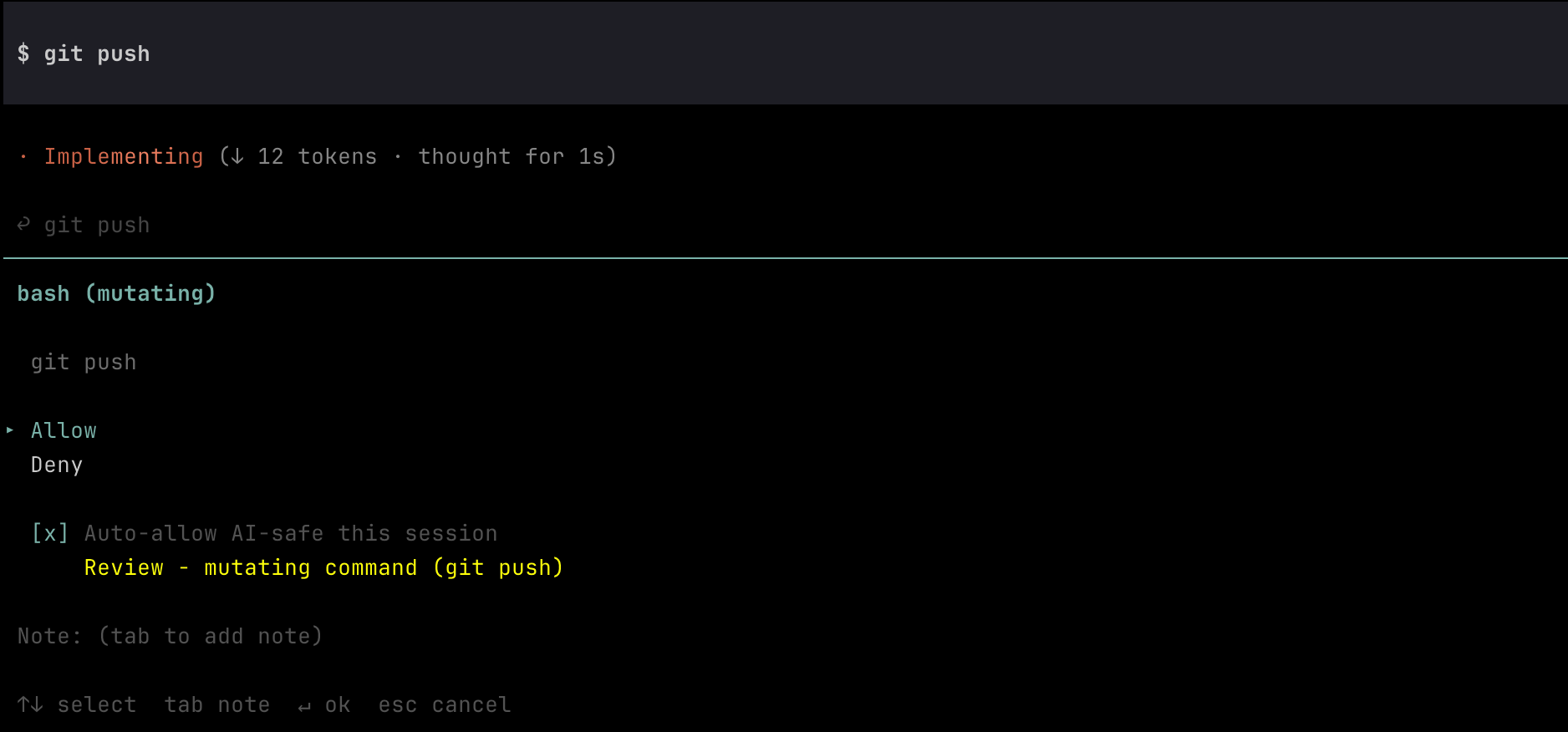
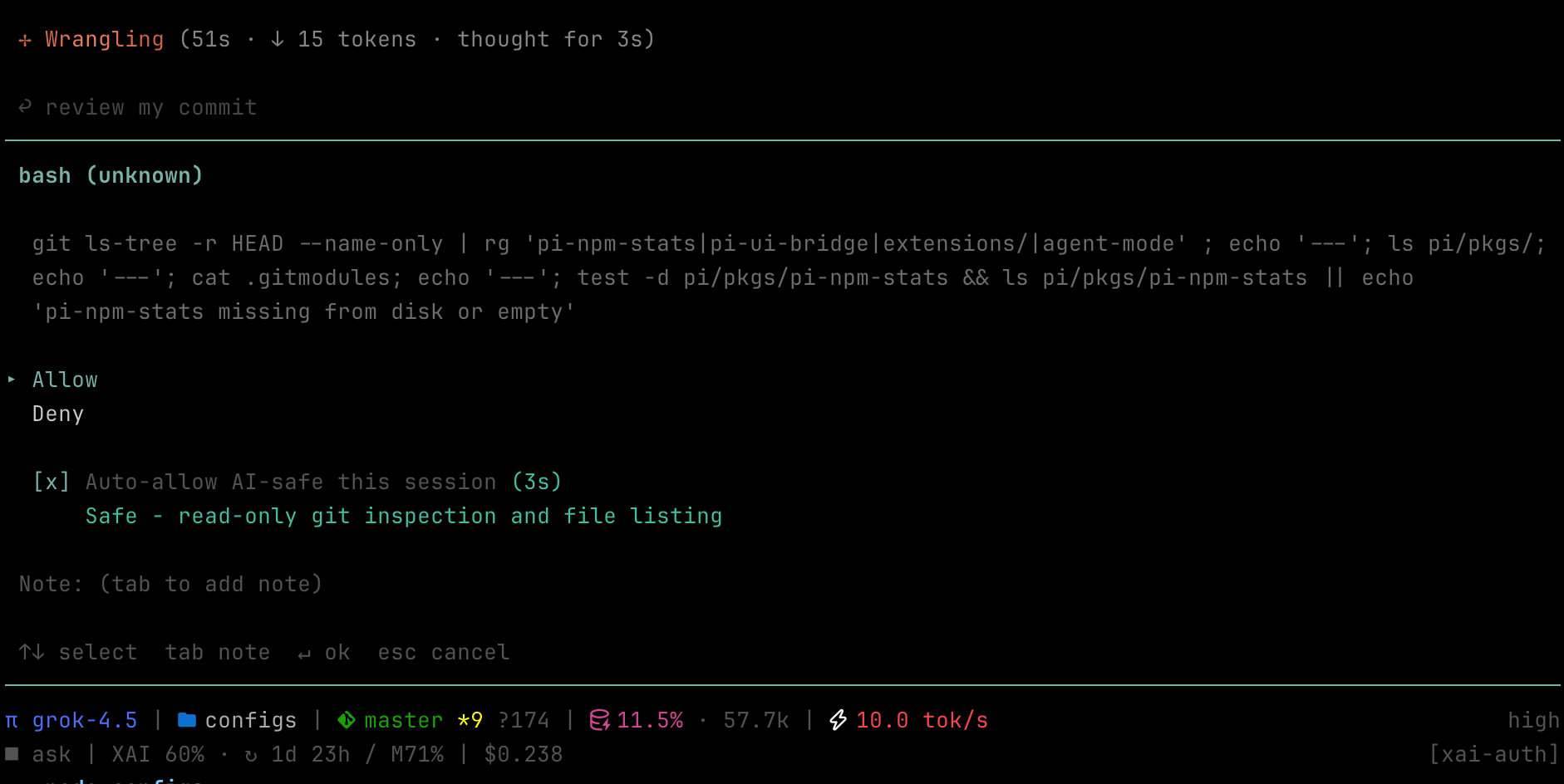
In ask, mutating/risky bash opens an approval dialog. AI review is advisory by default; with Auto-allow AI-safe this session checked, a safe verdict starts a short countdown and auto-submits Allow.
Review (needs human):
Safe (auto-allow countdown):
Plan mode — approve to execute
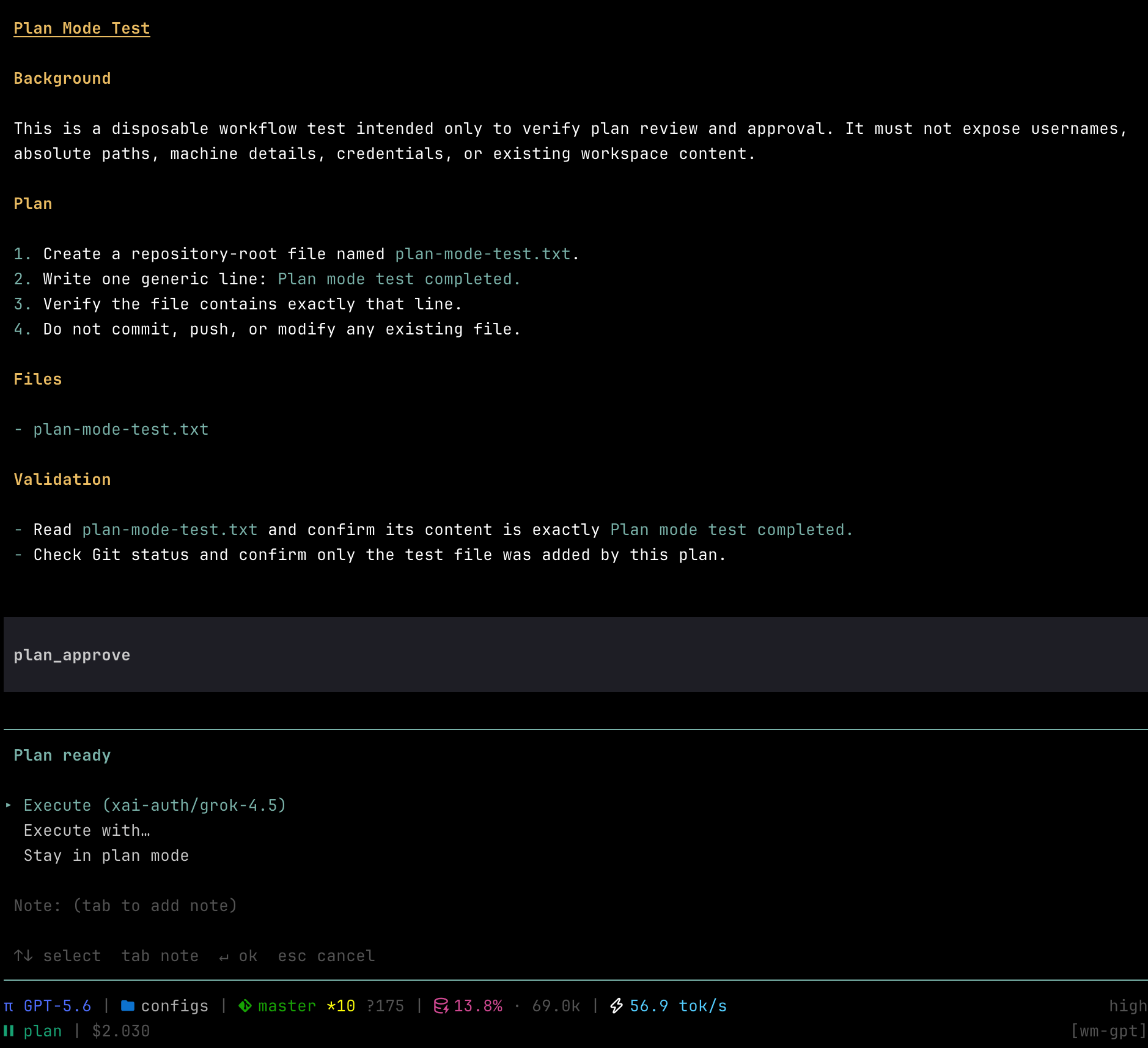
In plan, the model writes a plan file then calls plan_approve. You choose Execute (switch to auto and restore its configured model), Execute with… (switch to auto and pick another model), or Stay in plan mode.
Mode and model flow
ask / auto
  │
  └─ plan_start
       ↓
plan (GPT-5.5)
  ├─ Stay ──────────────────────→ plan (GPT-5.5)
  ├─ Execute ───────────────────→ auto (DeepSeek V4 Flash)
  └─ Execute with… → pick model → auto (selected model)
Usage
| Action | How |
|---|---|
| Show mode | /run-mode |
| Set mode | /run-mode ask · /run-mode plan · /run-mode auto |
| Request planning | Ask naturally (for example, “plan this first”); the model calls plan_start |
| Cycle mode | /run-mode toggle (or configured shortcut): follows cycleModes order |
| Start pi in plan | pi --plan |
No cycle shortcut is registered by default (pi’s default Shift+Tab cycles thinking level). Set cycleShortcut in config if you want a key.
Avoid legacy ctrl letters that collide with control characters — e.g. ctrl+m is the same byte as Enter, ctrl+i is Tab, ctrl+[ is Escape. Prefer shift+tab, alt+m, or chords with more than one modifier.
Plan tools (model-driven)
| Tool | Purpose |
|---|---|
plan_start |
Enter read-only Plan mode |
plan_approve |
Request Execute / Execute with… / Stay |
Plan content is written to ~/.pi/agent/plans/<sessionId>.md.
Configuration
Create ~/.pi/agent/pi-run-mode.json.
This example uses a stronger model for planning and a cheaper model for everyday approval and execution:
{
  "cycleShortcut": "alt+m",
  "cycleModes": ["auto", "ask", "plan"],
  "modeModels": {
    "ask": { "provider": "deepseek", "id": "deepseek-v4-flash", "thinkingLevel": "medium" },
    "plan": { "provider": "openai", "id": "gpt-5.5", "thinkingLevel": "high" },
    "auto": { "provider": "deepseek", "id": "deepseek-v4-flash", "thinkingLevel": "low" }
  },
  "syncModels": ["ask", "auto"],
  "hardDeny": {
    "read": [".env", ".env.*", "*.pem", "*.key", "~/.ssh/id_*"],
    "write": [".env", ".env.*", "*.pem", "*.key", "~/.ssh", "~/.aws/credentials"],
    "bash": []
  },
  "bashClassifier": {
    "inheritDefaults": true,
    "risky": ["^\\s*deploy\\b"]
  },
  "askAiReview": {
    "autoApproval": true,
    "provider": "deepseek",
    "model": "deepseek-v4-flash"
  }
}| Field | Description |
|---|---|
cycleShortcut |
Optional key chord to cycle modes (e.g. alt+m). Omit / null / "" = command only. Change requires /reload. |
cycleModes |
Ordered list of active modes for cycling and default startup (e.g. ["auto", "plan"]). First entry = default mode. Omit to keep ["ask", "plan", "auto"]. |
modeModels |
Per-mode model binding; restored on mode switch / session start. Each binding accepts an optional thinkingLevel (off, minimal, low, medium, high, xhigh, max), which is saved automatically when switching modes. |
syncModels |
Modes that share one model (changes propagate across the group). Remove modes from this list when each should keep an independent binding. |
hardDeny.read/write |
Glob-ish path denylist (basename patterns match any dir) |
hardDeny.bash |
Substring / regex-source denylist against raw commands |
bashClassifier |
Optional regex-source arrays for dangerous, readonly, risky, and mutating. Rules extend the built-ins by default. |
askAiReview |
Model used for ask-mode bash safety advisory; autoApproval seeds the session checkbox |
bashClassifier.inheritDefaults defaults to true. Set it to false to replace all built-in rules; in that mode, all four rule arrays are required. Invalid configurations fall back to the built-in rules. Classification priority remains dangerous → readonly → risky → mutating → unknown. Dangerous commands are blocked in every mode, so replacing the defaults can remove built-in safety guards.
Provider and model IDs are examples. Replace them with IDs available in your pi model registry.
Session state (current mode + modeModels, including thinkingLevel) is also persisted in the session log.
Events
Outbound bus only (no hard dependencies). Listen if you want to react:
| Event | Payload | When |
|---|---|---|
pi-run-mode:change |
{ label: string | null } |
Mode changes (ask → null) |
pi-run-mode:notify |
{ type: "approval-needed" | "plan-ready", body: string } |
Approval wait and plan ready |
pi-run-mode:modal |
{ phase: "open" | "close" } |
Approval or model-selection dialog open/close |
Footer integration
Display mode changes with Pi's status API:
let ui: { setStatus(key: string, text: string | undefined): void } | null = null;

pi.on("session_start", (_event, ctx) => {
  ui = ctx.ui;
});

pi.events.on("pi-run-mode:change", (data) => {
  const { label } = data as { label: string | null };
  ui?.setStatus("run-mode", label ?? undefined);
});
Ask emits null, while plan and auto emit their styled display labels.
Notification integration
Example mapping from pi-run-mode:notify to pi-terminal-notifier for native macOS notifications:
pi.events.on("pi-run-mode:notify", (data) => {
  const event = data as {
    type: "approval-needed" | "plan-ready";
    body: string;
  };
  const planReady = event.type === "plan-ready";

  pi.events.emit("pi-terminal-notifier:notify", {
    title: planReady ? "📋 Plan Ready" : "✏️ Approval Needed",
    body: event.body,
    sound: planReady ? "plan-ready" : "question",
  });
});
Notification presentation is handled by the consuming extension.
Notes
- Subagent / headless sessions without UI re-decide under auto rules; actions that would still prompt are blocked.
- AI review is advisory by default. Auto-allow only runs when explicitly enabled for the session and the review returns safe.
- Timeout, abort, or review failure always falls back to human approval.
License
MIT