pi-tree-labeler
LLM-curated navigation labels for Pi session trees
Package details
Install pi-tree-labeler from npm and Pi will load the resources declared by the package manifest.
$ pi install npm:pi-tree-labeler- Package
pi-tree-labeler- Version
0.1.3- Published
- Aug 31, 2026
- Downloads
- 163/mo · 14/wk
- Author
- 0x-rya
- License
- MIT
- Types
- extension
- Size
- 812.1 KB
- Dependencies
- 0 dependencies · 5 peers
Pi manifest JSON
{
  "extensions": [
    "./extensions/pi-tree-labeler.ts"
  ],
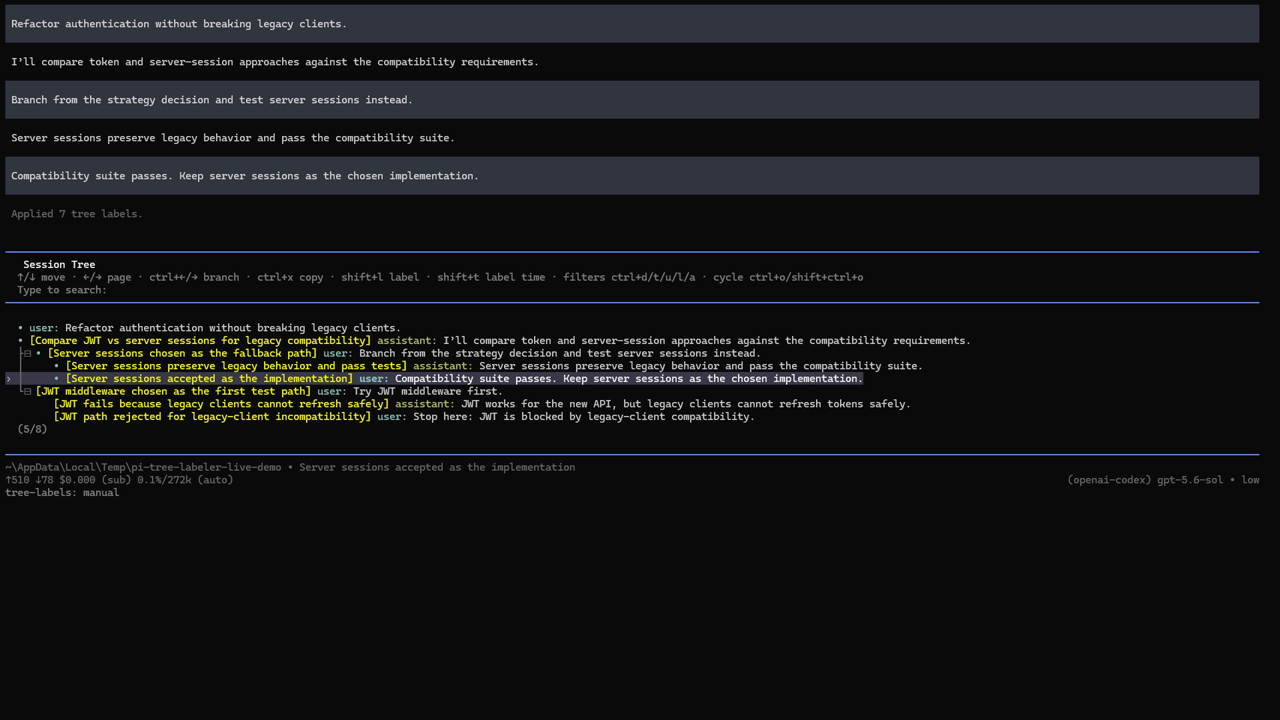
  "video": "https://unpkg.com/pi-tree-labeler@latest/media/demo.mp4",
  "image": "https://unpkg.com/pi-tree-labeler@latest/media/preview.png"
}
Security note
Pi packages can execute code and influence agent behavior. Review the source before installing third-party packages.
README
pi-tree-labeler
LLM-curated navigation labels for the Pi coding agent. It analyzes the real session tree and proposes sparse labels for branch roots, decisions, checkpoints, outcomes, and useful endpoints.
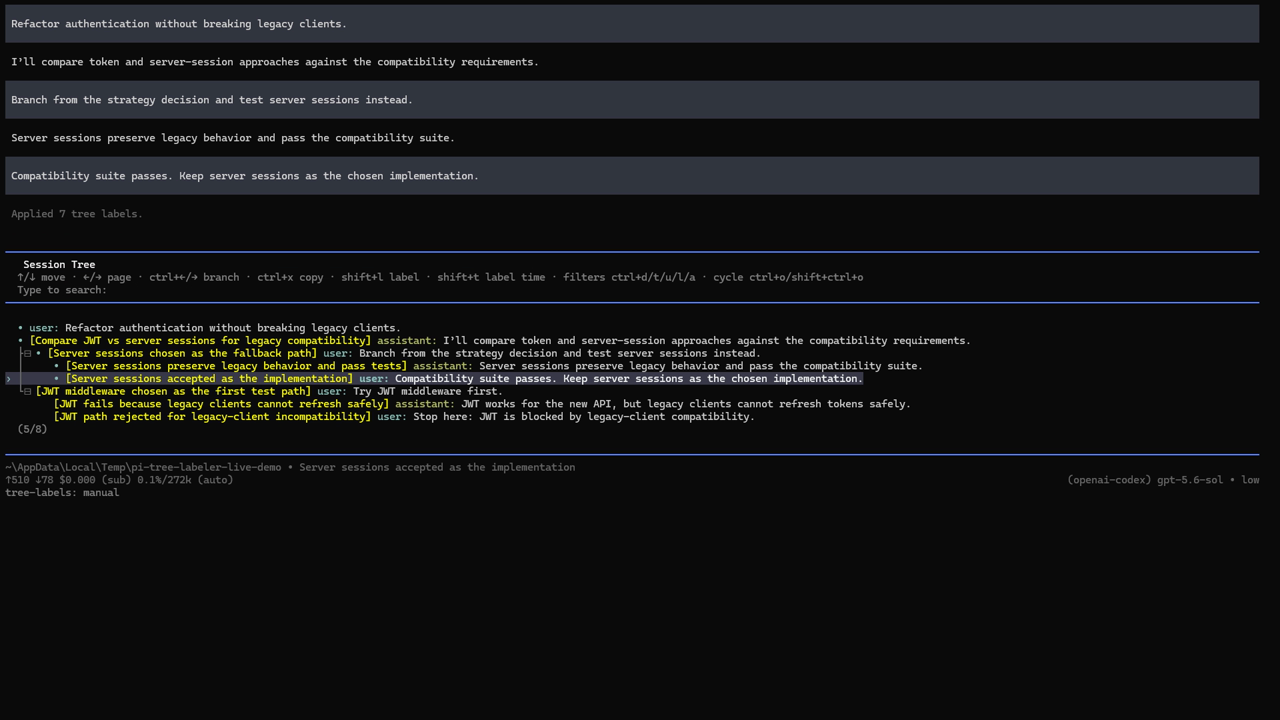
Actual Pi TUI screen recording: generate labels → review proposals → apply → inspect the labeled session tree.
Install
View pi-tree-labeler in the Pi package catalog.
pi install npm:pi-tree-labeler
Or try it for one run:
pi -e npm:pi-tree-labeler
For local development:
pi -e /path/to/pi-tree-labeler
Commands
/tree-labels              Generate and review proposals
/tree-labels run          Generate and review proposals
/tree-labels run --apply  Generate and apply safe proposals
/tree-labels review       Reopen the newest pending proposal
/tree-labels apply-pending Apply all safe labels in the newest pending proposal
/tree-labels discard      Discard the newest pending proposal
/tree-labels config       Configure every option interactively
/tree-labels config global
/tree-labels config project
/tree-labels status       Show automation countdown, activity, triggers, and pending work
/tree-labels history      Show recent runs
The default review UI uses Up/Down, Space to toggle proposals, Enter to apply, and Escape to leave the proposal pending. It separates Fresh labels from Replacements; replacements show "current label" → "proposed label" before you approve them.
/tree-labels config provides an interactive editor for every setting below. Settings are organized into General, Model and capacity, Tree input, Label policy, Automation, Session naming, and Privacy and diagnostics submenus. Unsaved summary values are highlighted in the warning color, dirty categories are marked unsaved, and the Save action remains highlighted until changes are written. All option lists use a bounded, scrollable viewport; use Up/Down to reach options beyond the visible page. Its model picker lists Pi's currently authenticated models plus current, which follows Pi's active model. The scope picker shows the effective apply mode for each scope and explicitly marks project settings as overrides. When global settings are open from a trusted directory with project overrides, a warning-colored line directly below the heading shows ⚠ Project Setting Found, They Will Override This!. Choose global or trusted project scope; /tree-labels config global and /tree-labels config project skip the scope prompt.
Configuration
Add treeLabeler to ~/.pi/agent/settings.json, or to trusted project .pi/settings.json:
{
  "treeLabeler": {
    "enabled": true,
    "model": "current",
    "thinkingLevel": "off",
    "applyMode": "review",
    "automation": {
      "enabled": false,
      "afterTurns": 5,
      "onBranchCreated": true,
      "onTreeNavigation": true,
      "onCompaction": true
    },
    "sessionNaming": {
      "enabled": true,
      "fallbackToMessage": true,
      "maxChars": 80
    },
    "exposure": "balanced",
    "prompt": "Prefer labels that help me resume abandoned implementation paths.",
    "autoLimits": true,
    "offerLimitIncreases": true,
    "maxLabels": 12,
    "maxLabelChars": 48,
    "maxNodes": 400,
    "excerptChars": 420,
    "maxInputChars": 48000,
    "outputTokens": null,
    "timeoutSecs": 30,
    "includeToolNames": true,
    "persistPayloads": false
  }
}
Exposure modes
All modes omit raw tool results, thinking blocks, images, and hidden custom messages.
balanced— sends the whole tree as a compact structural map, with richer excerpts for branch points, branch roots, endpoints, existing labels, and the checked-out path. Recommended default.tree— sends the whole structural map and gives every exposed entry its full configured excerpt. Best context, highest token cost.branch— sends only the currently checked-out root-to-leaf path. Cheapest and most private, but unable to understand or label abandoned sibling branches.neighborhood— sends the whole tree as a compact map, but reserves rich excerpts for the checked-out path and its immediate sibling branch roots/endpoints. Useful for large trees.
Apply modes
review— show a checklist after generation (default).auto— apply safe proposals immediately when a run is requested. Before applying, the extension warns whether this value came from project or global settings.manual— save proposals for/tree-labels review.
Model-aware limits
"autoLimits": true (default) derives input and output budgets from Pi's live contextWindow and maxTokens metadata for the selected model. It therefore works across Anthropic, OpenAI, Google, xAI, DeepSeek, Qwen, Mistral, local/open-source catalogues, and future models without a hard-coded model allowlist. The Model and capacity submenu shows whether metadata is available and displays the selected model's context/output capacities; the category summary shows auto limits ✓ or auto limits unavailable. Turn it off to use the individual Max … values.
Automatic limits cover maximum nodes, excerpt characters, input characters (derived from the model context-token budget), output tokens, labels per run, label characters, and a 300-second minimum request timeout. There is no separate input-token setting or general output-character setting: input tokens are represented by the context-derived character budget, and output characters are bounded per label. Larger configured timeouts remain effective while automatic limits are on.
When a limit is reached, "offerLimitIncreases": true offers to raise that specific limit in either trusted project or global settings, including after automatic runs. The prompt itself can be disabled from the settings menu or directly from a limit warning.
Output token budget
Set "outputTokens": null to omit maxTokens from the labeling request and use the provider/model default. The config wizard calls this Provider default — no extension cap. Set an integer from 256–64000 to enforce an extension-level cap. This value is ignored while model-aware automatic limits are enabled.
Actionable errors and partial output
Known failures are classified by root cause and include a concrete next step: change the relevant config, authenticate/select a model, reload after schema changes, or report a compatibility issue with the failed run ID. If a response contains valid proposals followed by a malformed/truncated item, valid proposals are retained and the malformed item is skipped with guidance instead of failing the entire run. Failed-run logs store the same classification and guidance.
Safety and ownership
- Manual labels and manual clears are protected.
- Labels created by this extension are tracked through session-local audit entries and may be updated on later runs.
- Uncertain ownership is treated as manual.
- Thinking blocks, raw tool results, images, hidden custom messages, and cwd are not exposed. Common home-directory paths and credential patterns are redacted best-effort; conversation excerpts can still contain sensitive text.
- Successful and failed run metadata is stored under
~/.pi/agent/pi-tree-labeler/runs/<session-id>/. Failures always record the stage, error type, and a value-free output-shape diagnostic. Exact prompts and malformed/raw responses are stored only withpersistPayloads: true.
Automation
Automation is opt-in. When enabled, it runs after a configured number of settled user turns, when a new branch point appears, after /tree navigation, or after compaction. With applyMode: "review" or "manual", background runs save proposals without opening an unsolicited modal. With applyMode: "auto", safe labels are applied immediately.
Each run operates on an immutable snapshot of the entries exposed when it started. New prompts, labels, bookkeeping entries, branch growth, and checkouts do not cancel it; newer entries are simply left for a later run. Only timeout, provider abort, or session shutdown/reload stops an in-flight request.
A persistent footer status makes the controller visible:
tree-labels: manual
tree-labels: 2/5 turns +branch/tree/compact
tree-labels: running (tree-navigation)
tree-labels: 4 pending · 0/5 turns +branch/tree/compact
/tree-labels status opens a detailed panel showing whether automation is enabled, current activity and trigger, turn progress and turns remaining, event triggers, pending proposals, last outcome, model/apply/exposure settings, and ownership counts.
Checked-out section naming
Session naming is enabled by default. On session resume, /tree checkout, and label application, the session name becomes the nearest label on the active path. If that path has no label, it can fall back to the latest user message. Redundant names are not re-appended. Configure or disable this under Session naming… in /tree-labels config.
Current scope
Version 0.1 includes direct-model curation, topology-aware automation, review/apply flows, audit history, and manual-label protection. Planned follow-ons are profile management, richer review editing, cooldown controls, and an optional @tintinweb/pi-subagents executor.