On this page
Use Pi in the terminal
Run pi from the folder you want to work in. Pi uses that folder to discover files, instructions, and configuration, and to group saved sessions. If you have not installed Pi or chosen a model yet, follow the Quickstart.
Pi may ask whether you trust the working folder before loading its project resources. See Project trust.
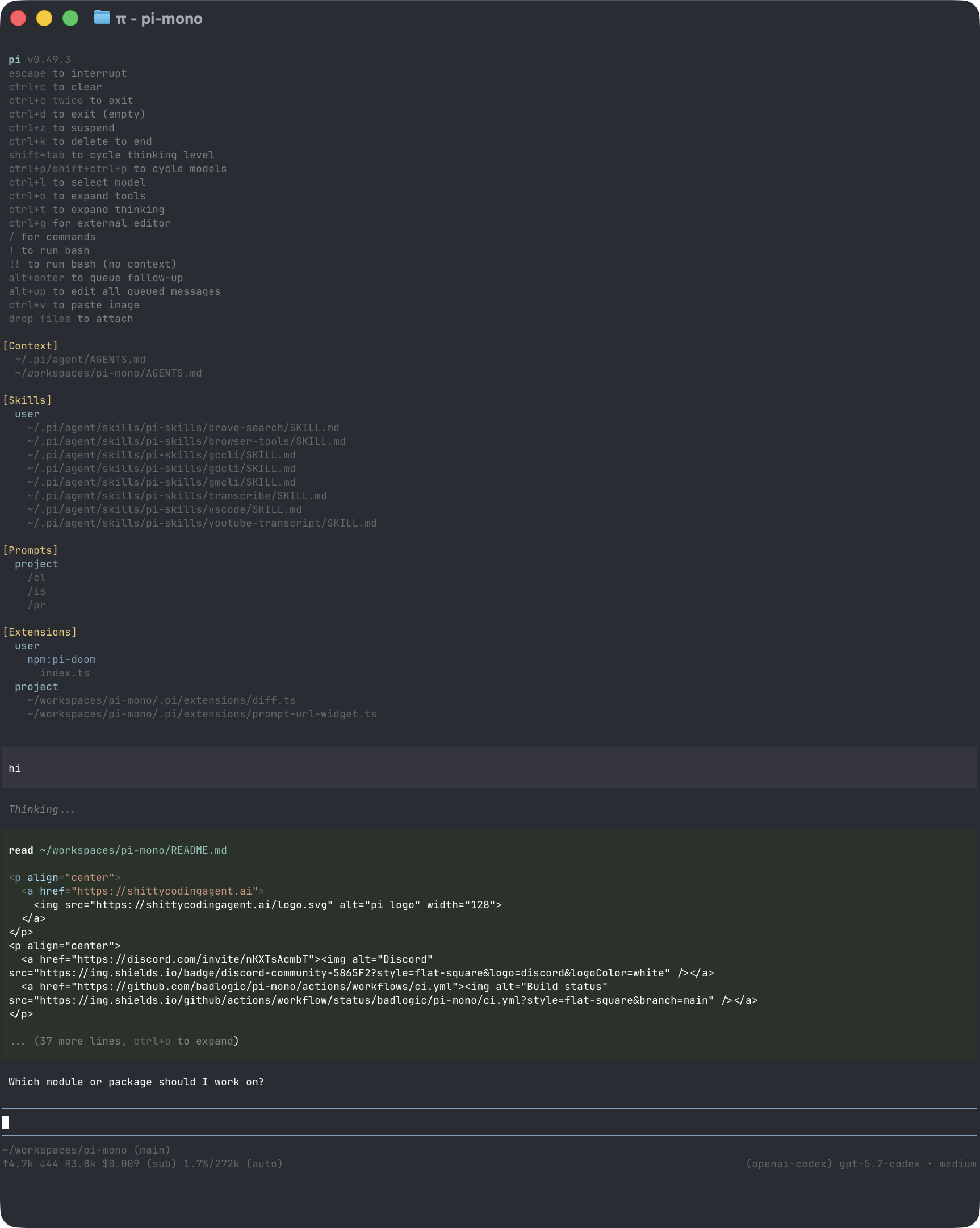
The transcript shows your prompts, Pi's responses, tool calls, results, and errors. You write prompts and commands in the editor. The footer shows the current folder, session, model, context usage, and accumulated usage and cost.
Enter a prompt
CopiedType a request and press Enter to send it. Use Shift+Enter to add a line, or press Ctrl+G to work on a longer prompt in your configured external editor.
To include files or images:
- Type
@to search for a file and add it to your prompt. - Press
Tabto complete a path. - Paste an image or drag it into a compatible terminal.
Follow Pi's work
CopiedPi shows each tool call and result while it works. Press Ctrl+O to expand or collapse tool output. Press Ctrl+T to show or hide thinking blocks.
The startup header lists the instructions and resources Pi loaded. The editor border indicates the current thinking level. The footer updates as the model uses context and reports usage.
Pi does not ask before every tool call. Review commands and changed files, and use a sandbox for untrusted or unattended work. See Security.
Change direction
CopiedYou can send more input while Pi is working:
| What you want | Action |
|---|---|
| Adjust the current task | Type a message and press Enter |
| Add work after the current task | Type a message and press Alt+Enter |
| Return queued messages to the editor | Press Alt+Up |
| Stop the current task | Press Escape |
A message sent with Enter waits until the current response and its tool calls finish, then guides the next response. A follow-up sent with Alt+Enter waits until Pi finishes the current task. Aborting returns queued messages to the editor.
Windows Terminal reserves some Alt shortcuts. See Terminal Setup for the Windows alternatives.
Change the model or settings
CopiedType / to search the available commands. The commands you will use most often are:
/modelselects a model. PressCtrl+Lto open the same selector./thinkingselects how much reasoning the current model uses. PressShift+Tabto cycle through supported levels./loginand/logoutmanage provider access./settingschanges common preferences.
Prompt templates, skills, and extensions can add more commands to the same menu. See Choose a Model, Configuration, or the complete Slash Commands reference.
Continue or start over
CopiedPi saves sessions automatically unless session persistence is disabled.
/newstarts a new session./resumeopens another saved session./namegives the current session a recognizable name./sessionshows its file, ID, message count, token usage, and cost.
Use /tree, /fork, or /clone when you want to explore another approach without losing existing work. Use /compact to reduce the conversation history sent to the model. See Sessions and Context for these workflows.
After leaving Pi, run pi --continue from the same folder to resume its most recent session.
Run a terminal command
CopiedPrefix a command with ! to run it and include its output in the conversation:
!git statusUse !! when you want to run a command without sending its output to the model.
Copy, export, or share results
CopiedPress Ctrl+X or run /copy to copy the last assistant response. Use /export to save the session as HTML or JSONL.
Use /share to upload the session and get a viewer link. By default, Radius authentication makes the artifact visible to your Radius organization; otherwise, Pi creates a private GitHub gist through the GitHub CLI. The sessionShareDestination setting can force either destination. Review the session first because it can contain prompts, tool output, file contents, and credentials exposed during the conversation.
Adjust the terminal
CopiedFullscreen mode, the default, keeps the editor and status area fixed while the transcript scrolls within the terminal window. Regular mode uses the terminal's normal scrollback. Choose a mode through /settings or --tui-mode.
Terminal support for mouse input, keyboard shortcuts, and inline images varies. See Terminal Setup for platform-specific configuration and Keybindings for every configurable shortcut. Run /hotkeys to inspect the shortcuts active in your current session.
Collect diagnostic information
CopiedWhen troubleshooting terminal rendering or conversation state, run /debug. Pi writes the rendered terminal lines and current session messages to pi-debug.log in your agent directory.
Review this file before sharing it. It can contain prompts, model responses, tool output, file contents, and terminal data.